Freedom251 › Citation Management Software

Paperpile
What Paperpile is
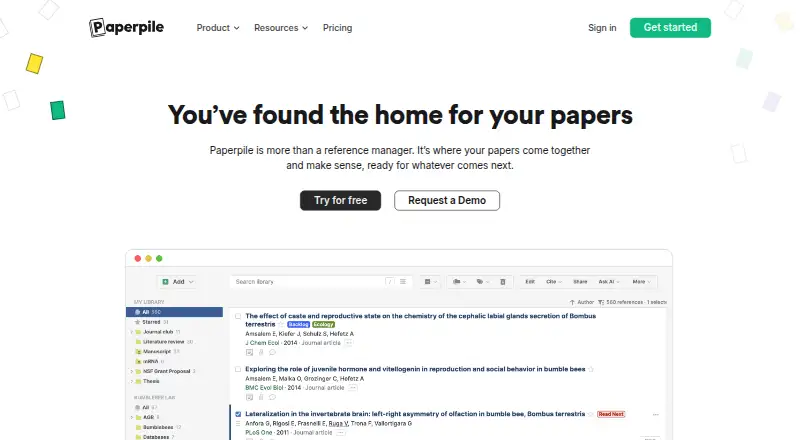
Paperpile is a reference manager for collecting, organizing, storing, and writing with research papers. It imports references, extracts PDF metadata, organizes libraries with folders and labels, searches collections, detects duplicates, and repairs metadata. Plans include unlimited research-PDF storage. Citation support covers major standards and journals with more than 10,000 styles, plus plugins for Google Docs and Microsoft Word. Shared folders, libraries, permissions, and collaborative PDF annotations support group work. Mobile apps for Android and iOS synchronize with the web library and provide highlights, notes, and hand-drawn annotations. The mobile app can search 150 million articles from sources including PubMed, arXiv, and CrossRef, then save PDFs with one tap. Integrations include Google Drive, Overleaf, browser extensions, academic databases, publisher services, and beta OneDrive sync. Plans are billed annually, starting at $4.15/user/mo, with a 30-day trial.
Who it suits
Paperpile suits researchers, students, and teams managing large paper collections. It is useful for people writing in Google Docs or Word and collaborating on annotated PDFs.
What it does well
- Unlimited storage for research PDFs
- More than 10,000 citation styles
- Google Docs and Microsoft Word plugins
- Shared libraries and collaborative annotations
- Android and iOS library synchronization
What to know first
- No free plan is listed
- Plans are billed annually
- Safari and Firefox access is in beta
- Enterprise pricing requires a custom quote
Limits
The Regular plan covers reference collection, PDF storage and reading, major citation styles, BibTeX, and basic integrations. Full-text PDF search, notes and annotations, shared folders and libraries, supplementary files, advanced integrations, and custom citation styles are listed with Expert instead.
Plans
| Plan | Billed and limits | Price |
|---|---|---|
| Regular | All plans billed annually; the page shows $4.15*/ month and $8.30. · Collect and organize references · Store and read PDFs · Major citation styles and BibTeX · Basic Word, Google Docs, academic database, and publisher integrations | $4.15 a month |
| Expert | All plans billed annually; the page shows $5.75*/ month and $11.50. · Everything in Regular · Full-text PDF search · Notes and PDF annotations · Shared folders and libraries · Supplementary files · Advanced integrations and custom citation styles | $5.75 a month |
| Enterprise and Institutions | Custom pricing — get a quote today. · Everything in Expert · SAML single sign-on · Advanced security and privacy settings · Custom MSA and SLA · Vendor security reviews · HIPAA | On request |
As paperpile.com lists them, read 2 Oct 2026. The maker's own page has the final word.
Getting started
- Open the Paperpile website
- Sign up on Chrome
- Start the 30-day trial
- Authenticate with Google
- Install the browser extension or use the web app
- Add the Android or iOS app to sync your library
Verdict
Paperpile covers reference organization, PDF work, discovery, citations, and collaboration across web and mobile apps. Annual billing and browser availability should be considered when selecting it.
Questions
How much does Paperpile cost?
Regular is $4.15/user/mo and Expert is $5.75/user/mo, with plans billed annually. Enterprise and Institutions uses custom pricing.
Is there a free plan or trial?
There is no free plan. A 30-day trial is available.
Which platforms does Paperpile support?
Paperpile supports Android, iOS, macOS, Windows, web, and browser extensions. New sign-ups are currently available on Chrome, while Safari and Firefox access is in beta.
Does Paperpile work with word processors?
Yes. Citation plugins are available for Google Docs and Microsoft Word.
Can teams collaborate in Paperpile?
Yes. Shared folders and libraries, access permissions, and collaborative PDF annotations and citations are supported.
Does Paperpile integrate with storage and research tools?
Integrations include Google Drive sync, Overleaf, browser extensions, academic databases, and publishers. OneDrive sync is in beta.
Facts from Paperpile's own pages
- Authentication and Drive access
- Paperpile says it authenticates with Google without accessing or storing the user's password and accesses only files uploaded through Paperpile in Google Drive. · paperpile.com, 2 Oct 2026
- Browser support
- The site says new sign-ups are currently available on Chrome and that Safari and Firefox access is in beta. · paperpile.com, 2 Oct 2026
- Citations
- Paperpile says it supports citation styles for major standards and journals, with more than 10,000 styles, plus Google Docs and Microsoft Word citation plugins. · paperpile.com, 2 Oct 2026
- Collaboration
- Paperpile describes shared folders, shared libraries, access permissions, and collaborative PDF annotations and citations. · paperpile.com, 2 Oct 2026
- Company history and location
- Paperpile says it was founded in 2012 by three computational biologists and gives its mailing address as Cambridge, Massachusetts, USA. · paperpile.com, 2 Oct 2026
- Discounts and billing
- The pricing page says plans are billed annually and lists a 50% academic discount and group discounts of up to 20% on Expert plans. · paperpile.com, 2 Oct 2026
- Enterprise security
- The Enterprise and Institutions plan lists SAML single sign-on, advanced security and privacy settings, vendor security reviews, and HIPAA. · paperpile.com, 2 Oct 2026
- Founded
- 2012 · paperpile.com, 23 Sept 2026
- Headquarters
- Cambridge, Massachusetts, USA · paperpile.com, 23 Sept 2026
- Integrations
- The pricing page lists Google Drive sync, Overleaf integration, browser extensions, academic database and publisher integrations, and OneDrive sync in beta. · paperpile.com, 2 Oct 2026
- Mobile apps
- Paperpile offers iOS and Android apps that sync the research library with the web app and support PDF highlights, notes, and hand-drawn annotations. · paperpile.com, 2 Oct 2026
- PDF storage
- The plan comparison lists unlimited storage for research PDFs. · paperpile.com, 2 Oct 2026
- Purpose
- Paperpile describes itself as a home for research papers and says its goal is to simplify collecting, managing, and writing papers. · paperpile.com, 2 Oct 2026
- Reference management
- The pricing page lists reference import, PDF metadata extraction, folders and labels, library search, duplicate detection, and metadata repair. · paperpile.com, 2 Oct 2026
- Research discovery
- The mobile app page says users can search 150 million articles across sources including PubMed, arXiv, and CrossRef and save PDFs with one tap. · paperpile.com, 2 Oct 2026
- Support
- Paperpile directs questions to [email protected]. · paperpile.com, 2 Oct 2026
Where Paperpile stands on Freedom251
- Citation Management Software#19 of 23
- Reference Management Software#22 of 26