Freedom251 › Game Save Editors

Palworld Save Pal
What Palworld Save Pal is
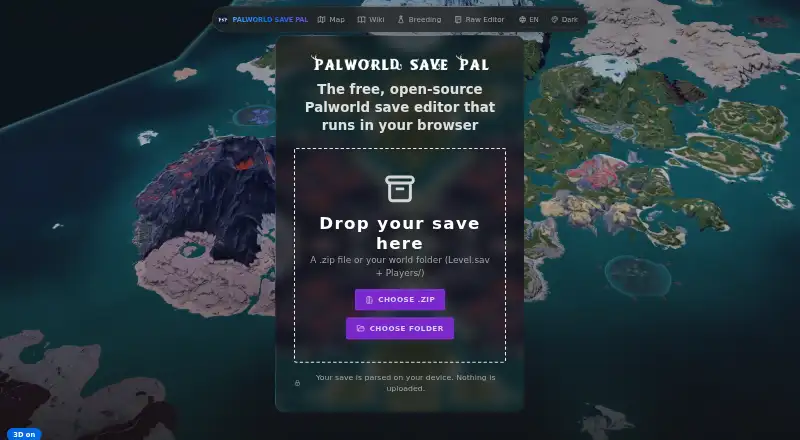
Palworld Save Pal is a free, open-source browser editor for Palworld save files. It accepts a ZIP file or a world folder containing Level.sav and Players/. Users can edit Pals, players, inventory, technology, recipes, blueprints, guilds, and GPS data. An interactive 3D map displays bases and Pals, and loadout presets can be saved and reapplied in the browser. The editor provides localized in-game names across 16 languages and handles Steam, Game Pass, and dedicated server saves. The site says saves are parsed on the user's device and are not uploaded; it also says there are no accounts, tracking, or servers holding user data. Writing changes back to a folder is optional, with originals backed up first. Modern Chromium browsers and Firefox are supported, but direct folder saving requires Chromium with the File System Access API. A free maintained desktop app is also described, with direct Game Pass folder access and dedicated server management. The project is fan-made and unaffiliated with Pocketpair, Inc.
Who it suits
It suits Palworld players who want to edit supported save files in a browser or use the described desktop app. It may also suit users who want local save parsing and optional folder write-back with originals backed up.
What it does well
- Edits inventory, progression, characters, and more
- Interactive 3D map shows bases and Pals
- Saves are parsed on the user's device
- Originals are backed up before folder write-back
What to know first
- Direct folder saving requires Chromium with the File System Access API
- Project is fan-made and unaffiliated with Pocketpair, Inc.
Plans
| Plan | Billed and limits | Price |
|---|---|---|
| Free | Free forever; no paywall · All features · Desktop browser required for save editing · Mobile limited to Maps, Wiki and Breeding | Free |
As palworldsavepal.app lists them, read 14 Oct 2026. The maker's own page has the final word.
Getting started
- Open the Palworld Save Pal website in a supported browser.
- Load a ZIP file or a world folder containing Level.sav and Players/.
- Edit the save data or use the 3D map and browser-stored presets.
- Choose whether to write changes back to a folder; originals are backed up first.
- Use Chromium with the File System Access API for direct folder saving.
- Alternatively, use the free desktop app for direct Game Pass folder access or dedicated server management.
Overview
Palworld Save Pal is a free browser-based editor for Palworld saves, built for players who want to adjust both character data and the wider world. Its range of editing controls and interactive map make it a capable choice for save work; direct folder saving, however, depends on using a compatible Chromium browser.
It accepts a ZIP file or a world folder containing Level.sav and Players/. You can change Pals, players, inventory, technology, recipes, blueprints, guilds, and GPS data, covering more than a single narrow editing task. The project is fan-made and unaffiliated with Pocketpair, Inc.
For a broader selection of tools, see Game Save Editors.
Key features
- Wide-ranging save edits: Controls span Pals, players, inventory, technology, recipes, blueprints, guilds, and GPS data. That breadth suits players making several kinds of changes in one place.
- Interactive 3D map: Bases and Pals are pinned on a world map, adding a visual way to explore save data alongside editing.
- Browser-stored presets: Save and reapply loadout presets in the browser. This helps with repeat setups, though the presets are browser-stored rather than described as account-synced.
- Localized names: In-game names are available in 16 languages, a practical aid for players using different language settings.
- Privacy and backups: The site says saves are parsed on the user's device and nothing is uploaded; it also says there are no accounts, tracking, or servers holding user data. Writing changes back to a folder is opt-in, and originals are backed up first. These safeguards are useful for cautious editing, but do not replace keeping a separate copy of an important save.
- Save compatibility: The browser editor handles Steam, Game Pass, and dedicated server saves. A separate desktop app is described as maintained and adds direct Game Pass folder access and dedicated server management.
- Open-source project: Its code is publicly auditable on GitHub, which gives technically minded users a way to inspect the project.
Pricing
Palworld Save Pal is free: its Free plan costs nothing and includes every feature, with no paywall. There is no paid tier to weigh against the free version, and no trial is offered. The desktop app is also described as free and maintained.
The broad feature set without a charge suits players who want save editing, the map, and presets without taking on a subscription. The main trade-off is not a feature cap but workflow: direct folder saving requires a Chromium browser with the File System Access API.
Platforms
The editor is browser-based and is presented for Windows, macOS, Linux, Docker/web, Android, and iOS. The browser support includes modern Chromium browsers and Firefox, but direct folder saving specifically requires Chromium with the File System Access API. Firefox and other supported browsers therefore remain options for browser editing, while users who need direct folder saving should choose a compatible Chromium browser.
The desktop app is described as free, maintained, and able to access Game Pass folders directly and manage dedicated servers. The editor's save handling covers Steam, Game Pass, and dedicated server saves.
Who it's for
Palworld Save Pal is a strong fit for Palworld players who want to edit several kinds of save data, inspect bases and Pals on a map, or reuse browser-stored loadouts. It is also a sensible choice for players who value on-device parsing and the option to back up originals before writing changes.
It is less suitable for someone who needs direct folder saving but cannot use a compatible Chromium browser, or who expects browser presets to follow them across devices. Its focus is Palworld, so players seeking an editor for another game should look elsewhere.
Pros and cons
- Pro: Editing covers Pals, players, inventory, progression-related content, guilds, and GPS data, rather than limiting users to one category of change.
- Pro: The 3D map and reusable presets add useful navigation and repeatability to save editing.
- Pro: The free plan includes every feature, while the site says saves stay on the user's device and originals are backed up before folder writing.
- Con: Direct folder saving requires Chromium and the File System Access API, so browser choice affects the workflow.
- Con: Presets are stored in the browser, which may be less convenient for users switching browsers or devices.
- Con: The tool is specifically for Palworld, not a general-purpose editor for multiple games.
Alternatives
SaveEditor.top is another free option if you want a broader save editor across supported formats; its free plan allows files up to 50MB, requires no registration, and is limited to supported formats.
Fallout Shelter Save Editor is the relevant free alternative for Fallout Shelter saves, with a browser-based, no-account approach and no ads or telemetry.
Pokémon SRM Editor suits players working with Pokémon Red, Blue, or Yellow saves who want a web or desktop app.
NHSE is a free Windows, macOS, and Linux option when you already have a save file; it does not dump or import save data from the console.
RepoDitor is another free choice for users seeking a web or Windows tool.
SOTFEdit is a free Windows alternative.
NMSE (No Man's Save Editor) is a free alternative for Windows, Linux, and macOS.
Secrets of Grindea Savegame Editor is a free option for Windows and Linux.
Verdict
Choose Palworld Save Pal if you want a free, Palworld-focused editor with broad save controls, a 3D map, and reusable presets. Its on-device workflow and opt-in folder writing with original backups strengthen the case. Look elsewhere if direct folder saving without Chromium is essential, or if you need an editor for a different game.
Verdict
Palworld Save Pal covers a broad range of save edits and includes a 3D map and browser-stored presets. For direct folder saving, use a supported Chromium browser; the project is fan-made and unaffiliated with Pocketpair, Inc.
Questions
Does Palworld Save Pal cost anything?
The Free plan costs $0.00 per free and includes every feature, with no paywall.
Is Palworld Save Pal open source?
Yes. The project is open source, and its code is described as publicly auditable on GitHub.
Which save files can it handle?
It accepts a ZIP file or a world folder containing Level.sav and Players/. It handles Steam, Game Pass, and dedicated server saves.
Which browsers support the editor?
The site lists modern Chromium browsers and Firefox. Saving directly to a folder requires Chromium with the File System Access API.
Does it upload save data?
The site says saves are parsed on the user's device and nothing is uploaded. It also says it has no accounts, tracking, or servers holding user data.
Is Palworld Save Pal affiliated with Pocketpair?
No. The project describes itself as a fan-made tool that is not affiliated with Pocketpair, Inc.
Facts from Palworld Save Pal's own pages
- 3D map
- Its browser map renders the Palpagos Islands in 3D and pins bases and Pals for navigation. · palworldsavepal.app, 14 Oct 2026
- Accounts and tracking
- The site says it has no accounts, no tracking, and no servers holding user data. · palworldsavepal.app, 30 Sept 2026
- Affiliation
- The site describes itself as a fan-made tool not affiliated with Pocketpair, Inc. · palworldsavepal.app, 30 Sept 2026
- API
- The project README says its WebSocket API remains available after migration to the Rust backend. · github.com, 14 Oct 2026
- Backend technology
- The current backend is a single Rust binary called psp-server; the earlier Python/FastAPI backend is retired. · github.com, 14 Oct 2026
- Blueprints
- Base structures can be captured as blueprints and placed in other worlds. · palworldsavepal.app, 14 Oct 2026
- Browser requirements
- Modern Chromium browsers and Firefox can run the editor, while direct folder writing requires Chromium with the File System Access API. · palworldsavepal.app, 14 Oct 2026
- Browser support
- The site lists modern Chromium browsers and Firefox; saving directly to a folder requires Chromium with the File System Access API. · palworldsavepal.app, 30 Sept 2026
- Company status
- The official site calls Palworld Save Pal a fan-made tool and says it is not affiliated with Pocketpair, Inc. · palworldsavepal.app, 14 Oct 2026
- Desktop app
- The desktop app is described as free and maintained, with direct Game Pass folder access and dedicated server management. · palworldsavepal.app, 30 Sept 2026
- Desktop application
- A maintained desktop version adds direct Game Pass folder access and dedicated-server features. · palworldsavepal.app, 14 Oct 2026
- Documentation depth
- Documentation includes installation, usage, Docker, developer, plugin and feature sections plus a user guide wiki. · github.com, 14 Oct 2026
- Game compatibility
- The browser editor handles Steam, Game Pass, and dedicated server saves. · palworldsavepal.app, 30 Sept 2026
- Guild and GPS tools
- Guild tools manage guilds and transfer or clone Pals between saves, while GPS data is supported. · palworldsavepal.app, 14 Oct 2026
- Independent classification
- TheGamerCodex describes the tool as a free, open-source save editor for Steam and Game Pass with a beginner-oriented interface. · thegamercodex.com, 14 Oct 2026
- Independent license discrepancy
- TheGamerCodex page last verified July 16, 2026 labels the software MIT-licensed, while the current repository states GPL-3.0-only after a later license change. · thegamercodex.com, 14 Oct 2026
- Independent usage evidence
- A Reddit announcement says the project was created as a Svelte learning project and to provide a web interface beside a Palworld server container. · reddit.com, 14 Oct 2026
- Inventory editing
- Inventory and storage editing covers items, materials, ammunition, stacks and base storage. · palworldsavepal.app, 14 Oct 2026
- Languages
- The editor provides localized in-game names across 16 languages. · palworldsavepal.app, 30 Sept 2026
- License
- The current repository is GPL-3.0-only and requires redistributed derivative works to provide source under the same license. · github.com, 14 Oct 2026
- Limit: antivirus flags
- Reddit users reported Windows Defender, Malwarebytes and Heimdal flagging the executable as a Trojan, while the creator said they were testing builds to reduce false positives. · reddit.com, 14 Oct 2026
- Limit: compatibility
- TheGamerCodex warns that large Palworld patches can temporarily break save-editor compatibility. · thegamercodex.com, 14 Oct 2026
- Limit: operating systems
- TheGamerCodex's July 16, 2026 listing described the desktop build as Windows-only and said Mac and Linux builds were unavailable at that time. · thegamercodex.com, 14 Oct 2026
- Limit: remote servers
- TheGamerCodex says the tool requires local file access and is unsuitable for remote dedicated-server editing compared with Docker-based alternatives. · thegamercodex.com, 14 Oct 2026
Where Palworld Save Pal stands on Freedom251
- Game Save Editors#3 of 26