Freedom251 › Book Writing Software
Pagewright
What Pagewright is
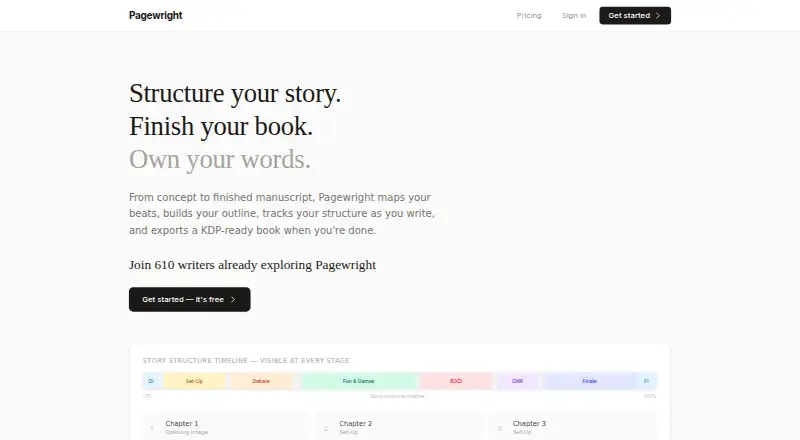
Pagewright is novel-writing software that helps authors plan a story, keep its structure in view while drafting, and prepare a book for export. Authors can work with all 15 Save the Cat beats, each with its own area for notes, and choose a genre to get suggested chapter counts for each beat. Beats can be adjusted and pinned to particular chapters. The writing view keeps chapter beat notes and a story-structure timeline visible, alongside a focus-mode editor. Pagewright exports KDP-ready PDFs or EPUBs with front matter, back matter, and chapter headings. The Free plan includes Save the Cat and Hero's Journey, while the home page advertises multiple frameworks. Pagewright says writing is encrypted in the browser before it leaves the device and that the password-derived key exists only in the user's memory; it also says it cannot see manuscripts. The Free plan costs nothing and covers one book and up to five chapters or 15,000 words. Writer costs £9 a month and adds unlimited books, words, and chapters, Amazon KDP formatting, and priority support. It runs on Linux, macOS, Windows, and the web.
Who it suits
Pagewright suits novelists who want story-beat planning and structure tools alongside their writing editor. Self-publishing authors preparing books for Amazon KDP may find the Writer plan's formatting and export options relevant.
What it does well
- Supports all 15 Save the Cat beats with notes.
- Keeps beat notes and story timeline visible while writing.
- Exports PDF and EPUB with book sections and headings.
- Free plan includes two story frameworks.
- Writing is encrypted in the browser, according to Pagewright.
What to know first
- Free plan is limited to one book.
- Free plan allows up to five chapters or 15,000 words.
- Amazon KDP formatting is part of the paid Writer plan.
Limits
The Free plan covers one book and up to five chapters or 15,000 words. Amazon KDP formatting and unlimited books, chapters, and words are part of Writer, priced at £9/mo.
Plans
| Plan | Billed and limits | Price |
|---|---|---|
| Free | £0/mo · 1 book · up to 5 chapters or 15,000 words · all writing features · Save the Cat & Hero's Journey · client-side encryption | Free |
| Writer | £9 billed monthly · unlimited books · unlimited words and chapters · everything in Free · Amazon KDP formatting · priority support | £9 a month |
As pagewright.co lists them, read 15 Oct 2026. The maker's own page has the final word.
Getting started
- Open the Pagewright website in a browser or use its Windows, macOS, or Linux platform.
- Start for free; the site says an account is not required to try it.
- Choose a story framework, such as Save the Cat or Hero’s Journey.
- Select a genre for suggested chapter counts, then adjust and pin beats as needed.
- Draft with chapter beat notes and the structure timeline visible.
- Export the book as a PDF or EPUB; Amazon KDP formatting is part of Writer.
Pagewright is a novel-writing workspace that connects beat planning, outlining, drafting, and book export. It suits self-publishing authors who want a structured story method and a route to KDP-ready files, while its free manuscript cap makes it less suitable for long projects unless you upgrade.
Overview
Pagewright is built around story structure rather than a blank document. You can map a novel against all 15 Save the Cat beats, give each beat its own notes, and keep that plan connected to chapter-level writing. Genre selection can suggest chapter counts for each beat, after which you can change the beats and pin important ones to particular chapters. That makes the service a good fit for authors who want a visible architecture while drafting, especially those working to a familiar plotting framework.
The writing view keeps chapter beat notes and a story-structure timeline on screen as you write. A focus-mode editor is also provided, so the product can support both deliberate planning and concentrated drafting. Its export is aimed at publication: Pagewright produces KDP-ready PDF or EPUB files with front matter, back matter, and chapter headings.
Key features
Beat-based planning
Save the Cat is unusually concrete here: all 15 beats have dedicated note space, and beats can be adjusted or assigned to chapters. Genre-based chapter suggestions reduce the initial planning work, but they remain suggestions rather than a fixed template. The Free plan also includes Hero's Journey, while the home page promotes multiple story frameworks.
Drafting with structure in view
Keeping beat notes and the timeline visible can help prevent a draft from drifting away from its intended arc. Writers who prefer to discover a story without an outline may find that structure more intrusive than useful. Focus mode provides a cleaner writing setting when planning information is no longer needed.
Publishing export and privacy
PDF and EPUB export includes the front matter, back matter, and chapter headings required for a more complete book file, rather than only a raw manuscript. The Writer plan specifically adds formatting for Amazon KDP. Pagewright says writing is encrypted in the browser before it leaves the device, with a key derived from the password and held only in the user's memory; it also says it cannot see the manuscript or any sentence of it.
Pricing
| Plan | Price | Includes |
|---|---|---|
| Free | £0.00 per free | One book; up to 5 chapters or 15,000 words; all writing features; Save the Cat and Hero's Journey; client-side encryption |
| Writer | £9 per month, billed monthly | Unlimited books, words, and chapters; everything in Free; Amazon KDP formatting; priority support |
The Free plan is a credible way to try the workflow, including without an account, but one book and a 5-chapter or 15,000-word ceiling limits it to short manuscripts, samples, or an evaluation project. Writer is the practical choice for a serious or ongoing author: the £9 monthly subscription removes both manuscript limits and adds KDP formatting and priority support. The paid plan is less compelling for writers who only need a short draft or who already handle publication formatting elsewhere.
Platforms
Pagewright runs on the web and supports Windows, macOS, and Linux. That combination suits authors who move between computers or use Linux, although the service is presented as a browser-based workflow rather than a separate native application.
Who it's for
Choose Pagewright if you are a serious self-publishing novelist who wants beat-level guidance, an always-visible structure plan, and direct PDF or EPUB output. It is particularly well matched to Save the Cat or Hero's Journey users and to authors targeting Amazon KDP. The Free plan works for a short book or a trial; authors with full-length manuscripts should budget for Writer. Readers wanting a primarily free, unrestricted desktop tool, or a less prescriptive drafting process, should look elsewhere.
Pros and cons
Pros
- Complete beat workspace: all 15 Save the Cat beats have dedicated notes, with chapter pinning and adjustable structure.
- Planning stays connected to drafting: chapter notes and the timeline remain visible while writing, with a focus mode when you want fewer distractions.
- Publication-oriented export: KDP-ready PDF or EPUB includes front matter, back matter, and chapter headings.
- Strong privacy position: client-side encryption and the stated inability to read manuscript text address a central concern for unpublished work.
- Linux support: the web service is usable alongside Windows and macOS on Linux.
Cons
- Free limits are tight: one book and either five chapters or 15,000 words will not cover most full novels.
- KDP formatting is paid-only: the feature that most directly serves self-publishers requires the £9 monthly Writer plan.
- Framework-led workflow: writers who dislike beat systems may find the planning model constraining.
Alternatives
See the broader Book Writing Software list when you want to compare more tools.
- Campfire is a better fit if you want writing and worldbuilding modules across Android, iOS, macOS, web, and Windows, with a free trial that requires no credit card.
- Wavemaker Cards suits readers seeking a free option across desktop, mobile, and web platforms.
- yWriter is worth choosing for free desktop novel-writing software on Windows, with Linux use through Wine and an Android app.
- LivingWriter fits writers wanting a free web or desktop plan with one manuscript, a 25,000-word allowance, chapter and subchapter editing, PDF export, and limited AI requests.
- Novlr is the alternative for a free, mobile-friendly writing service with two projects, syncing, planning tools, focus mode, sprints, and analytics.
- Plot Factory is aimed at authors who want story and universe management, including a Hobbyist plan with unlimited stories.
- Author's Forge is another freemium choice for Linux, macOS, and Windows users.
- Manuskript is the straightforward free, open-source desktop alternative for Linux, macOS, and Windows, with no recurring subscription price.
Verdict
Pagewright is a strong choice for a structured self-publishing novelist who wants beat planning, drafting context, privacy-focused storage, and KDP-oriented export in one workflow. Its main reason to choose it is the tight link between a 15-beat outline and a publication-ready book file. Look elsewhere if you need a full-length free plan, a completely open-ended writing process, or a free desktop application without a subscription.
Verdict
Pagewright brings beat planning, drafting, and book export into one writing workflow, with a free option for a limited manuscript. Check the Free plan's book and length limits, or consider Writer for unlimited projects and Amazon KDP formatting.
Questions
Is Pagewright free?
Yes. The Free plan costs nothing and includes one book, up to five chapters or 15,000 words, all writing features, Save the Cat and Hero’s Journey, and client-side encryption.
How much does the Writer plan cost?
Writer costs £9/mo, billed monthly. It includes unlimited books, words, and chapters, Amazon KDP formatting, and priority support.
Which platforms does Pagewright support?
Pagewright supports web, Windows, macOS, and Linux.
What formats can it export?
It exports PDF and EPUB. Exports can include front matter, back matter, and chapter headings.
Can Pagewright see my manuscript?
Pagewright says writing is encrypted in the browser before leaving the device and that it cannot see manuscripts. It says the encryption key is derived from the password and exists only in the user’s memory.
Facts from Pagewright's own pages
- Audience
- The site describes Pagewright as novel-writing software for serious self-publishing authors and offers Amazon KDP formatting on its Writer plan. · pagewright.co, 9 Oct 2026
- Encryption
- The site says writing is encrypted in the browser before transmission, with a password-derived key held only in memory. · pagewright.co, 15 Oct 2026
- Export
- Pagewright exports KDP-ready PDF and EPUB files with front matter, back matter and chapter headings. · pagewright.co, 15 Oct 2026
- Frameworks
- The Free plan includes Save the Cat and Hero's Journey; the home page also advertises multiple story frameworks. · pagewright.co, 9 Oct 2026
- Free access
- The homepage says users can start without an account. · pagewright.co, 15 Oct 2026
- Genre suggestions
- Authors can select a genre to receive suggested chapter counts for each beat. · pagewright.co, 15 Oct 2026
- Independent classification
- TechYorker categorizes Pagewright as book-writing software. · techyorker.com, 15 Oct 2026
- Independent export record
- TechYorker records PDF and EPUB export formats. · techyorker.com, 15 Oct 2026
- Independent formatting record
- TechYorker marks manuscript formatting as documented for Pagewright. · techyorker.com, 15 Oct 2026
- Independent free-plan record
- TechYorker records a free plan for Pagewright. · techyorker.com, 15 Oct 2026
- Independent outlining record
- TechYorker marks outlining tools as documented for Pagewright. · techyorker.com, 15 Oct 2026
- Independent platform record
- TechYorker records Pagewright on web, Windows, Mac and Linux. · techyorker.com, 15 Oct 2026
- Independent trial record
- TechYorker says a free trial is not stated for Pagewright. · techyorker.com, 15 Oct 2026
- Limit: API
- TechYorker’s comparison table marks a public API as not listed for Pagewright. · techyorker.com, 15 Oct 2026
- Limit: cloud sync
- TechYorker marks cloud sync as not established in its Pagewright record. · techyorker.com, 15 Oct 2026
- Limit: collaboration
- TechYorker marks collaboration as not established in its Pagewright record. · techyorker.com, 15 Oct 2026
- Limit: documentation
- The maker pages available publicly describe product features and pricing but do not expose API, SDK or developer documentation. · pagewright.co, 15 Oct 2026
- Limit: integrations
- The public homepage and pricing page do not name third-party integrations. · pagewright.co, 15 Oct 2026
- Limit: mobile apps
- The maker lists desktop and web platforms but no iPhone, iPad or Android platform. · pagewright.co, 15 Oct 2026
- Limit: revision history
- TechYorker marks revision history as not established in its Pagewright record. · techyorker.com, 15 Oct 2026
- Limit: self-hosting
- TechYorker’s comparison table marks self-hosting as not listed for Pagewright. · techyorker.com, 15 Oct 2026
- Manuscript privacy
- Pagewright states that it cannot see a user's manuscript, including individual sentences. · pagewright.co, 15 Oct 2026
- Outline controls
- Users can change beat allocations and assign key beats such as Midpoint and All Is Lost to exact chapters. · pagewright.co, 15 Oct 2026
- Outlining
- Authors can choose a genre for suggested chapter counts per beat, adjust beats, and pin key beats to specific chapters. · pagewright.co, 9 Oct 2026
Where Pagewright stands on Freedom251
- Book Writing Software#9 of 34