Freedom251 › Desktop Publishing Software
PageStream
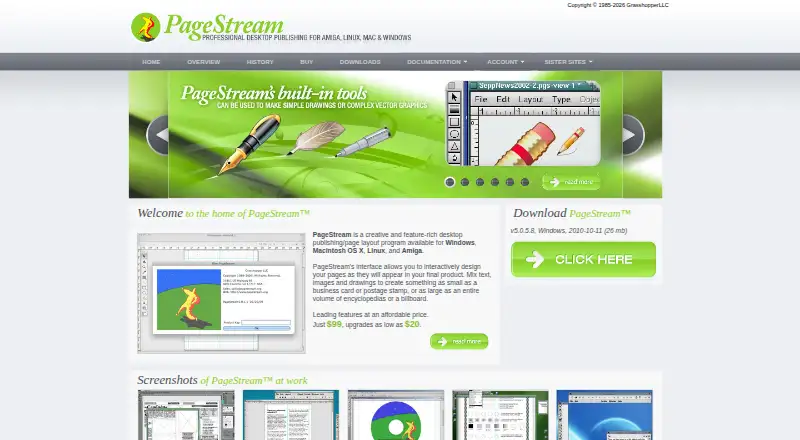
What PageStream is
PageStream is desktop publishing and page-layout software for composing pages from text, images, and drawings. Its range covers small pieces such as business cards and postage stamps, as well as large or extensive work such as billboards and encyclopedias. Users arrange elements interactively to shape pages as they will appear in the finished product. Shape and path tools handle geometric forms, irregular polygons, and sketches, and PageStream can import pictures, drawings, and EPS illustrations made with Adobe Photoshop, Adobe Illustrator, GIMP, and Nova Design ImageFX. It does not create bitmap pictures or EPS illustrations internally, but it can export or print to those formats for later import. Version 5 adds transparency for text, objects, and picture alpha channels, along with printer marks, path editing, and bitmap-picture output. The Professional edition includes TextFX, Borders 1 and 2, Gary's Effects, Paper Direct templates, and Home & Office forms; it can also place a specified PDF page as a graphic. PageStream supports PDF export, master pages, and color management. It runs on Windows, Macintosh OS X, Linux, and Amiga. The standard edition costs $99.95, paid once, and Professional costs $149.95, paid once; a 14-day trial is available.
Who it suits
PageStream suits professionals who need typography, drawing, color output, or scripts, as well as beginners creating newsletters, cards, and banners. It is also relevant for people laying out printed pages who can prepare bitmap or EPS artwork in another application when needed.
What it does well
- Layouts combine text, images, and drawings interactively.
- Shape and path tools include polygons and sketches.
- Imports pictures, drawings, and EPS illustrations from named graphics applications.
- Supports PDF export, master pages, and color management.
- Professional edition can place a specified PDF page as a graphic.
- Free support includes email, mailing list, FAQs, and updates.
What to know first
- Cannot create bitmap pictures or EPS illustrations internally.
- Standard edition costs $99.95, paid once.
- Professional edition costs $149.95, paid once.
Limits
The standard edition is listed at $99.95, paid once, while Professional is $149.95, paid once. The trial lasts 14 days; bitmap pictures and EPS illustrations cannot be created internally.
Plans
| Plan | Billed and limits | Price |
|---|---|---|
| PageStream5.1 Pro | full Professional edition · platform choice | $149.95, paid once |
| PageStream5.1 | full standard edition · platform choice | $99.95, paid once |
As pagestream.org lists them, read 2 Oct 2026. The maker's own page has the final word.
Getting started
- Visit https://www.pagestream.org/.
- Choose the standard edition for $99.95, paid once or Professional for $149.95, paid once.
- Select a platform: Windows, Macintosh OS X, Linux, or Amiga.
- Use the available 14-day trial to evaluate PageStream.
Verdict
Choose PageStream if you need desktop page layout across its listed design range, with drawing tools, PDF export, and master pages. Look elsewhere if you need to create bitmap pictures or EPS illustrations within the program rather than importing them from elsewhere.
Questions
How much does PageStream cost?
PageStream5.1 standard is $99.95, paid once. PageStream5.1 Pro is $149.95, paid once.
Is there a free plan or trial?
There is no free plan. A 14-day trial is available.
Which platforms does PageStream support?
The listed supported platforms are Windows, Macintosh OS X, Linux, and Amiga.
Can PageStream export to PDF?
Yes. PDF export is supported.
What does the Professional edition add?
It includes TextFX, Borders 1 and 2, Gary's Effects, Paper Direct templates, and Home & Office forms. Professional users can also place a specified PDF page onto a PageStream page as a graphic.
Can it create bitmap pictures or EPS illustrations?
No. PageStream can export or print to bitmap or EPS files, which can then be imported.
Facts from PageStream's own pages
- Audience
- The maker says professionals use PageStream for typography, drawing, color output and scripts, while beginners use it for newsletters, cards and banners. · pagestream.org, 2 Oct 2026
- Bitmap limitation
- PageStream cannot create bitmapped pictures or EPS illustrations internally, but it can export or print to bitmap or EPS files for later import. · pagestream.org, 2 Oct 2026
- Core workflow
- Users can mix text, images and drawings and interactively design pages as they will appear in the final product. · pagestream.org, 2 Oct 2026
- Design scope
- It supports designs ranging from business cards and postage stamps to encyclopedias and billboards. · pagestream.org, 2 Oct 2026
- Downloads
- Official demos are listed for Linux, Macintosh OS X, MorphOS, Windows 32-bit and Windows 64-bit. · pagestream.org, 2 Oct 2026
- Drawing tools
- PageStream includes shape and path tools for geometric shapes, irregular polygons and sketches. · pagestream.org, 2 Oct 2026
- Graphic import
- It can import pictures, drawings and EPS illustrations created with Adobe Photoshop, Adobe Illustrator, GIMP and Nova Design ImageFX. · pagestream.org, 2 Oct 2026
- Headquarters
- Belle Fourche, South Dakota, USA · pagestream.org, 28 Sept 2026
- Language support
- The download page lists translation, language-module, hyphenation-exception and spelling-dictionary support across many languages. · pagestream.org, 2 Oct 2026
- Product type
- PageStream is a creative desktop publishing and page layout program. · pagestream.org, 2 Oct 2026
- Pro features
- PageStream Professional includes TextFX, Borders 1 and 2, Gary's Effects, Paper Direct templates and Home & Office forms. · pagestream.org, 2 Oct 2026
- Pro PDF support
- Professional users can place a specified PDF page onto a PageStream page like an EPS graphic. · pagestream.org, 2 Oct 2026
- Support
- Free support includes an internet mailing list, private email support, FAQs and free updates. · pagestream.org, 2 Oct 2026
- System requirements
- The documentation states that PageStream 5.0 for Windows requires Windows 95 or later or NT 4.0 or later through Vista and Windows 7, with 60MB of disk space. · pagestream.org, 2 Oct 2026
- Version 5 features
- PageStream 5 adds text and object transparency, picture alpha-channel transparency, definable printer marks, path editing tools and bitmap-picture output. · pagestream.org, 2 Oct 2026
Where PageStream stands on Freedom251
- Desktop Publishing Software#18 of 30