Freedom251 › Packaging Design Software
Packaging Workbench
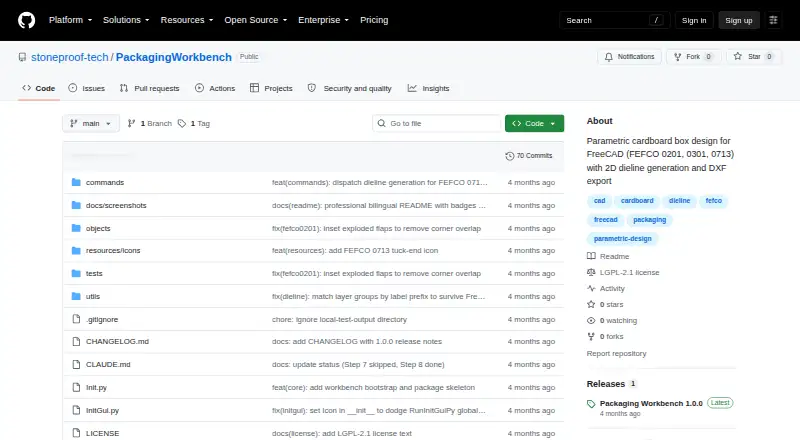
What Packaging Workbench is
Packaging Workbench is a FreeCAD workbench for designing cardboard boxes parametrically and producing flat dielines. It requires FreeCAD 1.0 or later and supports the FEFCO 0201, 0301, and 0713 box types. Set dimensions such as length, width, height, or thickness, and the workbench regenerates the box. Its 3D geometry shows the flaps open at 90 degrees.
For flat drawings, it creates a 2D dieline with separate Cut, Crease, and Perforation layers. DXF export is available through FreeCAD, and package metadata also lists SVG export. The project says it uses FreeCAD core modules without external dependencies. It is licensed under LGPL-2.1-or-later and is described as an open-source alternative to commercial packaging CAD software.
To install it, download or clone the repository and place it in FreeCAD’s Mod directory. Addon Manager installation is planned for after publication. The project links to a GitHub issue tracker for bug reports and invites pull requests and contributions. Packaging Workbench is free and supports Linux, macOS, and Windows.
Who it suits
Packaging Workbench suits people who use FreeCAD 1.0 or later to create cardboard box designs based on FEFCO 0201, 0301, or 0713. It may also suit users looking for an open-source packaging CAD workbench with editable dimensions and dieline export.
What it does well
- Supports three FEFCO box types: 0201, 0301, and 0713.
- Regenerates the box when dimensions change.
- Creates 3D geometry with flaps open at 90 degrees.
- Separates dieline Cut, Crease, and Perforation layers.
- DXF export through FreeCAD; package metadata also lists SVG export.
- Uses FreeCAD core modules without external dependencies.
What to know first
- Requires FreeCAD 1.0 or later.
- Installation requires placing the repository in FreeCAD’s Mod directory.
- Addon Manager installation is planned for after publication.
Getting started
- Download or clone the repository from the project website.
- Place the repository in FreeCAD’s Mod directory.
- Open FreeCAD 1.0 or later and use the workbench to design a supported box.
Verdict
Choose Packaging Workbench if you use FreeCAD 1.0 or later and need parametric designs for its three supported FEFCO box types. Its free, open-source workflow includes 2D dielines and export options. Look elsewhere if you need box types beyond those three or an Addon Manager installation today.
Questions
How much does Packaging Workbench cost?
It is free, with a free plan.
Which box types does it support?
It supports FEFCO 0201, 0301, and 0713.
Which platforms are listed?
Linux, macOS, and Windows.
What FreeCAD version does it require?
FreeCAD 1.0 or later.
Is it open source?
Yes. The repository is licensed under LGPL-2.1-or-later.
How do I install it?
Download or clone the repository and place it in FreeCAD’s Mod directory. Addon Manager installation is planned once the workbench is published.
Facts from Packaging Workbench's own pages
- 3D design
- Its box geometry is parametric, and changing dimensions such as length, width, and height rebuilds the box automatically. · github.com, 7 Oct 2026
- 3D geometry
- The workbench creates parametric 3D geometry with flaps opened at 90 degrees. · github.com, 4 Oct 2026
- Addon Manager
- The README says Addon Manager installation will be available once the workbench is published. · github.com, 7 Oct 2026
- Box types
- The workbench supports FEFCO 0201, 0301, and 0713 box types. · github.com, 4 Oct 2026
- Dependencies
- The README says it uses only FreeCAD core modules and has no external dependencies. · github.com, 7 Oct 2026
- Dielines
- It generates flat 2D dielines with separate Cut, Crease, and Perforation layers. · github.com, 7 Oct 2026
- DXF export
- Dielines can be exported to DXF through FreeCAD. · github.com, 4 Oct 2026
- Export
- Dielines can be exported to DXF through FreeCAD's native importer; package metadata also lists SVG export. · github.com, 7 Oct 2026
- FreeCAD requirement
- The workbench is for FreeCAD 1.0 or later. · github.com, 7 Oct 2026
- Installation
- The README describes manual installation by copying or linking the workbench into FreeCAD's Mod directory and restarting FreeCAD. · github.com, 7 Oct 2026
- Intended users
- The README describes it as an open-source alternative to commercial cardboard packaging CAD software. · github.com, 7 Oct 2026
- License
- The project is licensed under LGPL-2.1-or-later. · github.com, 7 Oct 2026
- Parametric editing
- Changing dimensions such as Length, Width, Height, or Thickness regenerates the box. · github.com, 4 Oct 2026
- Platforms
- The README gives manual installation locations for Windows, Linux, and macOS. · github.com, 4 Oct 2026
- Product
- Packaging is a FreeCAD 1.0+ workbench for parametric cardboard box design to FEFCO standards. · github.com, 4 Oct 2026
- Purpose
- Packaging is a FreeCAD workbench for parametric cardboard box design and 2D dieline generation. · github.com, 7 Oct 2026
- Support
- The repository invites pull requests and describes contribution conventions; it does not specify a customer support channel. · github.com, 4 Oct 2026
- Support and issue reporting
- The package metadata links to the project's GitHub issue tracker for bug reports. · github.com, 7 Oct 2026
- Supported box types
- It supports FEFCO 0201, 0301, and 0713 box types. · github.com, 7 Oct 2026
Where Packaging Workbench stands on Freedom251
- Packaging Design Software#10 of 27