Freedom251 › Text-to-Speech Software
OpenVox
What OpenVox is
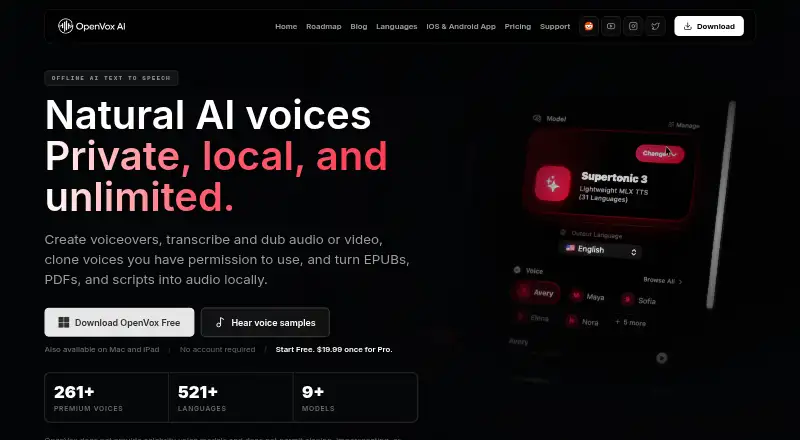
OpenVox provides local AI tools for text-to-speech, transcription, dubbing, and voice conversion across Android, iOS, macOS, Windows, and API access. For core voice processing, the maker says scripts, voice samples, and generated audio remain on the device. Core generation works offline after a one-time model download. Its audiobook tools import EPUB, PDF, or text and include chapter management for long-form narration. The app can transcribe audio or video into editable text and timestamped subtitles, and dub dialogue while preserving its original timing. The maker lists models covering 646 languages for OmniVoice, 99 transcription languages for Whisper Large v3 Turbo, and 100 translation languages for M2M100. The free tier provides 5,000 characters per day, three voice clones, 10 saved designs, WAV export, and 100 seconds of daily voice conversion; batch generation is excluded. OpenVox Pro is listed at $19.99 a month, described as a one-time purchase per platform, with unlimited generations, long-form and batch generation, and WAV, MP3, and M4A export. Pro includes commercial use. Local API and MCP server features are available on macOS and Windows.
Who it suits
OpenVox may suit people who want local voice generation, transcription, dubbing, or audiobook narration, including offline use after downloading its model. The free tier suits limited daily voice conversion; users needing batch generation or commercial use can consider Pro.
What it does well
- Core generation works offline after model download
- Audiobook tools accept EPUB, PDF, and text
- Transcription includes editable text and timestamped subtitles
- Pro includes WAV, MP3, and M4A export
What to know first
- Free voice conversion is limited to 100 seconds daily
- Free tier does not include batch generation
- Local API and MCP server are limited to macOS and Windows
- Listed hardware requirements specify Apple Silicon or Windows 10/11 x64
Limits
The free plan includes 5,000 characters per day, three voice clones, and 10 saved voice designs; Select & Read on PCs has a 10,000-character daily allowance. It includes 100 seconds of voice conversion daily and excludes batch generation. Pro lists unlimited generations, voice clones, and saved voice designs, plus long-form and batch generation.
Plans
| Plan | Billed and limits | Price |
|---|---|---|
| OpenVox Free | Forever · 5,000 characters/day · Select & Read: 10,000 characters/day on PCs · 3 voice clones · 10 saved voice designs · WAV export | Free |
| OpenVox Pro | One-time, per platform · Unlimited generations and voice conversion · Unlimited voice clones and saved designs · Long-form and batch generation · WAV, MP3, M4A export · Commercial use | $19.99, paid once |
As openvoxai.com lists them, read 11 Oct 2026. The maker's own page has the final word.
Getting started
- Visit openvoxai.com and choose the platform you use.
- For Apple devices, the listed requirements are Apple Silicon with macOS 15 or later, or Apple Silicon with iPadOS 18.4 or later.
- For Windows, use Windows 10/11 x64 with at least 8 GB RAM.
- Download the model once to use core generation offline.
- Choose the free plan or OpenVox Pro at $19.99 a month, billed as a one-time purchase per platform.
Verdict
OpenVox brings several voice tasks together with on-device processing and offline core generation after the model download. Its free tier has specific daily and batch limits, while Pro adds unlimited generation, batch tools, and commercial use.
Questions
Does OpenVox have a free plan?
Yes. OpenVox Free is listed as free, billed Forever, with daily character allowances and limits on clones and saved voice designs.
How much does OpenVox Pro cost?
OpenVox Pro is listed at $19.99 a month and described as a one-time purchase per platform.
Which platforms does OpenVox support?
The listed platforms are Android, API, iOS, macOS, and Windows. The local API and built-in MCP server are available on macOS and Windows.
Can OpenVox work offline?
Core generation works offline after the one-time model download.
Can I use OpenVox commercially?
Commercial use is included with the Pro plan.
What audio formats can it export?
The listed formats are WAV, MP3, and M4A. The free plan lists WAV export; Pro lists all three.
Facts from OpenVox's own pages
- API access
- Yes · openvoxai.com, 20 Sept 2026
- Audiobooks
- Audiobook tools import EPUB, PDF, or text and support chapter management for long-form narration. · openvoxai.com, 11 Oct 2026
- Commercial use
- Commercial use is included with both Free and Pro in the pricing comparison. · openvoxai.com, 11 Oct 2026
- Export formats
- WAV,MP3,M4A · openvoxai.com, 20 Sept 2026
- Free limits
- The Free tier includes 100 seconds of voice conversion daily and does not include batch generation. · openvoxai.com, 11 Oct 2026
- Free plan
- Yes · openvoxai.com, 20 Sept 2026
- Hardware requirements
- The listed requirements are Apple Silicon with macOS 15 or later, Apple Silicon with iPadOS 18.4 or later, or Windows 10/11 x64 with at least 8 GB RAM. · openvoxai.com, 11 Oct 2026
- Integration
- The maker lists a community Obsidian plugin called Narrate that connects to OpenVox’s local OpenAI-compatible TTS server. · openvoxai.com, 11 Oct 2026
- Local API and MCP
- The local API and built-in MCP server are available on macOS and Windows, with loopback as the default. · openvoxai.com, 11 Oct 2026
- Model coverage
- The site lists OmniVoice with 646 languages, Whisper Large v3 Turbo with 99 transcription languages, and M2M100 with 100 translation languages. · openvoxai.com, 11 Oct 2026
- Offline
- Core generation works offline after the one-time model download. · openvoxai.com, 11 Oct 2026
- Platforms
- macOS,Windows,iPadOS,local API · openvoxai.com, 20 Sept 2026
- Privacy
- The maker says scripts, voice samples, and generated audio stay on the device for core AI voice processing. · openvoxai.com, 11 Oct 2026
- Product
- OpenVox provides local AI text-to-speech, transcription, dubbing, and voice conversion. · openvoxai.com, 11 Oct 2026
- Reader app
- OpenVox Reader supports iPhone, iPad, and Android and reads books, PDFs, documents, web links, scanned pages, and pasted text. · openvoxai.com, 11 Oct 2026
- Support
- Support documentation links to Reddit and Discord communities and a bug report form. · openvoxai.com, 11 Oct 2026
- Transcription and dubbing
- The app transcribes audio or video into editable text and timestamped subtitles, and can dub dialogue while keeping original timing. · openvoxai.com, 11 Oct 2026
- Voice cloning
- Users can clone voices they own or have permission to use; the maker prohibits unauthorized cloning and impersonation. · openvoxai.com, 11 Oct 2026
Where OpenVox stands on Freedom251
- Text-to-Speech Software#49 of 223
- Text-to-speech tools#60 of 232