Freedom251 › Pitch Correction Software
OpenTune
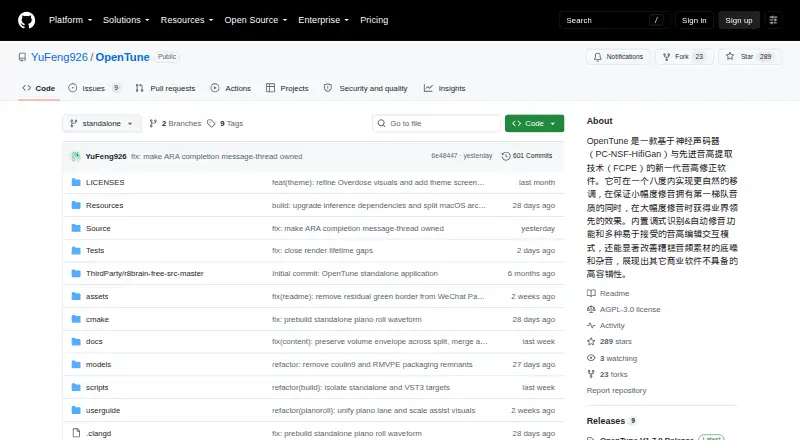
What OpenTune is
OpenTune is a free vocal pitch correction tool for macOS and Windows. It regenerates vocals with a neural vocoder while preserving formants, and offers real-time correction and formant control. For pitch editing, users can draw by hand or work with notes and anchors; automatic key detection can identify a key, with support for Chromatic, Major, Minor, Pentatonic, Dorian, Mixolydian, and Harmonic Minor scales. Per-note EQ lets users shape individual notes, and the software imports WAV, FLAC, OGG, and MP3 files. OpenTune runs as a standalone app or a VST3 plugin with ARA2 support. Its AI processing pairs FCPE pitch extraction with a PC-NSF HifiGAN vocoder through ONNX Runtime. GPU inference uses DirectML on Windows and CoreML on macOS. The interface is available in Chinese, English, Japanese, Russian, and Spanish. OpenTune is permanently free under the AGPL V3.0 license. macOS release packages are not Apple-notarized, so the first launch may display a developer verification prompt.
Who it suits
OpenTune suits vocalists, producers, and editors seeking pitch correction on macOS or Windows, either as a standalone app or within a VST3/ARA2 workflow. Its drawing, note, anchor, key-detection, and per-note EQ tools suit users who want detailed control over vocal edits.
What it does well
- Permanently free under AGPL V3.0.
- Supports real-time correction and formant control.
- Offers hand-drawn, note, and anchor editing.
- Imports WAV, FLAC, OGG, and MP3.
- Available standalone or as VST3 with ARA2.
What to know first
- Available only for macOS and Windows.
- macOS packages lack Apple notarization.
- First macOS launch may prompt developer verification.
Plans
| Plan | Billed and limits | Price |
|---|---|---|
| OpenTune | Permanently free; standalone app and VST3 plugin with ARA2 support | Free |
As github.com lists them, read 4 Oct 2026. The maker's own page has the final word.
Getting started
- Open the OpenTune GitHub project.
- Choose the standalone executable or VST3 plugin with ARA2 support.
- Install or launch the version for macOS or Windows.
- On macOS, respond to the developer verification prompt if it appears on first launch.
- Import a WAV, FLAC, OGG, or MP3 audio file.
OpenTune is a free, open-source vocal pitch editor for producers, singers, and engineers who need note-by-note control rather than a single corrective setting. It suits users working either in a DAW or a dedicated editor, especially when preserving a singer’s vocal character matters. Its broad format support and detailed editing make it a serious no-cost option, while the lack of a paid support tier and macOS launch warning are practical considerations.
Overview
OpenTune rebuilds vocals with a neural vocoder intended to retain formants while changing pitch. That is a more careful approach than simply shifting the whole signal, and it is useful for correcting individual notes without discarding the underlying vocal identity. Real-time correction is supported for situations that call for immediate pitch processing.
The application accepts WAV, FLAC, OGG, and MP3 files, so it fits common recording and delivery workflows. Its processing chain combines FCPE pitch extraction with a PC-NSF HifiGAN vocoder through ONNX Runtime inference. GPU acceleration is available via DirectML on Windows and CoreML on macOS, giving compatible systems a route to faster processing.
Key features
Detailed pitch editing
Hand-drawing, note, and anchor tools provide several ways to shape a performance in an Auto-Tune- or Melodyne-like workflow. Hand edits suit precise manual correction; note and anchor operations are better when you want to reposition or stabilize selected passages. Automatic key detection helps establish a correction target, with Chromatic, Major, Minor, Pentatonic, Dorian, Mixolydian, and Harmonic Minor scales available for different musical contexts.
Per-note processing
Per-note EQ extends the editor beyond pitch. You can address the tonal balance of individual notes, which is valuable when one syllable or note needs different treatment from the rest of a vocal. Users seeking only broad, automatic tuning may find this level of control unnecessary, but detailed vocal editing benefits from it.
Standalone and DAW workflows
OpenTune runs as a standalone executable and as a VST3 plugin, with ARA2 extension support. That combination works for producers who want a dedicated editor as well as those who prefer editing inside a compatible DAW. The interface supports Chinese, English, Japanese, Russian, and Spanish.
Pricing
OpenTune — free. The license is permanently free and includes the standalone application, VST3 plugin, and ARA2 support. There are no paid seats, usage quotas, renewal charges, or trial limits attached to this plan. The project is licensed under AGPL V3.0, making it an attractive choice for users who want a free, open-source tool rather than a subscription product.
Support is community-oriented: users are invited to report bugs through GitHub Issues, and donations do not change the order in which issues are handled. That keeps the cost low but does not provide a commercial support channel.
Platforms
OpenTune supports macOS and Windows. Windows GPU inference uses DirectML, while macOS uses CoreML. Release packages use ad-hoc signing without Apple notarization, so macOS may display a developer-verification prompt on first launch. The application is offered both as a standalone executable and a VST3 plugin with ARA2 support.
Who it's for
Choose OpenTune if you need detailed vocal correction, formant-aware regeneration, multiple scale options, and per-note tonal shaping without paying for a license. It is particularly suited to producers who move between standalone editing and DAW sessions, and to multilingual teams that benefit from its five interface languages.
It is less suitable if you require a paid support agreement, a notarized macOS installer, or a conventional commercial product with a separate support and update plan. Users who want only quick, broad pitch correction may not need its deeper note-level workflow.
Pros and cons
Pros
- Permanently free: the standalone app, VST3 plugin, and ARA2 support carry no subscription or quota.
- Fine-grained correction: hand-drawing, note, and anchor tools support targeted edits rather than one global setting.
- Formant-aware processing: neural-vocoder regeneration is designed to preserve vocal formants while correcting pitch.
- Musical flexibility: automatic key detection and seven scale choices cover common tonal and modal workflows.
- Per-note EQ: individual notes can receive tonal treatment in addition to pitch changes.
Cons
- macOS launch friction: ad-hoc signing and no Apple notarization can trigger a verification prompt.
- No commercial support tier: bug reporting goes through GitHub Issues, and donations do not alter handling order.
- Open-source licensing obligations: AGPL V3.0 may require more consideration than a conventional proprietary plug-in license.
Alternatives
Pitch Correction Software is the broader directory for comparing tools in this category.
Voloco is the better fit for users who want mobile apps on Android or iOS alongside macOS and Windows, with a free mobile plan offering five effects and a paid Producer Monthly option at $14.99 a month.
Auburn Sounds Graillon 3 suits users seeking a free edition with pitch shifting, formant shifting, pitch correction, three pitch engines, and built-in effects; some features are reserved for its full edition.
GVST GSnap is a straightforward free VST audio effect for Linux, macOS, and Windows.
MeldaProduction MAutoPitch is a free effect for macOS and Windows, included in MFreeFXBundle, with a 55.00 USD one-time upgrade for the extended bundle.
OpenVoxTuner is another free AGPLv3 option offering a full plugin.
AutoTune Pro 11 is the alternative for users who prefer a paid product with a perpetual-license option and a free trial.
Brainworx bx_masterdesk is a paid macOS and Windows subscription alternative with monthly CORE and PRO plans.
InTune Performer is a paid macOS and Windows option with a trial and a monthly Antelope Cosmos Standard membership.
Verdict
OpenTune is the right choice for producers who want deep, note-level vocal correction, formant-conscious processing, and DAW integration without paying. Its main reasons to look elsewhere are the macOS verification prompt and the absence of commercial support; if those trade-offs are acceptable, its free AGPL-licensed feature set is unusually substantial.
Verdict
OpenTune combines detailed pitch-editing tools with key detection and per-note EQ, and is available as a standalone app or plugin. Its free license and format support are useful, though macOS users may encounter a verification prompt on first launch.
Questions
How much does OpenTune cost?
OpenTune is permanently free. Its listed plan is free.
Which platforms does it support?
OpenTune supports macOS and Windows. GPU acceleration uses CoreML on macOS and DirectML on Windows.
Does OpenTune work as a plugin?
Yes. It is available as a VST3 plugin with ARA2 extension support, as well as a standalone executable.
What audio formats can it import?
OpenTune imports WAV, FLAC, OGG, and MP3 audio.
Is OpenTune open source?
Yes. The project is licensed under AGPL V3.0.
Will macOS show a security prompt?
It may. Release packages use ad-hoc signing without Apple notarization, so first launch may show a developer verification prompt.
Facts from OpenTune's own pages
- AI engine
- Its AI engine combines FCPE pitch extraction with a PC-NSF HifiGAN vocoder using ONNX Runtime inference. · github.com, 4 Oct 2026
- Audio formats
- It imports WAV, FLAC, OGG, and MP3 audio. · github.com, 4 Oct 2026
- DAW integration
- OpenTune is available as a standalone executable and a VST3 plugin, with ARA2 extension support. · github.com, 4 Oct 2026
- GPU acceleration
- GPU-accelerated inference uses DirectML on Windows and CoreML on macOS. · github.com, 4 Oct 2026
- Key detection
- The software includes automatic key detection and supports Chromatic, Major, Minor, Pentatonic, Dorian, Mixolydian, and Harmonic Minor scales. · github.com, 4 Oct 2026
- Languages
- The interface supports Chinese, English, Japanese, Russian, and Spanish. · github.com, 4 Oct 2026
- License
- The project is licensed under AGPL V3.0. · github.com, 4 Oct 2026
- macOS signing
- Release packages use ad-hoc signing without Apple notarization, so macOS may show a developer verification prompt on first launch. · github.com, 4 Oct 2026
- Per-note EQ
- OpenTune supports per-note EQ processing for fine-grained editing. · github.com, 4 Oct 2026
- Pitch editing
- It provides hand-drawing, note, and anchor tools in an Auto-Tune- or Melodyne-like workflow. · github.com, 4 Oct 2026
- Purpose
- OpenTune is an open-source vocal pitch correction tool that uses a neural vocoder to regenerate vocals while preserving formants. · github.com, 4 Oct 2026
- Support
- The project invites users to report bugs through GitHub Issues, and says donations do not affect issue handling order. · github.com, 4 Oct 2026
Where OpenTune stands on Freedom251
- Pitch Correction Software#5 of 25