Freedom251 › Pitch Correction Software

AutoTune Pro 11
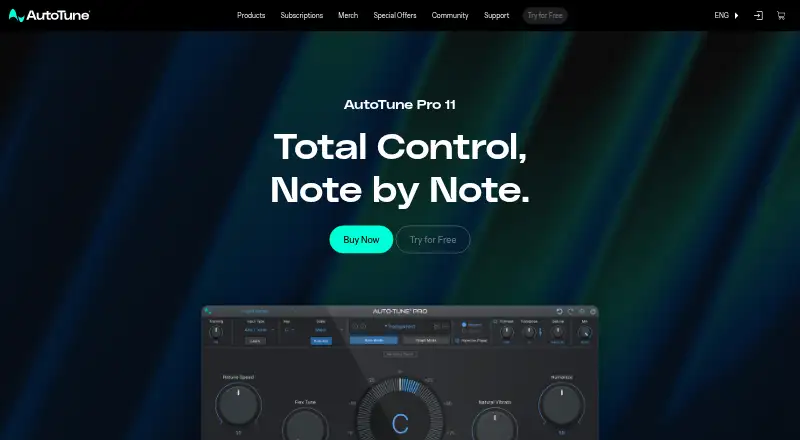
What AutoTune Pro 11 is
AutoTune Pro 11 is a plugin for automatic and manual vocal pitch correction. Auto Mode provides real-time correction with formant and vibrato controls, while Graph Mode lets users edit pitch and timing manually. The Harmony Player provides four individual harmonies that can be mixed and triggered with MIDI. Smart MIDI Mapping can assign a controller to any AutoTune Pro function. ARA2 support is available for Logic, Studio One, Cubase and Nuendo. Other listed host integrations include Ableton Live, Cubase, FL Studio, Logic Pro X, Pro Tools and Studio One; AU, VST3 and AAX formats vary by host and operating system. The product lists macOS 14 or higher and Windows 10 and 11 as technical requirements. AutoTune Central installs and activates the plugins and is supported on macOS 11 or higher and Windows 10 and 11. A three-day trial is available. No price is listed for the perpetual license or AutoTune Unlimited subscription.
Who it suits
AutoTune Pro 11 suits vocalists and audio producers who want automatic pitch correction, manual tuning, or MIDI-triggered harmonies. Its manual describes it as designed for beginners and experts alike.
What it does well
- Real-time correction includes formant and vibrato controls.
- Graph Mode supports manual pitch and time editing.
- Harmony Player provides four MIDI-triggered harmonies.
- Smart MIDI Mapping assigns controllers to functions.
- A three-day trial is available.
What to know first
- No price is listed for either license option.
- Requires macOS 14 or higher, or Windows 10 or 11.
- Host formats vary by system and application.
Limits
The trial lasts three days, and there is no free plan. The perpetual license is a one-time payment; the subscription is billed monthly and can be canceled anytime.
Plans
| Plan | Billed and limits | Price |
|---|---|---|
| AutoTune Pro 11 Perpetual License | One Time Payment. Keep Forever; comes with a free month of AutoTune Unlimited · perpetual license | On request |
| AutoTune Unlimited Subscription | Billed monthly, cancel anytime · 3 AutoTune editions & AutoKey · 5 AI-powered vocal mixing tools · 14 creative vocal effects · immediate access to new releases · recording templates | On request |
| AutoTune Unlimited Subscription | billed annually · 3 AutoTune editions & AutoKey · 5 AI-powered vocal mixing tools · 14 creative vocal effects · immediate access to new releases · recording templates | On request |
As antarestech.com lists them, read 2 Oct 2026. The maker's own page has the final word.
Getting started
- Visit the AutoTune Pro 11 product page.
- Choose the perpetual license or AutoTune Unlimited monthly subscription.
- Start the three-day trial if you want to try the plugin first.
- Install and activate the plugin through AutoTune Central on a supported system.
- Use it with a listed host integration and an available AU, VST3, or AAX format.
AutoTune Pro 11 is a vocal pitch-correction plug-in that combines automatic processing with detailed manual editing. It suits singers, producers and engineers who need both fast real-time correction and precise control over timing, pitch, harmonies and MIDI. Its broad host support and two licensing routes make it a serious option for full production work, although budget-conscious users will find several capable free alternatives.
Overview
Auto Mode corrects pitch as audio plays and adds formant and vibrato controls, making it appropriate for tracking, live-feeling workflows and quick corrective passes. Graph Mode takes a more surgical approach, allowing manual pitch and time edits when a transparent, natural result matters more than speed. Keeping both modes in one plug-in means you can move from broad correction to note-level refinement without changing tools.
The Harmony Player adds four separate harmonies that can be mixed and triggered from MIDI. Smart MIDI Mapping can assign a controller to any AutoTune Pro function, so keyboard or surface users can build a performance-oriented setup rather than relying solely on mouse automation. Pitch shifting spans 24 semitones, giving the processor useful room for substantial vocal transposition as well as conventional correction.
Key features
- Real-time correction: Auto Mode is the practical choice for immediate pitch control, with formant and vibrato parameters to help preserve a vocal’s character.
- Manual editing: Graph Mode targets engineers who need detailed pitch and timing decisions for exposed vocals or deliberately natural tuning.
- Harmony control: Four mixable, MIDI-triggered harmony voices support arranged parts and playable vocal effects.
- Controller integration: Smart MIDI Mapping lets hardware control any AutoTune Pro function, useful for repeatable performance workflows.
- ARA2: Logic, Studio One, Cubase and Nuendo can use ARA2 integration for an editing workflow tied closely to the host timeline.
- Formats and hosts: Ableton Live, Cubase, FL Studio, Logic Pro X, Pro Tools and Studio One are supported through AU, VST3 and AAX formats as applicable to the host and operating system.
Pricing
The AutoTune Pro 11 Perpetual License is a one-time payment that you keep permanently. It includes one free month of AutoTune Unlimited, making it the clearer fit for users who want a lasting Pro installation instead of an ongoing subscription. Its price is custom pricing.
AutoTune Unlimited Subscription is billed monthly and can be cancelled at any time. It includes three AutoTune editions, AutoKey, five AI-powered vocal-mixing tools, 14 creative vocal effects, immediate access to new releases and recording templates. This is better suited to producers who want the wider tool collection and continuous updates; the trade-off is recurring billing rather than permanent ownership. Its price is custom pricing.
There is no free plan, but a three-day trial lets prospective buyers evaluate the workflow before committing. Neither option states a seat quota, so teams should confirm activation terms with Antares.
Platforms
AutoTune Central installs and activates the plug-ins. Official support covers macOS 11 or later and Windows 10 and 11, while the product’s technical specifications list macOS 14 or later alongside Windows 10 and 11. Check the host-specific AU, VST3 or AAX requirements before installing. A product manual and Antares customer support are provided for setup and troubleshooting.
Who it's for
The manual positions AutoTune Pro 11 for beginners and experts. Beginners get a direct real-time mode and a guided route into harmonies, while experienced editors can use Graph Mode, ARA2 and MIDI mapping for detailed production work. It is the right choice when one purchase needs to cover correction, editing and playable harmony duties. It is less compelling if you only need a basic pitch effect or require a permanently free plug-in.
Pros and cons
Pros
- Combines real-time and manual correction, so speed and surgical editing are available in one plug-in.
- Four MIDI-triggered harmony voices and assignable MIDI controls support expressive, hardware-led workflows.
- ARA2 and broad host/format coverage fit established DAW setups.
- Perpetual licensing avoids mandatory subscription ownership for the core product.
Cons
- No free plan and only a three-day trial leave little time for extended evaluation.
- Custom pricing makes the up-front cost and subscription comparison difficult to judge.
- Different stated macOS support levels mean compatibility should be checked carefully before installation.
Alternatives
See the broader Pitch Correction Software list for more choices.
- Voloco is the better starting point for mobile users or anyone wanting a free tier; its Free mobile app offers five effects, while Producer Monthly costs $14.99 a month.
- Auburn Sounds Graillon 3 suits users seeking a free cross-platform plug-in with pitch shifting, formant shifting, pitch correction and three pitch engines.
- GVST GSnap is a free VST effect for those who need basic pitch processing without a trial or subscription.
- MeldaProduction MAutoPitch is a free macOS and Windows effect included in MFreeFXBundle.
- OpenVoxTuner is a permanently free AGPLv3 option for users who prefer an open-source route.
- OpenTune is permanently free as a standalone app and VST3 plug-in with ARA2 support.
- Brainworx bx_masterdesk is an alternative paid subscription with a free trial.
- InTune Performer is another paid macOS and Windows option with a free trial.
Verdict
Choose AutoTune Pro 11 if you need one vocal tool that spans instant correction, natural manual editing, MIDI-played harmonies and modern DAW integration. The perpetual license is the strongest reason to choose it for long-term ownership. Look elsewhere if your priority is free software, a longer evaluation period or transparent pricing.
Verdict
AutoTune Pro 11 combines real-time correction with detailed manual editing and MIDI-controlled harmonies. A three-day trial is available, but prices for its listed license options are not provided.
Questions
Is AutoTune Pro 11 free?
No. There is no free plan, but a three-day trial is available.
What platforms does it support?
The listed technical requirements are macOS 14 or later and Windows 10 or 11. AutoTune Central, which installs and activates plugins, supports macOS 11 or later and Windows 10 or 11.
Which audio hosts and plugin formats are listed?
Host integrations include Ableton Live, Cubase, FL Studio, Logic Pro X, Pro Tools, and Studio One. AU, VST3, and AAX availability depends on the host and operating system.
Does AutoTune Pro 11 support ARA2?
Yes. ARA2 support is listed for Logic, Studio One, Cubase, and Nuendo.
What purchase options are available?
The perpetual license is billed as a one-time payment and includes a free month of AutoTune Unlimited. AutoTune Unlimited is billed monthly, can be canceled anytime, and includes three AutoTune editions, AutoKey, five AI-powered vocal mixing tools, 14 creative vocal effects, new releases, and recording templates.
Who makes AutoTune Pro 11?
Antares makes AutoTune Pro 11. Its history dates to the original AutoTune release in 1997 by Antares founder Dr. Andy Hildebrand.
Facts from AutoTune Pro 11's own pages
- ARA2 integration
- ARA2 support is provided for Logic, Studio One, Cubase and Nuendo. · antarestech.com, 2 Oct 2026
- Audience
- The product manual says AutoTune Pro 11 is designed for beginners and experts alike. · antarestech.com, 2 Oct 2026
- Auto Mode
- Auto Mode provides real-time pitch correction with formant and vibrato controls. · antarestech.com, 2 Oct 2026
- DAW formats
- Supported host integrations include Ableton Live, Cubase, FL Studio, Logic Pro X, Pro Tools and Studio One, with AU, VST3 and AAX formats depending on host and operating system. · antarestech.com, 2 Oct 2026
- Download
- AutoTune Central installs and activates the plugins and is officially supported on macOS 11 or higher and Windows 10 and 11. · antarestech.com, 2 Oct 2026
- Graph Mode
- Graph Mode provides detailed manual pitch and time editing for natural vocal tuning. · antarestech.com, 2 Oct 2026
- Harmony Player
- The Harmony Player provides four individual harmonies that can be mixed and MIDI-triggered. · antarestech.com, 2 Oct 2026
- Headquarters
- Santa Cruz, California, United States · antarestech.com, 28 Sept 2026
- History
- AutoTune was first released in 1997 by Dr. Andy Hildebrand, who founded Antares. · antarestech.com, 2 Oct 2026
- MIDI mapping
- Smart MIDI Mapping lets users assign a MIDI controller to any AutoTune Pro function. · antarestech.com, 2 Oct 2026
- Privacy rights
- The privacy policy says Antares does not sell personal information and provides California rights to request disclosure or deletion. · antarestech.com, 2 Oct 2026
- Privacy security
- The privacy policy says information is stored on servers behind firewalls and certain personal information is encrypted using SSL. · antarestech.com, 2 Oct 2026
- Product requirements
- AutoTune Pro 11 lists macOS 14 or higher and Windows 10 and 11 as technical specifications. · antarestech.com, 2 Oct 2026
- Purpose
- AutoTune Pro 11 provides automatic and manual vocal pitch correction in one plugin. · antarestech.com, 2 Oct 2026
- Support
- The product page links users to a product manual and Antares customer support. · antarestech.com, 2 Oct 2026
Where AutoTune Pro 11 stands on Freedom251
- Pitch Correction Software#8 of 25