Freedom251 › Language learning apps
OpenKoto
What OpenKoto is
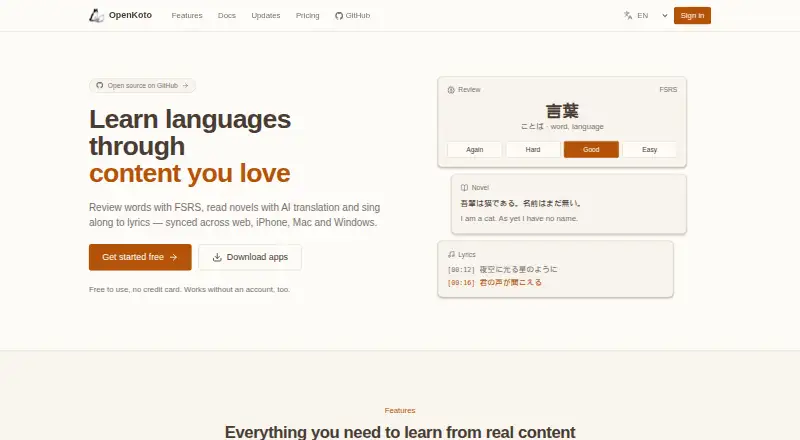
OpenKoto is a free, open-source language-learning app that turns chosen content into material for reading, translation, and study. It imports URLs and PDF, EPUB, TXT, Word, and Markdown files, then provides automatic translation and vocabulary extraction. The reader supports live language switching, instant word lookup, and grammar parsing. An AI assistant can explain words in context, break down grammar, guide pronunciation, and answer questions about highlighted text. OpenKoto supports learning and transcription in more than 100 languages. The maker also describes video learning with synchronized subtitles and transcription. Desktop downloads are available for Mac, Windows, and Linux; native iPhone and iPad apps include offline-first use, vocabulary review, and video subtitles. The maker says desktop data is processed locally, while the iOS app keeps learning data on the device and API keys in the iOS Keychain. The project is licensed under Apache 2.0. Documentation explains how to connect Google AI Studio or 302.AI API keys. The web version is being rebuilt, with vocabulary review, novels, and lyrics planned to sync with iOS and desktop.
Who it suits
OpenKoto suits language learners, polyglots, and people who want to study through content they enjoy. The documentation specifically describes it as suitable for Japanese and English learners.
What it does well
- Imports URLs and common document formats.
- Supports learning and transcription in over 100 languages.
- Includes contextual explanations and grammar parsing.
- iOS app offers offline-first use.
- Desktop data is processed locally, according to the maker.
What to know first
- The web version is being rebuilt.
- AI use requires connecting an API key.
- The web features described for future sync are planned, not current.
Plans
| Plan | Billed and limits | Price |
|---|---|---|
| Free | Free and open source · Apache 2.0 license | Free |
As openkoto.com lists them, read 7 Oct 2026. The maker's own page has the final word.
Getting started
- Visit the OpenKoto website.
- Choose the desktop download for Mac, Windows, or Linux, or use the native iPhone or iPad app.
- Import a URL or a supported PDF, EPUB, TXT, Word, or Markdown file.
- Connect a Google AI Studio or 302.AI API key to use the AI assistant.
- Use the reader's language switching, lookup, and grammar tools to study.
OpenKoto is an open-source language-learning app for people who want to study through reading and video they choose, rather than follow a preset course. It is best suited to self-directed learners who want import and study tools across desktop or iOS.
Overview
OpenKoto turns URLs and documents into material for reading, translation, and vocabulary study. That gives motivated learners a way to build practice around subjects they already care about, but it puts the choice of content and pace in their hands. It is a weaker fit for anyone looking for a guided curriculum.
Key features
Import and read
The app imports URLs and PDF, EPUB, TXT, Word, and Markdown files, with automatic translation and vocabulary extraction. Its reader adds real-time language switching, instant word lookup, and grammar parsing. The format range is useful for learners with material in several forms; the approach is less convenient if they would rather start with a ready-made course.
AI and video study
OpenKoto’s AI assistant explains words in context, breaks down grammar, offers pronunciation guidance, and answers questions about highlighted text. Video learning includes synchronized subtitles and transcription support. These features make the app more than a document reader, though using its AI requires connecting a Google AI Studio or 302.AI API key.
Language and learning support
OpenKoto supports learning and transcription in more than 100 languages, including Japanese, English, Chinese, Korean, French, German, Spanish, Italian, and Portuguese. Offline lessons and personalized review extend its usefulness beyond looking up words in a passage. The documentation identifies Japanese learners, English learners, polyglots, and people who prefer learning through content they enjoy as likely users.
Pricing
OpenKoto’s Free plan costs nothing and is free and open source under the Apache 2.0 license. It includes offline lessons, personalized review, and mobile apps. There are no paid tiers or seat counts to compare; the AI setup does require an API key from a supported provider. This suits learners who want an open-source tool without a subscription, but the plan is centered on self-directed study rather than a packaged course.
Platforms
OpenKoto has desktop downloads for Mac, Windows, and Linux, plus a native iPhone and iPad app. The maker describes the iOS app as offline-first, with on-device learning data and API keys kept in the iOS Keychain. The desktop app runs and processes data locally. The project’s web version is being rebuilt, with vocabulary review, novels, and lyrics planned to sync with iOS and desktop, so browser-first users should look elsewhere for now.
Who it's for
Choose OpenKoto if you already have texts or videos you want to learn from, value support across many languages, and are comfortable shaping your own study routine. Its import options and reading aids suit learners who want to investigate language in context. It is not the natural choice for learners who need a fixed sequence of lessons or a completed web experience.
Pros and cons
- Pro: Imports URLs and five document formats, giving learners flexibility to study material they already have.
- Pro: Combines lookup, grammar help, vocabulary extraction, AI explanations, and video subtitles in one study workflow.
- Pro: Supports more than 100 languages and includes offline lessons and personalized review.
- Con: The web version is being rebuilt, which makes it a poor fit for learners who need a stable browser-based option.
- Con: AI features require connecting a third-party API key, adding setup beyond installing the app.
- Con: Its content-first approach leaves learners to choose their own material and direction instead of supplying a conventional course path.
Alternatives
Lute is another free option for learners who want software installed locally and need Android support. Learning with Texts may suit people comfortable running a local web and database server with PHP to work with texts and terms. LinguaCafe is worth considering for a self-hosted, one-user-per-server setup.
LingQ offers a free membership with limits of 20 saved words and phrases, 5 imported lessons, and 1 audio playlist; pick it if those allowances fit your needs and you prefer its freemium model. Readlang is another freemium alternative. Beelinguapp provides stories and news, plus a glossary and flashcards; free users can switch languages only during the first 30 minutes, so it suits readers who want that story-based format and can work within the restriction.
E-clair is a mobile alternative with a free tier that limits collections and monthly transcription of users’ own audio. jidoujisho is a free, open-source Android option for learners who specifically want Android support.
For broader discovery, browse Language Immersion Apps or Language learning apps.
Verdict
OpenKoto is a strong choice for independent learners who want to turn their own reading and video into study material, especially across desktop and iOS. Its import range, contextual help, and broad language support are the reasons to choose it; the rebuilding web version and need to configure an AI API key are the clearest reasons to look elsewhere.
Verdict
OpenKoto combines content import, translation, vocabulary tools, and an AI assistant for language study. Its desktop and iOS privacy descriptions differ, and its web version is still being rebuilt.
Questions
Is OpenKoto free?
Yes. The listed Free plan costs nothing, and the product is open source under Apache 2.0.
Which platforms does it support?
The listed platforms are iOS, Linux, macOS, web, and Windows. The maker lists desktop downloads for Mac, Windows, and Linux and a native iPhone and iPad app.
How many languages does OpenKoto support?
It supports learning and transcription in more than 100 languages, including Japanese, English, Chinese, Korean, French, German, Spanish, Italian, and Portuguese.
Is OpenKoto open source?
Yes. The project is distributed under the Apache 2.0 license.
Do I need an API key for the AI assistant?
The documentation explains how to connect Google AI Studio or 302.AI API keys to OpenKoto.
Where can I get help?
The maker directs users to open a GitHub issue or join project discussions.
Facts from OpenKoto's own pages
- AI assistant
- The AI assistant provides contextual word explanations, grammar breakdowns, pronunciation guidance, and interactive questions about highlighted text. · openkoto.com, 7 Oct 2026
- AI setup
- The documentation explains how to connect Google AI Studio or 302.AI API keys to OpenKoto. · openkoto.com, 7 Oct 2026
- Content import
- It imports URLs and PDF, EPUB, TXT, Word, and Markdown files with automatic translation and vocabulary extraction. · openkoto.com, 7 Oct 2026
- Desktop availability
- The maker lists desktop downloads for Mac, Windows, and Linux. · github.com, 7 Oct 2026
- Free plan
- Yes · openkoto.com, 23 Sept 2026
- Intended users
- The documentation describes the app as suitable for Japanese learners, English learners, polyglots, and people who want to learn through content they enjoy. · openkoto.com, 7 Oct 2026
- iOS availability
- A native app is available for iPhone and iPad, with offline-first use, vocabulary review, and video subtitles. · github.com, 7 Oct 2026
- Languages
- OpenKoto supports learning and transcription in more than 100 languages, including Japanese, English, Chinese, Korean, French, German, Spanish, Italian, and Portuguese. · openkoto.com, 7 Oct 2026
- Languages offered
- 100 · openkoto.com, 23 Sept 2026
- License
- The project is distributed under the Apache 2.0 license. · github.com, 7 Oct 2026
- Privacy
- The maker says the desktop app runs locally and processes data locally; the iOS app keeps learning data on the device and API keys in the iOS Keychain. · github.com, 7 Oct 2026
- Product
- OpenKoto is an open-source language-learning app that turns content users choose into reading, translation, and learning material. · openkoto.com, 7 Oct 2026
- Reading tools
- Its reader offers real-time language switching, instant word lookup, and grammar parsing. · openkoto.com, 7 Oct 2026
- Support
- The maker directs users to open a GitHub issue or join project discussions for questions. · openkoto.com, 7 Oct 2026
- Video learning
- The maker describes video learning with synchronized subtitles and transcription support on its homepage. · openkoto.com, 7 Oct 2026
- Web version
- The project README describes the web version as being rebuilt, with vocabulary review, novels, and lyrics planned to sync with iOS and desktop. · github.com, 7 Oct 2026
Where OpenKoto stands on Freedom251
- Language learning apps#123 of 278
- Language Immersion Apps#15 of 25