Freedom251 › Language Immersion Apps
E-clair
What E-clair is
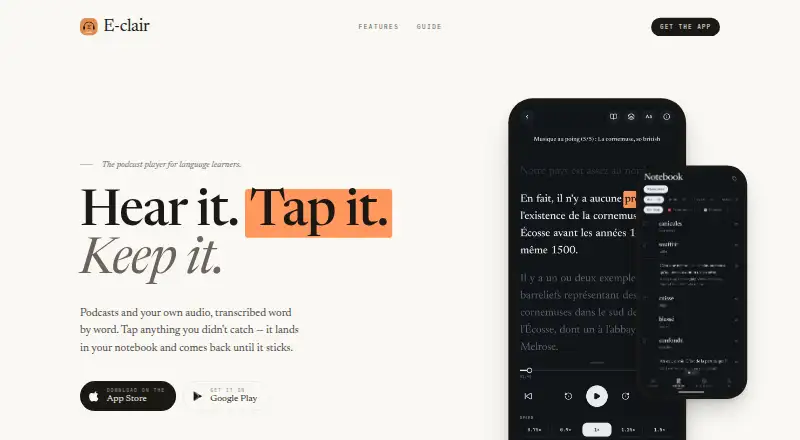
E-clair turns podcasts and other audio into language-learning sessions with transcripts, translations, saved vocabulary and flashcards. Learners can subscribe to podcasts, upload recordings or paste links to audio files. As audio plays, the transcript tracks it word by word; users can replay a selected word or phrase, and tap a word or hold a phrase to see a DeepL-powered translation. Saved words and phrases retain their place in the recording and can be reviewed with FSRS spaced repetition. E-clair transcribes more than 20 languages, while its guide lists 16 translation target languages. Uploads can be MP3, M4A, WAV, AAC, OGG, FLAC or AIFF; video uploads are not supported. The free plan costs nothing and limits collections and the amount and size of users’ own audio transcriptions, while podcast transcription is handled separately. E-clair is available on Android and iOS, with offline access listed.
Who it suits
It suits intermediate learners who want to study podcasts or recordings they already have. The maker says it is intended for learners past the beginner stage.
What it does well
- Word-by-word transcript synced to playback
- Replay selected words or phrases
- Flashcards use FSRS spaced repetition
- Offline access is listed
- Free plan available
What to know first
- Video files are not supported for upload
- Free plan limits collections
- Free plan limits own-audio transcription amount and size
Limits
The free plan limits the number of collections and the amount and size of users’ own audio transcriptions. Podcast transcription is handled separately.
Plans
| Plan | Billed and limits | Price |
|---|---|---|
| Free | Limited number of collections · monthly limit on transcribing your own audio · podcast episodes are handled more generously | Free |
As e-clair.app lists them, read 3 Oct 2026. The maker's own page has the final word.
Getting started
- Visit https://e-clair.app/.
- Install E-clair on Android or iOS.
- Subscribe to a podcast, upload a supported audio file, or paste an audio link.
- Follow the synchronized transcript and save words or phrases for flashcard review.
Verdict
E-clair combines audio playback, synchronized transcripts and vocabulary review for learners using podcasts or recordings. Check the free plan’s collection and own-audio transcription limits if you plan to bring in your own files.
Questions
Is E-clair free?
Yes. Its free plan is listed as free and has limits on collections and personal audio transcription.
Which platforms does E-clair support?
E-clair is available on Android and iOS.
What audio can I use?
You can subscribe to podcasts, upload recordings in MP3, M4A, WAV, AAC, OGG, FLAC, or AIFF, or paste links to audio files. Video uploads are unsupported.
Which languages are supported?
E-clair transcribes more than 20 languages. Its guide lists 16 translation target languages.
How does vocabulary review work?
Saved words and phrases retain their position in the audio and can be reviewed as flashcards using FSRS spaced repetition.
How does E-clair handle translation data?
Its privacy policy says text sent to DeepL is handled as a transient request and is not retained or used to train models.
Facts from E-clair's own pages
- Audio formats
- The upload picker supports MP3, M4A, WAV, AAC, OGG, FLAC and AIFF; video files are not supported for upload. · e-clair.app, 3 Oct 2026
- Audio sources
- Users can subscribe to podcasts, upload recordings or paste links to audio files. · e-clair.app, 3 Oct 2026
- Free-plan limit
- The free plan limits the number of collections and the amount and size of users’ own audio transcriptions; podcast transcription is treated separately. · e-clair.app, 3 Oct 2026
- Intended users
- The maker describes E-clair as intended for learners past the beginner stage who want to study podcasts or recordings they already have. · apps.apple.com, 3 Oct 2026
- Languages
- E-clair transcribes more than 20 languages and offers 16 listed translation target languages in its guide. · e-clair.app, 3 Oct 2026
- Platforms
- The maker links to the App Store and Google Play for downloads. · e-clair.app, 3 Oct 2026
- Privacy
- The privacy policy says data is encrypted in transit using HTTPS/TLS and audio files are processed in temporary server memory rather than permanently logged or distributed. · e-clair.app, 3 Oct 2026
- Purpose
- E-clair turns podcasts and other audio into language-learning sessions with synchronized transcripts, translations, saved vocabulary and flashcards. · e-clair.app, 3 Oct 2026
- Support
- The maker lists support by email at [email protected] and says users can request account deletion in the app or by email. · e-clair.app, 3 Oct 2026
- Transcript
- Transcripts are synced to playback word by word, and users can replay a selected word or phrase. · e-clair.app, 3 Oct 2026
- Translation
- Users can tap a word or hold a phrase for translation; translations are powered by DeepL. · e-clair.app, 3 Oct 2026
- Translation data
- The privacy policy says text sent to DeepL is handled as a transient request and is not retained or used to train models. · e-clair.app, 3 Oct 2026
- Vocabulary review
- Saved words and phrases retain their audio position and can be reviewed as flashcards using FSRS spaced repetition. · apps.apple.com, 3 Oct 2026
Where E-clair stands on Freedom251
- Language Immersion Apps#8 of 25