Freedom251 › Language Immersion Apps
Gravity
What Gravity is
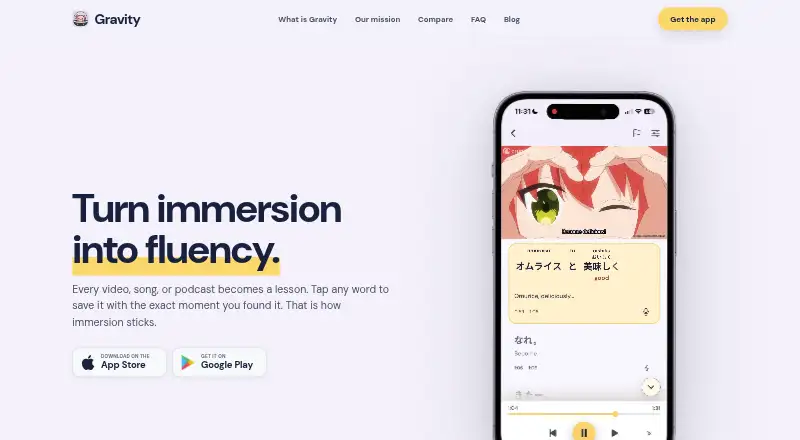
Gravity is a Japanese-learning app that turns real media and captured material into study activities. Its Media catalog offers more than 1,000 hours of native Japanese video, organized by topic and JLPT level. Moments gives learners a shorter, swipeable way to work with similar content. Word-by-word synced transcripts let learners tap vocabulary to inspect dictionary entries, read contextual explanations, or save words. Gravity can also extract vocabulary from photos and screenshots, and it supports material such as podcasts, songs, livestreams, manga panels, and text. Saved words can be practised, searched, sorted, and arranged in personal decks. Words saved from Media retain their source context. Spaced reviews and daily plans adjust to a learner’s progress, and the app is intended for all levels. Japanese is currently its only supported learning language. Gravity is available for Android, iOS, and macOS; its App Store listing labels it early access. A free plan is available, with paid options ranging from $4.99, paid once for Special Offer to $69.99, paid once for Polyglot. Immersive Monthly is $8.99 a month. The maker describes the app as useful for travelers, immigrants, expats, partners of native speakers, and students abroad.
Who it suits
Gravity suits Japanese learners at any level who want to study through videos, music, podcasts, or their own captured text and images. Its stated audience includes travelers, immigrants, expats, partners of native speakers, and students abroad.
What it does well
- More than 1,000 hours of Japanese video are organized by topic and JLPT level.
- Synced transcripts provide tappable words, dictionary entries, and contextual explanations.
- Photo and screenshot vocabulary can become study material.
- Personal decks retain source context for words saved from Media.
- Reviews and daily plans adapt to learner progress.
What to know first
- Japanese is currently the only supported learning language.
- The App Store listing labels the app as early access.
- Some paid plans are one-time purchases, while Immersive Monthly is recurring.
Limits
A free plan is available, but the listed facts do not describe its quotas or feature limits. Paid options include Special Offer at $4.99, paid once, Fluency at $6.99, paid once, Immersive Monthly at $8.99 a month, Immersion at $14.99, paid once, and Polyglot at $69.99, paid once.
Plans
| Plan | Billed and limits | Price |
|---|---|---|
| Immersion | — | $14.99, paid once |
| special offer | — | $4.99, paid once |
| Fluency | — | $6.99, paid once |
| Polyglot | — | $69.99, paid once |
| Immersive Monthly | — | $8.99 a month |
As learngravity.com lists them, read 8 Oct 2026. The maker's own page has the final word.
Getting started
- Visit https://learngravity.com/.
- Choose Android, iOS, or macOS as your platform.
- Start with the free plan or choose a paid plan.
- Use the Media catalog or Moments to explore Japanese content.
- Tap transcript words or capture vocabulary from photos and screenshots, then save words for study.
Verdict
Choose Gravity if you want to build Japanese study around native media, captured material, and vocabulary review. It is less suitable if you need a learning language other than Japanese or prefer an app outside early access.
Questions
What languages does Gravity support?
Japanese is currently the supported learning language.
What platforms is Gravity available on?
It is available on Android, iOS, and macOS.
Is there a free plan?
Yes, Gravity offers a free plan.
What are the paid plan prices?
Special Offer is $4.99, paid once, Fluency is $6.99, paid once, Immersive Monthly is $8.99 a month, Immersion is $14.99, paid once, and Polyglot is $69.99, paid once.
Who makes Gravity?
The product website is learngravity.com, and the maker describes Gravity as intended for travelers, immigrants, expats, partners of native speakers, and students abroad.
Facts from Gravity's own pages
- Audience
- The maker describes Gravity as intended for travelers, immigrants, expats, partners of native speakers, and students abroad. · learngravity.com, 8 Oct 2026
- Early access
- The App Store listing labels Gravity as being in early access. · apps.apple.com, 8 Oct 2026
- Headquarters
- Vancouver, Canada · learngravity.com, 28 Sept 2026
- Image capture
- Gravity can extract vocabulary from photos and screenshots and turn it into study material. · apps.apple.com, 8 Oct 2026
- Integrations
- Gravity’s privacy policy names Google sign-in, AI services from OpenAI and Google Cloud AI, and billing through Apple, Google Play, RevenueCat, or Stripe. · learngravity.com, 8 Oct 2026
- Language
- Japanese is currently the supported learning language. · learngravity.com, 8 Oct 2026
- Media catalog
- The Media catalog contains more than 1,000 hours of native Japanese video organized by topic and JLPT level. · learngravity.com, 8 Oct 2026
- Media handling
- Gravity says it does not download, host, or store underlying third-party video or audio; playback uses the platform’s embedded player. · learngravity.com, 8 Oct 2026
- Moments
- Moments offers a shorter, swipeable way to learn from the same kind of real Japanese content as the Media catalog. · learngravity.com, 8 Oct 2026
- Product
- Gravity turns Japanese videos, music, podcasts, and captured text into personalized language-learning material. · learngravity.com, 8 Oct 2026
- Review
- The app provides spaced reviews and daily learning plans tailored to a learner’s progress. · apps.apple.com, 8 Oct 2026
- Security and privacy
- The maker says it uses HTTPS encryption in transit, production-data access controls, and vendor due diligence, and does not sell personal information. · learngravity.com, 8 Oct 2026
- Study tools
- Saved words can be practised, searched, sorted, and organized into user-created decks, with source context retained for words saved from Media. · learngravity.com, 8 Oct 2026
- Support
- The maker directs users to email [email protected] for questions and feedback. · learngravity.com, 8 Oct 2026
- Word capture
- Learners can tap words in word-by-word synced transcripts to inspect them, view dictionary entries, get contextual explanations, or save them for study. · learngravity.com, 8 Oct 2026
Where Gravity stands on Freedom251
- Language Immersion Apps#7 of 25