Freedom251 › Authenticator apps
OpenAuthenticator
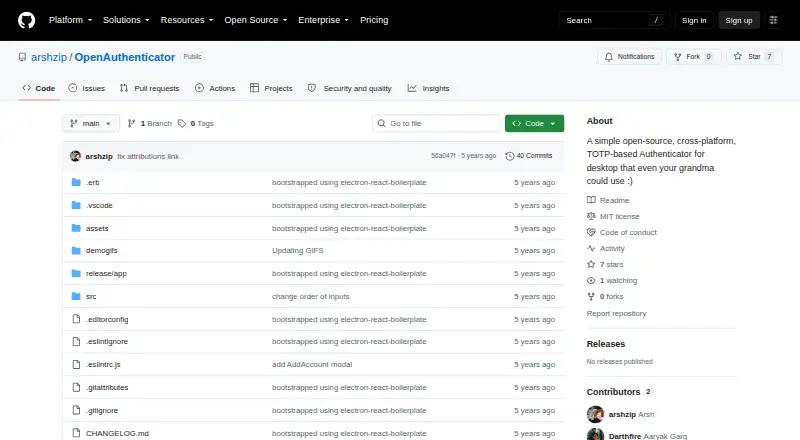
What OpenAuthenticator is
OpenAuthenticator is a free, open-source desktop authenticator for Linux, macOS, and Windows. It uses time-based one-time passwords, or TOTP, and lets users add or delete authenticator tokens. Codes can be copied to the clipboard, and keys refresh automatically. The application fetches a favicon for each service to help identify tokens. The project credits otplib for cryptographic token generation and lists an MIT license. The repository documents local development: clone the project, install dependencies with npm, and run npm start. The README says npm run package creates a package for the local platform. The GitHub repository has a Releases section with no release entries and a Packages section with no package entries. The project is described as simple enough for broad everyday use, while its cross-platform design covers the three listed desktop systems. With no published releases or packages, the repository provides the route for obtaining the code, running it locally, and creating a local package.
Who it suits
It suits desktop users who need a free TOTP authenticator on Linux, macOS, or Windows. Developers can also use the documented npm workflow to run and package it locally.
What it does well
- Free and open source
- Supports Linux, macOS, and Windows
- Adds and deletes authenticator tokens
- Copies codes to the clipboard
- Automatically refreshes keys
What to know first
- No published release entries
- No published package entries
- Requires local npm setup for development
- Desktop platforms only
Verdict
OpenAuthenticator provides straightforward TOTP token management across three desktop platforms under an MIT license. Users should expect to work from the repository, since no releases or packages are published.
Facts from OpenAuthenticator's own pages
- Availability
- The repository’s Releases page says there are no releases. · github.com, 12 Oct 2026
- Build
- The README says to run npm run package to package the app for the local platform. · github.com, 12 Oct 2026
- Clipboard
- The app can copy tokens to the clipboard. · github.com, 12 Oct 2026
- Code type
- totp · github.com, 21 Sept 2026
- Copy codes
- The app can copy codes to the clipboard. · github.com, 12 Oct 2026
- Development
- The README gives instructions to clone the repository, install dependencies with npm install, and run npm start. · github.com, 12 Oct 2026
- Development setup
- The README instructs developers to clone the repository, install dependencies with npm, and run npm start. · github.com, 12 Oct 2026
- Founded
- 2021 · github.com, 28 Sept 2026
- Intended audience
- The project describes itself as simple enough for “your grandma” to use. · github.com, 12 Oct 2026
- License
- The repository lists an MIT license. · github.com, 12 Oct 2026
- Manage tokens
- Users can add and delete authenticator tokens. · github.com, 12 Oct 2026
- Packaging
- The README says to run npm run package to package the app for a local platform. · github.com, 12 Oct 2026
- Published packages
- The repository page has a Packages section but shows no package entries. · github.com, 12 Oct 2026
- Published releases
- The repository page has a Releases section but shows no release entries. · github.com, 12 Oct 2026
- Purpose
- OpenAuthenticator is an open-source, cross-platform, TOTP-based authenticator for desktop. · github.com, 12 Oct 2026
- Refresh
- The app automatically refreshes keys. · github.com, 12 Oct 2026
- Refreshing codes
- The app automatically refreshes keys. · github.com, 12 Oct 2026
- Service icons
- The app fetches favicons for each service. · github.com, 12 Oct 2026
- Supported platforms
- windows,macos,linux · github.com, 21 Sept 2026
- Token generation
- The project credits otplib for cryptographically generating authentication tokens. · github.com, 12 Oct 2026
- Token management
- Users can add and delete authenticator tokens. · github.com, 12 Oct 2026
Where OpenAuthenticator stands on Freedom251
- Authenticator apps#111 of 111