Freedom251 › File Viewer Software
OmniViewer
What OmniViewer is
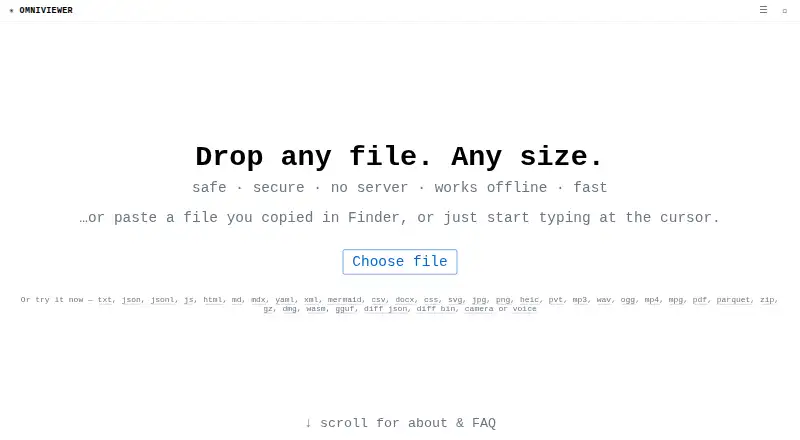
OmniViewer is a free browser-based tool for viewing files, inspecting their raw content, and reading a hex view with offsets and ASCII. It also lets users edit text files in place, including line by line in very large files, then download the edited result. Its dedicated tools cover JSON formatting and conversion, CSV tables and SQL, Markdown previews, media metadata, PDFs, and ZIP archives. The CSV viewer can sort and filter data, run SQL queries, convert, export, and split files; the site says it was tested with a 21 GB, 100-million-row file. PDF tools extract text and images, inspect or remove metadata, and open password-protected files, but do not perform OCR on scanned pages. Files are read in the browser rather than uploaded, and the tools continue working offline once the page has loaded. OmniViewer describes itself as static, with no application server, API, database, or upload endpoint. File content can be placed in a URL fragment for sharing up to 32 KB.
Who it suits
OmniViewer suits people who want to inspect or edit files in a browser, including users working with CSV, JSON, PDFs, or ZIP archives. It may also suit those who need browser-based tools that keep working offline after loading.
What it does well
- Files are read in the browser and not uploaded.
- Tools continue working offline after the page loads.
- Text files can be edited in place and downloaded.
- CSV tools include sorting, filtering, SQL, and export.
What to know first
- PDF tools do not perform OCR on scanned pages.
- URL sharing is limited to content up to 32 KB.
- The PDF viewer requires a modern browser.
Limits
The URL sharing toolbar supports file content up to 32 KB. PDF tools do not perform OCR on scanned pages.
Getting started
- Open the OmniViewer website in a modern browser on a computer or phone.
- Load the page while connected to the network.
- Open a file using the relevant viewer or format toolkit.
- Edit supported text files in place and download the result if needed.
- Use the URL sharing toolbar for file content up to 32 KB.
Verdict
OmniViewer combines file inspection and format-specific tools in a browser, with local processing and offline use after loading. Its PDF toolkit lacks OCR for scanned pages, and sharing file content through a URL is limited to 32 KB.
Questions
Is OmniViewer free?
Yes. OmniViewer is listed as free and has a free plan.
Which platforms can I use it on?
It runs in a browser on Windows, Linux, and macOS. The PDF viewer also supports phones.
Are files uploaded to a server?
The site says files are read in the browser and not uploaded. It describes the service as having no application server, API, database, or upload endpoint.
Can OmniViewer work offline?
The viewer and its format tools continue working after the page has loaded and the network is turned off.
What can its PDF tools do?
They can extract text and images, inspect and remove metadata, and open password-protected PDFs. They do not perform OCR on scanned pages.
Can I share a file with a URL?
The toolbar can create a URL containing file content in its fragment for files or snippets up to 32 KB.
Facts from OmniViewer's own pages
- Analytics
- OmniViewer uses Google Analytics and says it sends the page path, but not the URL query or fragment or file contents. · omniviewer.org, 3 Oct 2026
- CSV capacity
- The CSV viewer offers sorting, filtering, SQL queries, export, and splitting, and the site says it was tested with a 21 GB, 100-million-row file. · omniviewer.org, 2 Oct 2026
- CSV tools
- The CSV viewer offers a sortable and filterable table, in-browser SQL, conversion, statistics, export, and splitting; the site says it was tested with 21 GB and 100 million rows. · omniviewer.org, 3 Oct 2026
- Editing
- Users can edit text files in place and download the result, including line-by-line editing for huge files. · omniviewer.org, 3 Oct 2026
- File sharing
- Files or snippets up to 32 KB can be shared in a URL whose payload is stored in the URL fragment. · omniviewer.org, 3 Oct 2026
- File viewer
- OmniViewer is a browser-based file viewer that displays raw content and a hex view with offsets and ASCII. · omniviewer.org, 2 Oct 2026
- Format tools
- Dedicated toolkits include JSON, JSON Lines, CSV, HTML, Markdown, MDX, YAML, XML, JavaScript, MP3, MP4, and PNG viewers. · omniviewer.org, 3 Oct 2026
- Integrations
- The site says OmniViewer uses the same engine as fastjsonviewer.com and hugecsv.com. · omniviewer.org, 3 Oct 2026
- Large files
- The site says file size is effectively unlimited and cites a 40 GB in-browser test of the same viewing engine. · omniviewer.org, 3 Oct 2026
- Local processing
- The site says files are read by the browser and never uploaded to a server. · omniviewer.org, 3 Oct 2026
- No backend
- The site describes itself as static, with no application server, API, database, or upload endpoint. · omniviewer.org, 2 Oct 2026
- Offline use
- The site says OmniViewer works fully offline once loaded. · omniviewer.org, 3 Oct 2026
- PDF support
- The PDF toolkit can extract text and images, inspect and remove metadata, and open password-protected PDFs; it does not perform OCR on scanned pages. · omniviewer.org, 2 Oct 2026
- Platform support
- The PDF viewer says it works in modern browsers on Windows, Linux, macOS, or a phone. · omniviewer.org, 3 Oct 2026
- Product
- OmniViewer is a universal file viewer that runs in the browser and shows raw content and a hex view. · omniviewer.org, 3 Oct 2026
- Sharing limit
- The toolbar can create a URL containing file content in its fragment for content up to 32 KB. · omniviewer.org, 2 Oct 2026
- Supported computers
- The PDF viewer works in a modern browser on Windows, Linux, macOS, or a phone, with no additional software required. · omniviewer.org, 2 Oct 2026
- ZIP tools
- The ZIP viewer lists archive contents, previews or downloads individual entries, and can extract selected files. · omniviewer.org, 3 Oct 2026
Where OmniViewer stands on Freedom251
- File Viewer Software#14 of 31