Freedom251 › File Viewer Software

OpenFiles
What OpenFiles is
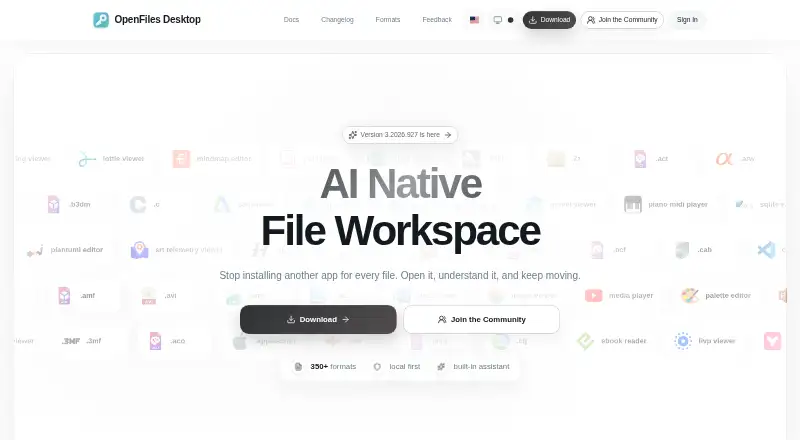
OpenFiles is a desktop workspace for browsing, viewing, editing, converting, and getting AI assistance with personal files. Its navigator moves through folders, searches files, and opens them in the appropriate app. Contextual toolbars support documents, media, archives, maps, and code, while conversion and export are available from the current tab. The maker describes support for more than 350 formats across documents, images, media, data, code, and archives, with a searchable format catalog. Its built-in assistant supports summaries, generation, and file-aware work. File processing happens on the device. File content is not sent to a server unless a user opts into an internet feature, such as online conversion; the application prompts for confirmation before upload. The privacy policy says Umeng+ and Google Analytics collect anonymized usage, performance, and file-format statistics. OpenFiles is available for Linux, macOS, and Windows. The maker says users can open and view SBZ files for free. The individual developer, Liang Wensen, invites feedback through Discord, QQ, and GitHub, and lists an email address for support.
Who it suits
OpenFiles suits people who want a desktop-centered place to browse and work with personal files across several formats. It is relevant to users who need document, archive, office-file, or code previews alongside editing, conversion, and file-aware AI help.
What it does well
- Available for Linux, macOS, and Windows.
- Supports more than 350 described file formats.
- Combines browsing, viewing, editing, and conversion in one workspace.
- Built-in assistant supports summaries and generation.
- Local processing keeps file content on the device unless an online feature is chosen.
What to know first
- Online conversion can send file content to a server after confirmation.
- Anonymized usage and performance statistics are collected by analytics services.
Getting started
- Visit https://openfiles.pansysoft.app/.
- Choose the Linux, macOS, or Windows desktop platform.
- Open the app and use its navigator to browse folders or search files.
- Select a file to view or use its contextual toolbar for supported tasks.
- For online conversion, confirm before file content is uploaded.
Verdict
Choose OpenFiles if you want a desktop workspace that combines file navigation, previews, editing, conversion, and AI assistance across many formats. Consider another option if you do not want anonymized usage statistics collected or do not want to confirm uploads when using online features.
Questions
Is OpenFiles free?
The pricing model is free, and a free plan is available. The maker also says SBZ files can be opened and viewed for free.
Which operating systems are supported?
OpenFiles is listed for Linux, macOS, and Windows.
How many file formats does it support?
The maker describes support for more than 350 formats across documents, images, media, data, code, and archives.
Are files uploaded when using OpenFiles?
File processing happens on the device. Content is not sent to a server unless a user chooses an internet feature such as online conversion, which requires confirmation before upload.
Does OpenFiles collect usage data?
The privacy policy says Umeng+ and Google Analytics collect anonymized usage, performance, and file-format statistics.
Facts from OpenFiles's own pages
- AI assistant
- The built-in assistant supports summaries, generation, and file-aware work. · openfiles.pansysoft.app, 30 Sept 2026
- Analytics
- The privacy policy says Umeng+ and Google Analytics collect anonymized usage events, feature frequency and duration, performance metrics, and format usage statistics. · openfiles.pansysoft.app, 30 Sept 2026
- Developer
- The maker identifies Liang Wensen as the individual developer. · openfiles.pansysoft.app, 29 Sept 2026
- Editing and conversion
- The product offers contextual toolbars for documents, media, archives, maps, and code, and can convert or export files from the current tab. · openfiles.pansysoft.app, 30 Sept 2026
- File browsing
- Users can navigate folders, search files, and open files from one navigator. · openfiles.pansysoft.app, 30 Sept 2026
- File workspace
- OpenFiles combines file browsing, viewing, editing, conversion, and AI assistance in one desktop workspace. · openfiles.pansysoft.app, 29 Sept 2026
- Format coverage
- The maker describes support for more than 350 formats across categories including documents, images, media, data, code, and archives. · openfiles.pansysoft.app, 29 Sept 2026
- Formats
- The site describes OpenFiles as supporting more than 350 file formats and provides a searchable catalog. · openfiles.pansysoft.app, 30 Sept 2026
- Free use
- The maker says users can open and view SBZ files with OpenFiles for free. · openfiles.pansysoft.app, 29 Sept 2026
- Intended users
- The homepage describes OpenFiles as designed for personal files and emphasizes a desktop-focused workflow. · openfiles.pansysoft.app, 30 Sept 2026
- Local processing
- The privacy policy says file processing happens locally unless a feature such as online format conversion requires internet access, in which case upload requires explicit confirmation. · openfiles.pansysoft.app, 30 Sept 2026
- Permissions
- The policy says system permissions are requested only when needed for a feature and can be revoked through device settings. · openfiles.pansysoft.app, 30 Sept 2026
- Platforms
- The official site provides Windows downloads and separate macOS Apple Silicon and Intel downloads; the site also describes OpenFiles as available for macOS, Windows, and Linux. · openfiles.pansysoft.app, 30 Sept 2026
- Product
- OpenFiles is a desktop workspace for browsing, viewing, editing, converting, and getting AI help with files. · openfiles.pansysoft.app, 30 Sept 2026
- Security
- The privacy policy says the developer uses reasonable technical measures, including encrypted transmission and trusted cloud providers, to protect data. · openfiles.pansysoft.app, 30 Sept 2026
- Support
- Users can contact support by email, submit feedback, or reach the developer through GitHub, Discord, and QQ. · openfiles.pansysoft.app, 30 Sept 2026
- Support response
- The privacy policy says the individual developer will make a best effort to respond to reasonable privacy requests within 15 business days and does not provide a standardized large-company support system. · openfiles.pansysoft.app, 30 Sept 2026
- Telemetry
- The privacy policy says Umeng+ and Google Analytics collect anonymized usage, performance, and file-format statistics. · openfiles.pansysoft.app, 29 Sept 2026
Where OpenFiles stands on Freedom251
- File Viewer Software#15 of 31