Freedom251 › Favicon Generators
OhMyIcon
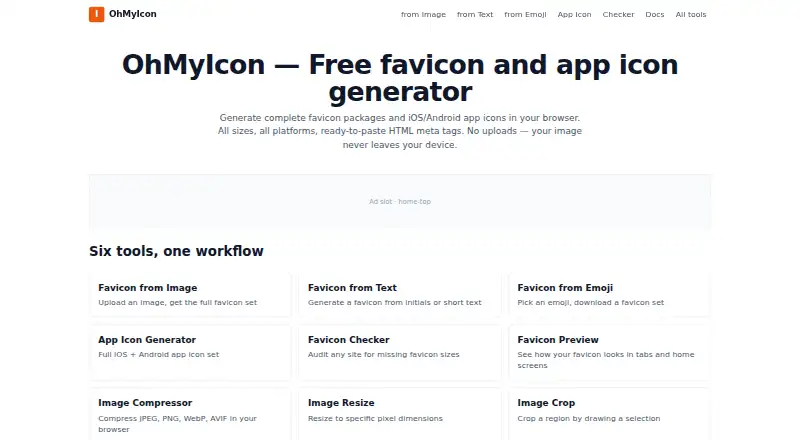
What OhMyIcon is
OhMyIcon is a browser-based tool for making favicon packages and iOS and Android app icons. A favicon package can include ICO and PNG files in multiple resolutions, Apple and Android icons, a Windows tile, starter manifest files, and HTML meta tags. The site also provides image, text, and emoji favicon generators, an app icon generator, a favicon checker, and image utilities. Its app icon output includes 12 iOS sizes and six Android sizes, including a 1024-pixel App Store icon and a 512-pixel Play Store icon. The image favicon tool accepts PNG, JPG, SVG, and WebP files, recommends source images of at least 260×260 pixels, and permits uploads up to 25 MB. Image generation and processing run in the browser, so source images are not uploaded to OhMyIcon’s servers. The checker is different: it fetches the entered URL’s public HTML head and may use a public CORS proxy. OhMyIcon is free, requires no signup, and has no usage limits. It works in modern Chrome, Edge, Firefox, and Safari on desktop and mobile, and can work offline once loaded.
Who it suits
OhMyIcon suits people who need favicon files or app icon sizes from a browser. It may also help developers preparing icon assets for Xcode AppIcon.appiconset or Android mipmap resource folders.
What it does well
- Free with no signup or usage limits.
- Creates favicon packages with ICO and PNG files.
- Generates 12 iOS and six Android icon sizes.
- Image processing happens in the browser.
- Works offline once loaded.
What to know first
- Does not generate Android adaptive icon layers.
- No SVG export is listed.
- The checker fetches public page HTML and may use a CORS proxy.
Limits
The app icon generator accepts uploads up to 25 MB and does not create Android adaptive icon foreground/background layers. The favicon image tool also allows uploads up to 25 MB; its free plan has no usage limits.
Plans
| Plan | Billed and limits | Price |
|---|---|---|
| Free | No signup · no usage limits | Free |
As ohmyicon.app lists them, read 4 Oct 2026. The maker's own page has the final word.
Getting started
- Open https://ohmyicon.app/ in a supported browser
- Choose a favicon or app icon tool
- Upload an image or use a text or emoji favicon generator
- Download the generated files and place app icons in Xcode AppIcon.appiconset or Android mipmap folders
Verdict
OhMyIcon covers favicon packages, app icon sets, and a URL checker in a free browser tool. Note the adaptive-icon limitation and the checker’s public-page lookup when deciding whether it fits your workflow.
Questions
How much does OhMyIcon cost?
The Free plan costs nothing and has no usage limits.
Do I need an account?
No signup is required.
Which browsers and devices does it support?
The site says it works in modern Chrome, Edge, Firefox, and Safari on desktop and mobile. It can work offline once loaded.
Does OhMyIcon upload source images?
Image processing and generation happen in the browser, and source images are not uploaded to OhMyIcon’s servers. The favicon checker fetches the entered URL’s public HTML head and may use a public CORS proxy.
What does the app icon generator produce?
It produces 12 iOS icon sizes and six Android sizes, including the 1024-pixel App Store icon and 512-pixel Play Store icon.
Who operates OhMyIcon?
It is operated by an independent web developer based in South Korea.
Facts from OhMyIcon's own pages
- Advertising
- The site uses Google AdSense, whose partners may use cookies and similar technologies for advertising. · ohmyicon.app, 4 Oct 2026
- App icon limit
- The app icon generator accepts uploads up to 25 MB and does not generate Android adaptive icon foreground/background layers. · ohmyicon.app, 4 Oct 2026
- App icon output
- The app icon generator produces 12 iOS icon sizes and six Android sizes, including the 1024-pixel App Store icon and 512-pixel Play Store icon. · ohmyicon.app, 4 Oct 2026
- Checker exception
- The favicon checker fetches the entered URL’s public HTML head and may use a public CORS proxy. · ohmyicon.app, 4 Oct 2026
- Favicon input
- The image favicon tool accepts PNG, JPG, SVG, and WebP, recommends at least 260×260 pixels, and allows uploads up to 25 MB. · ohmyicon.app, 4 Oct 2026
- Favicon package
- The generated package includes multi-resolution ICO and PNG files, Apple and Android icons, a Windows tile, starter manifest files, and HTML meta tags. · ohmyicon.app, 4 Oct 2026
- Headquarters
- South Korea · ohmyicon.app, 28 Sept 2026
- Integrations
- The app icon output can be placed in Xcode’s AppIcon.appiconset or Android mipmap resource folders. · ohmyicon.app, 4 Oct 2026
- Local processing
- Image processing and generation happen in the browser using the Canvas API, and source images are not uploaded to OhMyIcon’s servers. · ohmyicon.app, 4 Oct 2026
- Maker
- OhMyIcon is operated by an independent web developer based in South Korea. · ohmyicon.app, 4 Oct 2026
- Offline use
- The site says it works offline once loaded. · ohmyicon.app, 4 Oct 2026
- Privacy and analytics
- The privacy policy says Google Analytics 4 collects pseudonymous visit and device data, and visitors can opt out using Do Not Track or Google’s opt-out add-on. · ohmyicon.app, 4 Oct 2026
- Purpose
- OhMyIcon generates favicon packages and iOS/Android app icons in a browser. · ohmyicon.app, 4 Oct 2026
- Support
- The maker says it reads every message and replies to questions, feedback, bug reports, and business inquiries within three business days. · ohmyicon.app, 4 Oct 2026
- Supported browsers
- The site says it works in modern Chrome, Edge, Firefox, and Safari browsers on desktop and mobile. · ohmyicon.app, 4 Oct 2026
- Tools
- The site lists image, text, and emoji favicon generators, an app icon generator, a favicon checker, and image utilities. · ohmyicon.app, 4 Oct 2026
Where OhMyIcon stands on Freedom251
- Favicon Generators#22 of 30