Freedom251 › Favicon Generators
Genfavicon
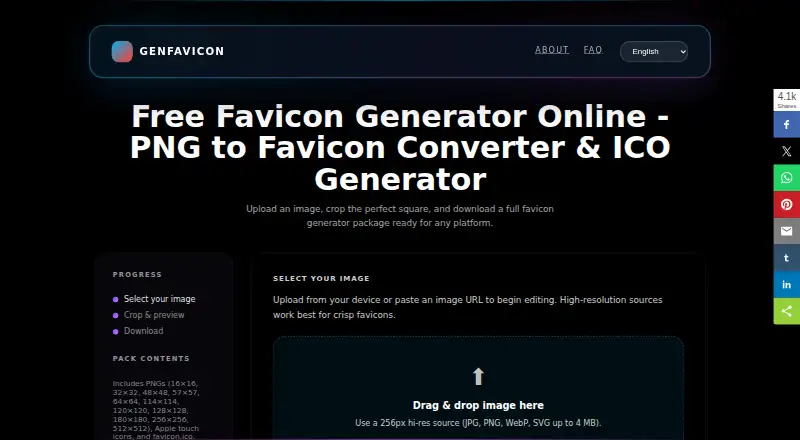
What Genfavicon is
Genfavicon is a web tool that turns an uploaded image into a package of favicon files for a website. You can crop a rectangular image to a square before exporting. The resulting package includes favicon.ico, PNG files in sizes from 16×16 through 512×512, and Apple touch icons. The homepage uploader accepts JPG, PNG, WebP, or SVG files up to 4 MB; the FAQ also lists GIF among its supported upload formats. Image processing runs on Genfavicon’s servers and takes seconds.
The service is free, with ICO and PNG export and an app icon set. Genfavicon says uploads are processed automatically, are not used to build datasets or train AI models, and are removed after the operational window. Temporary workspaces are cleared after a configured retention window, so download the ZIP before it expires. Generated files belong to you or your client for commercial use if you hold the rights to the source artwork. The site credits Color Vivo Internet, S.L.U., located in Herencia, Spain, and says Genfavicon is hosted on Stackscale’s cloud infrastructure. Its API is private, with no public API access for third-party integrations.
Who it suits
Genfavicon suits website owners who need favicon files made from a logo or illustration. It also fits users who want to crop an image and export ICO, PNG, and Apple touch icons in one package.
What it does well
- Free favicon generation on the web.
- Crops rectangular images to a square.
- Exports ICO, PNG, and Apple touch icons.
- Supports uploads up to 4 MB.
- Generated files can be used commercially with source-artwork rights.
What to know first
- Homepage uploads are limited to 4 MB.
- There is no public API for third-party integrations.
- Temporary workspaces expire after a configured retention window.
Limits
The free plan accepts uploads up to 4 MB. Temporary workspaces are cleared after a configured retention window, so the ZIP must be downloaded before it expires.
Plans
| Plan | Billed and limits | Price |
|---|---|---|
| Free | Free favicon generation; uploads up to 4 MB | Free |
As genfavicon.com lists them, read 9 Oct 2026. The maker's own page has the final word.
Getting started
- Open https://genfavicon.com/ in a web browser.
- Upload a JPG, PNG, WebP, or SVG file up to 4 MB.
- Crop a rectangular image to a square if needed.
- Export the favicon package and download its ZIP before the workspace expires.
Verdict
Choose Genfavicon if you need a free web-based way to create a favicon package from an image, including ICO, PNG, and Apple touch icon files. Look elsewhere if you need public API access or uploads larger than 4 MB.
Questions
Is Genfavicon free?
Yes. Its Free plan costs nothing and includes favicon generation with uploads up to 4 MB.
Which platforms does Genfavicon support?
It is available on the web.
What files can it export?
The package includes favicon.ico, PNG sizes from 16×16 through 512×512, and Apple touch icons.
What image formats can I upload?
The homepage uploader accepts JPG, PNG, WebP, or SVG up to 4 MB. The FAQ also lists GIF.
Can I use the generated files commercially?
Yes, provided you or your client hold the rights to the source artwork.
Does Genfavicon offer a public API?
No. Its API is private, with no public API access for third-party integrations.
Facts from Genfavicon's own pages
- API
- Genfavicon says its API is private and it does not offer public API access for third-party integrations. · genfavicon.com, 9 Oct 2026
- Commercial use
- Generated output belongs to the user or their client, provided they hold the rights to the source artwork. · genfavicon.com, 9 Oct 2026
- Crop
- Users can crop rectangular images to a square before exporting. · genfavicon.com, 9 Oct 2026
- Generated files
- The package includes favicon.ico, PNG sizes from 16×16 through 512×512, and Apple touch icons. · genfavicon.com, 9 Oct 2026
- Hosting
- The homepage says Genfavicon is hosted on Stackscale's cloud infrastructure. · genfavicon.com, 9 Oct 2026
- Maker
- The site credits Color Vivo Internet and identifies it in its terms as Color Vivo Internet, S.L.U., located in Herencia, Spain. · genfavicon.com, 9 Oct 2026
- Privacy
- The FAQ says uploaded files are processed automatically, are not used to build datasets or train AI models, and are removed after the operational window. · genfavicon.com, 9 Oct 2026
- Processing
- Genfavicon says image processing happens on its servers and takes seconds. · genfavicon.com, 9 Oct 2026
- Purpose
- Genfavicon converts an uploaded image into a favicon package for websites. · genfavicon.com, 9 Oct 2026
- Support
- The FAQ directs users to email support and says replies typically arrive within one business day in Madrid/Herencia time. · genfavicon.com, 9 Oct 2026
- Temporary workspaces
- Workspaces are cleaned automatically after a configured retention window, and users should download their ZIP before it expires. · genfavicon.com, 9 Oct 2026
- Upload formats
- The FAQ lists PNG, JPG/JPEG, WebP, GIF, and SVG as supported upload formats. · genfavicon.com, 9 Oct 2026
- Upload limit
- The homepage uploader accepts JPG, PNG, WebP, or SVG files up to 4 MB. · genfavicon.com, 9 Oct 2026
- Who it is for
- The site describes the tool as a way to turn a logo or illustration into a favicon package for a website. · genfavicon.com, 9 Oct 2026
Where Genfavicon stands on Freedom251
- Favicon Generators#19 of 30