Freedom251 › AI Object Removal Tools
ObjectRemover.com
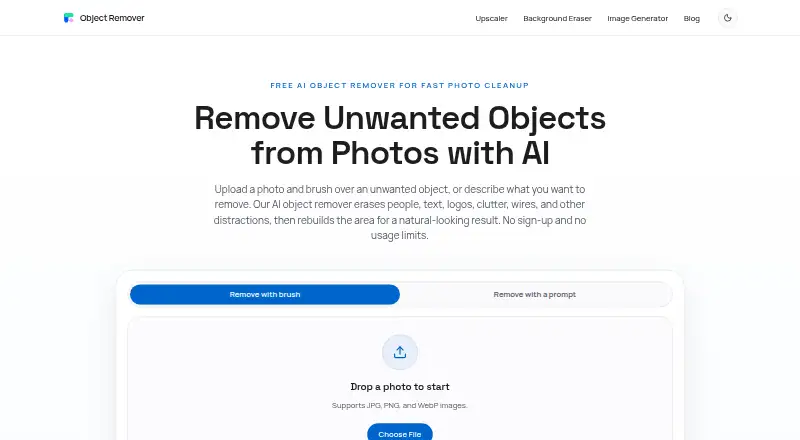
What ObjectRemover.com is
ObjectRemover.com is a photo editing tool that uses AI to remove unwanted objects and reconstruct the selected part of an image. In its online workflow, you can mark an object with a brush or describe what to remove in a text prompt. The brush lets you refine the mask before generating the result. The AI fills the selected area using nearby details such as texture, color, lighting, shadows, and scene structure. People and text removal are supported. The online workflow accepts JPG, PNG, and WebP images, and the site lists travel, portraits, products, real estate, food, social media, marketing, and screenshot cleanup as uses. It recommends covering the full object with a small edge; results are strongest against simple or repeatable backgrounds. The online tool requires no sign-up or login, and uploaded images and generated results are automatically removed within 2 hours. The service is listed for web, macOS, and Windows; its privacy policy describes an online tool and Windows/Mac software. The Free plan costs nothing, with no usage limits, credits, subscription, or watermarked exports. The privacy policy says the service uses commercially acceptable means to protect personal information, while noting it cannot guarantee absolute security and that service providers may access personal information for assigned tasks.
Who it suits
ObjectRemover.com suits people who want to clean up photos for uses such as travel, portraits, products, real estate, food, social media, marketing, or screenshots. It may fit people who want to remove people or text using either a brush or a text prompt, without creating an online account.
What it does well
- Brush or text prompt can select what to remove.
- Brush control lets you refine the mask before generating.
- Supports people removal, text removal, and generative reconstruction.
- Online workflow accepts JPG, PNG, and WebP.
- Free plan has no usage limits, credits, subscription, or watermarked exports.
- Online tool requires no sign-up or login.
What to know first
- Results are strongest on simple or repeatable backgrounds.
- Uploaded images and results are removed within 2 hours.
- Privacy policy says absolute security cannot be guaranteed.
- Third-party service providers may access personal information for assigned tasks.
Limits
The Free plan is listed as free and has no usage limits, credits, subscription, or watermarked exports. Uploaded images and generated results are automatically removed within 2 hours.
Plans
| Plan | Billed and limits | Price |
|---|---|---|
| Free | No usage limits · no credits · no subscription · no watermarked exports · no account required | Free |
| Web free | unlimited use · no credits · no subscription · no watermark · no account · JPG, PNG, WebP · files deleted within 2 hours | Free |
| Yearly Plan | yearly subscription · unlimited saves while access is active | $19.99 a year |
| Lifetime Plan | unlimited saves while access is active | $29.99, paid once |
| Monthly Plan | monthly subscription · unlimited saves while access is active | $6.99 a month |
As objectremover.com lists them, read 7 Oct 2026. The maker's own page has the final word.
Getting started
- Open https://objectremover.com/ in a web browser.
- Upload a JPG, PNG, or WebP image.
- Brush over an object or describe what to remove with a text prompt.
- Fine-tune the mask, then generate the result.
Verdict
Choose ObjectRemover.com if you want a free photo object-removal tool with brush and text-prompt selection, mask refinement, and no online account requirement. Look elsewhere if your images need consistently strong results on complex backgrounds or if the stated privacy and third-party access terms do not suit you.
Questions
How much does ObjectRemover.com cost?
The Free plan costs nothing. It has no subscription.
Does ObjectRemover.com have a free plan or trial?
It has a Free plan with no usage limits or credits. There is no free trial.
Which platforms does it support?
It is listed for web, macOS, and Windows. The online workflow supports JPG, PNG, and WebP images.
Do I need an account to use the online tool?
No. The online tool requires no sign-up or login.
What types of removal does it support?
It supports people removal, text removal, and generative reconstruction. You can select an object with a brush or a text prompt.
What happens to uploaded images and generated results?
They are automatically removed within 2 hours. The privacy policy says service providers may access personal information to perform assigned service-related tasks.
Facts from ObjectRemover.com's own pages
- Accounts
- The online tool requires no sign-up or login; its terms say the latest version has no account system. · objectremover.com, 7 Oct 2026
- Account status
- The terms say the latest version has no account system. · objectremover.com, 15 Oct 2026
- API reference
- The terms mention official APIs as an allowed access route but provide no endpoint, SDK or integration details. · objectremover.com, 15 Oct 2026
- Apple compatibility
- The app requires iOS 16 or later, iPadOS 16 or later, and macOS 13 or later; it also lists visionOS 1.0 or later. · apps.apple.com, 15 Oct 2026
- App updates
- The App Store version history lists version 1.3.0 with a redesigned home screen, smoother brushing, improved comparison and nine added languages. · apps.apple.com, 15 Oct 2026
- Automatic renewal
- The Apple listing says subscriptions renew automatically until canceled through App Store account settings. · apps.apple.com, 15 Oct 2026
- Best-result guidance
- The maker recommends covering the whole object with a small surrounding edge and using another pass for leftovers. · objectremover.com, 15 Oct 2026
- Brush control
- Users can fine-tune the mask before generating a result. · objectremover.com, 7 Oct 2026
- Brush editing
- Users paint over the unwanted area and can refine the mask before generating the result. · objectremover.com, 15 Oct 2026
- Capterra category
- Capterra describes Object Remover as a cloud photo-editing solution that removes unwanted objects with AI. · capterra.com, 15 Oct 2026
- Commercial use
- The maker says commercial cleanup is allowed when the user has rights to edit and use the original image. · objectremover.com, 15 Oct 2026
- Data disclosure
- Apple shows the developer declaration that the app does not collect data, while noting the declaration is unverified by Apple. · apps.apple.com, 15 Oct 2026
- Desktop software
- The privacy policy describes the service as an online tool and Windows/Mac software. · objectremover.com, 7 Oct 2026
- Domain registration
- ScamAdviser reports a WHOIS registration date of April 13, 2023, with WHOIS data hidden. · scamadviser.com, 15 Oct 2026
- File limits
- The homepage states there are no usage limits and no credit or subscription requirement. · objectremover.com, 15 Oct 2026
- File retention
- Uploaded images and generated results are automatically removed within 2 hours. · objectremover.com, 7 Oct 2026
- Free saves
- The Apple app gives 10 free saves, with one credit consumed for each successfully saved image. · apps.apple.com, 15 Oct 2026
- Gridinsoft infrastructure
- Gridinsoft reports Namecheap registration, Cloudflare hosting in the United States and Google domain verification. · gridinsoft.com, 15 Oct 2026
- Gridinsoft reputation
- Gridinsoft assigns objectremover.com a 59/100 trust score and says independent reputation data is limited. · gridinsoft.com, 15 Oct 2026
- Image-quality limit
- The maker says results are strongest on repeatable textures and simple backgrounds such as walls, sky, grass and fabric. · objectremover.com, 15 Oct 2026
- Inpainting
- The AI fills the selected area based on nearby texture, color, lighting, shadows, and scene structure. · objectremover.com, 7 Oct 2026
- Input formats
- The web workflow accepts JPG, PNG and WebP images. · objectremover.com, 15 Oct 2026
- Limit: processing hangs
- Another Apple reviewer reported that pressing remove left the app loading indefinitely. · apps.apple.com, 15 Oct 2026
- Limit: removal residue
- An Apple reviewer said removing one object took five attempts and still left residue. · apps.apple.com, 15 Oct 2026
Where ObjectRemover.com stands on Freedom251
- AI Object Removal Tools#9 of 24