Freedom251 › GPU Overclocking Software
nvuv
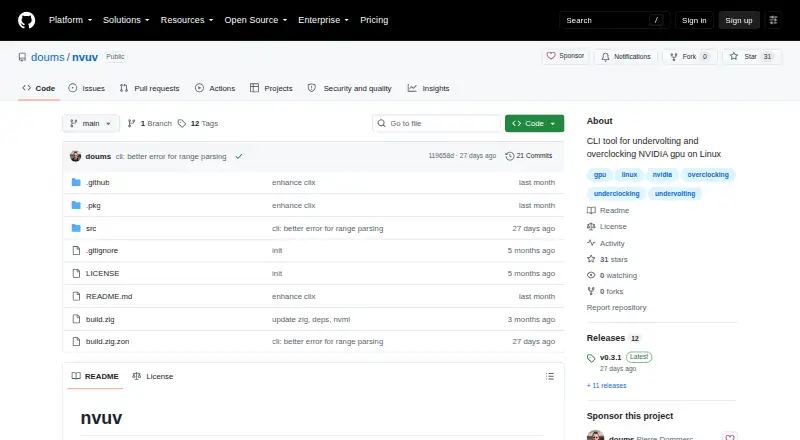
What nvuv is
nvuv is a free Linux command-line utility for changing NVIDIA GPU power and clock behavior. It can set power limits, lock GPU or memory clock ranges, and apply offsets to either GPU or memory clocks. Use the `-i GPU_INDEX` option to target a particular card when more than one GPU is installed. The project describes nvuv as a thin wrapper around NVIDIA’s NVML library. Its indirect undervolting approach locks the GPU’s maximum clock and applies a positive clock offset; the project explains that NVIDIA does not expose direct voltage control on Linux. It says this technique can achieve roughly similar performance with lower voltage and power draw, with possible reductions in temperature and fan noise. Settings can be loaded from a TOML file, whose default location is `/etc/nvuv/nvuv.toml`. Applying, changing, or resetting GPU settings requires root privileges. Changes do not remain in effect after reboot, resume, or driver reload unless configuration is reapplied. A provided systemd service can perform that work at startup and after resume or driver reload. Download routes include GitHub releases and an Arch User Repository package. The maintainer is Pierre Dommerc, and the project uses Apache License 2.0 WITH Commons-Clause-1.0.
Who it suits
nvuv is for Linux users with NVIDIA GPUs who are comfortable using a command line and root privileges to tune power limits and clocks. It may suit users seeking indirect undervolting, provided they account for reapplying settings after reboot, resume, or driver reload.
What it does well
- Sets GPU power limits and GPU or memory clock ranges.
- Applies offsets to GPU and memory clocks.
- Can select a GPU by index on multi-GPU systems.
- Reads settings from a TOML configuration file.
- A systemd service can reapply settings after startup and resume.
- Free, with GitHub releases and an Arch User Repository package.
What to know first
- Supports Linux and NVIDIA GPUs only.
- Changing or resetting GPU settings requires root privileges.
- Settings need a systemd service to persist across reboot, resume, or driver reload.
- Direct voltage control is not available.
Limits
GPU settings require root privileges and do not persist through reboot, resume, or driver reload unless a systemd service reapplies configuration. The tool does not provide direct voltage control.
Getting started
- Visit https://github.com/doums/nvuv.
- Choose a download route from GitHub releases or the Arch User Repository.
- Install nvuv on a Linux system with an NVIDIA GPU.
- Create or edit a TOML configuration file, using `/etc/nvuv/nvuv.toml` as the default path.
- Run commands requiring root privileges to apply or change GPU settings.
- Configure the provided systemd service if settings should be reapplied at startup, resume, or driver reload.
Verdict
Linux users tuning NVIDIA GPUs from the command line should consider nvuv for its power-limit, clock-range, and offset controls. Look elsewhere if you need direct voltage control or settings that persist without configuring the provided systemd service.
Questions
Is nvuv free?
Yes. Its pricing model is free, and there is no free trial.
Which operating system and GPU vendor does it support?
nvuv is for Linux and NVIDIA GPUs.
What can nvuv change?
It can set GPU power limits, lock GPU or memory clock ranges, and apply GPU or memory clock offsets.
Does nvuv directly control voltage?
No. The project describes an indirect undervolting method because NVIDIA does not expose direct voltage control on Linux.
How do I keep settings applied after a reboot or resume?
A provided systemd service can apply configuration at startup and after resume or driver reload.
What license does nvuv use?
The project uses Apache License 2.0 WITH Commons-Clause-1.0.
Facts from nvuv's own pages
- Automation
- A provided systemd service can apply configuration at startup and after resume or driver reload. · github.com, 7 Oct 2026
- Configuration
- nvuv can apply settings from a TOML configuration file, with `/etc/nvuv/nvuv.toml` as the default path. · github.com, 7 Oct 2026
- Controls
- The CLI can set power limits, lock GPU or memory clocks, and apply GPU or memory clock offsets. · github.com, 7 Oct 2026
- Download options
- The README links to GitHub releases and an Arch User Repository package. · github.com, 7 Oct 2026
- Downloads
- The README links to GitHub releases and an Arch User Repository package. · github.com, 7 Oct 2026
- Expected effect
- The README says this technique can deliver roughly the same performance with lower voltage and power draw, reducing temperature and fan noise. · github.com, 7 Oct 2026
- GPU controls
- It can set GPU power limits, lock GPU or memory clock ranges, and apply GPU and memory clock offsets. · github.com, 7 Oct 2026
- GPU selection
- The `-i GPU_INDEX` option selects a specific GPU when multiple GPUs are present. · github.com, 7 Oct 2026
- Implementation
- nvuv is described as a thin wrapper around NVIDIA's NVML library. · github.com, 7 Oct 2026
- License
- The project uses Apache License 2.0 WITH Commons-Clause-1.0. · github.com, 7 Oct 2026
- Maker
- The GitHub profile identifies the maintainer as Pierre Dommerc and says Arch Linux is his main driver. · github.com, 7 Oct 2026
- NVIDIA library
- The project describes nvuv as a thin wrapper around NVIDIA's NVML library. · github.com, 7 Oct 2026
- Permissions
- Applying, changing, and resetting GPU settings requires root privileges. · github.com, 7 Oct 2026
- Persistence limit
- Settings changes do not survive reboot, resume, or driver reload unless a systemd service reapplies the configuration. · github.com, 7 Oct 2026
- Purpose
- nvuv is a command-line tool for indirectly undervolting and overclocking NVIDIA GPUs on Linux. · github.com, 7 Oct 2026
- Requirements
- Root privileges are required to change or apply GPU settings. · github.com, 7 Oct 2026
- Startup and resume
- A provided systemd service can apply the configuration at startup and after resume or driver reload. · github.com, 7 Oct 2026
- Undervolting method
- The project describes indirect undervolting as locking the GPU maximum clock and applying a positive clock offset because NVIDIA does not expose direct voltage control on Linux. · github.com, 7 Oct 2026
Where nvuv stands on Freedom251
- GPU Overclocking Software#17 of 19