Freedom251 › Music Theory Software
note-noodle
What note-noodle is
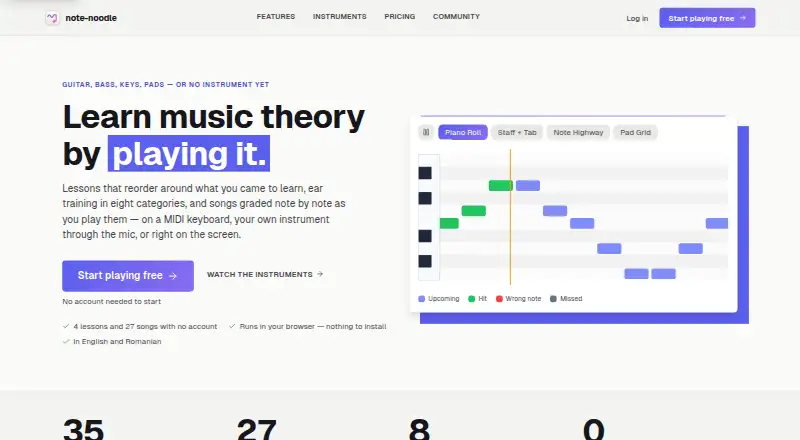
note-noodle is an interactive music theory practice service for fretboard work, staff notation, ear training, rhythm, and play-along exercises. Its guided curriculum describes 35 lessons, quizzes, unit exams, spaced repetition, and seven learning paths. Play Along grades pitch and timing as users perform through a microphone, MIDI keyboard, or screen, and accepts MIDI or Guitar Pro files up to 5 MB. Free accounts can upload three files per month. Ear training has eight categories and four difficulty tiers, with answers by ear, MIDI, or microphone. Four digital instruments send per-note bend, slide, and pressure across up to 15 member channels; hearing per-note bend requires an MPE host such as Live 11. The MIDI Bridge connects those instruments to a desktop DAW over a local network. Users can connect Google Drive to save and reopen selected Play Along files. Guest progress and preferences stay in browser storage. The Free plan includes 10 daily ear-training sessions and the first four lessons without an account. Premium is €7/month and adds unlimited sessions and uploads, all MPE instruments, and Take Studio while subscribed.
Who it suits
It suits learners who want structured music theory practice across notation, fretboard, rhythm, and ear training. Instrument players and DAW users may also value Play Along and the MIDI Bridge.
What it does well
- 35 lessons across seven learning paths
- Play Along grades pitch and timing
- Eight ear-training categories and four tiers
- Works on web, desktop, and Android
- Guest progress stays in local browser storage
What to know first
- Free accounts get three uploads monthly
- Free ear training is limited to 10 sessions daily
- Per-note bend requires an MPE host to hear
Limits
The Free plan includes 10 ear-training sessions per day and three personal Play Along uploads per month; the first four lessons are available without an account. Premium at €7/month provides unlimited uploads and sessions, all MPE instruments, and Take Studio while subscribed.
Plans
| Plan | Billed and limits | Price |
|---|---|---|
| Free | 10 ear-training sessions/day · 3 personal Play Along uploads/month · first four lessons without an account | Free |
| Stylophone | €5 once · One-time instrument purchase | €5, paid once |
| Theremin | €6 once · One-time instrument purchase | €6, paid once |
| Premium | €7/month; yearly billing option is shown, but no yearly price is stated · Unlimited Free features · all MPE instruments and Take Studio while subscribed · unlimited uploads and ear-training sessions | €7 a month |
| Take Studio | €7 once · Record, edit, and export as MPE | €7, paid once |
| Bass & Pad Grid | €9 once · One-time purchase; includes bass layout and kit | €9, paid once |
As note-noodle.com lists them, read 29 Sept 2026. The maker's own page has the final word.
Getting started
- Open https://www.note-noodle.com/ in a browser or use the Android download page for an APK.
- Start with the first four lessons without an account, or create an account for a Free plan.
- Choose a paid option if you need its additional instruments, Take Studio, or Premium features.
- Upload a MIDI or Guitar Pro file in Play Along, within the applicable upload allowance.
- Connect Google Drive to save and reopen selected Play Along files, if desired.
- Use the MIDI Bridge over your local network to connect instruments to a desktop DAW.
Overview
note-noodle is an interactive music-theory practice app for learners who want structured lessons alongside instrument-based exercises. It is strongest for people combining theory study with ear training, performance practice, or MIDI work; its free quotas and paid instrument features make it less suited to unlimited practice without a subscription or purchase.
Its breadth is the draw: curriculum, notation, rhythm, pitch-and-timing feedback, and MPE instruments sit in one service. The trade-off is that access to the full curriculum and generous practice limits is split across free, one-time purchases, and a monthly plan.
For a broader shortlist, see Music Theory Software.
Key features
Curriculum and ear training
The curriculum has seven learning paths and 35 lessons, with quizzes, unit exams, and spaced repetition. That gives learners a defined route through practice rather than a collection of disconnected drills. The free plan exposes the first four lessons without an account, so it is useful for a short tryout but not a complete course.
Ear training spans eight categories and four difficulty tiers, with responses by ear, MIDI, or microphone. The free allowance of 10 sessions per day supports regular short practice; learners who want longer or unlimited sessions need Premium.
Play Along and MIDI
Play Along grades pitch and timing as users perform through an instrument microphone, MIDI keyboard, or the screen. That makes it more performance-oriented than a theory drill set alone. It accepts MIDI and Guitar Pro files up to 5 MB, but free accounts are capped at three personal uploads per month. Google Drive connection lets users save and reopen selected Play Along files.
MPE instruments and DAW connection
Four digital instruments send per-note bend, slide, and pressure over as many as 15 member channels. The MIDI Bridge connects over a local network and provides separate MIDI ports beside a desktop DAW, a useful setup for MIDI-focused musicians. Hearing per-note bend requires an MPE host such as Live 11, so the expressive controls are not equally audible in every setup.
Privacy and support
Guest-mode practice progress, achievements, curriculum progress, and preferences stay in browser local storage. The privacy policy says note-noodle does not use analytics cookies, advertising trackers, or third-party tracking scripts, and does not sell or share data with advertisers. It names Supabase, Resend, Stripe, Google Play, Google/Firebase, and Sentry as service providers for specified functions. Support is available by ticket, and users can request a full refund within 14 days of a subscription or one-time purchase.
Pricing
The Free plan costs €0.00 per free and includes 10 ear-training sessions per day, three personal Play Along uploads per month, and the first four lessons without an account. Those caps still allow exploration and daily practice, but constrain learners who rely on their own files or want an unrestricted course.
Stylophone costs €5 once and Theremin costs €6 once; each is a one-time instrument purchase. Take Studio costs €7 once and adds recording, editing, and MPE export. Bass & Pad Grid costs €9 once and includes a bass layout and kit. These purchases suit users seeking a particular instrument or production tool without an ongoing subscription, but they do not replace Premium's broader access.
Premium costs €7/month, with a yearly billing option shown but no yearly price stated. It includes unlimited Free features, all MPE instruments and Take Studio while subscribed, plus unlimited uploads and ear-training sessions. This is the fit for frequent users who need the full toolset and higher quotas; occasional learners may prefer the free plan or a one-time purchase. A five-day trial is offered.
Platforms
note-noodle supports web, Windows, macOS, Linux, and Android. Android APKs are available directly while Google Play listings are being prepared.
Who it's for
Choose note-noodle if you want lessons and theory exercises tied to instrument practice, especially if you use MIDI or a DAW and value pitch-and-timing feedback. The free tier is a sensible way to sample the approach. It is a weaker fit if you need a full course at no cost, unlimited file uploads without paying, or MPE expression that works without a compatible host.
Pros and cons
Pros
- Multiple practice modes: lessons, ear training, notation, rhythm, and performance feedback cover different parts of theory learning.
- Useful MIDI workflow: separate Bridge ports and four expressive instruments give MIDI users more than basic note-entry exercises.
- Low-cost entry options: several instrument and studio features can be bought once rather than requiring a continuing subscription.
- Guest privacy controls: core practice progress and preferences remain in local browser storage in guest mode.
Cons
- Free quotas are narrow: daily ear-training and monthly upload caps can interrupt sustained practice.
- Course access is limited on Free: only the first four lessons are included without an account.
- MPE has a compatibility caveat: hearing per-note bend depends on an MPE host.
- Premium value depends on use: its €7/month cost is harder to justify for learners who only need a single instrument or occasional exercises.
Alternatives
Harmonia is worth considering for independent practice with advanced analyzing and feedback features on its free plan; it also supports iOS, unlike note-noodle.
MyMusicTheory suits learners who want more than 100 free exercises and do not need note-noodle's stated DAW and MPE workflow.
Study Music Theory offers a free full course and all eight trainers without ads or paywalls, making it a stronger option for learners prioritizing unrestricted free study.
uTheory is a web-based alternative with 10 free video lessons or exercises daily, detailed progress tracking, and cross-device synchronization.
Complete Rhythm Trainer is another freemium alternative.
muted.io may suit someone seeking a desktop set of 23 interactive music tools for a one-time $16.00 purchase.
music21 is a free alternative for users who want a free music-theory tool across web and desktop platforms.
ToneSavvy is a web-based freemium alternative.
Verdict
note-noodle is a strong choice for learners who want a guided theory path alongside instrument practice, ear training, and a capable MIDI setup. Its best reason to choose it is that breadth; its main reason to look elsewhere is the combination of free-plan caps and a Premium subscription for unlimited use and the complete instrument set.
Verdict
note-noodle combines guided lessons with instrument-oriented exercises, ear training, and MIDI tools. The free plan has session and upload limits; Premium is €7/month, with a five-day trial listed.
Questions
Is note-noodle free?
Yes. Its Free plan costs €0.00 per free and includes 10 ear-training sessions a day and three personal Play Along uploads per month.
What does Premium cost?
Premium costs €7/month. It includes unlimited Free features, all MPE instruments, and Take Studio while subscribed; a yearly billing option is shown without a stated yearly price.
Which platforms does note-noodle support?
It supports the web, Windows, macOS, Linux, and Android. Android APKs are available directly while Google Play listings are being prepared.
Can I connect note-noodle to a DAW?
Yes. Its MIDI Bridge runs alongside a desktop DAW and connects over the local network, providing separate MIDI ports for the instruments.
Can I get a refund?
The terms say users can request a full refund within 14 days of a subscription or one-time purchase.
Facts from note-noodle's own pages
- Android availability
- The download page says Android APKs are available directly while Google Play listings are being prepared. · note-noodle.com, 29 Sept 2026
- Curriculum
- The features page describes 35 lessons, quizzes, unit exams, spaced repetition, and seven learning paths. · note-noodle.com, 29 Sept 2026
- DAW connection
- The MIDI Bridge runs beside a desktop DAW and provides separate MIDI ports for the instruments; it connects over the local network. · note-noodle.com, 29 Sept 2026
- Ear training
- Ear training offers eight categories with four difficulty tiers and can accept answers by ear, MIDI, or microphone. · note-noodle.com, 29 Sept 2026
- Google Drive
- Users can connect Google Drive to save and reopen selected Play Along files there. · note-noodle.com, 29 Sept 2026
- Guest privacy
- In guest mode, practice progress, achievements, curriculum progress, and preferences are stored only in the browser's local storage. · note-noodle.com, 29 Sept 2026
- Headquarters
- Mediaș, Sibiu County, Romania · note-noodle.com, 28 Sept 2026
- MPE instruments
- Four digital instruments send per-note bend, slide, and pressure over up to 15 member channels; hearing per-note bend requires an MPE host such as Live 11. · note-noodle.com, 29 Sept 2026
- Play Along
- Play Along grades pitch and timing while users play on an instrument through a microphone, a MIDI keyboard, or the screen. · note-noodle.com, 29 Sept 2026
- Service providers
- The policy names Supabase, Resend, Stripe, Google Play, Google/Firebase, and Sentry as service providers for specified app functions. · note-noodle.com, 29 Sept 2026
- Support and refunds
- The terms say users can open a support ticket and request a full refund within 14 days of a subscription or one-time purchase. · note-noodle.com, 29 Sept 2026
- Supported uploads
- Play Along accepts MIDI and Guitar Pro files up to 5 MB, and free accounts get three uploads per month. · note-noodle.com, 29 Sept 2026
- Tracking
- The privacy policy says the app does not use analytics cookies, advertising trackers, or third-party tracking scripts, and does not sell or share data with advertisers. · note-noodle.com, 29 Sept 2026
- What it does
- note-noodle provides interactive music theory practice tools for fretboard, staff notation, ear training, rhythm, play-along, and a guided curriculum. · note-noodle.com, 29 Sept 2026
Where note-noodle stands on Freedom251
- Music Theory Software#10 of 27