Freedom251 › Music Theory Software
Interactive Music Theory Lab
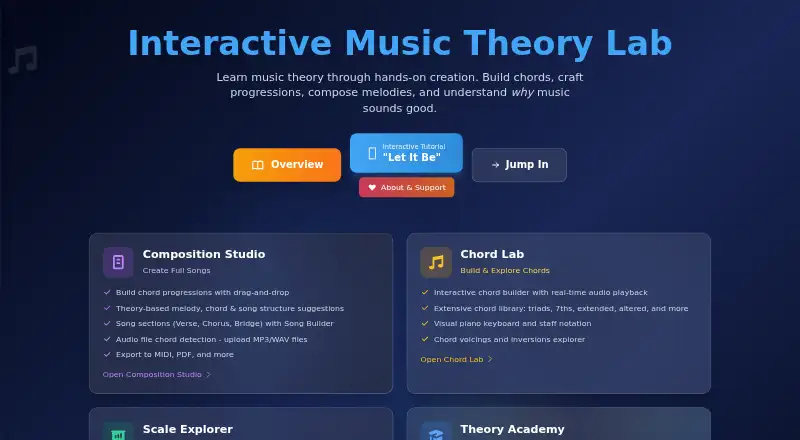
What Interactive Music Theory Lab is
Interactive Music Theory Lab is a free web app for learning music theory through chord building, progressions, melody composition, and songwriting. Its Theory Academy offers interactive lessons, guided tutorials, and exercises on topics from intervals to voice leading. Chord Lab combines a chord builder and library with piano keys, staff notation, voicings, and inversions. Scale Explorer covers more than 100 scales, showing patterns on piano and fretboard. Composition Studio lets users arrange progressions and song sections by dragging them into place, use theory-based suggestions, and export MIDI or PDF. The interface also lists MIDI and MusicXML import and export, along with PDF and audio export. Users can upload MP3, WAV, OGG, M4A, or FLAC files to detect chord progressions. The maker says detection works best with clear recordings and may be less accurate on complex mixes. The site requires no account. The maker describes the tool as guidance for aspiring musicians and songwriters, rather than software that writes the song for them.
Who it suits
It suits aspiring musicians and songwriters who want to explore theory while composing or studying musical ideas. It may also help learners who want to analyze chord progressions in audio, keeping in mind the stated accuracy limitation for complex mixes.
What it does well
- Free to use with no account required
- Chord builder includes voicings and inversions
- More than 100 scales with piano and fretboard patterns
- Composition Studio exports MIDI and PDF
- Audio chord detection supports five listed formats
What to know first
- Chord detection may be less accurate on complex mixes
- The maker says the app has bugs
- It provides songwriting guidance rather than writing songs
Plans
| Plan | Billed and limits | Price |
|---|---|---|
| Free | Free to use · No account required | Free |
As imtl.net lists them, read 7 Oct 2026. The maker's own page has the final word.
Getting started
- Visit https://imtl.net/
- Open the web app; an account is not required
- Choose Chord Lab, Scale Explorer, Theory Academy, or Composition Studio
- Upload an MP3, WAV, OGG, M4A, or FLAC file for chord-progression detection
Verdict
Interactive Music Theory Lab brings lessons, notation, harmony tools, and composition features together in a browser. Its stated limits include possible bugs and reduced chord-detection accuracy on complex recordings.
Questions
Is Interactive Music Theory Lab free?
Yes. Its Free plan is listed as free, and the maker says no account is required.
Which platforms can I use it on?
It is available on the web.
Can I import and export MIDI or MusicXML?
The interface lists MIDI and MusicXML import and export. It also lists PDF and audio export.
Which audio formats can I upload for chord detection?
MP3, WAV, OGG, M4A, and FLAC are supported. The maker says detection works best with clear recordings and may be less accurate with complex mixes.
Does the app write songs for users?
The maker describes it as offering guidance and suggestions, not writing the song for the user.
Where can I send bug reports or feature requests?
The maker directs users to GitHub for feature requests and bug reports, and says there are bugs.
Facts from Interactive Music Theory Lab's own pages
- Account requirement
- The site says it is free to use and requires no account. · imtl.net, 7 Oct 2026
- Audience
- The maker describes it as intended for aspiring musicians and songwriters, including people who want to understand how music works. · imtl.net, 7 Oct 2026
- Audio analysis
- Users can upload audio files to detect chord progressions; supported formats include MP3, WAV, OGG, M4A, and FLAC. · imtl.net, 7 Oct 2026
- Audio limits
- The site says chord detection works best on clear recordings and may be less accurate with complex mixes. · imtl.net, 7 Oct 2026
- Chord tools
- Chord Lab provides an interactive chord builder, chord library, piano keyboard and staff notation, voicings, and inversions. · imtl.net, 7 Oct 2026
- Composition
- The Composition Studio supports drag-and-drop progressions, song sections, theory-based suggestions, and MIDI and PDF export. · imtl.net, 7 Oct 2026
- Contributions
- The maker says 50% of contributions go to musical charities or nonprofits, with the Detroit Youth Choir named as an example. · imtl.net, 7 Oct 2026
- Import and export
- The app interface lists MIDI and MusicXML import and export, plus PDF and audio export. · imtl.net, 7 Oct 2026
- Learning
- Theory Academy offers interactive lessons, guided tutorials, exercises, and topics from intervals to voice leading. · imtl.net, 7 Oct 2026
- Purpose
- Interactive Music Theory Lab teaches music theory through hands-on chord building, progressions, melody composition, and songwriting. · imtl.net, 7 Oct 2026
- Scales
- Scale Explorer includes more than 100 scales and displays patterns on piano and fretboard. · imtl.net, 7 Oct 2026
- Songwriting scope
- The maker says the app provides guidance and suggestions but is not meant to write the song for the user. · imtl.net, 7 Oct 2026
- Support
- The maker directs users to GitHub for feature requests and bug reports and says there are bugs. · imtl.net, 7 Oct 2026
Where Interactive Music Theory Lab stands on Freedom251
- Music Theory Software#11 of 27