Freedom251 › Wireframing Software

NinjaMock
by NinjaMock
What NinjaMock is
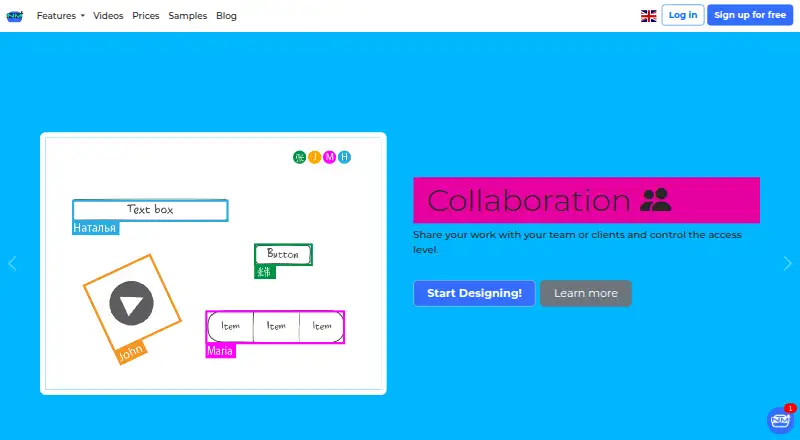
NinjaMock is a web-based tool for designing and presenting app and website mockups. Its wireframing components cover iOS, Android, Windows, and web designs. Components can link to other pages, making prototypes navigable, and a built-in vector editor supports shapes, curve paths, and freehand drawing. Teams can collaborate with real-time visualizations and project comments: users can write, reply to, resolve, or delete comments. Prototypes can include video from YouTube, Vimeo, Dailymotion, or Rumble URLs, as well as MP4, WEBM, and OGG files. Designs can be exported as PNG, HTML, or PDF on plans with export access. Starter costs nothing and allows one shared and one private project, up to 200 elements per project, and 30 translation credits, but no export. Educational costs nothing for students and educators and includes unlimited projects and users. Professional costs $85 a month and includes unlimited projects, exports, revision history, team and project management, real-time collaboration, and 300 translation credits. Enterprise pricing is available by contacting sales.
Who it suits
NinjaMock suits people designing and presenting app or website mockups, including teams that need linked prototypes and project comments. Students and educators can apply for its free Educational plan.
What it does well
- Wireframing components cover four design platforms
- Linked pages make prototypes navigable
- Includes a vector editor for shapes and drawing
- Supports real-time collaboration and project comments
- Educational plan includes unlimited projects and users
What to know first
- Starter projects are limited to 200 elements each
- Starter does not include exports
- Professional costs $85 a month
Limits
Starter allows one shared project and one private project, with 200 elements per project and 30 translation credits; exports are unavailable. Educational is free for students and educators and has unlimited projects and users, with 300 translation credits.
Plans
| Plan | Billed and limits | Price |
|---|---|---|
| Starter | 1 shared project · 1 private project · 200 elements per project · no export · 30 translation credits | Free |
| Professional | Monthly or annually; the page says annual billing saves 38%. · Unlimited projects · exports · revision history · team and project management · real-time collaboration · 300 translation credits | $85 a month |
| Educational | Free for students and educators · same features as Professional | Free |
| Enterprise | Billed annually · Custom · SSO · invoice billing · project archiving · team chat · priority support and dedicated subdomain for teams with more than 10 seats | On request |
As ninjamock.com lists them, read 9 Oct 2026. The maker's own page has the final word.
Getting started
- Visit https://ninjamock.com/home.
- Use NinjaMock on the web.
- Choose Starter, Educational if eligible, Professional, or contact sales about Enterprise.
- Create a mockup with the available wireframing components.
- Link project components to other pages to make a navigable prototype.
- Invite teammates if you want to collaborate.
Verdict
NinjaMock combines wireframing, linked prototypes, vector editing, collaboration, and video playback. Check the Starter export restriction and element limit, or consider the listed plans that include exports.
Questions
How much does NinjaMock cost?
Starter and Educational are listed as free. Professional costs $85 a month. Enterprise pricing is available by contacting sales.
Is there a free plan?
Yes. Starter is free, and a free Educational plan is available to students and teachers worldwide.
Can designs be exported?
PNG, HTML, and PDF exports are supported. Starter does not allow exports; Professional includes exports.
Which platforms does NinjaMock support?
NinjaMock is available on the web. Its wireframing components cover iOS, Android, Windows, and web designs.
Can teams collaborate on projects?
Yes. Users can invite teammates, collaborate with real-time visualizations, and write, reply to, resolve, or delete project comments.
Who makes NinjaMock?
NinjaMock is the maker. The company describes itself as a self-built and self-financed startup based in Miami, Florida.
Facts from NinjaMock's own pages
- Collaboration
- Users can invite teammates, collaborate with real-time visualizations, and write, reply to, resolve, or delete project comments. · ninjamock.com, 9 Oct 2026
- Company
- NinjaMock says it is a self-built and self-financed startup based in the USA; its listed mailing address is in Miami, Florida. · ninjamock.com, 9 Oct 2026
- Education
- Students and teachers worldwide can apply for a free educational plan with the same features as the professional plan. · ninjamock.com, 9 Oct 2026
- Exports
- The product supports exporting designs to PNG, HTML, or PDF. · ninjamock.com, 9 Oct 2026
- Free plan
- Yes · ninjamock.com, 21 Sept 2026
- Free plan limit
- The pricing FAQ says free projects are limited to 200 elements and cannot be exported. · ninjamock.com, 9 Oct 2026
- Headquarters
- Miami, Florida, United States · ninjamock.com, 28 Sept 2026
- Integrations
- The maker's homepage states that video playback supports YouTube, Vimeo, Dailymotion, and Rumble. · ninjamock.com, 9 Oct 2026
- Product
- NinjaMock describes itself as a creative mockup tool for designing and presenting apps and websites, with device testing and sharing. · ninjamock.com, 9 Oct 2026
- Prototyping
- Project components can link to other pages, and a prototype can be run and navigated by following those links. · ninjamock.com, 9 Oct 2026
- Security
- The purchasing FAQ says NinjaMock stores data on secure servers and makes daily backups. · ninjamock.com, 9 Oct 2026
- Support
- The site lists customer support at [email protected] and says Enterprise plans with more than 10 seats receive priority customer support. · ninjamock.com, 9 Oct 2026
- Vector editing
- The built-in vector editor supports shapes, curve paths, and freehand drawing. · ninjamock.com, 9 Oct 2026
- Video playback
- Prototypes can include video URLs from YouTube, Vimeo, Dailymotion, and Rumble, as well as MP4, WEBM, and OGG files. · ninjamock.com, 9 Oct 2026
- Wireframing
- The product offers wireframing components for mobile apps and web designs, including iOS, Android, Windows, and web designs. · ninjamock.com, 9 Oct 2026
Where NinjaMock stands on Freedom251
- Wireframing Software#14 of 29
- Prototyping Software#16 of 30
- Interface Design Tools#14 of 26
- UI design tools#23 of 37
- Game UI Design Software#20 of 32
- Prototyping tools#19 of 30
- Wireframe Tools#14 of 22