Freedom251 › Patch Management Software
Ninite Pro
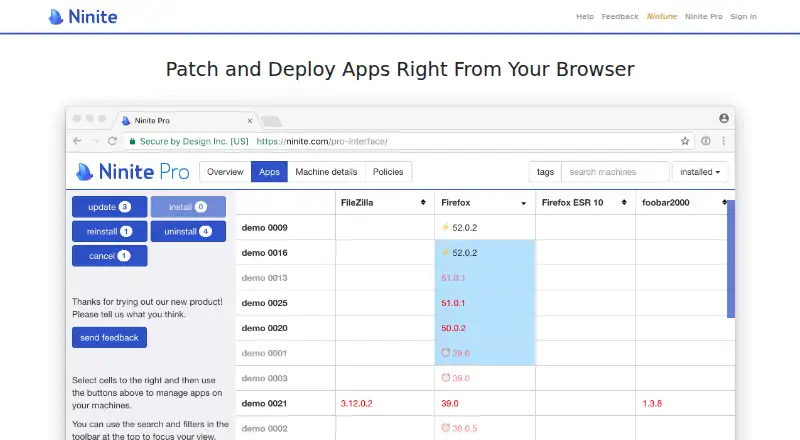
What Ninite Pro is
Ninite Pro manages software on Windows PCs from a live web interface. Administrators can install, update or uninstall supported applications on individual machines or in bulk, while watching agents work in real time. Commands sent to offline machines wait until they reconnect. Machines can act as download cache servers so other computers reuse files and reduce bandwidth use. Update policies can install new versions automatically or lock applications against changes. Every Pro account includes Ninite Pro Classic for command-line use and integration with RMM or other tools. Ninite lists support for 199 programs and provides integration instructions for Atera, Kaseya, Labtech, SCCM and N-able. The agent runs on Windows 11, 10, 8.x, 7 and equivalent Server versions. Ninite says downloads are checked with SHA-256 hashes or publisher signatures; executables are company-signed and use TLS. Pricing is per machine, starting with the first 20 at $1.00 each per month, with lower rates for additional machines, and a 14-day trial.
Who it suits
Ninite Pro suits administrators managing third-party applications across Windows machines. It is useful for teams needing bulk actions, offline command delivery, caching or RMM integration.
What it does well
- Bulk install, update and uninstall actions
- Offline machines receive queued commands
- Download caching can save bandwidth
- Includes command-line Classic edition
- Supports 199 listed programs
What to know first
- No free plan
- Custom application support is not built in
- Windows platforms only
- Pricing varies by machine count
Plans
| Plan | Billed and limits | Price |
|---|---|---|
| Ninite Pro | Per machine per month: first 20 at $1.00 each; next 400 at $0.50 each; additional machines at $0.25 each. Annual payment is available for 12 times the monthly price. · Pricing based on machine count · Unlimited technicians per account | On request |
As ninite.com lists them, read 4 Oct 2026. The maker's own page has the final word.
Verdict
Ninite Pro provides centralized Windows application management with policy controls, offline handling and RMM options. Check whether its supported program list covers the applications you need, especially because custom support is not built in.
Facts from Ninite Pro's own pages
- App management
- Admins can install, update, or uninstall apps on individual machines or in bulk, and watch agents work in real time. · ninite.com, 4 Oct 2026
- Classic version
- Ninite Pro Classic is included with every Pro account and supports command-line use and integration with RMM or other tools. · ninite.com, 4 Oct 2026
- Company
- The site identifies the company as Secure By Design Inc. and lists a mailing address in New York, New York. · ninite.com, 4 Oct 2026
- Download caching
- Machines can be configured as cache servers so other machines can reuse downloads and save bandwidth. · ninite.com, 4 Oct 2026
- Founders
- Ninite was founded by Patrick Swieskowski and Sascha Kuzins. · ninite.com, 4 Oct 2026
- Headquarters
- New York, New York, United States · ninite.com, 28 Sept 2026
- Integrations
- Ninite provides integration instructions for RMM tools including Atera, Kaseya, Labtech, SCCM, and N-able. · ninite.com, 4 Oct 2026
- Notable limitation
- Ninite says custom application support is not currently built in. · ninite.com, 4 Oct 2026
- Offline machines
- Commands for offline machines are delivered when they next come online. · ninite.com, 4 Oct 2026
- Purpose
- Ninite Pro manages software on Windows PCs through a live web interface. · ninite.com, 4 Oct 2026
- Security
- Ninite says it validates downloads using SHA-256 hashes or publisher file signatures, and that its executables are company-signed and connect over TLS. · ninite.com, 4 Oct 2026
- Supported operating systems
- The Pro agent runs on Windows 11, 10, 8.x, 7, and equivalent Server versions. · ninite.com, 4 Oct 2026
- Supported software
- The Pro app list states that Ninite Pro supports 199 programs. · ninite.com, 4 Oct 2026
- Update policies
- Admins can set apps to update automatically when updates become available or lock apps to prevent changes through Ninite Pro. · ninite.com, 4 Oct 2026
Where Ninite Pro stands on Freedom251
- Patch Management Software#30 of 49
- Application Deployment Software#33 of 44
- App Installation#19 of 24
- Software Update Tools#25 of 29