Freedom251 › AI Diagram Generators
Nimbalyst
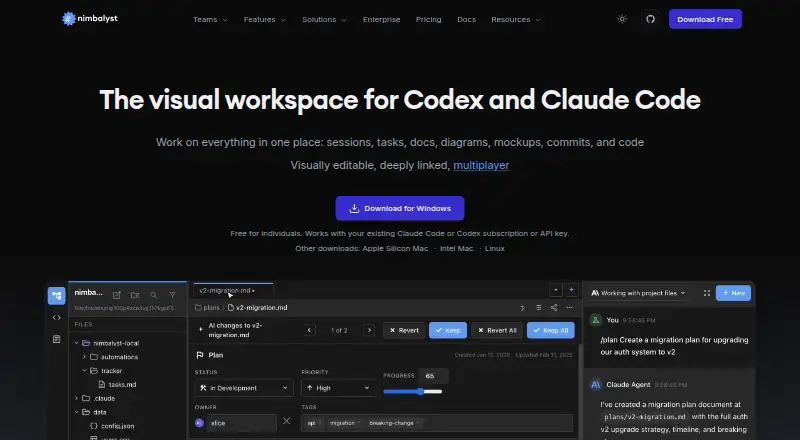
What Nimbalyst is
Nimbalyst is a visual workspace for working with Claude Code and Codex on files, sessions, and tasks. Its editors cover markdown, code, CSV spreadsheets, mockups, Excalidraw diagrams, data models, and Mermaid diagrams. You can run multiple agent sessions in parallel, search and resume saved sessions, and link them to files they read or write. Developer Mode includes a Monaco code editor, terminal, visual git management, worktrees, and pull request review. Teams can edit shared documents, mockups, diagrams, trackers, and kanban boards together in real time. Content and metadata are kept as standard files on the local filesystem, with optional GitHub syncing. The desktop and iOS apps are MIT licensed, and the app is available for Linux, macOS, and Windows; Android is planned for a future release. AI features require your own AI subscription or API key, with local models through LM Studio also listed. Individual is free with no feature limits; Teams is listed at $20.00 per month or $200.00 per year and is free during Beta.
Who it suits
Nimbalyst suits individuals or teams working with coding agents who want files, sessions, and tasks in one workspace. It may fit developers who want local-file storage and optional real-time team collaboration.
What it does well
- Runs multiple agent sessions in parallel.
- Includes terminal, worktrees, and pull request review.
- Teams supports real-time collaborative editing.
- Stores content and metadata as standard local files.
- Desktop and iOS apps are MIT licensed.
What to know first
- AI features require your own AI subscription or API key.
- Android is planned, not currently listed as available.
- Teams is free during Beta, with listed paid rates.
Limits
Individual has no feature limits, but AI features require your own AI subscription or API key; local models through LM Studio are also listed. Teams is listed at $20 a month or $200 a year and is free during Beta.
Plans
| Plan | Billed and limits | Price |
|---|---|---|
| Individual | No feature limits · no trial period · requires your own AI access | Free |
| Teams | or $200 / user / year. Free during Beta. · Everything in Individual · real-time collaboration · shared docs and trackers | $20 a month |
| Teams (annual) | Free during Beta. · Everything in Individual · real-time collaboration · shared docs and trackers | $200 a year |
| Enterprise | Everything in Teams · collaboration server in your cloud or managed by Nimbalyst · data residency and custom editors | On request |
As nimbalyst.com lists them, read 29 Sept 2026. The maker's own page has the final word.
Getting started
- Visit https://nimbalyst.com/.
- Choose the app for iOS, Linux, macOS, or Windows.
- Start with the free Individual plan or choose Teams for collaboration.
- Provide your own AI subscription or API key, or use local models through LM Studio.
- Connect Claude Code or Codex; OpenCode and GitHub Copilot are listed as alpha providers.
- Optionally sync files through GitHub or connect services through MCP.
Nimbalyst is a workspace for using Claude Code and Codex alongside project files, tasks, and visual editors. It is best suited to people who want to organize agent work around the materials those agents read and change. Its main appeal is that this workspace is free for individual use; AI features still require separate access.
Overview
Nimbalyst brings agent sessions and project materials into a shared workspace. You can run sessions in parallel, find and resume saved sessions, and connect them to files they read or write. That structure suits ongoing, multi-step agent work better than a tool used only to draw diagrams.
Content and metadata stay in plain markdown and other standard files on the local filesystem, with GitHub sync as an option. The desktop and iOS apps are MIT licensed, and their source code is on GitHub. Nimbalyst says workspace data remains on-device unless you opt into cloud features such as sync, sharing, or Teams. It also states that it is SOC 2 Type II audited and uses encryption in transit and at rest, access controls, logging, and vendor due diligence.
Key features
- Visual editors: Markdown, code, CSV spreadsheets, mockups, Excalidraw diagrams, data models, and Mermaid diagrams cover a wide range of project artifacts. Mermaid diagrams can be imported, and exports include Mermaid, Excalidraw, and Prisma schema formats.
- Agent sessions: Parallel sessions, search, and resume make it easier to manage continuing work, while links to files help relate an agent's activity to project materials.
- Developer Mode: A Monaco code editor, terminal, visual Git management, worktrees, and pull request review put common development work alongside agent sessions. This is useful for developers who want one workspace for those tasks, rather than a separate editor and session organizer.
- Integrations: Claude Code and Codex are supported; OpenCode and GitHub Copilot are alpha providers. MCP connections include services such as Linear, GitHub, and Slack. The alpha status matters if you are considering OpenCode or Copilot for regular work.
- Team collaboration: Teams enables real-time multiplayer editing of shared documents, mockups, diagrams, trackers, and kanban boards. Its value is clearest for groups coordinating shared project artifacts; individual users do not need it to get the core workspace.
- iPhone session control: The iOS app can monitor and resume sessions, review diffs, and send instructions to agents. Android is planned for a future release, so this is not a cross-platform mobile option today.
Pricing
The Individual plan costs nothing, has no feature limits or trial period, and requires your own AI access. The absence of a Nimbalyst feature cap makes it a strong starting point for solo users, but it does not include AI access itself: users need their own AI subscription or API key, or can use local models through LM Studio.
Teams costs $20 a month (billed or $200 / user / year. Free during Beta.) or $200 a year (billed Free during Beta.). Both plans include everything in Individual, plus real-time collaboration and shared docs and trackers. The monthly plan fits teams preferring monthly billing; the annual price is lower than twelve monthly payments at the stated monthly rate. Both are described as free during Beta. Teams pricing is per user, so the cost grows with seats.
Enterprise has custom pricing and includes everything in Teams, plus a collaboration server in your cloud or managed by Nimbalyst, data residency, and custom editors. Those deployment and customization options make it the plan to consider for organizations that need them, rather than a cheaper way to get the individual workspace.
Platforms
Nimbalyst supports iOS, Linux, macOS, and Windows. Its iPhone app offers session monitoring and control, while Android remains planned rather than supported.
Who it's for
Nimbalyst is a good fit for developers and teams who work with Claude Code or Codex and want sessions, files, visual artifacts, and development tools together. Local standard files and optional GitHub sync also suit users who want project content outside a proprietary cloud workspace. It is a weaker fit if you want AI access bundled into the price, need Android, or only need a dedicated diagramming app.
Pros and cons
- Pro: Individual has no feature limits, making the workspace broadly usable without a Nimbalyst subscription.
- Pro: Standard local files and optional GitHub sync give users a way to keep project materials in familiar formats.
- Pro: Sessions, editors, and developer tools sit together, which can reduce the need to move between separate workspaces during agent-assisted development.
- Pro: Teams collaboration covers shared documents and visual artifacts, not just chat or code.
- Con: AI features require a separate subscription or API key, so the free plan is not a complete AI service.
- Con: Android support is only planned, limiting mobile use to iOS.
- Con: OpenCode and GitHub Copilot are alpha providers, making them less established choices than Claude Code and Codex in this workspace.
- Con: Teams pricing is per user, which can make the collaboration plan less attractive as a group grows.
Alternatives
For a dedicated diagramming tool, compare the AI Diagram Generators directory. Among individual alternatives, Creately is worth considering if you need unlimited canvases and collaborators on its free plan, which caps each canvas at 45 items. OpenCharts may suit users who want AI credits, project types, and Drive storage in a free plan, including 10 GB of storage.
Lucid Train is an option for users seeking a free, open-source CLI with local models or their own API keys and no account requirement. ArchitectureDiagram.ai is an alternative focused on architecture diagrams, with a free plan allowing two diagrams per month and watermarked exports. Archway offers a free plan with five AI generations per month, three diagrams, and PNG and SVG export.
Eraser may fit users who want a free plan capped at three files and three AI diagrams, with unlimited guests. flow-chart.io is another choice for flowchart work, with a free plan offering monthly AI credits and up to three saved projects. LetDraw may be suitable for users comfortable with a free plan limited to three documents, one workspace, five comments per document, and three AI prompts.
Verdict
Choose Nimbalyst if you work regularly with Claude Code or Codex and want agent sessions tied to local files, visual artifacts, and development tools in one workspace. Its unrestricted free Individual plan and standard-file approach are compelling, but you must bring your own AI access. Look elsewhere if you need Android support, bundled AI, or a focused diagramming tool rather than an agent-work workspace.
Verdict
Nimbalyst brings agent sessions, visual editors, and developer tools into one workspace while keeping content in standard local files. Before choosing it, account for the separate AI access requirement and the stated availability status for Android and Teams pricing.
Questions
Is Nimbalyst free?
Yes. The Individual plan costs nothing and has no feature limits. Teams is listed at $20 a month or $200 a year, and is free during Beta.
Does Nimbalyst include AI access?
AI features require your own AI subscription or API key. Local models through LM Studio are also listed as an option.
Which platforms does Nimbalyst support?
Nimbalyst lists iOS, Linux, macOS, and Windows. Android is described as planned for a future release.
Is Nimbalyst open source?
The desktop and iOS apps are MIT licensed, and the source code is available on GitHub.
Which agent providers and integrations are supported?
Claude Code and Codex are supported, while OpenCode and GitHub Copilot are listed as alpha providers. MCP connections include services such as Linear, GitHub, and Slack.
Where is workspace data stored?
Content and metadata are stored as plain markdown and other standard files on the local filesystem. Workspace data stays on the device and is processed on Nimbalyst servers only when users opt into cloud features such as sync, share, or Teams.
Facts from Nimbalyst's own pages
- Agent sessions
- Users can run multiple agent sessions in parallel, search and resume saved sessions, and link sessions to files they read or write. · nimbalyst.com, 29 Sept 2026
- AI access requirement
- Users bring their own AI subscription or API key for AI features; the pricing FAQ also lists local models through LM Studio as an option. · nimbalyst.com, 29 Sept 2026
- Cloud processing
- The trust page says workspace data stays on the device and is processed on Nimbalyst servers only when users opt into cloud features such as sync, share, or Teams. · nimbalyst.com, 29 Sept 2026
- Code tools
- Developer Mode includes a Monaco code editor, terminal, visual git management, worktrees, and pull request review. · nimbalyst.com, 29 Sept 2026
- Editors
- The workspace includes visual editors for markdown, code, CSV spreadsheets, mockups, Excalidraw diagrams, data models, and Mermaid diagrams. · nimbalyst.com, 29 Sept 2026
- Integrations
- Nimbalyst supports Claude Code and Codex, with OpenCode and GitHub Copilot listed as alpha providers, and MCP connections to services such as Linear, GitHub, and Slack. · nimbalyst.com, 29 Sept 2026
- Intended users
- Nimbalyst describes its audience as teams of people, from one-person teams to larger teams, working with agents. · nimbalyst.com, 29 Sept 2026
- Mobile
- The iOS app can monitor sessions, review diffs, resume sessions, and send instructions to agents from an iPhone; Android is described as planned for a future release. · nimbalyst.com, 29 Sept 2026
- Open source
- The desktop and iOS apps are MIT licensed, and the source code is available on GitHub. · nimbalyst.com, 29 Sept 2026
- Product
- Nimbalyst is an agent-native visual workspace for working with Claude Code and Codex on files, sessions, and tasks in one interface. · nimbalyst.com, 29 Sept 2026
- Security
- Nimbalyst states it is SOC 2 Type II audited and uses encryption in transit and at rest, access controls, logging, and vendor due diligence. · nimbalyst.com, 29 Sept 2026
- Storage
- Content and metadata are stored in plain markdown and other standard files on the local filesystem; users can sync through GitHub if they choose. · nimbalyst.com, 29 Sept 2026
- Team collaboration
- Teams supports real-time multiplayer editing of shared documents, mockups, diagrams, trackers, and kanban boards. · nimbalyst.com, 29 Sept 2026
Where Nimbalyst stands on Freedom251
- AI Diagram Generators#14 of 32