Freedom251 › AI Diagram Generators

Archi
What Archi is
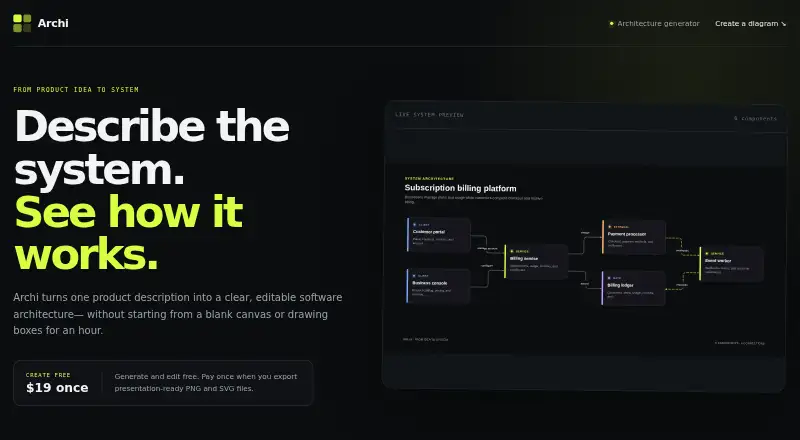
Archi is a web app that turns a product description into an editable software architecture diagram. Its description field displays a 1,600-character counter. After generating a draft, you can regenerate it, select components, and edit their labels and explanations. The editor also includes fields for a diagram title and summary. Archi frames the diagram around a complete user transaction and the system enabling it. Its guidance favors four to eight boxes instead of a crowded collection of services, databases, and vendor logos. Example prompts include subscription billing, realtime support, and AI document review. Generating and editing diagrams are free. Exporting a presentation-ready PNG or SVG requires a one-time $19 payment, which provides lifetime export access on the browser where it was purchased. The workflow runs in a browser, from entering the description through refining the diagram and saving supported export formats.
Who it suits
It suits product and technical teams that need editable architecture diagrams from short system descriptions. It is also useful when presentation-ready PNG or SVG output is needed.
What it does well
- Free diagram generation and editing
- Editable labels and explanations
- Regenerate control for new drafts
- Exports PNG and SVG
- Lifetime export access after one payment
What to know first
- Description field displays a 1,600-character limit
- PNG and SVG export requires $19 once
- Export access is tied to the purchasing browser
- Web platform only
Plans
| Plan | Billed and limits | Price |
|---|---|---|
| Export access | $19 once · Presentation-ready PNG and SVG exports · lifetime export access on this browser | $19, paid once |
As getarchi.com lists them, read 11 Oct 2026. The maker's own page has the final word.
Verdict
Archi offers a browser-based path from product description to editable architecture diagram. The free editor covers drafting, while a one-time payment unlocks presentation-ready exports.
Facts from Archi's own pages
- Decision context
- The page says Archi traces a complete user transaction through the system that enables it. · getarchi.com, 11 Oct 2026
- Design guidance
- Archi says four to eight boxes usually explain more than a wall of services, databases, and vendor logos. · getarchi.com, 11 Oct 2026
- Diagram details
- The editor includes fields for a diagram title and summary. · getarchi.com, 11 Oct 2026
- Diagram editing
- Users can select components to edit their labels and explanations. · getarchi.com, 11 Oct 2026
- Example use cases
- The site offers subscription billing, realtime support, and AI document review as example prompts. · getarchi.com, 11 Oct 2026
- Export cost
- Exporting presentation-ready PNG or SVG files requires a one-time $19 payment. · getarchi.com, 11 Oct 2026
- Free use
- Users can generate and edit diagrams for free. · getarchi.com, 11 Oct 2026
- Input limit
- The product description field displays a 1,600-character counter. · getarchi.com, 11 Oct 2026
- Lifetime access
- The page describes export access as lifetime access on the browser where it is purchased. · getarchi.com, 11 Oct 2026
- Purpose
- Archi turns a product description into an editable software architecture diagram. · getarchi.com, 11 Oct 2026
- Regeneration
- The architecture draft interface includes a Regenerate control. · getarchi.com, 11 Oct 2026
Where Archi stands on Freedom251
- AI Diagram Generators#11 of 32