Freedom251 › AI Diagram Generators

AI Flowchart
What AI Flowchart is
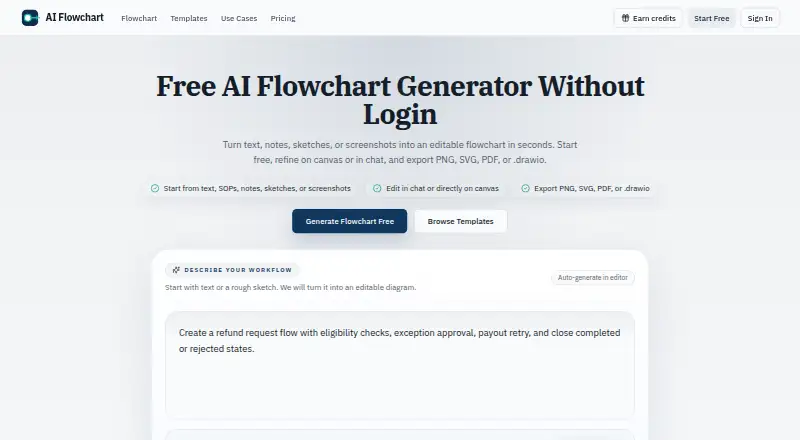
AI Flowchart is a web tool for turning text, notes, procedures, sketches, screenshots, or logic steps into editable flowcharts. You can adjust a diagram through chat or directly on the canvas, and use pseudocode to show branches and control flow. For image-based generation, it accepts PNG, JPG, and WEBP files up to 5MB. Diagrams can be exported as PNG, SVG, PDF, or editable .drawio files, and templates cover workflows such as approvals, onboarding, support escalation, refunds, data pipelines, and canary deployment. A standard text-to-flowchart generation uses one credit, while some actions, including image generation, can use more. The free plan provides one daily credit without login or two when logged in, and includes ads. Pro costs $9 a month for 1,500 monthly credits; Premium costs $19 a month for 5,000 credits and priority support. Subscription credits reset each billing cycle and do not roll over. The maker positions the tool for product, engineering, operations, and support teams mapping workflows and system interactions.
Who it suits
It suits product, engineering, operations, and support teams that need to map workflows, approvals, or system interactions. Teams that want to start without paying can use the free plan, subject to its daily credits and ads.
What it does well
- Accepts text, images, and pseudocode as inputs.
- Refine diagrams in chat or on the canvas.
- Exports PNG, SVG, PDF, and editable .drawio files.
- Templates cover several common workflow types.
What to know first
- Image inputs are limited to 5MB.
- Free plan includes ads and daily credit limits.
- Subscription credits reset and do not roll over.
Limits
The Free plan provides one daily credit without login or two daily credits when logged in, and includes ads. A standard text-to-flowchart generation uses one credit, some actions can use more, and subscription credits do not roll over between billing cycles.
Plans
| Plan | Billed and limits | Price |
|---|---|---|
| Free | Billed Monthly · 1 daily credit without login · 2 daily credits when logged in · Ads on the free plan | Free |
| Premium | Billed Monthly · 5,000 credits per month · No ads · Priority support | $19 a month |
| Pro | Billed Monthly · 1,500 credits per month · No ads · Priority support not listed | $9 a month |
As aiflowchart.org lists them, read 8 Oct 2026. The maker's own page has the final word.
Getting started
- Open https://aiflowchart.org/ in a web browser.
- Start with text, notes, pseudocode, or a supported image file.
- Use a workflow template if one fits the diagram.
- Refine the result in chat or directly on the canvas.
- Export as PNG, SVG, PDF, or .drawio.
- Choose Free, Pro, or Premium based on the available credits and features.
AI Flowchart turns written instructions, code logic, and reference images into editable flowcharts in a browser. It suits product, engineering, operations, and support teams that need to map processes quickly and then refine the result. Its broad input and export support make it practical for mixed documentation workflows, provided your usage fits the monthly credit rules.
Overview
You can start with ordinary text, notes, standard operating procedures, sketches, or screenshots rather than building every node manually. The editor also accepts pseudocode and logic steps, which is useful when the structure is already expressed as branches and control flow. Generated diagrams remain editable, either through a chat interface or directly on the canvas.
Image generation accepts PNG, JPG, and WEBP files up to 5MB. That makes photographed whiteboards and existing screen captures viable starting points, although image-based actions can consume more than the one credit used by a standard text-to-flowchart generation. Diagram import is supported, and templates cover approvals, onboarding, support escalation, refunds, data pipelines, and canary deployment.
Key features
Multiple ways to build
Text-to-diagram generation is the straightforward route for policies and process descriptions. Pseudocode input favors technical teams documenting branches, while image input helps convert informal sketches into a structured chart. Chat revision is useful when you want to describe a change conversationally; canvas editing gives precise control afterward.
Portable output
Exports include PNG, SVG, PDF, and editable .drawio files. Raster and document formats cover sharing and presentation, while SVG and Draw.io output preserve more flexibility for downstream editing.
Privacy and operations
Prompts, diagrams, and uploaded images are not published publicly by default. Data transmission uses SSL/TLS, with cloud storage, Supabase authentication, and regular security audits and updates named in the privacy policy. Uploaded reference images are sent to the configured AI provider, and third-party processors may temporarily retain request logs under their own policies. Payment and infrastructure providers include Creem, Cloudflare, and Supabase. Support is offered by email, with most requests answered within one to two business days.
Pricing
| Plan | Price and allowance | Best fit |
|---|---|---|
| Free | 0.00 USD, billed monthly; one daily credit without login or two daily credits when logged in; ads | Occasional experiments and light personal use |
| Pro | $9 a month, billed monthly; 1,500 credits; no ads | Regular individual or small-team diagram work |
| Premium | $19 a month, billed monthly; 5,000 credits; no ads and priority support | Heavy users and teams that need a larger allowance |
The free tier is unusually restrictive for repeated work: even logged-in users receive only two daily credits, and advertising remains in the interface. Pro removes ads and supplies a substantial monthly pool at the lower paid price, but priority support is not included. Premium costs $10 more each month for over three times the Pro credits and priority support, making it the sensible choice for frequent generation or image-heavy workflows. Subscription credits reset each billing cycle and do not roll over, so unused capacity should not be treated as a bank for later projects. Paid pricing is monthly, and generation actions can draw different credit amounts.
Platforms
AI Flowchart runs on the web. A browser-based workflow avoids desktop installation, while teams wanting offline or native applications will need another option.
Who it's for
The tool is a strong match for product, engineering, operations, and support teams translating procedures, approvals, and system interactions into shareable diagrams. It is especially useful when source material is mixed—text for one process, pseudocode for another, and a screenshot or sketch for a third. Casual users can stay on the free tier, but the daily cap makes it unsuitable for sustained project work.
Pros and cons
- Pro: Accepts text, pseudocode, and up-to-5MB PNG, JPG, or WEBP references, so teams can start from the material they already have.
- Pro: Chat and direct-canvas editing support both broad revisions and exact cleanup.
- Pro: PNG, SVG, PDF, and editable Draw.io exports cover presentation, sharing, and continued editing.
- Con: Free use is capped at one or two credits per day and includes ads.
- Con: Subscription credits expire at the billing reset rather than rolling over, and image actions may consume extra credits.
- Con: Reference images are sent to an external AI provider and request logs may be temporarily retained by processors, which matters for confidential material.
Alternatives
Creately is the better pick if you need desktop, API, or self-hosted platform coverage, unlimited canvases and collaborators on its free plan, and a free trial.
InfraSketch suits users seeking a free, cross-platform option for infrastructure-focused work.
Nimbalyst is preferable when MIT-licensed desktop and iOS apps and source availability are priorities.
OpenCharts offers a free-forever tier with 500,000 AI credits, project limits, 10GB of Drive storage, and all export formats.
Lucid Train is worth choosing for an open-source CLI with local models or your own API keys and no account requirement.
AI Diagram Maker is an alternative with API and web access, a 50-credit monthly free tier, and code, SVG, or PNG export.
Archflow fits web users who want a free project-based plan with user stories and a Kanban board.
ArchGPT is an option for a free-forever plan priced in INR with recurring credits and watermarked PNG exports.
Verdict
Choose AI Flowchart when you want one web editor that can turn prose, logic, or images into editable diagrams and export them in both presentation and Draw.io formats. Look elsewhere if you need native or self-hosted deployment, strict control over external image processing, or credit rollover; its monthly reset and low free allowance favor predictable, active subscribers over sporadic heavy projects.
Verdict
AI Flowchart combines several ways to create and revise flowcharts with multiple export formats. Consider the daily credit limits and non-rollover subscription credits when choosing a plan.
Questions
Is AI Flowchart free?
Yes. The Free plan costs nothing and provides one daily credit without login or two daily credits when logged in. Ads are included.
How much do the paid plans cost?
Pro costs $9 a month for 1,500 credits per month and no ads. Premium costs $19 a month for 5,000 credits per month, no ads, and priority support.
What can I use to create a flowchart?
You can use text, notes, standard operating procedures, pseudocode, or logic steps. For image-based generation, PNG, JPG, and WEBP files up to 5MB are accepted.
Which export formats are available?
Flowcharts can be exported as PNG, SVG, PDF, or editable .drawio files.
What platforms does AI Flowchart support?
AI Flowchart is available on the web.
Do credits carry over?
Subscription credits reset each billing cycle and do not roll over. A standard text-to-flowchart generation uses one credit, while some actions may use more.
Facts from AI Flowchart's own pages
- Audience
- The maker says the tool is for product, engineering, operations, and support teams mapping workflows, approvals, and system interactions. · aiflowchart.org, 8 Oct 2026
- Code logic
- Users can paste pseudocode or logic steps to visualize branches and control flow. · aiflowchart.org, 8 Oct 2026
- Credit rollover
- Subscription credits reset each billing cycle and do not roll over. · aiflowchart.org, 8 Oct 2026
- Credits
- A standard text-to-flowchart generation uses 1 credit, while some actions such as image-based generation can use more. · aiflowchart.org, 8 Oct 2026
- Data processing
- Uploaded reference images are sent to the configured AI provider, and third-party processors may temporarily keep request logs under their own policies. · aiflowchart.org, 8 Oct 2026
- Editing
- Users can refine flowcharts in chat or directly on the canvas. · aiflowchart.org, 8 Oct 2026
- Exports
- The product exports flowcharts as PNG, SVG, PDF, or editable .drawio files. · aiflowchart.org, 8 Oct 2026
- Image input
- The editor accepts PNG, JPG, or WEBP sketches and screenshots up to 5MB for flowchart generation. · aiflowchart.org, 8 Oct 2026
- Integrations
- The privacy policy names Creem for payment processing, Cloudflare and Supabase for cloud infrastructure, and AI processing providers for generation. · aiflowchart.org, 8 Oct 2026
- Privacy
- The privacy policy says prompts, diagrams, and uploaded images are not published publicly by default. · aiflowchart.org, 8 Oct 2026
- Security
- The privacy policy lists SSL/TLS encryption for data transmission, cloud storage, Supabase authentication, and regular security audits and updates. · aiflowchart.org, 8 Oct 2026
- Support
- Support is available at [email protected], and the contact page says most requests receive a response within 1–2 business days. · aiflowchart.org, 8 Oct 2026
- Templates
- The site offers templates for workflows including approvals, onboarding, support escalation, refunds, data pipelines, and canary deployment. · aiflowchart.org, 8 Oct 2026
- What it does
- Turns text, notes, SOPs, sketches, or screenshots into editable flowcharts. · aiflowchart.org, 8 Oct 2026
Where AI Flowchart stands on Freedom251
- AI Diagram Generators#7 of 32