Freedom251 › Property Access Control Software
Napco MVP Access
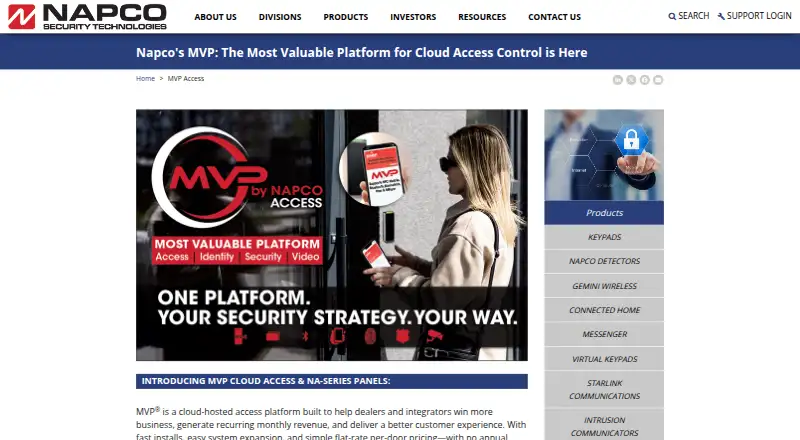
What Napco MVP Access is
Napco MVP Access is a cloud-hosted access control platform for dealers and integrators serving schools, business campuses, and organizations with multiple sites. Administrators and security teams use a PC browser interface alongside Android and iOS apps. The platform supports unlimited users and can manage ten to thousands of doors and gates.
Access controls include multiple credentials per user, complex access groups, layered permissions, and schedules across departments, buildings, and locations. Supported credentials include BLE, mobile, NFC, Prox, MIFARE, and biometrics. NFC mobile credentials work through Google Wallet or Apple Wallet. Microsoft Entra ID provides single sign-on and automated user provisioning, while Microsoft Authenticator and Google Authenticator support multi-factor authentication.
MVP Access integrates with video systems from DW, Hanwha Wave, ExacqVision, and Milestone XProtect. BadgeHub from BadgePass synchronizes cardholder information and supports credential printing through its mobile app. Organizations moving from MVP-EZ can retain their database and installed hardware. Dealers order the cloud service through Napco ComNet after a one-time free dealer signup; account setup typically follows within 24 hours. The service has a flat monthly per-door fee with no annual service contract, but the fee amount is not published here.
Who it suits
MVP Access suits dealers and integrators serving schools, campuses, businesses, and organizations managing access across multiple sites. It is designed for deployments that need to coordinate users, credentials, doors, gates, and schedules, with browser and mobile access for administrators and security teams.
What it does well
- Supports unlimited users and ten to thousands of doors and gates.
- Offers layered permissions and schedules across departments and locations.
- Supports BLE, mobile, NFC, Prox, MIFARE, and biometric credentials.
- Integrates with four listed video systems.
- MVP-EZ customers can retain their database and installed hardware when migrating.
What to know first
- Pricing is on request, with no numeric per-door fee published.
- The listed event storage period is six months unless upgraded.
- Cloud service ordering requires dealer signup through Napco ComNet.
Limits
The listed configuration limits include up to 30,000 access groups per account or 16 per person, 254 time schedules, and 10 facility codes per panel. Event storage is six months and can be upgraded.
Plans
| Plan | Billed and limits | Price |
|---|---|---|
| MVP Access | Monthly flat rate per door; no annual service contract · Unlimited users · Ten to thousands of doors and gates · Up to 30,000 access groups per account · 16 access groups per person · 254 time schedules per panel · 10 facility codes per panel · Six months event storage, upgradeable | On request |
As napcosecurity.com lists them, read 7 Oct 2026. The maker's own page has the final word.
Getting started
- Download the MVP Access app from Apple's or Google's app store, if needed.
- Complete the one-time free dealer signup for Napco ComNet.
- Order the cloud service through Napco ComNet.
- Allow for account setup, which typically follows within 24 hours.
- Use the PC browser interface or Android and iOS apps to manage access.
Napco MVP Access is a cloud-managed access-control platform built for dealers and integrators overseeing complex commercial, education, campus, and multi-site estates. It is most suitable when one operation must coordinate large door counts, varied credentials, and many administrators. The trade-off is a dealer-led purchase and a per-door quote rather than a self-serve subscription.
Overview
Administrators and security personnel can work from a mobile app or a PC browser. The service is designed for deployments from ten to thousands of doors and gates, with unlimited users. Access groups, permissions, credentials, and schedules can be arranged by department, building, or location, so it fits organizations whose policies differ across a broad property portfolio.
An organization upgrading from MVP-EZ can retain its existing database and installed hardware instead of converting records or replacing equipment. Dealers order the cloud service through Napco ComNet after a one-time free dealer signup, and account setup typically follows within 24 hours.
Key features
Identity, credentials, and authentication
Credential support spans BLE, mobile, NFC, Prox, MIFARE, and biometrics. NFC mobile credentials can be delivered through Apple Wallet or Google Wallet, while Microsoft Entra ID supplies single sign-on and automated provisioning. Multi-factor authentication works with Microsoft Authenticator and Google Authenticator. This range helps organizations accommodate existing badges alongside phone-based and biometric entry, though the mix may require careful policy and hardware planning.
Administration and integrations
The platform includes mobile credentials, visitor management, access schedules, audit logs, and control for both locks and gates. Listed video connections to DW, Hanwha Wave, ExacqVision, and Milestone XProtect bring access events, video, alarms, users, and remote door controls into one interface. BadgePass BadgeHub synchronizes cardholder records and supports credential printing from its mobile app, a practical addition for sites issuing badges at distributed locations.
Capacity and migration
The published limits are substantial but specific: an account can contain up to 30,000 access groups, each person can belong to 16 groups, each panel supports 254 time schedules and 10 facility codes, and event history covers six months. Event storage is upgradeable. These ceilings suit large deployments, while the per-person group limit may matter to organizations with unusually intricate overlapping entitlements.
Pricing
MVP Access uses a flat monthly fee per door and has no annual service contract, but the amount is custom pricing. The quoted service plan includes unlimited users, ten-to-thousands door and gate capacity, the group and schedule limits above, and six months of event storage. There is no published numeric rate to use for budgeting or direct comparison.
The mobile app is free to download from Apple's and Google's app stores; downloading it does not replace ordering the cloud service through Napco ComNet. A one-time free dealer signup is required. Buyers should ask the dealer to price additional event storage and clarify any hardware or installation costs.
Platforms
Napco provides Android, iOS, and web access. The mobile applications cover administrator and credential workflows, while the browser interface targets PC-based administration and security operations.
Who it's for
MVP Access is a strong candidate for schools, corporate campuses, commercial portfolios, and integrators managing multiple customer sites or thousands of openings. It is particularly sensible for MVP-EZ customers wanting a growth path without discarding their database and hardware. Small offices with a handful of doors, or buyers wanting transparent online checkout and pricing, should look elsewhere.
Pros and cons
- Pros: Unlimited users and a range from ten to thousands of doors support enterprise scale.
- Pros: Entra ID provisioning, MFA, multiple credential types, and Wallet support accommodate varied identity policies.
- Pros: Video, badging, visitor, audit, lock, and gate capabilities can be coordinated in one service.
- Pros: MVP-EZ migration preserves the database and installed hardware.
- Cons: Pricing is quote-only, so cost comparison requires a dealer conversation.
- Cons: Ordering and account setup run through Napco ComNet and a dealer rather than a fully self-service flow.
- Cons: Six months of event storage is the included period; longer retention costs extra.
Alternatives
Raven CloudAccess is the better starting point for a small installation or a buyer wanting a free tier: its Free plan covers two doors, five users, and seven days of history, while paid plans add capacity.
Paxton10 suits teams that prefer no software licence fees and a stated ceiling of 100 sites, 1,000 doors, 1,000 cameras, and 50,000 users, with hardware priced separately.
Gallagher Command Centre is another paid enterprise access-control option with web, mobile, API, and self-hosted platforms.
Honeywell Enterprise Buildings Integrator is a paid alternative spanning web, mobile, desktop, and self-hosted deployments.
ButterflyMX is a paid access product with a free-plan option and video-intercom hardware packages.
C•CURE 9000 is worth considering when a self-hosted enterprise architecture and high reader or credential capacity are priorities.
Nexkey offers another paid access-control route across Android, iOS, and web.
OpenVia is a freemium alternative with subscription terms and quote-based device pricing.
Verdict
Choose MVP Access when a dealer or integrator needs one cloud service for extensive door and gate networks, sophisticated permissions, varied credentials, and identity or video integrations. Its migration path and enterprise capacity are persuasive for growing portfolios. Look elsewhere if transparent pricing, direct self-service purchase, or a small free deployment matters more than scale.
Verdict
Choose MVP Access if you are a dealer or integrator managing access across a school, campus, business, or multi-site organization. Its scale, credential options, and integrations are the main reasons to consider it; buyers need to request a quote to learn the per-door fee.
Questions
How is MVP Access priced?
Napco describes a flat monthly fee per door with no annual service contract. The fee amount is available on request.
Which platforms are available?
MVP Access lists Android, iOS, and web platforms. Administrators and security teams can also use a PC browser interface.
Can MVP Access use mobile credentials?
Yes. Listed credential types include mobile and NFC, and NFC mobile credentials are supported through Google Wallet or Apple Wallet.
Which systems does MVP Access integrate with?
Listed video integrations are DW, Hanwha Wave, ExacqVision, and Milestone XProtect. BadgeHub from BadgePass synchronizes cardholder information and supports credential printing through its mobile app.
Can an MVP-EZ customer migrate to MVP Access?
Yes. Customers can move from MVP-EZ while keeping the same database and installed hardware, without data conversion or replacement.
How do dealers get started?
Dealers sign up once for free and order the cloud service through Napco ComNet. Account setup typically follows within 24 hours.
Facts from Napco MVP Access's own pages
- Access management
- Administrators can manage users, credentials, schedules, and security through a mobile app or customizable web browser interface. · napcosecurity.com, 7 Oct 2026
- Administration
- It combines a mobile app with a PC browser interface for administrators and security teams. · napcosecurity.com, 7 Oct 2026
- Authentication
- Multi-factor authentication supports Microsoft Authenticator and Google Authenticator. · napcosecurity.com, 7 Oct 2026
- Badging
- BadgeHub from BadgePass synchronizes cardholder information with MVP Access and supports credential printing from the BadgeHub mobile app. · napcosecurity.com, 7 Oct 2026
- Badging integration
- BadgeHub from BadgePass synchronizes cardholder information with MVP and supports credential printing through its mobile app. · napcosecurity.com, 7 Oct 2026
- Credentials
- Supported credential types listed include BLE, mobile, NFC, Prox, MIFARE, and biometrics; NFC mobile credentials are supported through Google or Apple Wallet. · napcosecurity.com, 7 Oct 2026
- Deployment
- Dealers order cloud services through Napco ComNet after a one-time dealer signup, and the product page says account setup typically follows within 24 hours. · napcosecurity.com, 7 Oct 2026
- Downloads
- The MVP Access app is described as freely downloadable from Apple's and Google's app stores; the cloud service is ordered through Napco ComNet after a one-time free dealer signup. · napcosecurity.com, 7 Oct 2026
- Founded
- 1969 · napcosecurity.com, 28 Sept 2026
- Headquarters
- Amityville, New York, USA · napcosecurity.com, 28 Sept 2026
- Identity
- The product page describes single sign-on and automated user provisioning through Microsoft Entra ID. · napcosecurity.com, 7 Oct 2026
- Identity integration
- Microsoft Entra ID integration provides single sign-on and automated user provisioning. · napcosecurity.com, 7 Oct 2026
- Integrations
- Listed video integrations include DW, Hanwha Wave, ExacqVision, and Milestone XProtect VMS. · napcosecurity.com, 7 Oct 2026
- Limits
- The maker's handout specifies up to 30,000 access groups per account or 16 per person, 254 time schedules, 10 facility codes per panel, and six months of event storage, which is upgradeable. · napcosecurity.com, 7 Oct 2026
- Migration
- Customers can move from MVP-EZ to MVP Access while retaining the same database and hardware, without data conversion or replacement. · napcosecurity.com, 7 Oct 2026
- Pricing
- The maker describes a flat per-door monthly fee with no annual service contract but does not publish a numeric price on the opened product page or handout. · napcosecurity.com, 7 Oct 2026
- Product
- MVP Access is a cloud hosted enterprise access control platform for dealers and integrators serving commercial, campus, school, and multi site environments. · napcosecurity.com, 7 Oct 2026
- Purpose
- MVP Access is a cloud-hosted enterprise access control platform for dealers and integrators serving school and business campuses and large, multi-site environments. · napcosecurity.com, 7 Oct 2026
- Scale
- The platform supports unlimited users and can manage ten to thousands of doors and gates. · napcosecurity.com, 7 Oct 2026
- Security status
- Napco’s About Us page says the company expects to attain SOC 2 compliance, while its product comparison handout describes SOC 2 cybersecurity protection through Napco’s network operations center. · napcosecurity.com, 7 Oct 2026
- Service terms
- Napco describes MVP cloud services as a flat monthly per-door fee with no annual service contract; it does not state the fee amount on these pages. · napcosecurity.com, 7 Oct 2026
- Support
- Napco says it offers US-headquarters-based technical support, round-the-clock AI-based self-help, and a call-you-back service option. · napcosecurity.com, 7 Oct 2026
- Training and support
- Napco offers free MVP Access training through live online webinars and hands-on classes at security distributor locations. · napcosecurity.com, 7 Oct 2026
- Upgrade path
- Customers can migrate from MVP-EZ as needs grow while keeping the same database and installed hardware. · napcosecurity.com, 7 Oct 2026
Where Napco MVP Access stands on Freedom251
- Property Access Control Software#17 of 31