Freedom251 › Financial Planning Software

myprosperity
What myprosperity is
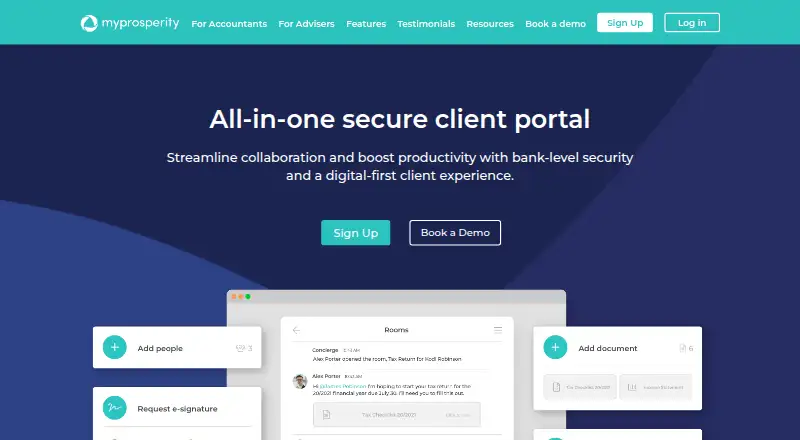
myprosperity is a client portal for accounting and financial advice firms to work with clients across their financial lives. Firms can use digital-form templates or turn paper forms into branded forms for the portal. DocuSign signing is included on all plans, and Rooms brings chat, document upload and signing, and collaboration among clients, staff, and external professionals together. Live data feeds can provide current information from banks, property, car, planning, and investment platforms. Client tools include a live balance sheet, household profit and loss, budgeting, goal tracking, document storage, and an Executor Kit. The service is available on web, Android, and iOS. The company describes it as read-only, without the ability to move money into or out of linked accounts; it also says it uses 256-bit encryption, is ISO 27001 certified, and supports multi-factor authentication. Starter is free. Pro is A$14.95 a month per user, excluding GST. Connect costs A$279 a month, with GST added and a 12-month commitment; larger firm plans have higher fees, and Mobile First has a 24-month commitment.
Who it suits
myprosperity suits accounting and financial advice firms working with clients through a shared portal. Its client tools also serve households managing budgets, goals, documents, and financial information.
What it does well
- DocuSign signing is included on all plans.
- Rooms combines chat, documents, signing, and collaboration.
- Client tools include budgeting and goal tracking.
- Read-only design cannot move money between linked accounts.
- Supports multi-factor authentication.
What to know first
- Pro costs A$14.95 a month per user, excluding GST.
- Connect costs A$279 a month plus GST.
- Partner plans require commitments of 12 or 24 months.
Limits
Starter includes one-time bank and credit card syncing and one-time property and car valuations. Pro adds live bank and credit card syncing and monthly property and car valuations for A$14.95 a month per user, excluding GST.
Plans
| Plan | Billed and limits | Price |
|---|---|---|
| Starter | Free (included in all Partner plans) · Client subscription · bank and credit card one-time sync · property and car one-time valuations · tasks and reminders · document storage | Free |
| Pro | per user per month (exc. GST) · Client subscription · live bank and credit card sync · monthly property and car valuations · additional Pro client subscriptions cost $14.95 per client | A$14.95 a month |
| Mobile First | +GST; 24-month commitment; contact required · 2,000 Starter subscriptions · 100 Pro subscriptions · 40 staff licences · 200GB storage · 5,000 DocuSign signatures/year · branded Apple/Google app · designated account manager · configurable forms · integrations · surveys and analytics | A$1,500 a month |
| Connect | +GST; 12-month commitment · 300 Starter subscriptions · 5 Pro subscriptions · 10 staff licences · 50GB storage · 500 DocuSign signatures/year · generic digital forms · lead-generation tools · branded marketing · cloud storage · mobile app and desktop | A$279 a month |
| Enhance | +GST; 12-month commitment · 600 Starter subscriptions · 10 Pro subscriptions · 20 staff licences · 100GB storage · 1,200 DocuSign signatures/year · configurable forms · integrations · surveys and analytics | A$399 a month |
| Accelerate | +GST; 12-month commitment · 1,000 Starter subscriptions · 40 Pro subscriptions · 30 staff licences · 200GB storage · 3,000 DocuSign signatures/year · configurable forms · integrations · surveys and analytics | A$749 a month |
As myprosperity.com.au lists them, read 30 Sept 2026. The maker's own page has the final word.
Getting started
- Visit the myprosperity website.
- Choose Starter, Pro or a firm plan.
- Use the web portal or get the client app through Apple or Google stores.
- Firms can contact the Support team for rollout and technical issues.
myprosperity is a client portal for accounting and financial advice firms that brings client collaboration together with household financial tools. It is best for practices that want clients, staff and outside professionals to work in shared spaces. Its appeal is the breadth of that portal; firms should choose carefully around client allowances, signing quotas and contract length.
Overview
Firms can create branded digital forms from templates or turn paper forms into portal forms. Rooms combines chat, document uploads, signatures and collaboration among clients, staff and external professionals. That makes it a fit for practices managing ongoing client work across several participants, not just occasional document exchange.
Clients can use a live balance sheet, household profit and loss, budgeting, goal tracking, document storage and an Executor Kit. Live data feeds can draw current information from banks, property, cars, planning and investment platforms, giving the portal a broader household view than document storage alone. Starter, however, provides one-time bank and card syncs and one-time property and car valuations; ongoing bank and card syncs and monthly valuations require Pro.
Key features
DocuSign signing is included on every plan, but firm plans impose annual signing allowances. Rooms keeps chat, files and signing within the same collaboration space. Integrations cover practice and document management, DocuSign, SMSF and fund feeds, direct feeds, and real estate and motor vehicle valuations.
The company says linked accounts are read-only, with no ability to move money, and describes its security as using 256-bit encryption. It also states that the service is ISO 27001 certified and supports multi-factor authentication. These protections matter for a portal handling household financial records, although they do not replace a firm’s own security and access controls.
Pricing
Starter is free and included in all Partner plans. It provides a client subscription, one-time bank and credit card sync, one-time property and car valuations, tasks and reminders, and document storage. It is a useful low-cost entry point, but the one-time updates make it less suitable when clients need current linked data.
Pro costs A$14.95 a month per user, excluding GST. It adds live bank and credit card sync and monthly property and car valuations. Additional Pro client subscriptions cost $14.95 per client. Pro suits firms that want more current household data without buying one of the larger bundled Partner plans; the per-user and added-client charges should be weighed against its narrower scope.
Partner plans are priced for firms and require a 12-month commitment, except Mobile First, which commits the firm for 24 months. All prices below are monthly, plus GST:
| Plan | Price and commitment | Included allowances | Best fit |
|---|---|---|---|
| Connect | A$279 a month; 12 months | 300 Starter client subscriptions, 5 Pro subscriptions, 10 staff licences, 50GB document storage and 500 DocuSign signings per annum | Smaller practices able to work within the lowest client, seat and signing allowances. |
| Enhance | A$399 a month; 12 months | 600 Starter subscriptions, 10 Pro subscriptions, 20 staff licences, 100GB storage and 1,200 signings per annum | Firms needing more than Connect’s included capacity across clients, staff, storage or signing. |
| Accelerate | A$749 a month; 12 months | 1,000 Starter subscriptions, 40 Pro subscriptions, 30 staff licences, 200GB storage and 3,000 signings per annum | Practices with larger client volumes or materially higher staff and signing needs. |
| Mobile First | A$1,500 a month; 24 months | 2,000 Starter subscriptions, 100 Pro subscriptions, 40 staff licences, 200GB storage and 5,000 signings per annum | Firms needing the largest listed allowances and prepared to accept the longer commitment. |
The tier increases expand client, staff, storage and signing capacity, but the included Pro subscriptions remain a separate, smaller allowance than Starter at each level. Firms should check their expected live-data users and annual signing volume before committing. Enterprise has custom pricing for larger practices.
Platforms
myprosperity runs on the web and has client portal apps for Android and iOS through the Google and Apple stores. That gives clients a mobile route into the portal as well as browser access.
Who it's for
Accounting and financial advice firms are the intended buyers, with clients using the portal for shared work and household financial oversight. It is strongest where a practice wants forms, collaboration, signing and financial records in one client-facing service. It is less compelling for firms that need only a basic document exchange or cannot use the included allowances and commitment terms efficiently.
Pros and cons
- Pro: Rooms combines chat, documents, signatures and multi-party collaboration, reducing the need to separate those client interactions across different workflows.
- Pro: Household tools and live feeds span banking, property, vehicles, planning and investments, supporting a broader client financial picture.
- Pro: DocuSign is included on all plans, with security measures including read-only linked accounts, 256-bit encryption, ISO 27001 certification and multi-factor authentication.
- Con: Starter’s syncs and valuations are one-time rather than ongoing, so clients needing current data need Pro.
- Con: Partner tiers cap staff licences, storage and annual signings as well as client subscriptions; firms can outgrow a tier’s allowances.
- Con: Partner plans require a year-long commitment, and Mobile First requires two years, limiting flexibility if needs change.
Alternatives
For a broader comparison, browse Financial Planning Software.
- Betterment is another freemium option on Android, iOS and web, with Digital and Premium plans; choose it if its investment-focused eligibility terms—$200 monthly recurring deposits or a $24,000 eligible balance for Digital, or a $100,000 minimum eligible investment balance for Premium—fit better.
- Boldin offers a free Basic plan with 100+ inputs, two interactive explorers, 10+ charts and up to five Boldin AI questions per day, plus a free trial; choose it for planning tools rather than myprosperity’s firm-oriented portal workflows.
- ProjectionLab has a free Basic plan with forecasting, financial planning, Monte Carlo simulations, historical backtesting and flexible modeling, plus a free trial; choose it when those modeling capabilities are the priority.
- AstuteWheel is a paid web service with an admin subscription requiring adviser subscriptions; choose it if that adviser-and-paraplanner structure suits your practice better.
- MyPlan has a free web Individual Plan with net worth and portfolio tracking, goal planning and projections, expense tracking and budgeting, secure document storage and estate planning tools; choose it for an individual-facing set of planning tools.
- LivePlan is a freemium business planning option across Android, iOS, macOS, web and Windows, with paid Standard and Premium plans; choose it if business planning is the need.
- Xplan is a paid service across Android, API, iOS and web, with packages and modules selected for business requirements; choose it if a configurable package better suits the firm.
- EVPro is another paid option available on web, iOS, Android, macOS and Windows.
Verdict
myprosperity is a strong fit for accounting and advice practices that want a shared client portal combining collaboration, signing and household financial tools. The breadth of the workspace is its main reason to choose it; the client and signing caps, plus 12- or 24-month commitments, are the main reasons to look elsewhere if a firm’s scale or flexibility needs do not match the plans.
Verdict
myprosperity brings client collaboration, document workflows, and financial tools into one portal. Firms should weigh plan commitments and included user and storage limits against their needs.
Questions
Is myprosperity free?
Yes. Starter is free and is included in all Partner plans.
How much do paid plans cost?
Pro costs A$14.95 a month per user, excluding GST. Connect costs A$279 a month plus GST with a 12-month commitment; Enhance is A$399 a month, Accelerate is A$749 a month, and Mobile First is A$1,500 a month, each plus GST and with its stated commitment.
Which platforms does myprosperity support?
It is available on the web, Android and iOS. The client portal is available through Apple and Google stores.
What does Starter include?
Starter includes a client subscription, one-time bank and credit card syncing, one-time property and car valuations, tasks and reminders, and document storage.
Does myprosperity integrate with other services?
Its integrations page lists practice management, document management, DocuSign, SMSF and fund feeds, direct feeds, real estate valuations and motor vehicle valuations.
Who makes myprosperity?
The company says it was founded in 2011 and is part of HUB24 Limited.
Facts from myprosperity's own pages
- Acquisition
- HUB24 announced completion of its acquisition of myprosperity on 30 May 2023 and said the business would operate as a separate unit. · data-api.marketindex.com.au, 15 Oct 2026
- Android distribution
- The Google Play listing shows more than 10,000 downloads and says personal information may be collected, data is encrypted in transit and deletion can be requested. · play.google.com, 15 Oct 2026
- API availability
- A public Swagger-based API documentation endpoint exists, but the opened page reports that its Swagger JSON could not be read. · api.myprosperity.co.nz, 15 Oct 2026
- Authentication
- Multi-factor authentication became mandatory for partners and clients from 30 November 2024, with email, SMS or authenticator codes and biometric options. · help.mpwealthportal.com, 15 Oct 2026
- Client tools
- Client features include a live balance sheet, household profit and loss, budgeting, goal tracking, document storage, and an Executor Kit. · myprosperity.com.au, 30 Sept 2026
- Client wealth view
- The platform presents assets, liabilities, cash flow, documents and net-worth information for clients and advisers. · g2.com, 15 Oct 2026
- Company
- myprosperity says it was founded in 2011 and is part of HUB24 Limited. · myprosperity.com.au, 30 Sept 2026
- Company identity
- ABN Lookup lists Myprosperity Pty Ltd as an active Australian private company from 10 March 2011, with main business location Victoria 3122. · abr.business.gov.au, 15 Oct 2026
- Company size
- LinkedIn lists myprosperity as a software-development company with 11–50 employees and Melbourne headquarters. · au.linkedin.com, 15 Oct 2026
- Digital forms
- Firms can use designed templates or convert paper forms into branded digital forms for the portal. · myprosperity.com.au, 30 Sept 2026
- Digital information collection
- Accountants can use checklists, digital forms and automated reminders to collect client information and reduce duplicate entry. · myprosperity.com.au, 15 Oct 2026
- Documentation and support
- The company provides partner and client help centres, guides, videos, webinars and technical support contact options. · myprosperity.com.au, 15 Oct 2026
- Electronic signatures
- DocuSign signing is built into the portal and is included on every listed plan. · myprosperity.com.au, 15 Oct 2026
- Financial data
- Live data feeds can provide current information from banks, property, car, planning, and investment platforms. · myprosperity.com.au, 30 Sept 2026
- Financial feeds
- Client subscriptions support bank and card feeds, property and vehicle valuations, cash-flow tracking, budgets, goals and periodic reports. · myprosperity.com.au, 15 Oct 2026
- Founded
- 2011 · myprosperity.com.au, 28 Sept 2026
- Founded and ownership
- myprosperity says it was founded in 2011 and is part of ASX-listed HUB24 Limited. · myprosperity.com.au, 15 Oct 2026
- Funding history
- SmartCompany reported that myprosperity closed a $2.5 million strategic investment in February 2017. · smartcompany.com.au, 15 Oct 2026
- FYI Docs integration
- The FYI Docs connector synchronizes clients and documents in both directions, including signed documents. · help.mpwealthportal.com, 15 Oct 2026
- Headquarters
- The contact page gives the address Level 12, 15 William Street, Melbourne, Victoria 3000, Australia. · myprosperity.com.au, 15 Oct 2026
- Integrations
- The integrations catalogue covers practice and document management, DocuSign, SMSF and fund feeds, direct banking or portfolio feeds, real-estate valuations and motor valuations. · myprosperity.com.au, 15 Oct 2026
- ISO certification
- The home page states that myprosperity is ISO 27001 certified. · myprosperity.com.au, 15 Oct 2026
- Lead generation
- White-labelled portals and configurable surveys are used to communicate services, identify client needs and generate leads. · myprosperity.com.au, 15 Oct 2026
- Limit: delayed or incomplete feeds
- App reviewers report feeds arriving several days late, failing to refresh, duplicate transactions and a desire for more lender connections. · apps.apple.com, 15 Oct 2026
Where myprosperity stands on Freedom251
- Financial Planning Software#3 of 34