Freedom251 › Financial Planning Software

Elements
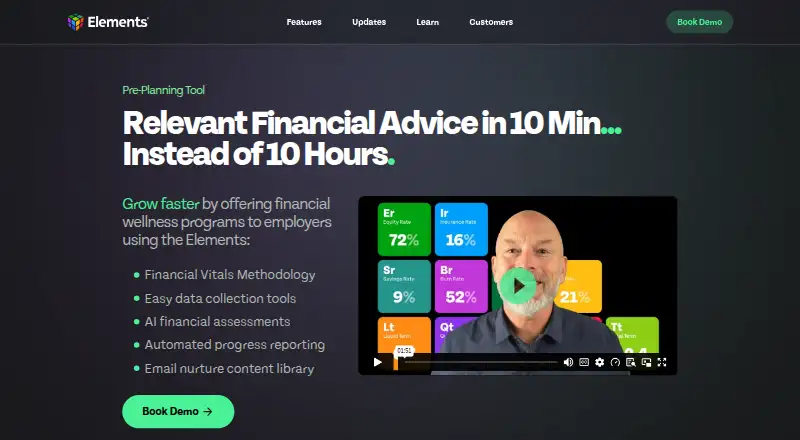
What Elements is
Elements is a financial planning platform that helps advisors explain a client’s financial picture and follow changes over time. Its Financial Vitals summarize a client’s story in 11 metrics, while the Scorecard lets advisors compare, sort, and filter client metrics from one view. Advisors can use combined client data to benchmark prospective clients. One-Page Plans and automated Scorecard Progress Reports summarize advice and show shifts in financial health. The platform also includes Easy Invites, prospect onboarding, and communication tools for advisor marketing and client service. Elements says it partners with Plaid, Morningstar, and Zapier for account data updates and connections to other systems. It is available on Android, iOS, and the web. AI Connections is an opt-in beta for eligible firms with AI enabled; its MCP connection is read-only, and advisors must review and approve requested permissions. The Starting plan is free for up to five clients. Core costs $149/mo and Pro costs $299/mo. Plans are month-to-month with no annual contract, and an optional Support User Seat costs $50/month.
Who it suits
Elements is designed for advisors, firms, coaches, and teams seeking a repeatable way to deliver advice. The free Starting plan is for up to five clients; Core and Pro support unlimited clients.
What it does well
- Financial Vitals summarize a client’s story in 11 metrics
- Scorecard supports client comparison and filtering
- One-Page Plans and automated progress reports are available
- Plans are month-to-month with no annual contract
What to know first
- Starting plan is limited to five clients
- Core costs $149/mo and Pro costs $299/mo
- AI Connections beta is limited to eligible firms with AI enabled
Limits
Starting is free for up to five clients. Core is $149/mo and Pro is $299/mo; the optional Support User Seat costs $50/month.
Plans
| Plan | Billed and limits | Price |
|---|---|---|
| Starting | $0/mo · 0–5 clients · Free up to 5 clients | Free |
| Core | $149/mo · Unlimited clients · Planning and monitoring workflows · Financial health tracking · Client-facing reporting and dashboards | $149 a month |
| Pro | $299/mo · Unlimited clients · Account aggregation (Plaid, MorningStar) · AI features · Messaging · Mobile tools | $299 a month |
As getelements.com lists them, read 4 Oct 2026. The maker's own page has the final word.
Getting started
- Visit https://getelements.com/.
- Choose the Starting plan for up to five clients or review the paid plans.
- Use Elements on the web, Android, or iOS.
Elements is a financial planning platform for advisors who need to turn a client’s financial picture into a clear, ongoing conversation. It suits solo advisors and teams seeking repeatable client reporting and tracking; firms with more than five clients will need a paid plan.
Overview
Elements centers on Financial Vitals: 11 metrics that summarize a client’s financial story. Scorecards, client-facing visuals, and longitudinal tracking help advisors communicate not just a snapshot, but how financial health changes over time. The emphasis is on advice delivery and client communication rather than a broad description of investment management.
Its roster view adds a useful firm-level perspective: advisors can compare, sort, and filter client Scorecard metrics, and use aggregate data to benchmark prospective client health. That makes Elements more compelling for practices that want a consistent way to assess and communicate across a book of clients than for someone seeking only a standalone planning calculator.
Key features
Planning and progress reporting
One-Page Plans and automated Scorecard Progress Reports provide concise ways to summarize advice and show changes in financial health. These workflows are suited to advisors who want recurring client-facing updates; the product’s value depends on whether a practice wants its advice and progress organized around Elements’ Scorecard approach.
Onboarding and communication
Easy Invites, prospect onboarding, and tools for advisor marketing and client service support the journey from prospect to ongoing client. A client portal is also included. Together, these make the platform a workflow tool as well as a dashboard, although the published plan details place messaging and mobile tools in Pro rather than Core.
Connections and controls
Elements says it partners with Plaid, Morningstar, and Zapier for account updates and connections to other systems. AI Connections is an opt-in beta for eligible firms with AI enabled; its MCP connection is read-only, and advisors must review and approve requested permissions. The privacy policy says information is stored on secure servers behind firewalls and payment transactions are encrypted, while cautioning that internet transmission cannot be guaranteed completely secure.
Pricing
All plans are month-to-month with no annual contract. The free Starting plan costs $0/mo and is capped at five clients, making it a practical way for a small practice to assess the workflow, but not a fit for a larger roster.
Core costs $149/mo and removes the client cap. It includes planning and monitoring workflows, financial health tracking, and client-facing reporting and dashboards. It is the clearest choice for advisors who need Elements’ core tracking and reporting for an unlimited client roster but do not need the additional Pro features.
Pro costs $299/mo and adds account aggregation through Plaid and Morningstar, AI features, messaging, and mobile tools, alongside unlimited clients. It is the better fit for firms that want those capabilities in the same service; the $150 monthly step up from Core is hard to justify if the added tools are not part of the practice’s workflow. An optional Support User Seat costs $50/month.
Platforms
Elements is available on Android, iOS, and the web. That reach suits advisors and clients who need access across mobile and browser environments, though mobile tools are specifically included with Pro.
Who it's for
Elements is designed for advisors, firms, coaches, and teams seeking a repeatable, client-friendly way to deliver advice. It is strongest for practices that value financial-health summaries, progress reporting, and roster-level comparisons. A solo advisor with no more than five clients can start free; a growing practice should weigh Core’s uncapped roster against Pro’s bundled aggregation, AI, messaging, and mobile tools.
Pros and cons
- Pros: The 11-metric Vitals, Scorecards, and progress reports give advisors a consistent structure for discussing financial health over time.
- Pros: Roster comparison and aggregate benchmarking extend the product beyond individual client summaries.
- Pros: Month-to-month plans avoid an annual contract, and the free tier covers up to five clients.
- Cons: The free plan’s five-client ceiling makes it a limited long-term option for a growing practice.
- Cons: Account aggregation, AI features, messaging, and mobile tools require the $299/mo Pro plan, a substantial increase over Core.
- Cons: AI Connections is a beta limited to eligible firms with AI enabled, so it is not a universal reason to upgrade.
Alternatives
For a broader directory of options, see Financial Planning Software.
- myprosperity is another freemium choice with Android, iOS, and web availability; consider it if its included-in-Partner-plans Starter option and client subscription are a better fit.
- Betterment offers Digital and Premium plans with eligibility thresholds rather than published prices; consider it if those balance or deposit requirements align with your needs.
- Boldin has a free Basic plan with forecasting, charts, and up to five daily AI questions; choose it when those planning tools are a closer fit than advisor-centered Scorecards and workflows.
- FE CashCalc is a paid option with an included paraplanner licence alongside an individual adviser licence; consider it if that licence structure suits your practice.
- Pocket Risk is a paid option with a free trial; consider it as an alternative if you are comparing advisor software.
- ProjectionLab has a free Basic plan and trial, with forecasting, financial planning, Monte Carlo simulations, and historical backtesting; choose it if those modeling capabilities are the priority.
- AstuteWheel is a paid, web-based option with separate admin and paraplanner plans; consider it if that role-based structure fits your team.
- Conquest is a paid option with a free waitlist and an upcoming 14-day trial; consider it if you want to compare another advisor-focused platform.
Verdict
Elements is a strong fit for advisors who want a repeatable way to summarize client finances, track progress, and keep advice visible through client-facing reports. Its free plan is useful for practices of up to five clients, while Core makes the central workflows available to an unlimited roster at $149/mo. Look elsewhere if you need the Pro features but cannot justify $299/mo, or if Elements’ Scorecard-centered approach is not how you want to deliver planning.
Verdict
Elements combines client financial summaries, tracking, and advisor communication workflows. Its free plan has a five-client limit, while paid plans are month-to-month.
Questions
Is Elements free?
Yes. Starting costs $0/mo and covers up to five clients.
How much do the paid plans cost?
Core costs $149/mo and Pro costs $299/mo. Plans are month-to-month with no annual contract.
Which platforms does Elements support?
Elements is available on Android, iOS, and the web.
What integrations does Elements offer?
Elements says it has partnered with Plaid, Morningstar, and Zapier for account updates and connections to other systems.
Does Elements include AI features?
AI Connections is an opt-in beta for eligible firms with AI enabled. Its MCP connection is read-only, and advisors review and approve requested permissions.
What does Elements do for client planning?
It includes Financial Vitals, the Scorecard, One-Page Plans, and automated Scorecard Progress Reports.
Facts from Elements's own pages
- Advisor workflows
- The product includes the Elements Scorecard, Easy Invites, prospect onboarding, and communication tools for advisor marketing and client service. · getelements.com, 4 Oct 2026
- AI connection
- AI Connections is an opt-in beta for eligible firms with AI enabled; its MCP connection is read-only and requires advisors to review and approve requested permissions. · getelements.com, 4 Oct 2026
- Audience
- Elements is designed for advisors, firms, coaches, and teams seeking a repeatable, client-friendly way to deliver advice. · getelements.com, 4 Oct 2026
- Billing
- The pricing page says all plans are month-to-month with no annual contract and lists an optional Support User Seat for $50/month. · getelements.com, 4 Oct 2026
- Client plans
- Elements offers One-Page Plans and automated Scorecard Progress Reports to summarize advice and show changes in clients' financial health over time. · getelements.com, 4 Oct 2026
- Client roster
- Advisors can compare, sort, and filter client Scorecard metrics from one view and use aggregate client data to benchmark prospective client health. · getelements.com, 4 Oct 2026
- Financial Vitals
- Elements Vitals summarize a client's financial story in 11 metrics. · getelements.com, 4 Oct 2026
- Integrations
- Elements says it has partnered with Plaid, Morningstar, and Zapier for account data updates and connections to other systems. · getelements.com, 4 Oct 2026
- Product
- Elements is a financial planning platform that helps advisors understand and communicate a client's financial picture using Financial Vital Signs, visuals, and longitudinal tracking. · getelements.com, 4 Oct 2026
- Security and privacy
- The privacy policy says information is stored on secure servers behind firewalls, payment transactions are encrypted, and internet transmission cannot be guaranteed completely secure; the policy was last modified October 1, 2023. · getelements.com, 4 Oct 2026
- Support
- The site links advisors to a Help Center and a support-ticket submission page. · getelements.com, 4 Oct 2026
Where Elements stands on Freedom251
- Financial Planning Software#2 of 34