Freedom251 › Webinar platforms

MyOwnConference
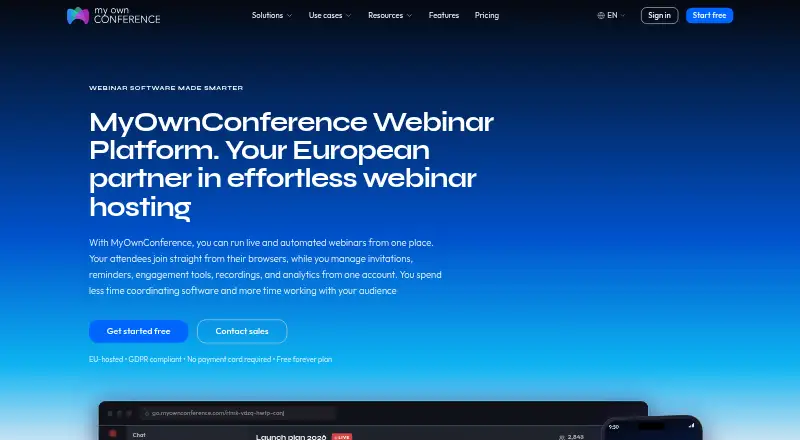
What MyOwnConference is
MyOwnConference is a webinar platform for live, automated, and on-demand sessions. It supports registration pages, polls and Q&A, recordings, and integrations; live events have no time limit on any plan. Attendees can join through browsers on Windows, macOS, Linux, Android, and iOS, with listed capacity up to 5,000 attendees. Screen sharing requires a downloadable presenter app, which does not run on Linux. The free Starter plan does not expire or require a payment card, and includes five attendees, 500 MB of storage, two speakers, one autowebinar per day, and 20-minute recordings. Paid billing options include daily, monthly, and annual subscriptions. Business for 60 attendees is listed at €33.00 per month and includes 10 hours of continuous recording; 24-hour access is listed at €11.00 without a subscription. Connections are encrypted, with access controlled using permissions and passwords. Paid accounts support unlimited additional people with per-area permissions. The company operates in the EU with EU-based data centers and GDPR rights.
Who it suits
MyOwnConference suits hosts running live, automated, or on-demand webinars, from small free sessions to larger events. It may also fit teams that need co-hosts, speakers, and area-specific permissions.
What it does well
- Live events have no time limit on any plan.
- Attendees can join from five operating systems.
- Free Starter does not expire or require a card.
- Supports registration pages, polls, and Q&A.
- Paid accounts allow unlimited additional people.
What to know first
- Starter is limited to five attendees.
- Starter recordings are limited to 20 minutes.
- Screen-sharing app does not run on Linux.
- Starter includes 500 MB storage.
Limits
Starter allows 5 attendees, 500 MB of storage, 2 speakers, 1 autowebinar per day and recordings up to 20 minutes. The listed Business plan at €33 per month allows 60 attendees and 10 hours of continuous recording.
Plans
| Plan | Billed and limits | Price |
|---|---|---|
| Starter | Free forever; no payment card required · 5 attendees · 500 MB storage · 2 speakers · 1 autowebinar per day · 20 minutes recording | Free |
| Business — 60 attendees | billed monthly · 60 attendees · 10 hours continuous recording | €33 a month |
| One-time access | 24-hour access; no subscription required · 20 attendees · 24 hours | €11 a month |
| Enterprise | 5,000 attendees · 1 TB storage | On request |
| Business 60 attendees | €26.40 billed yearly | On request |
As myownconference.com lists them, read 20 Sept 2026. The maker's own page has the final word.
Getting started
- Open https://myownconference.com/
- Choose the free Starter plan or a paid access option
- Use the browser on a supported platform to join or host
- Download the presenter app if you need screen sharing
Overview
MyOwnConference is a webinar platform for live, automated and on-demand events, with registration and audience-interaction tools. It suits hosts who need those formats and want to start without a subscription. Its strongest practical advantage is that live events have no time limit; the free plan’s five-attendee cap makes it a trial-sized option, not a broad-reach one.
Key features
The platform combines live events with automated and on-demand webinars, session recording, registration pages, polls and Q&A. That covers the core path from sign-up through presentation and audience participation. Starter includes one autowebinar per day, but its 20-minute recording limit and 500 MB of storage constrain longer sessions and ongoing use. Paid plans remove the stated live-event time limit too, so duration alone does not force an upgrade.
Hosts can invite co-hosts and speakers with one click; speaker capacity reaches 12. Paid accounts allow unlimited additional team members and permissions by area, useful when several people need distinct responsibilities. Google Calendar and Outlook sync support scheduling, while paid plans add a public API for integrations and data export.
Connections are encrypted, with access controlled through permissions and passwords. The company operates in the EU, uses EU-based Tier III data centers and supports GDPR rights. Support ranges from email and live chat to priority queues, with dedicated support on Enterprise.
Pricing
Starter is free forever and requires no payment card. It allows five attendees, two speakers, 500 MB of storage, one autowebinar per day and recordings up to 20 minutes. That is a useful way to run a small session or assess the workflow, but it is too constrained for a larger audience or a full-length recording archive.
Business for 60 attendees costs €33.00 per month, billed monthly, and includes 10 hours of continuous recording. It is the straightforward step up for regular events with a modest audience and longer recording needs. A separate Business 60-attendee option is billed yearly at €26.40 and includes automated webinars. The lower monthly-equivalent cost comes with annual billing, so it suits users prepared to commit for the year.
One-time access costs €11.00 for 24-hour access, with no subscription required. The plan describes live events for audiences from 20 to 1,000 attendees, while its stated allocation is 20 attendees and 24 hours; that makes it a short-term option rather than a recurring plan for a large audience. Enterprise has custom pricing and supports up to 5,000 attendees, 1 TB of storage, and 2160p recording, for organizations with larger event and storage requirements.
Any plan can be tested for 24 hours without a subscription. That is a time-limited evaluation, separate from Starter’s no-expiry free access; no separate refund terms are given.
Platforms
Attendees can join through browsers on Windows, macOS, Linux, Android and iOS, so they do not need a dedicated platform app to attend. Presenters need a downloadable app for screen sharing, and that app does not run on Linux. Linux hosts who rely on sharing their screen should look elsewhere or plan around that limitation.
Who it's for
MyOwnConference makes sense for hosts who need live, automated and on-demand formats, flexible session length, and a path from a small free event to a 5,000-attendee Enterprise plan. The free tier suits short, very small sessions; Business is a better match for recurring webinars with up to 60 attendees. It is a weaker fit for Linux presenters who need screen sharing, or for free users who need more than five attendees or 20-minute recordings.
Pros and cons
- Pros: Starter never expires and needs no card, making it possible to keep using the service for small events without a subscription.
- Pros: Live events have no time limit on any plan, which suits sessions that cannot be scheduled around a short maximum duration.
- Pros: Browser attendance spans desktop and mobile systems, and paid accounts support unlimited extra team members with area-based permissions.
- Cons: Starter is limited to five attendees, 500 MB and 20-minute recordings, restricting both event size and recording use.
- Cons: Screen sharing depends on a presenter app that does not run on Linux.
- Cons: The one-time option lasts only 24 hours, while the discounted Business price requires annual billing.
Alternatives
LiveWebinar is worth comparing if a free webinar plan is enough: its free tier also supports up to five attendees, with 30-minute sessions and five cameras. Webex App fits readers seeking general meetings rather than larger webinar capacity; its free plan allows up to 100 attendees and meetings up to 40 minutes.
Shindig is an alternative for events with up to 100 participants, four speakers on stage and a 40-minute maximum. For video hosting, Vimeo offers a free plan with one seat and 1 GB of storage, rather than MyOwnConference’s webinar-oriented event tools.
Zoho Webinar may suit a smaller free webinar: its free plan allows 20 attendees and 60 minutes per event. Livestorm is another free option, with 30 attendee credits per year and a 30-minute event maximum.
WebinarIgnition is an alternative to consider if its Unlimited plan’s unlimited registrations, attendees and webinars match your needs. Beamstage has a free plan capped at 15 concurrent viewers, two webinars or meetings per month and 30 watched hours per month.
Browse more options in Webinar Software.
Verdict
Choose MyOwnConference if you need multiple webinar formats, unrestricted live-event duration and a no-expiry free option, with paid capacity available for larger audiences. The main reasons to look elsewhere are the severe Starter limits and the Linux screen-sharing restriction; both matter if you need to grow beyond tiny events or present from Linux.
Verdict
MyOwnConference offers a no-expiry free option and browser access across desktop and mobile systems. Screen sharing requires a separate presenter app, and the free plan has tight attendee, storage, and recording limits.
Questions
Is there a free plan?
Yes. Starter is free forever and does not require a payment card.
What does the free plan include?
Starter includes 5 attendees, 500 MB of storage, 2 speakers, 1 autowebinar per day and 20-minute recordings.
How much does a paid plan cost?
Business for 60 attendees is €33 per month. A 24-hour access option is €11 and does not require a subscription.
Which platforms can attendees use?
Attendees can join from browsers on Windows, macOS, Linux, Android and iOS.
Does screen sharing work on Linux?
Screen sharing requires a downloadable presenter app, and that app does not run on Linux.
Who makes MyOwnConference?
The maker is MyOwnConference, which launched in 2013. Akovana, UAB is based in Vilnius, Lithuania.
Facts from MyOwnConference's own pages
- API Integrations
- A public API is available on paid plans for system integrations and data export. · myownconference.com, 28 Sept 2026
- Attendee limit
- 5000 · myownconference.com, 20 Sept 2026
- Automated webinars
- Yes · myownconference.com, 20 Sept 2026
- Billing Options
- Plans are available as daily, monthly and annual subscriptions. · myownconference.com, 28 Sept 2026
- Supported Platforms
- Attendees can join from browsers on Windows, macOS, Linux, Android and iOS. · myownconference.com, 28 Sept 2026
- Calendar Integrations
- The platform syncs with Google Calendar and Outlook. · myownconference.com, 28 Sept 2026
- Co-host Invitations
- Hosts can invite co-hosts and speakers with one click; speaker capacity ranges up to 12. · myownconference.com, 28 Sept 2026
- Company History
- MyOwnConference launched in 2013; Akovana, UAB is based in Vilnius, Lithuania. · myownconference.com, 28 Sept 2026
- Founded
- 2013 · myownconference.com, 28 Sept 2026
- Free Forever Plan
- The free plan does not expire and requires no payment card. · myownconference.com, 28 Sept 2026
- Free Plan Limits
- Starter includes 5 attendees, 500 MB storage, 2 speakers, 1 autowebinar and 20-minute recordings. · myownconference.com, 28 Sept 2026
- GDPR Compliance
- The company operates in the EU with EU-based Tier III data centers and GDPR rights. · myownconference.com, 28 Sept 2026
- Integrations
- Yes · myownconference.com, 20 Sept 2026
- Live Duration
- Live events have no time limit on any plan. · myownconference.com, 28 Sept 2026
- Polls and Q&A
- Yes · myownconference.com, 20 Sept 2026
- Presenter App
- A downloadable app is needed only for screen sharing, and it does not run on Linux. · myownconference.com, 28 Sept 2026
- Session recording
- Yes · myownconference.com, 20 Sept 2026
- Refund Policy
- The page states that plans can be tested risk-free for 24 hours but gives no separate refund terms. · myownconference.com, 28 Sept 2026
- Registration pages
- Yes · myownconference.com, 20 Sept 2026
- Security Encryption
- Connections are encrypted and access can be controlled with permissions and passwords. · myownconference.com, 28 Sept 2026
- Support Levels
- Support includes email, live chat, priority queues and dedicated support for Enterprise. · myownconference.com, 28 Sept 2026
- Team Permissions
- Paid accounts support unlimited extra people with per-area permissions. · myownconference.com, 28 Sept 2026
- Trial Access
- Any plan can be tested risk-free for 24 hours without a subscription. · myownconference.com, 28 Sept 2026
- Webinar modes
- live automated and on-demand · myownconference.com, 20 Sept 2026
Where MyOwnConference stands on Freedom251
- Webinar platforms#3 of 62
- Webinar Software#3 of 61