Freedom251 › AI Music Generators
Muse
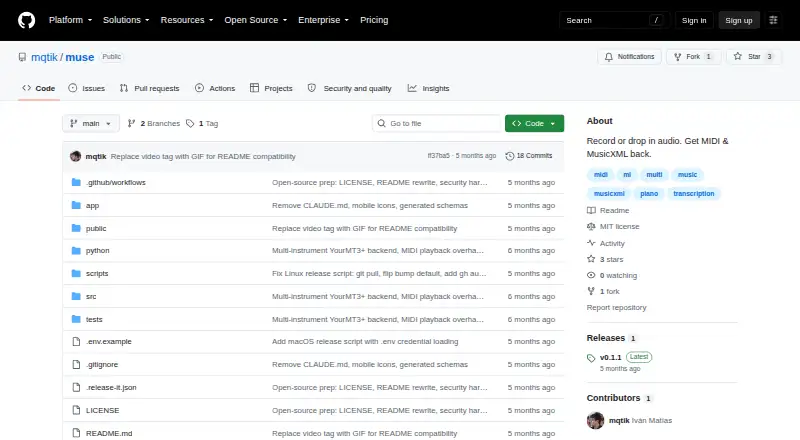
What Muse is
Muse is a desktop app for turning recorded or uploaded audio into MIDI, with separate workflows for solo piano and multi-instrument recordings. The piano workflow separates piano from a mix, transcribes the notes, and assigns them to left and right hands. Multi-instrument mode can transcribe up to 13 tracks in one pass without source separation. Audio can be recorded through a microphone or imported as MP3, WAV, OGG, or FLAC. Playback uses a built-in grand piano synth, with options to mute or solo tracks. The native app processes audio locally; its maker says audio stays on the user's machine. GPU acceleration supports CUDA and Apple Silicon MPS. Muse is free and open-source under the MIT license, with builds for Windows, macOS on Apple Silicon and Intel, and Linux Debian/Ubuntu and AppImage. Setup needs Python 3.10 or later and downloads about 3 GB of models on first run. The maker estimates multi-instrument CPU processing takes roughly two minutes per 30 seconds of audio. MIDI is available; MusicXML export is on the roadmap.
Who it suits
Muse suits musicians who want to turn audio into MIDI on a desktop, including users working with piano or multi-instrument recordings. It is available for Windows, macOS, and Linux.
What it does well
- Free and open-source under the MIT license
- Transcribes up to 13 tracks in one pass
- Accepts microphone recordings and four audio formats
- Local processing; maker says audio stays on-device
- Supports CUDA and Apple Silicon MPS acceleration
What to know first
- First run downloads about 3 GB of models
- Requires Python 3.10 or later
- CPU multi-instrument processing is estimated at two minutes per 30 seconds
- MusicXML export is on the roadmap, not available now
Limits
Muse is free and provides MIDI output. The first run downloads about 3 GB of models; MusicXML export is on the roadmap. The maker estimates multi-instrument CPU inference at roughly two minutes per 30 seconds of audio.
Plans
| Plan | Billed and limits | Price |
|---|---|---|
| Muse | Open-source · MIDI output | Free |
| Free | MIDI output · local desktop use · models download on first run | Free |
As github.com lists them, read 4 Oct 2026. The maker's own page has the final word.
Getting started
- Open the Muse repository at https://github.com/mqtik/muse.
- Choose the build for Windows, macOS on Apple Silicon or Intel, or Linux Debian/Ubuntu or AppImage.
- Ensure Python 3.10 or later is available.
- Run Muse and allow about 3 GB of models to download on first run.
- Record through a microphone or load an MP3, WAV, OGG, or FLAC file.
Overview
Muse is an open-source desktop app that turns recorded or uploaded audio into MIDI, with separate workflows for solo piano and multi-instrument tracks. It suits musicians who want a local tool for shaping audio into editable notes; its free price and three-platform builds are appealing, but setup involves a substantial model download and piano results can suffer on sounds unlike a concert grand.
Key features
Piano and multi-instrument transcription
The piano workflow isolates piano from a mix, transcribes its notes, and separates them between left and right hands. That makes Muse a focused option for turning piano recordings into MIDI, though its accuracy can decline with synth piano, electric piano, or other sounds that differ from a concert grand.
For broader arrangements, multi-instrument mode transcribes up to 13 tracks in one pass without source separation. This can save a separate stem-separation step, but CPU inference is estimated at roughly two minutes for every 30 seconds of audio; GPU acceleration via CUDA or Apple Silicon MPS can make a significant difference.
Audio, playback, and processing
Users can record through a microphone or import MP3, WAV, OGG, and FLAC files. Built-in playback uses a grand-piano synth, with mute and solo controls for individual tracks. Processing runs locally, and the maker says audio never leaves the user's machine—a meaningful fit for people who prefer not to send recordings to a remote service.
Muse currently outputs MIDI; MusicXML export is on the roadmap rather than an available output. The repository provides an MIT license, making the software open-source.
Pricing
Muse — free. The free plan is open-source and includes MIDI output. It is the straightforward choice for anyone comfortable setting up desktop software and working with MIDI. There is no paid tier to trade against a cheaper plan, but the free price does not remove the setup cost: Muse requires Python 3.10 or later and downloads about 3 GB of machine-learning models on first run.
Platforms
Muse is available for Linux, macOS, and Windows. Repository builds cover Windows, macOS on Apple Silicon and Intel, and Linux Debian/Ubuntu and AppImage. GPU acceleration is supported for CUDA and Apple Silicon MPS; CPU use remains possible, though the maker's estimated multi-instrument processing time is a consideration for longer recordings.
Who it's for
Muse is best suited to musicians who want free, local audio-to-MIDI conversion, especially piano players working from concert-grand-like recordings or users converting arrangements into as many as 13 tracks. It is less suitable when the source is a synth or electric piano and accuracy is central, when a machine cannot accommodate the model download, or when notation export is required now.
Pros and cons
- Pros: Free and open-source, with an MIT license and builds across three desktop operating systems.
- Pros: Offers both piano-specific transcription with left/right-hand splits and multi-instrument transcription for up to 13 tracks.
- Pros: Local processing keeps audio on the user's machine, according to the maker.
- Cons: First-run setup requires Python 3.10 or later and about 3 GB of model downloads.
- Cons: Multi-instrument CPU inference is estimated at about two minutes per 30 seconds of audio, making GPU support consequential for larger jobs.
- Cons: Piano accuracy can decline on synth piano, electric piano, and other non-concert-grand sounds; MusicXML export is not available now.
Alternatives
For a broader comparison of transcription-focused tools, see AI Audio-to-MIDI Software. Readers comparing software for other music-making needs can browse AI Music Generators. For video lip-sync tools rather than audio-to-MIDI, VEED offers a free plan with 720p exports and a watermark, while its Creator plan removes the watermark and supports exports up to 1080p.
SadTalker is a free, offline, open-source option for lip sync, with builds for Linux, macOS, self-hosted use, and Windows. CHAMELAION LipSync API may suit API or web workflows: its free Starter tier includes 24,000 tokens, enough for two minutes of video translation and lip sync, with a watermark and no credit card requirement.
LipDub has a free Seed tier for one minute of 1080p AI dubbing, voice cloning, and lip sync, with a watermark. lipsyn.cc offers a five-second free preview, while its Quick Take plan is a one-time purchase. For a web-based video tool, Morph Studio has a free plan with 75 monthly credits and 90-day asset retention. Rendley has a no-card, no-time-limit free tier. Sync Labs offers a free tier with three generations per month, each up to 20 seconds.
Verdict
Choose Muse if you want free, local audio-to-MIDI conversion on a desktop, particularly for piano or multi-track work and can accommodate its model download. Its combination of hand-split piano transcription and up-to-13-track mode is the main reason to choose it; look elsewhere if your piano source is unlike a concert grand or you need MusicXML export.
Verdict
Muse offers piano and multi-instrument audio-to-MIDI workflows, with local processing and builds for three desktop operating systems. Account for the model download and setup requirements, and note that piano accuracy can decline with synth, electric, or other non-concert-grand sounds.
Questions
Is Muse free and open source?
Yes. Muse costs nothing and the repository provides an MIT license.
Which operating systems have builds?
Builds are listed for Windows, macOS on Apple Silicon and Intel, and Linux Debian/Ubuntu and AppImage.
What audio formats can it process?
Muse accepts MP3, WAV, OGG, and FLAC files, and it can also record through a microphone.
Does Muse process audio locally?
The native desktop app runs locally, and its maker says audio never leaves the user's machine.
What does Muse export?
MIDI output is available. MusicXML export is on the roadmap.
What does Muse require to get started?
Muse requires Python 3.10 or later and downloads about 3 GB of machine-learning models on first run.
Facts from Muse's own pages
- Audio input
- Users can record through a microphone or import MP3, WAV, OGG, and FLAC files. · github.com, 15 Oct 2026
- Community signal
- The GitHub repository shows 6 stars, 2 forks, and 0 watchers. · github.com, 15 Oct 2026
- Demucs model limitation
- An independent HTDemucs model card identifies six-stem htdemucs_6s separation as experimental for guitar and limited for piano quality. · huggingface.co, 15 Oct 2026
- Demucs research
- The Hybrid Transformer Demucs paper reports 9.20 dB SDR on MUSDB with extra training data. · arxiv.org, 15 Oct 2026
- Developer package
- The repository's Node package is named audio2sheets, exposes an audio2sheets CLI, and declares Node >=18. · github.com, 15 Oct 2026
- Downloads
- Builds are listed for Apple-Silicon and Intel macOS, Windows x64, Debian/Ubuntu, and Linux AppImage. · github.com, 15 Oct 2026
- Extensibility
- The source tree contains a Tauri desktop app, SolidJS frontend, Rust backend, Python pipeline, Node CLI/library, and automated tests. · github.com, 15 Oct 2026
- Free plan
- Yes · github.com, 20 Sept 2026
- GPU support
- CUDA and Apple Silicon MPS acceleration are supported. · github.com, 15 Oct 2026
- Independent comparison context
- AlternativeTo lists NeuralNote and Basic Pitch as free open-source audio-to-MIDI alternatives and AnthemScore as a paid alternative. · alternativeto.net, 15 Oct 2026
- Issue activity
- The repository's open-issues view currently shows zero open issues. · github.com, 15 Oct 2026
- Licence
- Muse is released under the MIT License with copyright attributed to Muse Contributors in 2025. · github.com, 15 Oct 2026
- License
- The repository identifies Muse as open-source and provides an MIT license. · github.com, 4 Oct 2026
- Limit: CPU speed
- The README estimates about two minutes of CPU inference for each 30 seconds of multi-instrument audio. · github.com, 15 Oct 2026
- Limit: instrument timbre
- The maker says piano results worsen for synths, electric pianos, and sounds unlike concert grands. · github.com, 15 Oct 2026
- Limit: model size
- Muse downloads roughly 3 GB of machine-learning models on first launch. · github.com, 15 Oct 2026
- Limit: MusicXML
- MusicXML export is listed as future work; MIDI is the currently available output. · github.com, 15 Oct 2026
- Local processing
- The native Tauri desktop application is designed to keep audio on the user's machine. · github.com, 15 Oct 2026
- Maker identity
- A public GitHub gist profile identifies mqtik as Iván Matías and lists Argentina as the location. · gist.github.com, 15 Oct 2026
- Maker technical background
- A public Editor.js issue shows mqtik discussing native React Native editor work and cross-platform development. · github.com, 15 Oct 2026
- MAPS accuracy
- Reported Transkun V2 onset F1 falls to 0.78–0.82 on MAPS real recordings. · github.com, 15 Oct 2026
- MIDI outputs
- The pipeline writes a hand-split score MIDI and a performance MIDI that retains sustain-pedal information. · github.com, 15 Oct 2026
- Multi-instrument
- Its multi-instrument mode transcribes up to 13 tracks in one pass without source separation. · github.com, 4 Oct 2026
- Multi-instrument transcription
- YourMT3+ transcribes arrangements in one pass with up to 13 tracks. · github.com, 15 Oct 2026
Where Muse stands on Freedom251
- AI Music Generators#2 of 123
- AI Audio-to-MIDI Software#2 of 29
- AI Video Lip Sync Tools#2 of 28