Freedom251 › AI Podcast Generators
Mozilla Document-to-Podcast
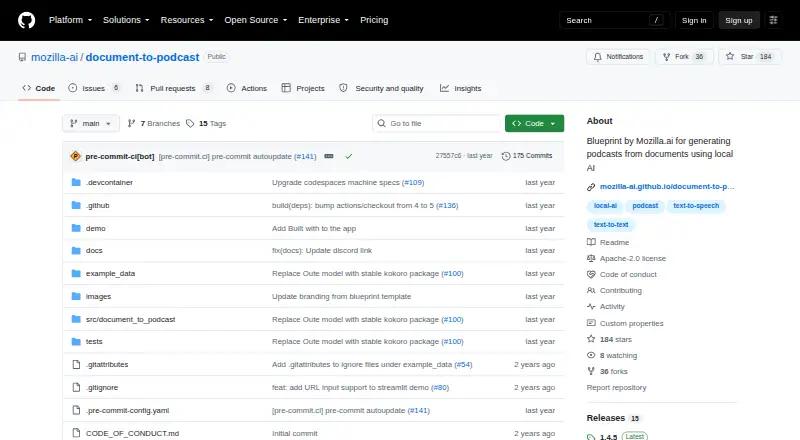
What Mozilla Document-to-Podcast is
Mozilla Document-to-Podcast is a free, open-source Mozilla.ai blueprint for turning documents into two-speaker audio programs. Its workflow extracts and cleans text, uses a language model to create dialogue, then converts the script to speech. The command-line interface accepts PDF, HTML, TXT, DOCX, and Markdown files, and saves the script as podcast.txt and audio as podcast.wav in a chosen output folder.
The project supports text models that can be loaded by llama.cpp and compatible text-to-speech loaders; Kokoro-82M is supported out of the box. You can adjust the prompt, speaker names and roles, descriptions, voice profiles, and model settings. Use the CLI or the Streamlit graphical demo. The project is designed for local processing without external API calls or GPU access, an approach it describes as more privacy-friendly. It runs on Windows, macOS, and Linux. Stated requirements include Python 3.10 or later, at least 8 GB of RAM, and 20 GB of disk space; Apple M chips require Python 3.12 or later. Setup options include local installation, Google Colab, and GitHub Codespaces. The project is licensed under Apache 2.0.
Who it suits
It suits developers who want to add document-to-audio capabilities using open-source models and tools. It is also relevant to people who want to turn supported document formats into dialogue with customizable speakers and voices, while keeping processing local.
What it does well
- Accepts PDF, HTML, TXT, DOCX, and Markdown files.
- Creates both a script file and a WAV audio file.
- Offers a CLI and a Streamlit graphical demo.
- Supports customizable prompts, speakers, voice profiles, and model settings.
- Designed to process locally without external API calls or GPU access.
- Licensed under Apache 2.0.
What to know first
- Requires at least 8 GB RAM and 20 GB disk space.
- Needs Python 3.12 or later on Apple M chips.
- May use only part of input that exceeds the model context limit.
Limits
When cleaned text exceeds the text model's context-based character limit, the CLI may use only a subset of the input.
Getting started
- Choose local installation, Google Colab, or GitHub Codespaces.
- For local use, install from PyPI with pip or clone the project and install it in editable mode.
- Use Windows, macOS, or Linux with the stated Python version, RAM, and disk requirements.
- Select a supported input document and text-to-text and text-to-speech models.
- Run the CLI or use the Streamlit demo app.
Verdict
Choose Mozilla Document-to-Podcast if you want a free, open-source way to generate two-speaker audio from documents, with configurable voices and local processing. Look elsewhere if your workflow needs the full text of documents that exceed the selected model's context-based character limit.
Questions
Is Mozilla Document-to-Podcast free?
Yes. It is free and open source.
Which document formats can it use?
The CLI accepts PDF, HTML, TXT, DOCX, and Markdown files.
What does it save?
It saves podcast.txt and podcast.wav in the selected output folder.
Which systems does it support?
The stated operating systems are Windows, macOS, and Linux. Requirements include Python 3.10 or later, except Apple M chips require Python 3.12 or later.
Can I customize the speakers and voices?
Yes. Speaker names, roles, descriptions, and voice profiles can be customized, along with the script prompt and model settings.
What license does it use?
It is licensed under Apache 2.0.
Facts from Mozilla Document-to-Podcast's own pages
- Cloud setup options
- The getting-started guide lists Google Colab, GitHub Codespaces, and local installation as setup options. · mozilla-ai.github.io, 7 Oct 2026
- Customization
- Users can customize the script prompt, speakers, voice profiles, and model settings. · mozilla-ai.github.io, 4 Oct 2026
- Document formats
- The documented pipeline accepts PDF, HTML, TXT, DOCX, and Markdown files. · mozilla-ai.github.io, 7 Oct 2026
- Input formats
- The CLI accepts PDF, HTML, TXT, DOCX, and Markdown files. · mozilla-ai.github.io, 4 Oct 2026
- Installation
- The project can be installed from PyPI with pip or cloned and installed in editable mode. · mozilla-ai.github.io, 4 Oct 2026
- Interfaces
- The project offers a command-line interface and a Streamlit graphical demo app. · github.com, 7 Oct 2026
- License
- The project is licensed under Apache 2.0. · github.com, 7 Oct 2026
- Local processing
- The project is designed to run on local setups without external API calls or GPU access, keeping processing local. · github.com, 7 Oct 2026
- Model choice
- Users can select a text-to-text model loadable by llama.cpp and can use the supported Kokoro-82M text-to-speech model out of the box. · mozilla-ai.github.io, 7 Oct 2026
- Model support
- Users can select text-to-text models loadable by llama.cpp and supported text-to-speech loaders; Kokoro-82M is listed as currently supported out of the box. · mozilla-ai.github.io, 4 Oct 2026
- Output files
- The CLI writes a podcast script as podcast.txt and audio as podcast.wav in the specified output folder. · mozilla-ai.github.io, 7 Oct 2026
- Pipeline
- The documented workflow extracts and cleans document text, generates a conversational script with a language model, then creates audio with text-to-speech. · mozilla-ai.github.io, 4 Oct 2026
- Privacy
- The project describes local processing without external API calls as a way to keep processing local and make it more privacy-friendly. · github.com, 4 Oct 2026
- Purpose
- Document-to-Podcast is a Mozilla.ai Blueprint for turning input documents into podcasts featuring two speakers. · github.com, 7 Oct 2026
- Speaker voices
- Each speaker can have a distinct voice profile, and speaker names, roles, descriptions, and voice profiles are customizable. · mozilla-ai.github.io, 7 Oct 2026
- Support
- The README directs users with issues to the troubleshooting documentation before opening a new issue, and the docs invite questions on Discord. · github.com, 7 Oct 2026
- Supported operating systems
- The stated system requirements list Windows, macOS, and Linux, Python 3.10 or later (3.12 or later for Apple M chips), at least 8 GB RAM, and at least 20 GB disk space. · github.com, 4 Oct 2026
- System requirements
- The README lists Windows, macOS, or Linux, Python 3.10 or later (3.12 or later for Apple M chips), at least 8 GB RAM, and 20 GB disk space. · github.com, 7 Oct 2026
- Target audience
- The project describes Blueprints as tools for developers to integrate AI capabilities into their projects using open-source models and tools. · mozilla-ai.github.io, 7 Oct 2026
- Usage limit
- The CLI may use only a subset of the input when cleaned text exceeds the text model's context-based character limit. · mozilla-ai.github.io, 4 Oct 2026
- Workflow
- The pipeline extracts and cleans document text, generates a conversational script with a language model, then creates audio with text-to-speech. · mozilla-ai.github.io, 7 Oct 2026
Where Mozilla Document-to-Podcast stands on Freedom251
- AI Podcast Generators#22 of 23