Freedom251 › AI Podcast Generators
Audify
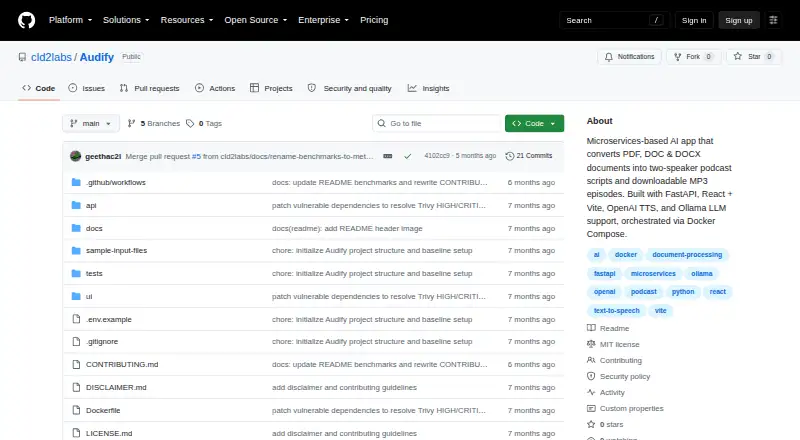
What Audify is
Audify is an open-source application that turns PDF, DOC, and DOCX files into editable two-speaker podcast scripts and downloadable MP3 episodes. It extracts text from uploaded documents and can use OCR when a scanned PDF produces little detected text. Before generating audio, users can revise speaker turns, wording, and flow, choose host and guest voices, and select conversational, educational, or professional tones. Ollama is the primary script-generation route, with OpenAI as a fallback. The text-to-speech service creates audio for each dialogue turn, combines the segments into an MP3, and provides playback and download. Audify is built as a FastAPI microservices application with a React and Vite frontend, orchestrated for local deployment through Docker Compose. Its gateway API handles document uploads, script generation, audio generation, job status, and MP3 downloads. Setup requires Docker Engine 24.x or later and Docker Compose Plugin v2 or later. An OpenAI API key is required for text-to-speech; Ollama is optional. The configured upload maximum is 10 MB, and TTS accepts up to 100 dialogue turns with five concurrent requests. Gateway and TTS job stores are in memory, so jobs reset after container restarts unless persistent storage is added.
Who it suits
Audify suits developers and self-hosting users who want to turn documents into editable, two-voice audio episodes. It fits workflows where users can review scripts, OCR results, and generated audio before sharing them.
What it does well
- Imports PDF, DOC, and DOCX documents
- OCR fallback handles scanned PDFs with little detected text
- Editable dialogue before audio generation
- Exports downloadable MP3 episodes
- Supports Ollama locally and OpenAI as fallback
- Available through web, API, and self-hosted deployment
What to know first
- Uploads are limited to 10 MB
- TTS scripts accept up to 100 dialogue turns
- Jobs reset on container restart without persistent storage
- Production-grade security controls are not included
Limits
Uploads are capped at 10 MB, and the TTS configuration allows up to 100 dialogue turns with five concurrent requests. Job metadata is held in memory and resets when containers restart unless persistent storage is added.
Getting started
- Install Docker Engine 24.x or later
- Install Docker Compose Plugin v2 or later
- Deploy the FastAPI and React application with Docker Compose
- Provide an OpenAI API key for text-to-speech
- Optionally configure Ollama for local model inference
- Upload a PDF, DOC, or DOCX file
- Review the dialogue, choose voices, then generate and download the MP3
Verdict
Choose Audify if you want an MIT-licensed, self-hosted document-to-podcast workflow with editable dialogue and MP3 output. Look elsewhere for production-ready security controls or persistent jobs without additional storage work.
Questions
What does Audify create?
It converts PDF, DOC, and DOCX documents into editable two-speaker scripts and downloadable MP3 podcast episodes.
Is Audify free or open source?
Audify is free and identified as open source under the MIT license.
What does setup require?
Docker Engine 24.x or later and Docker Compose Plugin v2 or later are required. An OpenAI API key is required for text-to-speech, while Ollama is optional.
Which platforms and interfaces are available?
Audify supports web, API, and self-hosted use. Its gateway exposes document upload, generation, status, and MP3 download endpoints.
What providers does it use?
Ollama is the primary script-generation provider, and OpenAI is the fallback for script generation; an OpenAI API key is required for text-to-speech.
Do jobs persist after a restart?
Gateway and TTS job stores use memory, so jobs reset when containers restart unless persistent storage is configured.
Facts from Audify's own pages
- Accuracy guidance
- The project advises users to review scripts, validate OCR output for scanned documents, and check generated audio and dialogue for factual accuracy and tone. · github.com, 4 Oct 2026
- API
- The gateway exposes endpoints for document upload, script and audio generation, job status, and MP3 download. · github.com, 8 Oct 2026
- Audio features
- The TTS service creates speech for each dialogue turn, mixes the segments into MP3, and provides voice options, status tracking, and downloadable audio. · github.com, 8 Oct 2026
- Audio generation
- The TTS service generates speech for dialogue turns, combines them into an MP3 podcast, and provides playback and download. · github.com, 4 Oct 2026
- Data handling
- The README says gateway and TTS job metadata use in-memory stores and jobs reset when containers restart unless persistent storage is added. · github.com, 8 Oct 2026
- Deployment
- The project is a FastAPI and React application orchestrated with Docker Compose, with setup instructions for running the stack locally. · github.com, 8 Oct 2026
- Document extraction
- It extracts text from PDF, DOC, and DOCX files and can use OCR for scanned PDFs when little text is detected. · github.com, 8 Oct 2026
- Document processing
- It extracts text from PDF, DOC, and DOCX files and uses OCR as a fallback for scanned PDFs with little detected text. · github.com, 4 Oct 2026
- Generation limit
- The TTS service's documented MAX_SCRIPT_LENGTH default is 100 dialogue turns. · github.com, 8 Oct 2026
- Integrations
- The documented external providers are Ollama for local model inference and OpenAI for TTS and optional LLM fallback. · github.com, 8 Oct 2026
- Intended use
- The project is described as an AI-assisted document-to-audio generator, and its disclaimer advises reviewing scripts and audio and checking OCR output. · github.com, 8 Oct 2026
- Job persistence
- Gateway and TTS job stores are in memory, so jobs reset when containers restart unless persistent storage is added. · github.com, 4 Oct 2026
- License
- The repository is licensed under the MIT License. · github.com, 8 Oct 2026
- Processing limit
- The TTS service configuration accepts up to 100 dialogue turns and allows up to five concurrent requests. · github.com, 4 Oct 2026
- Purpose
- Audify converts PDF, DOC, and DOCX documents into editable two-speaker podcast scripts and downloadable MP3 audio. · github.com, 8 Oct 2026
- Requirements
- The setup instructions require Docker Engine 24.x or later and Docker Compose Plugin v2 or later; an OpenAI API key is required for TTS, while Ollama is optional. · github.com, 4 Oct 2026
- Script editing
- Users can review the generated dialogue and edit speaker turns, wording, and flow before audio generation. · github.com, 4 Oct 2026
- Script generation
- Audify uses Ollama as the primary script-generation path and OpenAI as a fallback, with conversational, educational, and professional tone options. · github.com, 8 Oct 2026
- Security
- The maker says Audify lacks production-grade security controls and requires a security review before production use. · github.com, 8 Oct 2026
- Upload limit
- The README sets MAX_FILE_SIZE to 10,485,760 bytes and recommends keeping uploads under 10 MB. · github.com, 8 Oct 2026
- Voice selection
- The interface lets users choose host and guest voices from available text-to-speech options. · github.com, 4 Oct 2026
- Workflow
- Users upload a document, review and edit the generated dialogue, choose voices, then play or download the finished episode. · github.com, 8 Oct 2026
Where Audify stands on Freedom251
- AI Podcast Generators#18 of 23