Freedom251 › Green Screen Software
Molyin Video Background Remover
What Molyin Video Background Remover is
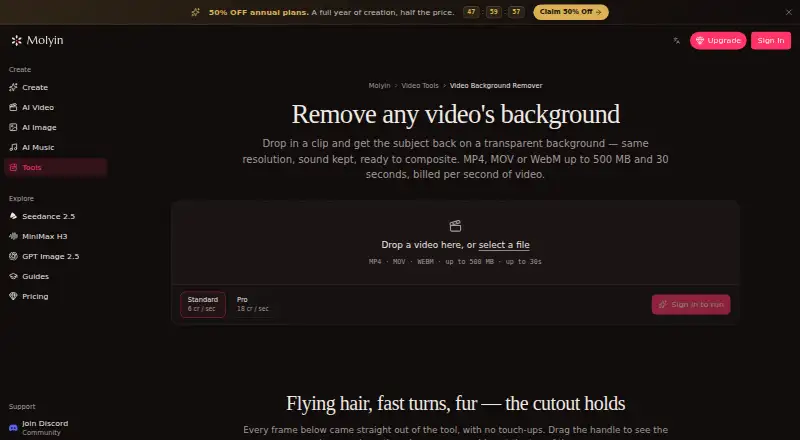
Molyin Video Background Remover separates a moving subject from its background and exports the result as a transparent WebM, retaining the source audio and resolution. It runs in a browser and accepts MP4, MOV, or WebM clips up to 500 MB and 30 seconds, including footage up to 4K and 30 fps. A before-and-after slider lets you compare the cutout with the original before downloading. Standard processing uses 4 credits per second of source video; Pro uses 12 credits per second and is intended for edges such as hair and fur. The page offers one free Standard-quality video per day, up to 10 seconds, without a card. The cutout can also be taken into Molyin’s AI Video Editor or used in its AI Video Generator to build a scene around the subject. Results remain available for download for 7–365 days depending on the plan, then are deleted. Failed jobs receive automatic credit refunds. Batch processing is not supported.
Who it suits
It suits people making product shots, talking-head clips, or AI-generated scenes who need a transparent video cutout. The browser workflow may fit users who do not want to install software.
What it does well
- Exports transparent WebM with audio retained
- Supports clips up to 4K and 30 fps
- One free Standard video daily up to 10 seconds
- Failed jobs receive automatic credit refunds
What to know first
- Maximum clip length is 30 seconds
- Batch processing is not supported
- Stored results are deleted after 7–365 days
Limits
The free tool page allows one Standard-quality video per day, up to 10 seconds. The Free plan includes 10 credits for new users and stores creations for 7 days; processing uses 4 credits per second for Standard or 12 for Pro. The tool accepts clips up to 30 seconds and 500 MB.
Plans
| Plan | Billed and limits | Price |
|---|---|---|
| Free | 10 free credits for new users · creations stored for 7 days · commercial use · no watermark | Free |
| Creator Yearly | $119.90 per year · 1,750 credits/month · creations stored for 365 days | $119.90 a year |
| Team Yearly | $1,350 per year · 22,000 credits/month · 5 seats · shared credit pool · per-member usage stats · priority support | $1,350 a year |
| Studio Yearly | $269.90 per year · 4,400 credits/month · creations stored for 365 days · priority support | $269.90 a year |
| Team Pro Yearly | $3,870 per year · 75,000 credits/month · 12 seats · shared credit pool · per-member usage stats · priority support · early access to new models | $3,870 a year |
| Spark Yearly | $59.90 per year · 780 credits/month · creations stored for 365 days | $59.90 a year |
| Director Yearly | $774 per year · 15,000 credits/month · creations stored for 365 days · priority support · early access to new models | $774 a year |
As molyin.com lists them, read 30 Sept 2026. The maker's own page has the final word.
Getting started
- Open the Molyin Video Background Remover page.
- Upload an MP4, MOV, or WebM clip in the browser.
- Choose Standard or Pro processing.
- Compare the result with the original using the before-and-after slider.
- Download the transparent WebM.
Verdict
Molyin offers browser-based subject removal with a free daily Standard option and a Pro tier for difficult edges. Check the clip limits and retention period against your workflow before using it.
Questions
Is there a free plan?
Yes. The Free plan is $0.00 per free and includes 10 credits for new users. The page also offers one free Standard-quality video per day up to 10 seconds, with no card required.
How much do paid plans cost?
The listed yearly plans are Spark at $59.90 per year, Creator at $119.90 per year, Studio at $22.49 per year, Director at $64.50 per year, Team at $112.50 per year, and Team Pro at $322.50 per year. The plan details also state annual billed totals for each option.
Which file types and video lengths can I use?
The tool accepts MP4, MOV, or WebM files up to 500 MB and 30 seconds. It supports video up to 4K and 30 fps.
What does the export include?
The result is a transparent-background WebM at the source resolution, with audio retained.
Can I use the cutout in other Molyin tools?
Yes. The page says the cutout can be taken into Molyin’s AI Video Editor or used in its AI Video Generator.
How long are results available?
Results remain downloadable for 7 to 365 days depending on the plan, after which they are deleted from storage.
Facts from Molyin Video Background Remover's own pages
- Browser workflow
- The tool runs on the website and the page describes uploading a clip in the browser; it does not require an installation. · molyin.com, 30 Sept 2026
- Failed jobs
- Credits are automatically refunded when processing fails. · molyin.com, 30 Sept 2026
- Free use
- The tool page offers one free Standard-quality video per day up to 10 seconds, with no card required. · molyin.com, 30 Sept 2026
- Input limits
- It accepts MP4, MOV, or WebM files up to 500 MB and 30 seconds, including video up to 4K and 30 fps. · molyin.com, 30 Sept 2026
- Integrations
- The page says the cutout can be taken into Molyin’s AI Video Editor or used in its AI Video Generator to build a new scene around the subject. · molyin.com, 30 Sept 2026
- Intended users
- The page gives product shots, talking-head clips, and AI-generated scenes as examples of videos users can process. · molyin.com, 30 Sept 2026
- Preview and download
- Results can be compared with the original using a before-and-after slider and downloaded as transparent WebM. · molyin.com, 30 Sept 2026
- Privacy details
- The product page FAQ asks whether videos are private, but the page content retrieved here does not provide an answer. · molyin.com, 30 Sept 2026
- Processing tiers
- Standard costs 4 credits per second of source video, while Pro costs 12 credits per second and is intended for difficult edges such as hair and fur. · molyin.com, 30 Sept 2026
- Purpose
- The tool separates a video subject from its background and returns a transparent-background WebM at the original resolution with audio retained. · molyin.com, 30 Sept 2026
- Retention
- Results remain downloadable for 7–365 days depending on the plan, after which they are deleted from storage. · molyin.com, 30 Sept 2026
Where Molyin Video Background Remover stands on Freedom251
- Green Screen Software#19 of 30