Freedom251 › AI Wireframe Generators
Mocksy
What Mocksy is
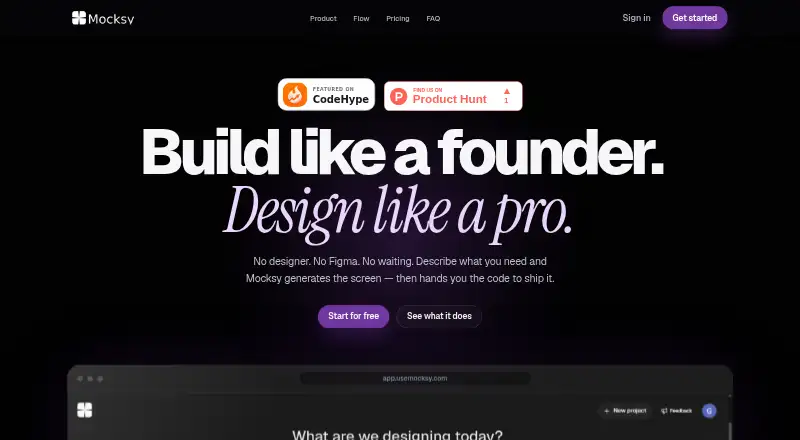
Mocksy turns descriptions and visual references into product screens and code exports. Users can begin with a prompt, sketch, image, or reference URL; when a reference is attached, Mocksy adds missing detail to the prompt before generating. App Mode creates mobile-app screens with native layouts, sizing, and patterns. Workflow generation can make connected screens such as onboarding, settings, and profile without separate prompts for each. A properties panel lets users adjust spacing, color, and type. Listed use cases include dashboards, admin panels, landing pages, onboarding flows, SaaS interfaces, mobile screens, and multi-screen product flows. Web exports include React, Vue, Vanilla JS, and HTML; mobile exports include React Native, SwiftUI, Kotlin, Flutter, and Ionic. The free plan costs nothing and includes 10 credits per month, design inputs, style guides, editing, and HTML export. Workflow generation, website URL input, and some export formats are gated on that tier. Pro costs $20 a month and includes 100 monthly credits and workflow generation. Pay as you go costs $1, paid once per credit, without a subscription.
Who it suits
Mocksy is aimed at founders and indie hackers who want to create product screens and code exports. It may suit people designing web interfaces, mobile screens, or connected multi-screen flows.
What it does well
- Starts from prompts, sketches, images, or reference URLs.
- Creates connected screen workflows.
- Offers web and mobile code export formats.
- Free plan includes 10 credits per month.
- Generated screens on an account belong to the user.
What to know first
- Free plan excludes workflow generation.
- Website URL input is gated on the free tier.
- Some export formats are gated on the free tier.
- Free plan is limited to 10 monthly credits.
Limits
The Free plan provides 10 credits per month. Workflow generation, website URL input, and some export formats are gated on that tier; Pro includes 100 credits monthly.
Plans
| Plan | Billed and limits | Price |
|---|---|---|
| Free | $0 / month · 10 credits / month · Chat to Design & Sketch to Design · Style guides · Edit Design properties panel · HTML export | Free |
| Pay as you go | $1 / credit · Buy credits only when you need them · No subscription · Use alongside Free or Pro | $1, paid once |
| Pro | $20 / month · 100 credits / month · Everything in Free · Workflow generation · Unlimited projects · React, VueJS, VanillaJS, Flutter, Kotlin & SwiftUI exports | $20 a month |
As usemocksy.com lists them, read 9 Oct 2026. The maker's own page has the final word.
Getting started
- Open https://usemocksy.com/
- Start with a prompt, sketch, image, or reference URL
- Generate product screens or use App Mode for mobile layouts
- Adjust spacing, color, and type in the properties panel
- Export HTML or another available code format
- Use Free, buy pay-as-you-go credits, or subscribe to Pro
Verdict
Mocksy combines screen generation, editing, workflows, and code exports for web and mobile projects. The free plan has 10 monthly credits and excludes some inputs, workflows, and export formats; Pro is $20 a month.
Questions
Is Mocksy free?
Yes. The Free plan costs nothing and includes 10 credits monthly.
What does Pro cost?
Pro costs $20 a month and includes 100 credits monthly.
Can I buy credits without subscribing?
Yes. Pay-as-you-go credits cost $1 per credit, with no subscription, and can be used alongside Free or Pro.
Which export formats are available?
Listed web exports are React, Vue, Vanilla JS, and HTML. Mobile exports include React Native, SwiftUI, Kotlin, Flutter, and Ionic.
Who owns generated screens?
The FAQ says screens generated on a Mocksy account belong to the user.
Facts from Mocksy's own pages
- Code exports
- The site lists web exports in React, Vue, Vanilla JS, and HTML, and mobile exports in React Native, SwiftUI, Kotlin, Flutter, and Ionic. · usemocksy.com, 9 Oct 2026
- Editing
- Users can adjust spacing, color, and type in the properties panel. · usemocksy.com, 9 Oct 2026
- Flows
- Workflow generation creates connected screens such as onboarding, settings, and profile without prompting for each screen separately. · usemocksy.com, 9 Oct 2026
- Free tier limit
- The free plan has 10 credits per month, and workflow generation, website URL input, and some export formats are gated. · usemocksy.com, 9 Oct 2026
- Inputs
- Users can start with a prompt, sketch, image, or reference URL. · usemocksy.com, 9 Oct 2026
- Intended users
- Mocksy says it is built for founders and indie hackers who want to ship quickly. · usemocksy.com, 9 Oct 2026
- Mobile design
- App Mode generates screens for a mobile app environment with native layouts, sizing, and patterns. · usemocksy.com, 9 Oct 2026
- Ownership
- The FAQ says generated screens on a Mocksy account belong to the user. · usemocksy.com, 9 Oct 2026
- Product
- Mocksy generates product screens from a description and provides code to ship them. · usemocksy.com, 9 Oct 2026
- Prompt refinement
- When a user attaches a reference, Mocksy expands the prompt with missing detail before generating. · usemocksy.com, 9 Oct 2026
- Support
- The site lists support contact at [email protected]. · usemocksy.com, 9 Oct 2026
- Use cases
- The site lists dashboards, admin panels, onboarding flows, landing pages, mobile app screens, SaaS interfaces, and multi-screen product flows. · usemocksy.com, 9 Oct 2026
Where Mocksy stands on Freedom251
- AI Wireframe Generators#21 of 34