Freedom251 › Knowledge base software
MkDocs
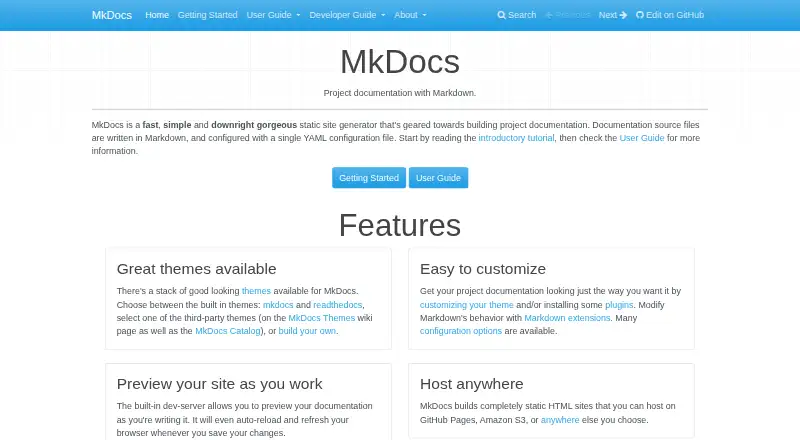
What MkDocs is
MkDocs is a free static site generator for project documentation written in Markdown and configured with a YAML file. It builds documentation into static HTML that can be hosted on GitHub Pages, Amazon S3, or another static-file host. A local development server previews the site and reloads it after changes, while generated pages include search that can link to matching sections. The built-in mkdocs and readthedocs themes are available, alongside third-party and custom themes. Themes, plugins, Markdown extensions, and configuration options can shape the output. MkDocs uses Python-Markdown and requires a recent Python version and pip. Its command-line tools include commands to create, serve, and build projects, get dependencies, and deploy to GitHub Pages. The built-in mkdocs theme supports multiple locales, including English, German, Spanish, French, Japanese, and Chinese. Third-party themes and plugins execute code supplied by their authors, and MkDocs does not sandbox it. The software is available for Linux, macOS, Windows, and self-hosted use, and is distributed under the BSD license.
Who it suits
MkDocs suits people building project documentation sites from Markdown files who want static HTML output. It can work for teams publishing documentation to GitHub Pages, Read the Docs, or another static-file host.
What it does well
- Free and distributed under the BSD license
- Local preview reloads when documentation changes
- Generated site includes search with section links
- Static HTML can use multiple hosting providers
What to know first
- Requires a recent Python version and pip
- Third-party themes execute unsandboxed author code
- Plugins execute unsandboxed author code
Limits
MkDocs is free, with a free plan. It requires a recent Python version and pip. Third-party themes and plugins execute code supplied by their authors, and MkDocs does not sandbox that code.
Getting started
- Install a recent version of Python and pip.
- Install MkDocs with pip install mkdocs.
- Create a documentation project with the command-line interface.
- Write documentation in Markdown and configure the project with a YAML file.
- Preview changes with the built-in development server.
- Build the static HTML site and deploy it to GitHub Pages or host it on a static-file service.
Verdict
MkDocs provides a command-line workflow for turning Markdown project documentation into static sites with search and theme options. Users should account for its Python requirements and the code-execution risks of third-party themes and plugins.
Questions
How much does MkDocs cost?
MkDocs is free, and a free plan is available.
What platforms does MkDocs support?
The listed platforms are Linux, macOS, Windows, and self-hosted use.
What does MkDocs build?
It builds static HTML documentation sites from Markdown files configured with a YAML file.
Where can I host a generated site?
Sites can be hosted on GitHub Pages, Amazon S3, or another static-file host. MkDocs also documents deployment to Read the Docs.
Is MkDocs open source?
MkDocs is distributed under the BSD license.
Are third-party themes and plugins sandboxed?
No. They execute code supplied by their authors, and MkDocs does not sandbox that code.
Facts from MkDocs's own pages
- Audience
- MkDocs is intended for people building project documentation sites from Markdown files. · mkdocs.org, 1 Oct 2026
- CLI
- The command-line interface provides build, get-deps, gh-deploy, new, and serve commands. · mkdocs.org, 30 Sept 2026
- Custom domain
- Yes · mkdocs.org, 20 Sept 2026
- Customization
- Users can customize themes, install plugins, enable Markdown extensions, and configure many options. · mkdocs.org, 1 Oct 2026
- Deployment
- MkDocs documents deployment to GitHub Pages and Read the Docs and states that any static-file hosting provider can be used. · mkdocs.org, 30 Sept 2026
- Deployment command
- The command-line interface includes gh-deploy for deploying documentation to GitHub Pages. · mkdocs.org, 1 Oct 2026
- Free plan
- Yes · mkdocs.org, 20 Sept 2026
- Hosting
- Generated sites can be hosted on GitHub Pages, Amazon S3, or other hosting services. · mkdocs.org, 1 Oct 2026
- Installation
- MkDocs is installed with the Python package manager using pip install mkdocs. · mkdocs.org, 1 Oct 2026
- Integrations
- MkDocs documentation can be deployed to GitHub Pages and hosted on Amazon S3. · mkdocs.org, 1 Oct 2026
- License
- MkDocs is distributed under the BSD license, which permits redistribution and use in source and binary forms subject to its conditions. · mkdocs.org, 1 Oct 2026
- Live preview
- The built-in development server previews documentation and auto-reloads when files change. · mkdocs.org, 1 Oct 2026
- Localization
- The built-in mkdocs theme supports multiple locales, including English, German, Spanish, French, Japanese, and Chinese. · mkdocs.org, 30 Sept 2026
- Markdown engine
- MkDocs uses Python-Markdown to render Markdown and supports Markdown extensions. · mkdocs.org, 30 Sept 2026
- Output
- MkDocs builds static HTML files that can be hosted on GitHub Pages, Amazon S3, or any other static-file host. · mkdocs.org, 30 Sept 2026
- Plugin ecosystem
- Third-party plugins are installed as Python packages and can be listed in the MkDocs Catalog. · mkdocs.org, 1 Oct 2026
- Plugin security
- MkDocs warns that plugins execute their authors' Python code and provides no sandboxing. · mkdocs.org, 1 Oct 2026
- Purpose
- MkDocs is a static site generator geared toward building project documentation from Markdown and a single YAML configuration file. · mkdocs.org, 1 Oct 2026
- Requirements
- MkDocs requires a recent version of Python and pip. · mkdocs.org, 1 Oct 2026
- Search
- The generated site includes search that can find text on pages and link directly to matching sections. · mkdocs.org, 30 Sept 2026
- Static output
- MkDocs builds completely static HTML sites. · mkdocs.org, 1 Oct 2026
- Support
- The project directs users to GitHub Discussions and GitHub Issues for help. · mkdocs.org, 1 Oct 2026
- Themes
- MkDocs includes built-in mkdocs and readthedocs themes and supports third-party or custom themes. · mkdocs.org, 1 Oct 2026
- Theme security
- Installing a third-party theme executes code supplied by its author, and MkDocs does not sandbox that code. · mkdocs.org, 30 Sept 2026
Where MkDocs stands on Freedom251
- Knowledge base software#53 of 138
- Documentation Generators#15 of 37
- Technical Documentation Software#17 of 37
- Technical Writing Platforms#14 of 27
- Developer Documentation Software#16 of 27