Freedom251 › Email Deliverability Software
Microsoft SNDS
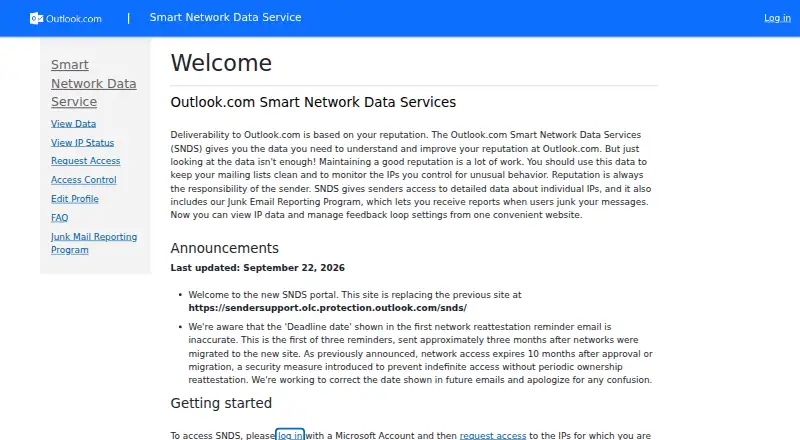
What Microsoft SNDS is
Microsoft SNDS is a free web service for senders and internet service providers managing email deliverability and sending reputation with Outlook.com. It gives senders detailed data about individual IP addresses and insight into how Outlook.com views the health of their IP space. The portal combines IP data with feedback loop settings, and its Junk Email Reporting Program can send reports when users mark messages as junk. SNDS can help IP owners detect compromised servers, malware, viruses, and botnets. It offers sender reputation monitoring, blocklist monitoring, and API access; inbox placement monitoring and spam trap monitoring are unavailable. To use the service, a sender signs in with a Microsoft Account and requests authorization for the IP addresses they are responsible for. Network access expires 10 months after approval or migration, after which ownership must be reattested. Data Reports stopped including trap hit counts starting July 22, 2026. For urgent Outlook.com delivery issues, Microsoft advises contacting sender support with someone familiar with the issue and email infrastructure. The Smart Network Data Services (SNDS) plan costs nothing.
Who it suits
SNDS suits senders and ISPs responsible for email deliverability and sending reputation with Outlook.com. It may also help IP owners monitor reputation and blocklists or look for signs of compromised servers and malware.
What it does well
- Free service for senders.
- Shows detailed data about individual IPs.
- Includes sender reputation monitoring.
- Includes blocklist monitoring and API access.
- Combines IP data and feedback loop settings in one portal.
- Can help identify compromised servers, malware, viruses, and botnets.
What to know first
- No inbox placement monitoring.
- No spam trap monitoring.
- Network access expires after 10 months and requires ownership reattestation.
- Trap hit counts are no longer included in Data Reports.
Limits
Network access expires 10 months after approval or migration and requires periodic ownership reattestation. SNDS does not provide inbox placement or spam trap monitoring, and Data Reports no longer include trap hit counts starting July 22, 2026.
Plans
| Plan | Billed and limits | Price |
|---|---|---|
| Smart Network Data Services (SNDS) | Free service for senders to view IP data and manage feedback loop settings | Free |
As substrate.office.com lists them, read 8 Oct 2026. The maker's own page has the final word.
Getting started
- Open the SNDS website.
- Sign in with a Microsoft Account.
- Request access to the IP addresses you are responsible for.
- Complete the authorization process.
- Reattest ownership when network access expires after 10 months.
Microsoft SNDS is a free web portal for senders and internet service providers that need to see how Outlook.com evaluates their sending IPs. It suits operators responsible for email infrastructure and Outlook.com consumer traffic, especially those investigating reputation or abuse signals. Its provider-specific data is useful, but it is not a complete deliverability-monitoring system.
Overview
SNDS combines detailed information about individual IP addresses with a view of the overall health of an IP space as Outlook.com sees it. That makes it a focused diagnostic service for organizations managing their own sending ranges. Sender-reputation and blocklist monitoring are included, while inbox-placement and spam-trap monitoring are not.
The portal also includes Microsoft’s Junk Email Reporting Program. Senders can configure feedback-loop settings and receive reports when Outlook.com users mark messages as junk. Keeping IP data and feedback controls in one web service is convenient for Outlook.com operations, but the scope remains limited to Microsoft’s consumer mailbox environment.
Key features
IP and reputation data
SNDS exposes data for individual IPs and provides context on the wider IP space. For an ISP or mail operator, that level of granularity can connect a reputation problem to a particular address or network rather than treating all traffic alike. Blocklist monitoring adds another signal for identifying delivery risks.
Microsoft says SNDS can help IP owners detect compromised servers, malware, viruses, and botnets. This makes the service relevant not only to campaign teams but also to infrastructure and security staff responsible for protecting outbound mail systems. It cannot, however, show whether messages reach inboxes, and it does not provide spam-trap monitoring.
Junk reports and feedback controls
The Junk Email Reporting Program can send reports after recipients classify messages as junk. Managing those settings alongside IP data gives senders a direct way to follow complaint signals at Outlook.com. It is a practical feedback loop for that audience, not a cross-provider complaint or placement analysis tool.
Access and data changes
Access requires a Microsoft Account and an authorization request for the IPs you are responsible for. Network access expires 10 months after approval or migration, so ownership must be reattested periodically. Microsoft also stopped including trap-hit counts in Data Reports on July 22, 2026, an important limitation for anyone expecting those reports to support spam-trap analysis.
API access is available, which can help teams incorporate SNDS data into their own operational workflows. For urgent Outlook.com delivery problems, Microsoft advises contacting sender support with someone familiar with both the issue and the email infrastructure.
Pricing
| Plan | Price | Includes |
|---|---|---|
| Smart Network Data Services (SNDS) | free | Free service for senders to view IP data and manage feedback loop settings |
There is one free plan, with no paid tier or seat, message, or retention allowance stated. That makes SNDS a low-risk addition for any eligible sender, but the absence of inbox-placement and spam-trap monitoring means a free account cannot replace a broader deliverability platform.
Platforms
SNDS is delivered through the web. Users sign in with a Microsoft Account, complete IP-ownership authorization, and can use the available API when integrating data into other systems.
Who it's for
Choose SNDS if you send mail to Outlook.com consumers and are accountable for the relevant IP addresses. ISPs, mail-service operators, and security teams can use its IP-level reputation, blocklist, junk-report, and abuse signals to investigate problems in their infrastructure.
It is a weaker fit for marketers or agencies needing inbox-placement tests across providers, spam-trap detection, or a unified view of multiple mailbox ecosystems. Those users will need another service alongside SNDS.
Pros and cons
- Pros: Free access to Outlook.com IP data; detailed individual-IP and IP-space visibility; sender-reputation and blocklist monitoring; Junk Email Reporting Program and feedback-loop controls in one portal; API access; signals that can reveal compromised infrastructure.
- Cons: Outlook.com-specific rather than cross-provider; no inbox-placement monitoring; no spam-trap monitoring; IP access requires authorization and expires after 10 months, requiring reattestation; trap-hit counts are no longer in Data Reports from July 22, 2026.
Alternatives
For a broader email deliverability category, see Email Deliverability Software.
- EasyDMARC is a better choice when you need API and web access plus a free plan covering 1,000 emails per month, one domain, 14 days of data history, and one invited user.
- Folderly suits teams seeking inbox-insight testing, including a free plan with two tests per month and a free real-time-alerts plan.
- GlockApps is preferable for spam testing and broader monitoring: its free plan includes two spam-test credits, 10,000 DMARC messages, unlimited DMARC domains, five uptime monitors, one IP reputation monitor, and one user.
- Postmark fits senders that need an email-delivery service as well as monitoring, with a free plan for 100 emails per month, no overages, and no expiration.
- DMARC Report is aimed at DMARC analysis, offering a free Core plan with 10,000 monthly messages, one domain, subdomains, 30 days of history, and aggregate reports.
- Suped offers web-based monitoring with a free plan covering 1,000 emails per month, one domain, 14 days of retention, unlimited users, and email support.
- TrueSend is an alternative for sending workflows, with a free plan of 6,000 emails per month, two sending domains, unlimited email IDs per domain, a drag-and-drop builder, more than 50 templates, basic analytics, and SPF.
- Unspam.email is suited to occasional testing, with a no-account tier offering three spam tests, two inbox placements, one device preview, and 24-hour data retention per month.
Verdict
Microsoft SNDS is the right choice for an Outlook.com-focused sender or ISP that wants free IP reputation data, blocklist signals, and feedback-loop management with API access. Look elsewhere, or pair it with another tool, if inbox placement, spam-trap detection, or reputation coverage beyond Outlook.com is central to your work.
Verdict
Choose Microsoft SNDS if you send mail to Outlook.com consumers and need IP data, reputation monitoring, or feedback loop settings at no cost. Look elsewhere if inbox placement or spam trap monitoring is essential, since SNDS does not provide either.
Questions
Is Microsoft SNDS free?
Yes. The Smart Network Data Services (SNDS) plan costs nothing.
What does SNDS monitor?
It provides sender reputation and blocklist monitoring. It also gives data about individual IPs and the health of an IP space as Outlook.com views it.
Does SNDS monitor inbox placement or spam traps?
No. Inbox placement monitoring and spam trap monitoring are both unavailable.
How do I get access?
Sign in with a Microsoft Account and request access to the IP addresses you are responsible for through the authorization process.
How long does network access last?
It expires 10 months after approval or migration, so ownership must be reattested periodically.
Does SNDS provide API access?
Yes. API access is listed as available.
Facts from Microsoft SNDS's own pages
- Abuse monitoring
- Microsoft says SNDS can help IP owners detect compromised servers, malware, viruses, and botnets. · substrate.office.com, 8 Oct 2026
- Access
- Users sign in with a Microsoft Account and request access to the IPs for which they are responsible through an authorization process. · substrate.office.com, 8 Oct 2026
- Data change
- Trap hit counts stopped being included in Data Reports starting July 22, 2026. · substrate.office.com, 8 Oct 2026
- Feedback settings
- The portal lets users view IP data and manage feedback loop settings in one website. · substrate.office.com, 8 Oct 2026
- Intended users
- Microsoft describes SNDS as a service for senders and ISPs managing email deliverability and sending reputation for Outlook.com consumers. · substrate.office.com, 8 Oct 2026
- IP data
- The service gives senders detailed data about individual IPs and insight into the health of their IP space as viewed by Outlook.com. · substrate.office.com, 8 Oct 2026
- Junk reports
- SNDS includes the Junk Email Reporting Program, which can send reports when users mark messages as junk. · substrate.office.com, 8 Oct 2026
- Purpose
- SNDS provides data to help senders understand and improve their reputation at Outlook.com. · substrate.office.com, 8 Oct 2026
- Security measure
- Network access expires 10 months after approval or migration, requiring periodic ownership reattestation. · substrate.office.com, 8 Oct 2026
- Support
- For urgent Outlook.com delivery issues, Microsoft advises contacting sender support with someone familiar with the issue and email infrastructure. · substrate.office.com, 8 Oct 2026
Where Microsoft SNDS stands on Freedom251
- Email Deliverability Software#12 of 31