Freedom251 › 3D File Converter Software
MeshFormat
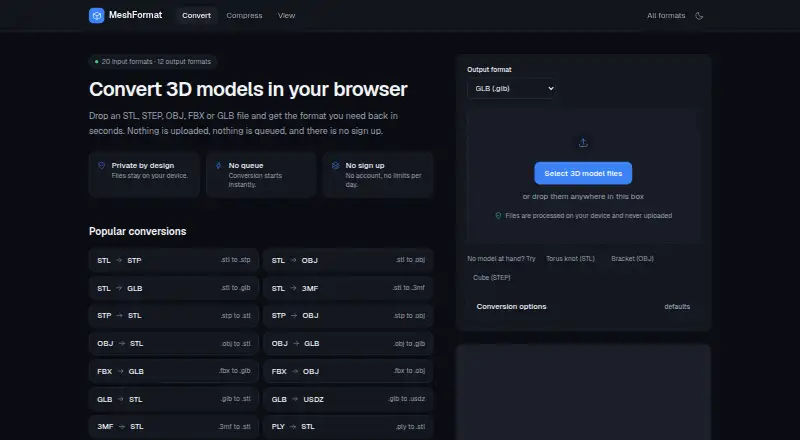
What MeshFormat is
MeshFormat is a web-based tool for converting 3D files between formats used in CAD, mesh, web, AR, real-time engine, and 3D-printing workflows. It reads 20 formats and writes 12, covering 229 conversion pairs. Readable formats include STL, OBJ, STEP, IGES, glTF, GLB, FBX, PLY, 3MF, 3DS, DAE, AMF, VRML, VTK, 3DM, BREP, OFF, and USDZ. During conversion, you can adjust scale, up-axis, triangle budget, and decimal places, centre a model on the origin, or combine it into one mesh. Separate tools compress models and display supported models with wireframe views and statistics. Conversion runs in a browser worker with WebAssembly geometry kernels, and models remain in browser memory rather than being sent to MeshFormat or another party. MeshFormat says it has no upload endpoint or backend and uses no tracking cookies, advertising pixels, or cross-site identifiers. The free plan costs nothing, requires no account, and has no daily quota or watermark. File size depends on available device memory. The service is provided as is, without a service-level commitment.
Who it suits
MeshFormat suits people who need to move 3D models among CAD, mesh, web, AR, real-time engine, or 3D-printing workflows. It is also suited to users who want browser-based conversion, compression, or model viewing without sending models to MeshFormat.
What it does well
- Converts across 229 pairs using 20 readable and 12 writable formats.
- Offers scale, axis, triangle-budget, and decimal-place controls.
- Includes model compression and wireframe viewing with statistics.
- Free use requires no account, quota, or watermark.
- Models stay in browser memory and are not transmitted.
What to know first
- Practical file size depends on available device memory.
- Does not read proprietary formats such as DWG, SKP, or SLDPRT.
- Cannot write binary FBX or make meshes into parametric CAD solids.
- The service has no service-level commitment.
Limits
The free plan has no daily quota or watermark, and practical file size depends on device memory. MeshFormat does not read DWG, SKP, or SLDPRT, write binary FBX, or convert meshes into parametric CAD solids.
Plans
| Plan | Billed and limits | Price |
|---|---|---|
| Free | No account · no daily quota · no watermark · limited by device memory | Free |
As meshformat.com lists them, read 7 Oct 2026. The maker's own page has the final word.
Getting started
- Open https://www.meshformat.com/ in a web browser.
- Choose the conversion or model tool you need.
- Use the available conversion settings, or select compression or model viewing.
- Process files in the browser; no account is required.
Verdict
Choose MeshFormat for free browser-based 3D conversion across its listed formats, with controls, compression, and model viewing in the same site. Look elsewhere if you need DWG, SKP, or SLDPRT input, binary FBX output, parametric CAD solids, or a service-level commitment.
Questions
How much does MeshFormat cost?
The Free plan costs nothing.
Is there a free plan or trial?
The service has a free plan and no free trial.
Which platform does MeshFormat support?
MeshFormat is available on the web.
Do I need an account?
No account is required.
Are models uploaded to MeshFormat?
MeshFormat says models are processed in browser memory and are not transmitted to it or third parties.
Which file types are unsupported?
It does not read proprietary native formats such as DWG, SKP, or SLDPRT, write binary FBX, or turn meshes into parametric CAD solids.
Facts from MeshFormat's own pages
- Additional tools
- The site also offers tools to compress models and view supported models with wireframe and model statistics. · meshformat.com, 7 Oct 2026
- Compatibility limits
- MeshFormat says it does not read proprietary native formats such as DWG, SKP or SLDPRT, write binary FBX, or turn meshes into parametric CAD solids. · meshformat.com, 7 Oct 2026
- Conversion options
- The converter offers scale, up-axis, triangle-budget and decimal-place settings, plus options to centre a model on the origin or merge it into one mesh. · meshformat.com, 7 Oct 2026
- File-size limit
- A converter page says practical file size is limited by available memory rather than an arbitrary cap. · meshformat.com, 7 Oct 2026
- Intended users
- The site describes use cases around moving 3D models between CAD, mesh, web, AR, real-time engine and 3D-printing workflows. · meshformat.com, 7 Oct 2026
- Local processing
- The conversion pipeline runs in a browser worker using WebAssembly geometry kernels. · meshformat.com, 7 Oct 2026
- Privacy
- Models are processed in browser memory and are not transmitted to MeshFormat or third parties; the site says it has no upload endpoint or backend. · meshformat.com, 7 Oct 2026
- Purpose
- MeshFormat converts 3D files in the browser, reading 20 formats and writing 12 across 229 conversion pairs. · meshformat.com, 7 Oct 2026
- Support and service commitment
- The terms say the service is provided free of charge and as is, with no account, subscription or service-level commitment. · meshformat.com, 7 Oct 2026
- Supported formats
- The site lists formats including STL, OBJ, STEP, IGES, glTF, GLB, FBX, PLY, 3MF, 3DS, DAE, AMF, VRML, VTK, 3DM, BREP, OFF and USDZ as readable formats. · meshformat.com, 7 Oct 2026
- Technical foundations
- MeshFormat names Open CASCADE, Assimp, three.js, glTF Transform and meshoptimizer among its open-source foundations. · meshformat.com, 7 Oct 2026
- Tracking
- The privacy page says MeshFormat uses no tracking cookies, advertising pixels or cross-site identifiers. · meshformat.com, 7 Oct 2026
Where MeshFormat stands on Freedom251
- 3D File Converter Software#14 of 31