Freedom251 › 3D File Converter Software

Convertpoly
What Convertpoly is
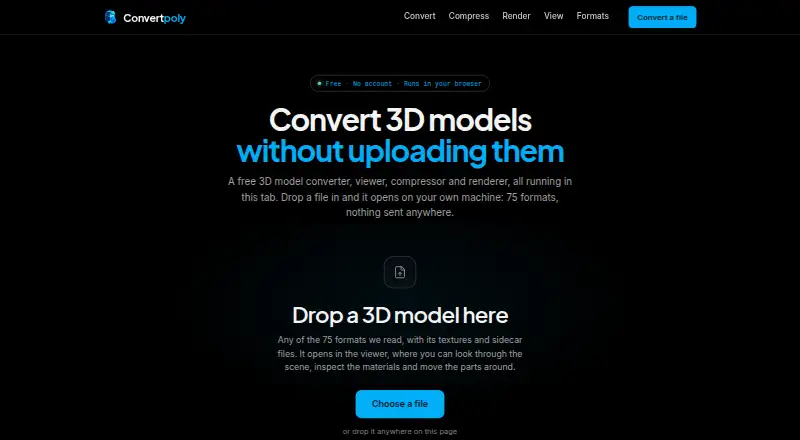
Convertpoly is a web-based toolkit for converting, compressing, rendering, and inspecting 3D models. It reads 75 3D formats and writes 19. Files are processed in the browser on your machine, without an upload step. Once the page has loaded, the tools can continue working offline. No installation or account is required.
The converter previews a model before conversion and saves the result to your downloads folder. The viewer shows scene hierarchy, mesh and material details, and texture map previews; it also lets you move, rotate, or scale a model and undo changes. For rendering, it exports still images as PNG, WebP, or JPEG, and can package multiple frames in a numbered ZIP. Image output can reach 8192 pixels on a side, subject to your GPU allocation.
The free plan costs nothing and has no imposed file-size limit. Browser memory is the practical constraint: the FAQ says a tab can generally handle models up to a few hundred megabytes. Format support also affects what carries through conversion: STL and PLY do not store textures, while OBJ, STL, and PLY do not store animation.
Who it suits
Convertpoly suits people who need to convert, compress, render, or inspect 3D files in a browser, including those who receive files their usual software will not open. It is also a fit for users who want local processing without installing software or creating an account.
What it does well
- Reads 75 3D formats and writes 19.
- Processes files locally in the browser, without uploading.
- Tools can work offline after the page loads.
- Viewer includes scene, mesh, material, and texture details.
- Renderer exports PNG, WebP, JPEG, or numbered frame ZIPs.
- Free plan has no imposed file-size limit.
What to know first
- Browser memory constrains practical model size.
- STL and PLY do not store textures.
- OBJ, STL, and PLY do not store animation.
Limits
The free plan has no imposed file-size cap, but browser memory is the practical limit; a tab can generally handle models up to a few hundred megabytes. Image output is subject to GPU allocation, and some formats do not store textures or animation.
Plans
| Plan | Billed and limits | Price |
|---|---|---|
| Free | No account · No ads · No file size limit imposed by Convertpoly | Free |
As convertpoly.com lists them, read 9 Oct 2026. The maker's own page has the final word.
Getting started
- Open https://www.convertpoly.com/ in a web browser.
- Load the page; no installation or account is required.
- Choose a conversion, viewer, compression, or rendering tool.
- Preview a model before converting, then save the result from the downloads folder.
Verdict
Choose Convertpoly if you want browser-based 3D conversion and inspection with local processing and no account or installation. Its viewer and renderer add ways to examine and export models. Look elsewhere if your workflow needs textures or animation preserved in formats that do not carry them, or if browser memory cannot handle your models.
Questions
What does Convertpoly cost?
Its Free plan costs nothing.
Is there a free plan or trial?
Yes, the Free plan is available. There is no free trial.
Which platforms does Convertpoly support?
It is available on the web.
Do I need to install it or create an account?
No installation or account is required.
Are files uploaded for processing?
Files are processed in the browser on your machine, with no upload step.
What formats can it handle?
The site says it reads 75 3D formats and writes 19. Some formats do not store textures or animation.
Facts from Convertpoly's own pages
- Audience
- The FAQ describes the tools as useful for people who receive 3D files that their software refuses to open. · convertpoly.com, 9 Oct 2026
- Conversion workflow
- The converter previews the model before conversion and saves the resulting file to the downloads folder. · convertpoly.com, 9 Oct 2026
- Format limitations
- The FAQ says some formats cannot carry textures or animation; for example, STL and PLY do not store textures, and OBJ, STL and PLY do not store animation. · convertpoly.com, 9 Oct 2026
- Format support
- The site says it reads 75 3D formats and writes 19. · convertpoly.com, 9 Oct 2026
- Installation and account
- The site says no installation or account is required. · convertpoly.com, 9 Oct 2026
- Local processing
- Files are read and processed in the browser on the user's machine, with no upload step. · convertpoly.com, 9 Oct 2026
- Model viewer
- The viewer displays scene hierarchy, mesh and material details, and texture map previews, and supports moving, rotating, scaling and undoing changes. · convertpoly.com, 9 Oct 2026
- Offline use
- The site says its tools continue to work after the page loads and the network is disconnected. · convertpoly.com, 9 Oct 2026
- Practical file limit
- Convertpoly imposes no file size limit, but the FAQ says browser memory is the practical constraint and a tab can generally handle models up to a few hundred megabytes. · convertpoly.com, 9 Oct 2026
- Rendering
- The renderer exports still images as PNG, WebP or JPEG and can provide multiple frames as a numbered ZIP. · convertpoly.com, 9 Oct 2026
- Rendering limit
- Image output can be up to 8192 pixels on a side, subject to the user's GPU allocation. · convertpoly.com, 9 Oct 2026
- What it does
- Convertpoly offers browser based tools to convert, compress, render and inspect 3D models. · convertpoly.com, 9 Oct 2026
Where Convertpoly stands on Freedom251
- 3D File Converter Software#11 of 31