Meme Creator
What Meme Creator is
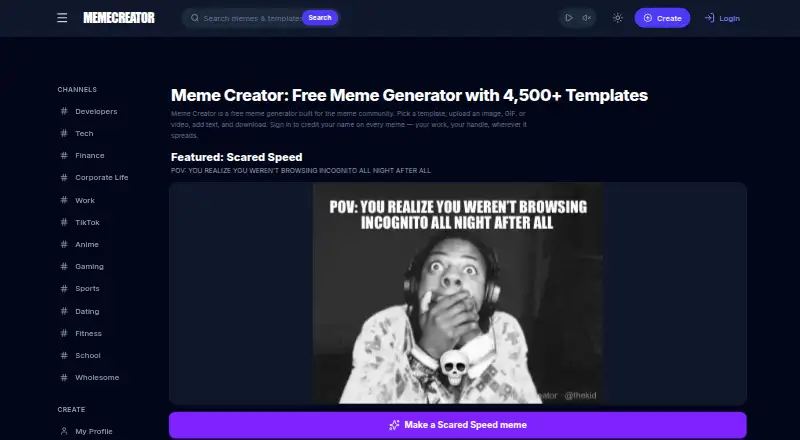
Meme Creator is a free online editor for making image, GIF, and video memes. It offers more than 4,500 templates and tools for draggable text, font and color changes, stickers, shapes, drawings, and effects. You can upload JPG, PNG, GIF, WEBP, and MP4 files; image uploads are limited to 10MB and video uploads to 200MB. Posts or clips from X, TikTok, Instagram, and YouTube can also be embedded. Image, GIF, and video exports have no Meme Creator watermark and do not require sign-up. On mobile, the editor runs in modern iOS and Android browsers without requiring an app installation. Slack and Discord integrations offer additional meme creation tools, including AI captions; Slack limits those captions to 100 per workspace per UTC day. The integrations' pages say they read only messages explicitly selected for meme creation. Users retain ownership of submitted content, while granting MemeCreator a worldwide license to host, modify, publish, and distribute it through the service. Meme Creator Pro is in development, with early access and a free trial offered to the first 100 participants.
Who it suits
It suits people who want to create image, GIF, or video memes in a browser, including on modern mobile browsers. The Slack and Discord integrations may also suit users who want meme-making tools within those services.
What it does well
- More than 4,500 templates.
- Image, GIF, and video exports have no watermark.
- Exports require no sign-up.
- Runs in modern mobile browsers without an app install.
- Accepts common image and video uploads.
What to know first
- Image uploads are limited to 10MB.
- Video uploads are limited to 200MB.
- Slack AI captions are limited to 100 per workspace per UTC day.
- Submitted content receives a worldwide service-use license.
Limits
The free plan is listed as free and includes 4,500+ templates, image, GIF and video creation, watermark-free exports and no sign-up. Image uploads are limited to 10MB, video uploads to 200MB, and Slack AI captions to 100 per workspace per UTC day.
Plans
| Plan | Billed and limits | Price |
|---|---|---|
| Free | 4,500+ templates · image/GIF/video creation · no watermark · no sign-up | Free |
As memecreator.org lists them, read 1 Oct 2026. The maker's own page has the final word.
Getting started
- Open https://www.memecreator.org/ in a web browser.
- Choose a template from the library or upload a supported image or video file.
- Edit with text, fonts, colors, stickers, shapes, drawings or effects.
- Export your image, GIF or video without signing up.
- For mobile use, open the editor in a modern iOS or Android browser; an app install is not required.
- For team use, access the Slack or Discord integration.
Overview
Meme Creator is a free meme-making service for image, GIF and video formats, available on the web and in mobile browsers. It suits people who want a broad template library and quick, account-free exports. Its strongest case is the combination of varied formats and no-watermark output; upload caps and a broad license on submitted content are worth weighing first.
Key features
More than 4,500 templates give creators plenty of starting points, and the editor supports draggable text, font and color changes, stickers, shapes, drawings and effects. That range works for both quick captions and more customized designs. Image, GIF and video creation broaden its use beyond static meme makers, though source files must fit the upload limits: 10MB for JPG, PNG, GIF or WEBP images, and 200MB for MP4 video.
Embedding posts or clips from X, TikTok, Instagram and YouTube offers another route when a meme begins with social content. Finished images, GIFs and videos export without a Meme Creator watermark, and no sign-up is required to create or export. This is a meaningful advantage for occasional creators who want to share work without adding branding or opening an account.
The Slack bot adds a visual picker, AI captions and a “Meme this” message shortcut, but limits AI captions to 100 per workspace per UTC day. Discord supports slash commands, AI captioning, message context-menu creation and server-private custom templates, making it more tailored to meme-making within a community. Both integration pages say only messages explicitly selected for “Meme this” are read; they do not access broader channel history, voice channels or unsolicited DMs.
Users retain ownership of submitted content, but grant MemeCreator a worldwide license to host, modify, publish and distribute it through the service. That breadth may be acceptable for casual material, but creators handling sensitive or commercially important work should consider the terms before uploading. The privacy policy says the service uses commercially acceptable safeguards while acknowledging that absolute security cannot be guaranteed.
Pricing
The Free plan costs nothing and includes 4,500+ templates, image, GIF and video creation, watermark-free exports and use without sign-up. There is no paid plan to compare for current everyday use. A free trial is also offered, while Meme Creator Pro is in development for marketers, agencies, content creators and automation builders. Its proposed features include reusable brand templates, bulk generation, GIF timelines and an API for Make and n8n; the Pro page offers early access and a free trial to the first 100 participants.
The free offer is a strong fit for casual creators who do not need an account or branded workflow. Teams seeking bulk production or automation may find the planned Pro features more relevant, but should not treat them as current capabilities.
Platforms
Meme Creator runs on the web and in modern mobile browsers on iOS and Android, so mobile use does not require an app install. Dedicated mobile apps are not offered. Slack and Discord integrations extend creation into those chat services.
Who it's for
Choose Meme Creator for varied meme formats, a large template collection and exports without sign-up or watermark. It is less suited to anyone whose source files exceed the upload caps, who needs a dedicated mobile app, or who is uncomfortable granting a service license to submitted content.
Pros and cons
- Pro: More than 4,500 templates and support for images, GIFs and videos cover a wider range of meme formats than static-image creation alone.
- Pro: Watermark-free exports without sign-up reduce friction for one-off use and sharing.
- Pro: Slack and Discord tools support in-chat creation, with Discord offering server-private custom templates.
- Con: Image uploads stop at 10MB and video uploads at 200MB, which can exclude larger source files.
- Con: The content license grants worldwide rights to host, modify, publish and distribute submitted material through the service.
- Con: There are no dedicated mobile apps, and Slack AI captions have a daily workspace limit of 100.
Alternatives
Browse Meme Makers for a wider comparison. YouInMeme is worth considering if its platform coverage, including desktop extension and macOS, matters more than unrestricted daily creation: its free tier allows two creations per day, with a one-time $0.99 Day Boost for three more. Groki may suit users who prefer credit-based pricing, with 20 welcome credits, bundles at $1.00 per 100 credits and a $4.99 monthly Starter plan.
Kapwing is an option for users who need a desktop-oriented web editor on macOS or Windows; its free plan has 10 credits, a four-minute export limit and 720p output, while Pro is $16.00 per month billed annually per member. Imgflip Meme Generator may appeal to users who prioritize a very large library: it has more than one million templates, though its free plan includes an Imgflip watermark and ads.
Mematic, Meme Maker Pro, MemeFast and Piñata Farms are other alternatives to compare.
Verdict
Meme Creator is a good fit for casual creators who want image, GIF and video memes from a large template library and value watermark-free, no-sign-up exports. Its format range and low-friction free plan are the main reasons to choose it. Look elsewhere if you need dedicated mobile apps, larger upload limits, or tighter control over rights to submitted content.
Verdict
Meme Creator offers multiple meme formats, a large template collection, and watermark-free exports without sign-up. Check its upload limits and content license before submitting material.
Questions
How much does Meme Creator cost?
The Free plan is listed as free.
Can I use Meme Creator without signing up?
Yes. Image, GIF and video exports do not require sign-up.
Which platforms does Meme Creator support?
It is listed for Android, iOS and web. On mobile, the editor runs in modern iOS and Android browsers without an app install.
What can I create with Meme Creator?
It supports image, GIF and video memes, with more than 4,500 templates and editing tools for text, stickers, shapes, drawings and effects.
Does Meme Creator have Slack or Discord integrations?
Yes. Slack offers a visual picker, AI captions and a message shortcut. Discord supports slash commands, AI captioning, context-menu meme creation and server-private custom templates.
Who makes Meme Creator?
A 2023 release identifies Risk Averse Technology Company as its creator.
Facts from Meme Creator's own pages
- Content rights
- Terms state that users retain ownership of submitted content but grant MemeCreator a worldwide license to host, modify, publish and distribute it through the service. · memecreator.org, 1 Oct 2026
- Core product
- Meme Creator is a free online meme maker for creating image, GIF and video memes. · memecreator.org, 1 Oct 2026
- Discord integration
- The Discord app supports slash commands, AI captioning, message context-menu meme creation and server-private custom templates. · memecreator.org, 1 Oct 2026
- Editor tools
- The editor supports draggable text, font and color changes, stickers, shapes, drawings and effects. · memecreator.org, 1 Oct 2026
- Export
- Image, GIF and video exports have no Meme Creator watermark and do not require sign-up. · memecreator.org, 1 Oct 2026
- Integration privacy
- Slack and Discord pages state that only messages explicitly selected for Meme this are read, while broader channel history, voice channels and unsolicited DMs are not accessed. · memecreator.org, 1 Oct 2026
- Maker
- A 2023 release identifies Risk Averse Technology Company as the creator of Meme Creator. · globenewswire.com, 1 Oct 2026
- Mobile use
- The editor runs in modern mobile browsers on iOS and Android without an app install. · memecreator.org, 1 Oct 2026
- Pro status
- Meme Creator Pro is in development for marketers, agencies, content creators and automation builders, with reusable brand templates, bulk generation, GIF timelines and an API for Make and n8n. · memecreator.org, 1 Oct 2026
- Pro trial
- The Pro page offers early access and a free trial for the first 100 participants. · memecreator.org, 1 Oct 2026
- Security statement
- The main privacy policy says Meme Creator uses commercially acceptable safeguards but cannot guarantee absolute security. · memecreator.org, 1 Oct 2026
- Slack integration
- The Slack bot provides a visual picker, AI captions and a message shortcut called Meme this, with a 100 AI-caption limit per workspace per UTC day. · memecreator.org, 1 Oct 2026
- Social embeds
- Users can embed posts or clips from X, TikTok, Instagram and YouTube. · memecreator.org, 1 Oct 2026
- Templates
- The service offers more than 4,500 meme templates. · memecreator.org, 1 Oct 2026
- Uploads
- Users can upload JPG, PNG, GIF, WEBP and MP4 files, with limits of 10MB for images and 200MB for video. · memecreator.org, 1 Oct 2026
Where Meme Creator stands on Freedom251
- Meme Makers#8 of 27