
Make-a.Meme
What Make-a.Meme is
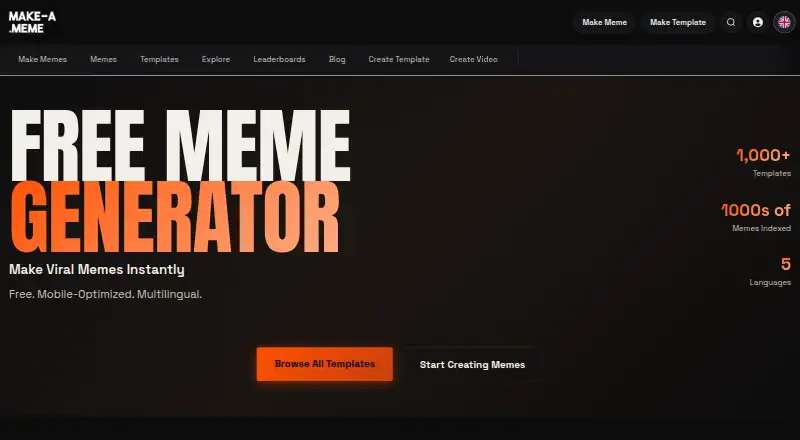
Make-a.Meme is a web-based meme generator for building memes from a template or an image you upload. Its homepage describes a library of more than 1,000 templates and thousands of indexed memes, with a multilingual interface listing five languages. Text can be customized by changing its font, color, and position; editor controls also include size, shadow, alignment, and uppercase text. Uploads include JPG, PNG, and other common image formats, and an uploaded image can be turned into a custom template for others to use. The service supports video meme creation as well as image memes. Once a meme is ready, you can download it or share it on social media platforms. Creating memes is free and unlimited without signup, while a free account provides meme saving and additional features. The project began as open-source software on GitHub. Templates are described as free for personal use, and the site advises checking copyright for commercial use. Social publishing and more advanced image processing and analysis are described as future aspirations.
Who it suits
Make-a.Meme suits people who want to create image or video memes in a web browser, whether they start with a template or their own image. It also fits users who want to save memes with a free account or share finished work on social media.
What it does well
- Free, unlimited meme creation without signup.
- More than 1,000 templates and thousands of indexed memes.
- Text controls include font, color, position, and shadow.
- Uploads can become custom templates for others to use.
- Finished memes can be downloaded or shared on social platforms.
What to know first
- Saving memes and accessing additional features requires a free account.
- Commercial use may require checking copyright for specific templates.
Limits
Meme creation is unlimited without signup on the free plan. Saving memes and access to additional features are tied to a free account; templates are described as free for personal use, with commercial copyright checks advised.
Plans
| Plan | Billed and limits | Price |
|---|---|---|
| Free | Unlimited meme creation · no signup required | Free |
As make-a.meme lists them, read 10 Oct 2026. The maker's own page has the final word.
Getting started
- Open https://make-a.meme/ in a web browser.
- Choose a template or upload an image in a supported format.
- Customize the text and available editor settings.
- Download the finished meme or share it on social media.
- Create a free account if you want to save memes and access additional features.
Verdict
Choose Make-a.Meme if you want a free browser-based way to create image or video memes, with no signup required for meme creation. Look elsewhere if you need social publishing or more sophisticated image processing now; those are described as future aspirations.
Questions
How much does Make-a.Meme cost?
The Free plan costs nothing. Meme creation is unlimited and does not require signup.
Can I use Make-a.Meme without an account?
Yes. You can create memes for free without signup. A free account lets you save memes and access additional features.
What platforms does it support?
Make-a.Meme is available on the web.
Can I upload my own images?
Yes. The site supports JPG, PNG, and other common image formats. Uploaded images can also be used to create custom templates for others.
Can I use its templates commercially?
Templates are described as free for personal use. The site advises checking copyright for commercial use.
Does it support video memes?
Yes. Make-a.Meme supports video meme creation.
Facts from Make-a.Meme's own pages
- Accounts
- The homepage says a free account lets users save memes and access additional features. · make-a.meme, 4 Oct 2026
- Commercial use
- The homepage says most templates are fair use for social media and personal projects and advises checking specific copyright for commercial use. · make-a.meme, 10 Oct 2026
- Cost and signup
- The homepage says meme creation is free, unlimited, and requires no signup. · make-a.meme, 4 Oct 2026
- Custom templates
- Users can upload images to create custom meme templates that others can use. · make-a.meme, 10 Oct 2026
- Editor controls
- The Gru's Plan editor provides controls for font size, shadow, color, font family, horizontal and vertical alignment, and uppercase text. · make-a.meme, 10 Oct 2026
- Export
- The homepage says users can download their finished memes and share them on social media platforms. · make-a.meme, 4 Oct 2026
- Export and sharing
- Users can download memes and share them across social media platforms. · make-a.meme, 10 Oct 2026
- Image uploads
- Users can upload their own images, and the homepage names JPG and PNG as supported formats. · make-a.meme, 4 Oct 2026
- Languages
- The homepage describes the service as multilingual and lists five languages. · make-a.meme, 10 Oct 2026
- Project history
- The homepage says Make-a.Meme began as an open-source GitHub project and now lets users save memes. · make-a.meme, 10 Oct 2026
- Publishing roadmap
- The homepage says social publishing and more sophisticated image processing and analysis are future aspirations. · make-a.meme, 10 Oct 2026
- Purpose
- Make-a.Meme lets users create memes from templates or uploaded images. · make-a.meme, 10 Oct 2026
- Saving
- The homepage says a free account lets users save memes and access additional features. · make-a.meme, 10 Oct 2026
- Template library
- The homepage lists more than 1,000 templates and thousands of indexed memes. · make-a.meme, 10 Oct 2026
- Template use
- The sports templates page says its templates are free for personal use and advises checking copyright for commercial use. · make-a.meme, 4 Oct 2026
- Text editing
- Users can adjust fonts, colors, and text positioning. · make-a.meme, 10 Oct 2026
- Uploads
- The site supports JPG, PNG, and other common image formats for uploads. · make-a.meme, 10 Oct 2026
Where Make-a.Meme stands on Freedom251
- Meme Makers#10 of 27