Freedom251 › Accounts Payable Software
Melio
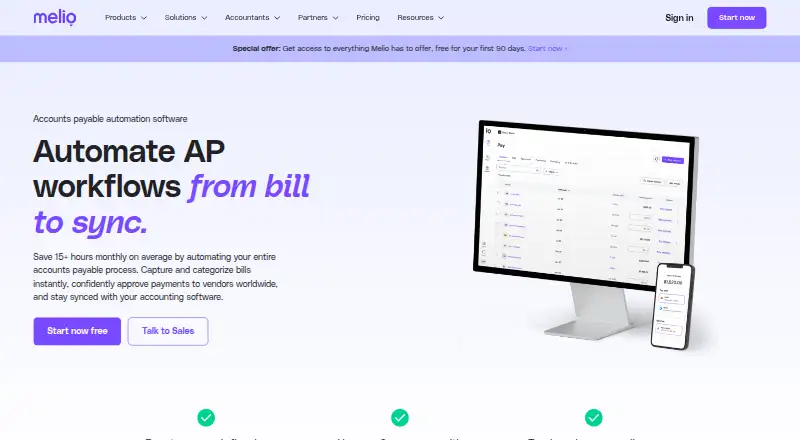
What Melio is
Melio is a business platform for bill pay, invoicing, accounts payable, accounts receivable, and payment processing. It captures bills using OCR or a dedicated email address, supports approvals, and syncs payments with QuickBooks, Xero, or NetSuite. Users can make one-time, recurring, and batch payments by ACH, card, instant transfer, paper check, and other methods. Melio also supports international vendor payments in USD or local currencies, and vendors can be paid without creating an account. Teams can assign roles such as viewer, approver, and admin. The mobile app supports reviewing, approving, paying, and managing payables and receivables; web access is also listed. An AI assistant answers questions about bills, vendors, and payments. The Go plan is free for one user and includes five free ACH payments per month, then charges $0.50 per ACH payment. Core costs $25/mo after the first 90 days, Boost $55/mo, and Unlimited $80/mo; the first 90 days are free under the stated offer. Melio says it is built specifically for US businesses.
Who it suits
It suits US businesses managing bills, vendor payments, approvals, and receivables. Small and midsize businesses moving beyond spreadsheets or paper-based bill pay are a stated target.
What it does well
- Captures bills by OCR or dedicated email
- Supports recurring and batch payments
- Syncs with QuickBooks, Xero, or NetSuite
- Mobile app manages payables and receivables
- Vendors can be paid without accounts
What to know first
- Go is limited to one user
- Go includes five free ACH payments monthly
- ACH payments after the allowance cost $0.50
Limits
The free Go plan is limited to one user and five free ACH payments per month; each ACH payment after that allowance costs $0.50. After the 90-day trial, an account without a paid subscription converts to the limited Go plan and loses premium-feature access.
Plans
| Plan | Billed and limits | Price |
|---|---|---|
| Go | Limited to one user · 5 free ACH/month · $0.50 per ACH after free monthly payments · pay by ACH, wire, check, or card · AI bill capture · international payments · free AR & invoicing | Free |
| Core | $0 /first 90 days; then $25/mo; plus $10/mo per additional user · annual price $20/mo plus $8/mo per additional user · 20 free ACH/month · QuickBooks Online and Xero sync · batch payments · custom approval workflows · W-9 collection · 1099 automation · priority chat support | On request |
| Boost | $0 /first 90 days; then $55/mo; plus $10/mo per additional user · annual price $44/mo plus $8/mo per additional user · 50 free ACH/month · advanced user roles · QuickBooks Desktop sync · premium phone support · vendor credits · advanced approvals | On request |
| Unlimited | $0 /first 90 days; then $80/mo · unlimited users · annual price $64/mo · billed annually · Unlimited free ACH · unlimited user seats · NetSuite sync · premium phone support · advanced user roles · vendor credits | On request |
| Platinum | Custom pricing · Custom transaction fees · preferred card fees · priority payment processing · faster settlement times · white-glove account management · custom integrations and API access · eligible high-volume businesses | On request |
| Free trial offer | free for your first 90 days | On request |
As melio.com lists them, read 28 Sept 2026. The maker's own page has the final word.
Getting started
- Visit the Melio accounts payable website.
- Choose the free Go plan or start the 90-day offer.
- Use Melio on the web or its Android or iOS app.
- Capture a bill through OCR scanning or send it to the dedicated email address.
- Set team permissions and connect QuickBooks, Xero, or NetSuite where supported by your plan.
Melio is a business platform for accounts payable, receivables, invoicing, and payment processing. It suits US small and midsize companies replacing spreadsheet or paper-based bill pay, while multi-entity and high-volume businesses get broader controls. Its strongest case is combining bill intake, approvals, vendor payments, and accounting synchronization instead of stitching those jobs together.
Overview
Melio automates the payable path from capturing an invoice to synchronizing payment information with accounting software. Bills can arrive through OCR scanning or a dedicated email address, then move through role-based review and payment. Vendors do not need to create Melio accounts, which removes a common obstacle when paying a large or changing supplier base.
Payment options include card, ACH, instant transfer, paper check, and other methods. Melio sends vendor payments globally in US dollars or local currencies, with same-day arrival possible. The company says businesses save more than 15 hours of manual work per month on average; actual savings depend on payment volume and how much manual processing a business replaces.
Key features
Capture, approvals, and payment
Automated OCR and email intake reduce rekeying at the start of the process. Team permissions can separate viewers, approvers, and administrators, while approval workflows provide structure before money leaves the business. One-time, recurring, and batch payments suit both occasional bills and regular payment runs. Multi-entity support is useful when one finance team oversees several businesses.
Accounting, receivables, and tax work
Payments synchronize with QuickBooks, Xero, or NetSuite, although the available connection depends on the plan. Melio also covers accounts receivable and invoicing, and its free offer includes free AR and invoicing. W-9 collection, review, editing, and 1099 automation with Tax1099 e-filing sync make the paid tiers more relevant to businesses managing contractors.
Mobile and assistance
The Android and iOS apps support reviewing, approving, paying, and managing payables and receivables. Agent Mel answers questions about bills, vendors, and payments. Help-center guidance is available, while live chat, email, priority support, and premium phone support vary by plan.
Security
Melio states that it undergoes an annual SOC 2 Type II audit and lists ISO/IEC 27001:2022, 27017:2015, and 27018:2019. Its stated controls include TLS 1.2 or higher, multifactor authentication, 24/7 monitoring, DDoS protection, and a private bug-bounty program. Card data is handled by a PCI Level 1-certified third-party processor rather than stored, processed, or transferred by Melio.
Pricing
The Go plan is free and includes one user, five free ACH payments monthly, AI bill capture, international payments, payment by ACH, wire, check, or card, and free AR and invoicing. Each ACH payment after the monthly allowance costs $0.50, and the single-seat limit makes Go best for an owner or solo operator rather than a finance team.
Core costs $25 per month after the first 90 days, or $20 per month when billed annually. Additional users cost $10 monthly on monthly billing or $8 annually. It includes 20 free ACH payments per month, QuickBooks Online and Xero sync, batch payments, custom approval workflows, W-9 collection, 1099 automation, and priority chat support. It is the practical step up for small teams that need collaboration and accounting connections.
Boost costs $55 per month after the trial, or $44 monthly when billed annually, with the same additional-user charges. It raises the allowance to 50 free ACH payments and adds advanced user roles, QuickBooks Desktop sync, vendor credits, advanced approvals, and premium phone support. Choose it when desktop QuickBooks or more structured controls justify the premium.
Unlimited costs $80 per month after the trial, or $64 per month billed annually. It has unlimited users and ACH payments, NetSuite sync, advanced roles, vendor credits, and premium phone support. This is the clearest fit for larger or high-volume teams; smaller businesses may not use enough volume to justify it.
Platinum uses custom transaction fees and adds priority payment processing, white-glove account management, and custom integrations and API access. A special free trial provides all features for 90 days. Afterward, an account without a paid subscription converts automatically to the limited Go plan and loses premium access.
Platforms
Melio is available on web, Android, and iOS. The mobile apps extend approval and payment work away from a desk, while the web platform is the more natural home for configuration and recurring finance operations.
Who it's for
Melio is built for US businesses, especially small and midsize companies moving beyond spreadsheets or paper checks. Multi-entity operators, high-volume payers, contractor-heavy businesses, and accounting firms can benefit from role controls, payment batches, tax-document workflows, and higher-tier integrations. Businesses outside the US or those needing a very narrow invoice tool should look elsewhere.
Pros and cons
- Pros: Combines bill capture, approvals, payments, receivables, and accounting sync in one workflow.
- Pros: Vendors can be paid without opening accounts, and international payments can arrive the same day.
- Pros: Mobile approval, multi-entity support, contractor tax workflows, and stated enterprise security controls broaden its usefulness.
- Cons: Go is limited to one user and five free ACH payments per month; overage ACH charges apply.
- Cons: Core and Boost charge per additional user, while key integrations and controls are tiered.
- Cons: The service is specifically built for US businesses, limiting its fit for other operating regions.
Alternatives
Choose Ramp AP when a smaller team wants a free plan focused on simplifying finances, with Android, iOS, web, API, and extension access. OpenEnvoy suits teams that prefer token-based invoice processing, including an 800-token free tier. Pick Ottimate when ACH transaction options and stated transaction limits are the priority.
Nanonets Accounts Payable Automation is an alternative for teams wanting API or web access, a free trial, and a Starter plan capped at three users. Flowie offers a free tier for up to 24 documents per month and one entity. Tradeshift is worth considering when a free allowance of 30 invoices per quarter matches your volume.
Relay Bill Pay provides a free Starter plan with 20 checking accounts and a $30 Grow tier with batched vendor payments. Hyland AP Automation is an enterprise AP automation option with custom pricing. For a broader shortlist, see Accounts Payable Software.
Verdict
Melio is a strong choice for US businesses that want one system for invoice intake, approvals, vendor payments, receivables, and accounting synchronization. Choose Core or above when multiple users, integration, tax workflows, or payment volume matter; choose Go only if one user and five free monthly ACH payments are enough. Look elsewhere if your business is outside the US or needs pricing and features without tier-based limits.
Verdict
Melio brings bill capture, payment execution, and accounting sync into one business platform. Check the Go plan’s user and ACH limits, and note that the service is built for US businesses.
Questions
Does Melio have a free plan?
Yes. Go is free and includes one user and five free ACH payments per month. Additional ACH payments cost $0.50 each.
How much do Melio's paid plans cost?
Core costs $25/mo after the first 90 days, Boost costs $55/mo, and Unlimited costs $80/mo. Annual prices are also listed: $20/mo for Core, $44/mo for Boost, and $64/mo for Unlimited, billed annually.
Is there a free trial?
Yes. The offer provides access to everything for the first 90 days at no cost. Without a paid subscription afterward, the account converts to the limited free Go plan.
Which platforms can I use Melio on?
Melio lists web, Android, and iOS platforms.
Which accounting integrations are supported?
Payments can sync with QuickBooks, Xero, or NetSuite. The plan details specify QuickBooks Online and Xero sync for Core, QuickBooks Desktop sync for Boost, and NetSuite sync for Unlimited.
Who is Melio built for?
Melio says it is built specifically for US businesses, including small, midsize, multi-entity, and high-volume businesses.
Facts from Melio's own pages
- Accounting integrations
- Melio integrates with QuickBooks Online, QuickBooks Desktop, Xero, and NetSuite, with payments syncing to accounting software after transactions. · melio.com, 28 Sept 2026
- Accounting sync
- Payments sync automatically with QuickBooks, Xero, or NetSuite. · melio.com, 27 Sept 2026
- AP automation
- Automates accounts payable workflows from bill capture through accounting synchronization. · melio.com, 27 Sept 2026
- AI assistant
- Agent Mel answers questions about bills, vendors, and payments. · melio.com, 27 Sept 2026
- AP automation
- Melio automates invoice capture, approval routing, payment processing, and recording in an end-to-end accounts-payable workflow. · melio.com, 28 Sept 2026
- Approval workflows
- Supports multi-level approvals based on team members, roles, payment amounts, and vendors. · melio.com, 27 Sept 2026
- Bill capture
- Captures bills through automated OCR scanning or email to a dedicated address. · melio.com, 27 Sept 2026
- Business segments
- Melio lists small businesses, midsize businesses, multi-entity businesses, and high-volume businesses. · melio.com, 27 Sept 2026
- Card-data handling
- Melio says it does not store, process, or transfer sensitive card information and uses a third-party processor certified PCI Level 1 compliant. · melio.com, 28 Sept 2026
- Company scale
- Melio says it processes tens of billions of dollars in payments every year for hundreds of thousands of US businesses and their vendors, plus thousands of accounting firms. · melio.com, 28 Sept 2026
- Customer support
- The pricing page lists live chat support, dedicated email support, priority support, and premium phone support as plan-dependent support options. · melio.com, 28 Sept 2026
- Free offer
- The special offer provides access to everything for the first 90 days at no cost. · melio.com, 27 Sept 2026
- Free plan
- Yes · melio.com, 20 Sept 2026
- Free-plan limits
- The Go plan includes five free ACH payments per month, is limited to one user, and charges $0.50 for each ACH payment after the free monthly allowance. · melio.com, 28 Sept 2026
- International payments
- Melio supports payments to vendors in eligible countries in USD or select foreign currencies; its official information page says it supports 80 countries and 15 currencies. · melio.com, 28 Sept 2026
- Invoice capture
- ai · melio.com, 20 Sept 2026
- Mobile app
- The Melio mobile app lets users review and approve bills, create invoices, track payment status, import bills, and use biometric login from a phone. · melio.com, 28 Sept 2026
- Time saved
- Melio says businesses save over 15 hours of manual work each month on average. · melio.com, 27 Sept 2026
- Multi-entity support
- Yes · melio.com, 20 Sept 2026
- Payment execution
- Yes · melio.com, 20 Sept 2026
- Payment methods
- Businesses can pay vendors by ACH bank transfer, card, wire transfer, or check, and vendors do not need a Melio account to receive payment. · melio.com, 28 Sept 2026
- Payment volume
- More than $100 billion in payments have run through Melio. · melio.com, 27 Sept 2026
- Batch payments
- Supports one-time, recurring, and batch payments. · melio.com, 27 Sept 2026
- Security certifications
- Melio states that it undergoes an annual SOC 2 Type II audit and lists ISO/IEC 27001:2022, ISO/IEC 27017:2015, and ISO/IEC 27018:2019. · melio.com, 28 Sept 2026
Where Melio stands on Freedom251
- Accounts Payable Software#7 of 97
- Bill Payment Software#2 of 27