Freedom251 › Minecraft Character Customizers
MC Skin Creator
What MC Skin Creator is
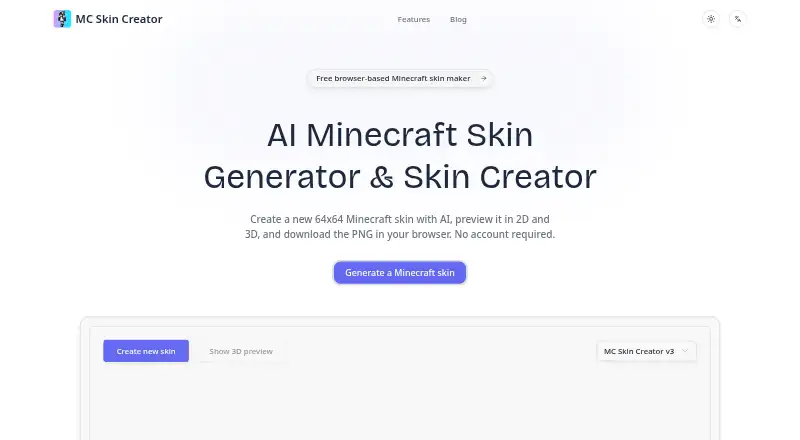
MC Skin Creator is a browser tool for generating Minecraft skin drafts and downloading them as 64x64 PNG files. Its built-in models v3 and v5 generate randomized ideas, which you can inspect in a 2D texture view or on a rotatable 3D character model. The maker says the browser-based tool needs no account to generate, preview, or download a skin. The exported PNG is a standard Minecraft-compatible skin texture. The maker cautions that generated results can contain noisy pixels or mismatched sections, so inspect or edit the PNG before using it. Skins use the inner body layer, which may mean turning off overlay layers in Minecraft. The first generation can take longer while the model loads, especially on slower connections or devices. The maker describes the tool as unofficial and not affiliated with, sponsored by, or endorsed by Microsoft, Mojang, or Minecraft. Support is listed through a contact form and email.
Who it suits
It suits Minecraft players who want to generate skin ideas, preview them, and download drafts for editing or use with a Minecraft profile.
What it does well
- Generates randomized ideas with models v3 and v5
- Offers 2D texture and rotatable 3D previews
- Downloads standard 64x64 Minecraft-compatible PNGs
- No account required to generate or download
What to know first
- First generation may take longer while the model loads
- Results may contain noisy pixels or mismatched sections
- Skins use the inner body layer
Limits
The listed free plan includes AI skin generation, 2D and 3D previews, and 64x64 PNG downloads without an account. Generated skins use the inner body layer and may contain noisy pixels or mismatched sections; the maker recommends inspecting or editing the PNG.
Plans
| Plan | Billed and limits | Price |
|---|---|---|
| Free browser-based Minecraft skin maker | AI skin generation · 2D and 3D previews · 64x64 PNG download · no account required | Free |
As mcskincreator.com lists them, read 9 Oct 2026. The maker's own page has the final word.
Getting started
- Visit https://www.mcskincreator.com/.
- Generate a randomized skin idea with built-in model v3 or v5.
- Inspect the 64x64 texture in the 2D preview.
- Rotate the 3D character model to check the skin from different angles.
- Download the PNG and inspect or edit it before using it.
- If needed, turn off overlay layers in Minecraft.
MC Skin Creator is a browser tool that generates Minecraft skin drafts and provides 2D and 3D previews. It suits players looking for a free idea to inspect or edit; its main limitation is that generated pixels may need cleanup before use.
Overview
Built-in models v3 and v5 generate randomized skin ideas, which users can inspect and download without installing software or creating an account. The 2D texture view and rotatable 3D character make it easier to spot visible problems before saving a draft. That makes MC Skin Creator useful when a quick starting point matters more than precise control over the design.
Generation runs in the browser, but the first run may take longer while the model loads, particularly on slower devices or connections. The maker also cautions that output can contain noisy pixels or mismatched sections. Treat the result as a draft to review or edit, rather than a finished design guaranteed to look right in game.
Key features
- Randomized generation: Choose between built-in models v3 and v5 to produce skin ideas. This can help players get started quickly, though random output may take further editing to suit a specific look.
- 2D and 3D previews: Inspect the 64x64 texture directly and rotate the character to view the design from different angles. Together, these views help reveal flaws before download.
- PNG export: Download a standard 64x64 Minecraft-compatible skin texture for editing or use with a profile. Generated skins use the inner body layer, so users may need to turn off overlay layers in Minecraft.
- No-account browser workflow: Generate, preview, and download in the browser without signing up. This keeps the process simple for occasional use, while the initial model load can slow the first generation.
Pricing
MC Skin Creator is freemium, with a free plan priced at $0. It includes AI skin generation, 2D and 3D previews, and 64x64 PNG downloads, with no account required. That is a good fit for players who want to explore ideas or make a draft without committing to a paid tool. The free plan is the only plan described.
Platforms
MC Skin Creator runs on the web. Its browser-based generation avoids an app installation, though the first model load may take longer on slower connections or devices.
Who it's for
This is a sensible choice for Minecraft players who want randomized concepts they can preview and then edit or use with a profile. The downloadable PNG and dual previews support that draft-first workflow. Players who need a polished result without checking pixels or adjusting overlay settings should look for a tool that better fits those requirements.
Pros and cons
- Pro: No account is needed. Players can generate, preview, and download skins without a sign-up step.
- Pro: Both preview modes are included. The 2D texture and rotatable 3D model offer complementary ways to inspect a draft before saving it.
- Pro: PNG export is included for free. The standard 64x64 format gives users a file they can edit or use with a Minecraft profile.
- Con: Generated output may need cleanup. Noisy pixels or mismatched sections make inspection and possible PNG editing part of the workflow.
- Con: Overlay settings may need adjustment. Because output uses the inner body layer, some users will need to turn off overlays in Minecraft.
- Con: The first generation can be slow. Model loading adds a wait, especially on slower devices or connections.
Alternatives
Minecraft Character Customizers is a useful place to compare tools if you want to consider a broader set of options.
- Minecraft Launcher suits players looking for a free launcher across desktop and mobile platforms; access to games requires ownership or a time-limited demo.
- NeedCoolerShoes is another free option, available on web and mobile.
- Minecraft Skin Generator may suit users who want a defined allowance: its free Noob plan includes five generations, while a 2.49 USD once Hobbyist plan adds 50 generations.
- Minecraft Skin Randomizer is a free option for Linux or self-hosted use, with no usage limits stated.
- Monster MCPE Skin Editor offers an online editor without installation or an account.
- Skin Maker is an Android option for creating, saving, exporting, and sharing skins for free; AI generation and premium packs use credits, and ads are included.
- SkinForge Minecraft Skin Studio offers a free web editor with 3D preview and PNG export, plus a 0.99 USD once Starter plan with 10 AI credits and 10 generations.
- SkinForge: AI Skin Maker is an iOS option with one free first skin and paid token packs or a monthly Pro plan.
Verdict
Choose MC Skin Creator if you want a free, account-free way to turn a randomized idea into a previewable 64x64 PNG draft. Its 2D and 3D inspection help make quick iteration practical, but output quality and inner-layer behavior mean some review and adjustment may be needed. Look elsewhere if you need a finished skin without cleanup or in-game setting changes.
Verdict
MC Skin Creator provides a quick route from generated idea to previewable, downloadable skin draft without an account. Expect to inspect the result and possibly adjust overlay settings or edit the PNG.
Questions
How much does MC Skin Creator cost?
The listed Free browser-based Minecraft skin maker plan costs nothing.
Do I need an account?
No account is required to generate, preview, or download skins.
What does it download?
It downloads a standard 64x64 Minecraft-compatible skin texture as a PNG.
What platforms can I use it on?
MC Skin Creator is listed for the web, and the generator runs in the browser.
Who makes MC Skin Creator?
The About page identifies the maker as the MC Skin Creator Team and lists a contact form and [email protected].
Is MC Skin Creator affiliated with Minecraft?
The maker describes it as unofficial and says it is not affiliated with, sponsored by, or endorsed by Microsoft, Mojang, or Minecraft.
Facts from MC Skin Creator's own pages
- 2D preview
- Users can inspect the 64x64 skin texture before downloading. · mcskincreator.com, 9 Oct 2026
- 3D preview
- Users can rotate a 3D character model to inspect the skin. · mcskincreator.com, 9 Oct 2026
- Account requirement
- The maker says users can generate, preview, and download skins without an account. · mcskincreator.com, 8 Oct 2026
- Affiliation
- The site says it is unofficial and is not affiliated with, endorsed by, or sponsored by Microsoft, Mojang, or Minecraft. · mcskincreator.com, 9 Oct 2026
- AI generation
- Users can choose model v3 or v5 to create randomized 64x64 Minecraft skin ideas. · mcskincreator.com, 9 Oct 2026
- Browser processing
- The maker says its AI model runs in the browser, and the first generation may take longer while the model loads, especially on slower connections or devices. · mcskincreator.com, 8 Oct 2026
- Cookies
- The maker's cookie policy describes essential, performance, functional, and targeting cookies, including advertising-partner cookies. · mcskincreator.com, 8 Oct 2026
- Download format
- The tool downloads a standard 64x64 Minecraft skin PNG. · mcskincreator.com, 9 Oct 2026
- Export
- The tool downloads a standard 64x64 Minecraft-compatible skin texture as a PNG. · mcskincreator.com, 8 Oct 2026
- In-browser use
- The skin generator runs in the browser, and no account is required to create or download a skin. · mcskincreator.com, 9 Oct 2026
- Intended users
- The maker presents the tool for Minecraft players who want to generate skin ideas and download them for editing or use with a Minecraft profile. · mcskincreator.com, 8 Oct 2026
- Loading limitation
- The first generation may take longer while the model loads, especially on slower connections or devices. · mcskincreator.com, 9 Oct 2026
- Maker identity
- The About page identifies the maker as the MC Skin Creator Team and lists [email protected] for contact. · mcskincreator.com, 9 Oct 2026
- Output caveat
- Generated skins use the inner body layer, so users may need to turn off overlay layers in Minecraft. · mcskincreator.com, 9 Oct 2026
- Output limitation
- Generated skins use the inner body layer, so users may need to turn off overlay layers in Minecraft. · mcskincreator.com, 8 Oct 2026
- Output quality
- The site cautions that AI output can contain noisy pixels or mismatched sections and may need editing. · mcskincreator.com, 9 Oct 2026
- Purpose
- MC Skin Creator generates Minecraft skin drafts that users can preview and download as PNG files. · mcskincreator.com, 9 Oct 2026
- Support
- The site provides a contact form for questions about the AI-powered skin creator and skin generation. · mcskincreator.com, 9 Oct 2026
Where MC Skin Creator stands on Freedom251
- Minecraft Character Customizers#10 of 24