Freedom251 › Menu Bar Customization Software
Manico
What Manico is
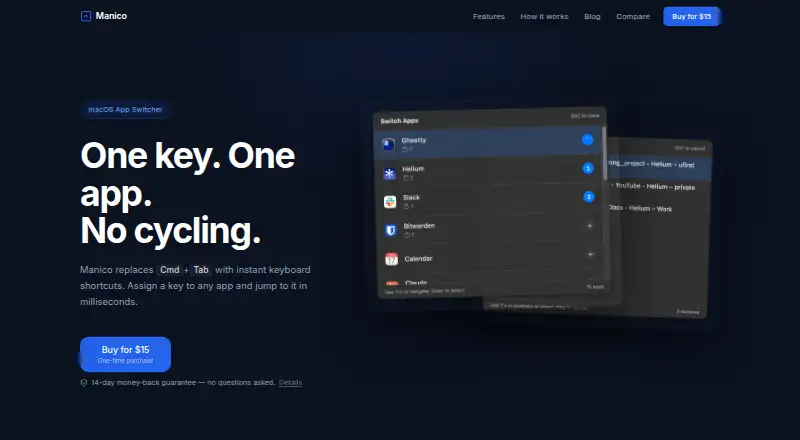
Manico is a keyboard-focused macOS app switcher for developers and power users. Assign a key to an application and switch directly to it, with a custom shortcut for each app and a configurable trigger hotkey. It can also move between different windows belonging to the same application, but it does not switch browser tabs. Manico runs from the menu bar without a Dock icon. The app supports macOS 13 Ventura or newer on Apple Silicon and Intel Macs, and needs Accessibility permission to switch apps and windows. Its site says it never reads keystrokes or screen contents. The desktop app runs entirely locally and collects no personal information, usage data, or analytics. Manico costs 15.00 USD as a one-time purchase and includes future updates. There is no free plan or trial, but purchases include a 14-day money-back guarantee. Paddle processes payment data and MailerSend sends download links. The website uses self-hosted Umami for anonymous, aggregated analytics without cookies.
Who it suits
Manico suits Mac users who work primarily from the keyboard and want direct app or same-app window switching.
What it does well
- Per-app keyboard shortcuts
- Switches windows within an app
- No Dock icon
- Local processing and no app analytics
- Future updates included
What to know first
- macOS 13 or newer required
- No free trial
- Does not switch browser tabs
- Accessibility permission required
Limits
Manico switches applications and windows but does not switch browser tabs. It requires macOS 13 Ventura or newer and Accessibility permission.
Plans
| Plan | Billed and limits | Price |
|---|---|---|
| Manico | One-time purchase · macOS 13.0+ · Future updates included · Download link sent via email | $15, paid once |
As manico.mariuti.com lists them, read 9 Oct 2026. The maker's own page has the final word.
Getting started
- Open the Manico website on a compatible Mac
- Purchase the 15.00 USD one-time plan
- Receive the download link by email
- Install on macOS 13 Ventura or newer
- Grant Accessibility permission for app and window switching
- Assign shortcuts and set the trigger hotkey
Verdict
Manico focuses on direct keyboard switching for apps and their windows, with local processing and a one-time license. It is less suitable if browser-tab switching is essential.
Questions
How much does Manico cost?
The Manico plan costs 15.00 USD once, with future updates included.
Is there a free plan or trial?
No. Manico has no free plan and no free trial, but purchases include a 14-day money-back guarantee.
Which Macs are supported?
It supports macOS 13 Ventura or newer on Apple Silicon and Intel Macs.
Does Manico switch browser tabs?
No. It switches apps and windows, not browser tabs.
What permission does it require?
Manico requires Accessibility permission to switch apps and windows. The site says it never reads keystrokes or screen contents.
Facts from Manico's own pages
- Accessibility and data
- Manico requires Accessibility permission to switch apps and windows, and the site says it never reads keystrokes or screen contents. · manico.mariuti.com, 9 Oct 2026
- Custom shortcuts
- Users can assign their own keyboard shortcut to each app and customize the trigger hotkey. · manico.mariuti.com, 9 Oct 2026
- Local processing
- The privacy policy says the desktop app runs entirely locally and collects no personal information, usage data, or analytics. · manico.mariuti.com, 9 Oct 2026
- Maker
- The terms identify Alexandru Florian Mariuti as the company and say it is registered in Italy. · manico.mariuti.com, 9 Oct 2026
- Menu bar
- Manico runs in the menu bar without a Dock icon. · manico.mariuti.com, 9 Oct 2026
- Notable limitation
- Manico switches apps and windows, and its app guide says it does not switch browser tabs. · manico.mariuti.com, 9 Oct 2026
- Payments and email
- The privacy policy says Paddle processes payment data and MailerSend delivers download links. · manico.mariuti.com, 9 Oct 2026
- Support
- The site lists [email protected] for support and refund requests. · manico.mariuti.com, 9 Oct 2026
- Supported Macs
- The site says macOS 13 Ventura or newer is supported on Apple Silicon and Intel Macs. · manico.mariuti.com, 9 Oct 2026
- Trial and refund
- There is no free trial; purchases include a 14-day money-back guarantee. · manico.mariuti.com, 9 Oct 2026
- Website analytics
- The privacy policy says the website uses self-hosted Umami for anonymous, aggregated analytics and does not use cookies. · manico.mariuti.com, 9 Oct 2026
- What it does
- Manico is a keyboard-focused macOS app switcher that assigns a key to an app for direct switching. · manico.mariuti.com, 9 Oct 2026
- Who it is for
- The site describes Manico as built for developers and power users who work on the keyboard. · manico.mariuti.com, 9 Oct 2026
- Window switching
- Manico can switch between different windows of the same app. · manico.mariuti.com, 9 Oct 2026
Where Manico stands on Freedom251
- Menu Bar Customization Software#25 of 25