Freedom251 › Menu Bar Customization Software

ChocolateBar
What ChocolateBar is
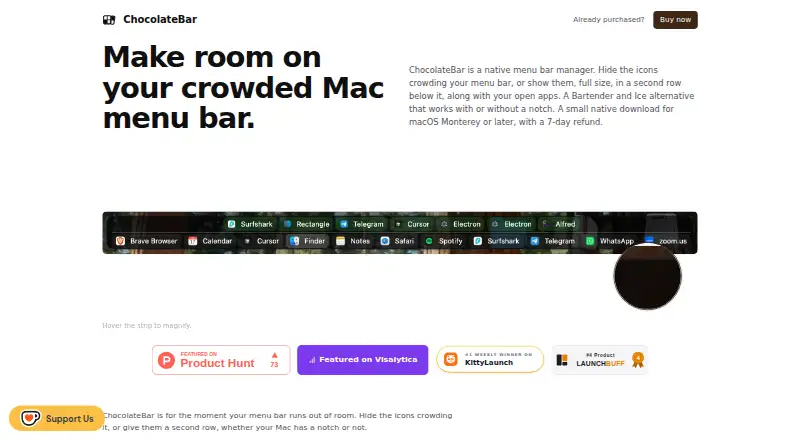
ChocolateBar is a macOS utility for managing a crowded menu bar. It can hide third-party icons or display them in a second row alongside open application windows. Clicking an icon in the row activates its actual menu bar item, and selecting a listed window brings it forward. The strip can be arranged horizontally or vertically, while profiles save icon visibility, order, and layout settings. The app supports keyboard shortcuts and notch use, but does not group menu items or add custom ones.
ChocolateBar is a universal binary for Apple Silicon and Intel Macs, supporting macOS Monterey through Sequoia; Tahoe is described as coming soon. It requires Accessibility permission to read and click menu bar items and list active windows. The maker says it contacts its servers only for update checks and that menu bar and window functions send nothing off the Mac. It does not request Screen Recording permission, though mirrored menus may omit original icons or custom behavior. It can display only icons macOS is currently drawing. The one-time purchase is 15.00 USD and includes one year of updates. A 48-hour full-featured trial is available without a card, and the maker offers a 7-day refund.
Who it suits
ChocolateBar suits Mac users who want to hide menu bar icons or keep them accessible in a second row. It may also suit people who want saved layout profiles and quick switching among active windows.
What it does well
- Can hide icons or show them in a second row
- Profiles save visibility, order, and layout
- Supports Apple Silicon and Intel Macs
- Includes keyboard shortcuts and notch support
- 48-hour trial requires no card
What to know first
- Requires Accessibility permission
- Shows only icons macOS is currently drawing
- Mirrored menus may omit icons or custom behavior
- Supports Monterey through Sequoia; Tahoe is coming soon
Limits
The 48-hour trial provides full features. The $15.00 USD one-time purchase includes one year of updates; ChocolateBar can display only icons macOS is currently drawing.
Plans
| Plan | Billed and limits | Price |
|---|---|---|
| ChocolateBar | One-time purchase; includes one year of updates · Every Mac you own · macOS Monterey through Sequoia · 7-day refund | $15, paid once |
As chocolatebar.app lists them, read 7 Oct 2026. The maker's own page has the final word.
Getting started
- Open the ChocolateBar website
- Download the macOS app
- Install on a Mac running Monterey through Sequoia
- Grant Accessibility permission
- Use the 48-hour full-featured trial without entering a card
- Arrange the strip and save a profile
Verdict
ChocolateBar offers flexible menu bar layouts and a second-row view that also lists active windows. Its permissions and limits on displayed and mirrored menu items are important considerations before purchase.
Questions
What does ChocolateBar cost?
The ChocolateBar plan costs $15.00 USD as a one-time purchase and includes one year of updates. A 7-day refund is offered.
Is there a free plan or trial?
There is no free plan. A 48-hour trial includes full features and does not require a card.
Which Macs and macOS versions are supported?
ChocolateBar is a universal binary for Apple Silicon and Intel Macs. It supports macOS Monterey through Sequoia; Tahoe is described as coming soon.
What permissions does it need?
Accessibility permission is required to read and click menu bar items and list active windows. It does not request Screen Recording permission.
Does it group or add menu items?
It can hide and rearrange menu items, but it does not group them or add custom menu items.
Facts from ChocolateBar's own pages
- Compatibility
- The app is a universal binary for Apple Silicon and Intel Macs and supports macOS Monterey through Sequoia; Tahoe is described as coming soon. · chocolatebar.app, 7 Oct 2026
- Compatibility limit
- ChocolateBar can show only icons that macOS is currently drawing in the menu bar. · chocolatebar.app, 7 Oct 2026
- Integrations
- The maker lists compatibility examples including 1Password, Slack, Linear, Tailscale, NordVPN, Dropbox, Notion Calendar, Raycast, Fantastical, Things, Bitwarden, iStat Menus, CleanShot X, and Discord. · chocolatebar.app, 7 Oct 2026
- Layouts and profiles
- The strip can be arranged horizontally or vertically, and profiles can save icon visibility, order, and layout settings. · chocolatebar.app, 7 Oct 2026
- Menu bar icons
- The second row shows hidden menu bar icons, and clicking an icon clicks its real menu bar item. · chocolatebar.app, 7 Oct 2026
- Permissions
- ChocolateBar requires Accessibility permission to read and click menu bar items and list active windows. · chocolatebar.app, 7 Oct 2026
- Privacy
- The maker says the app only contacts its servers when checking for updates and that nothing leaves the Mac during its menu bar and window functions. · chocolatebar.app, 7 Oct 2026
- Purpose
- ChocolateBar manages a crowded Mac menu bar by hiding third-party icons or displaying them in a second row with open app windows. · chocolatebar.app, 7 Oct 2026
- Screen recording
- ChocolateBar does not request Screen Recording permission; its mirrored menus may omit original icons or custom behavior. · chocolatebar.app, 7 Oct 2026
- Support and refund
- The maker offers a 7-day refund and directs support requests to [email protected]. · chocolatebar.app, 7 Oct 2026
- Trial
- The maker offers a 48-hour trial with full features and no card required. · chocolatebar.app, 7 Oct 2026
- Window switching
- The strip lists active application windows so users can bring a window forward with one click. · chocolatebar.app, 7 Oct 2026
Where ChocolateBar stands on Freedom251
- Menu Bar Customization Software#21 of 25