Freedom251 › Comic Creation Software
Manga Draft
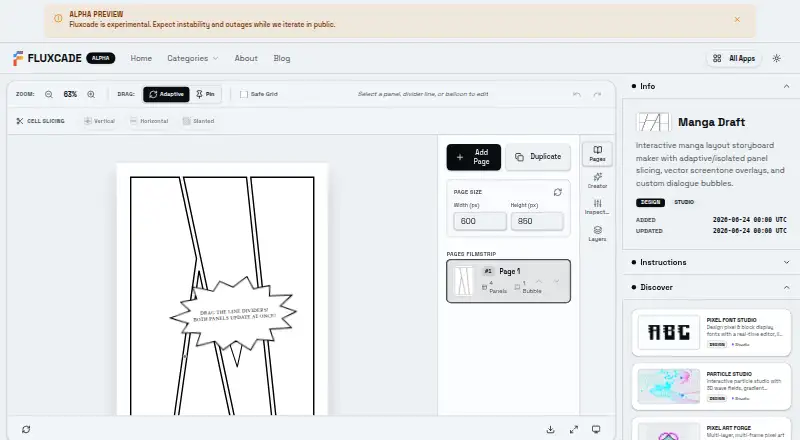
What Manga Draft is
Manga Draft is a free browser-based vector design tool for building manga storyboard layouts, comic frames, webtoon storyboards, and multi-page comic volumes. You can start from layout presets, edit panels, place artwork, adjust borders and lettering, reorder pages, and export the result. Its panel editor supports adaptive or isolated divider dragging, diagonal cuts, spacing gutters, and responsive layout alignment. You can add dot mesh, crosshatch, or action speedline screentones, with controls for transparency.
For lettering, Manga Draft offers speech, thought, and shout balloons, selectable font styles, and movable tails. Illustrations can be uploaded or dragged into panels, then adjusted for zoom, rotation, and offset. Exports include high-DPI PNG sheets, scalable SVGs, and a project packaged as a single ZIP book; the Free plan lists PNG and SVG exports. FLUXCADE says uploaded artwork remains in memory for the session and is not saved to a server or database. The maker says users own their creations and may use them for any purpose. Manga Draft is in active alpha, so the maker warns of possible instability, visual glitches, and temporary outages. FLUXCADE also uses anonymized usage analytics and displays Google AdSense ads that may use cookies for advertising.
Who it suits
Manga Draft suits comic and manga creators who want to arrange panels, artwork, screentones, and lettering in a browser. Its multi-page workflow and PNG, SVG, and ZIP exports are relevant to people creating storyboards, comic frames, or volumes.
What it does well
- Free browser-based design tool.
- Panel editor supports diagonal cuts and adjustable gutters.
- Includes three types of screentone overlays.
- Speech, thought, and shout balloons are available.
- Exports PNG sheets, SVGs, and a ZIP book.
- Maker says users own their creations.
What to know first
- The service is in active alpha and may be unstable.
- Temporary outages and visual glitches may occur.
- Google AdSense ads may use advertising cookies.
Limits
The Free plan lists PNG and SVG exports. The service is in active alpha, with possible instability, visual glitches, and temporary outages.
Plans
| Plan | Billed and limits | Price |
|---|---|---|
| Free | Free; PNG and SVG exports | Free |
As fluxcade.com lists them, read 8 Oct 2026. The maker's own page has the final word.
Getting started
- Visit https://www.fluxcade.com/apps/manga-draft in a browser.
- Choose a layout preset.
- Edit panels and add or drag illustrations into them.
- Adjust artwork, borders, screentones, and lettering.
- Reorder pages and export as PNG, SVG, or a ZIP book.
- Contact [email protected] with questions.
Verdict
Choose Manga Draft if you want a free browser tool for arranging comic panels, artwork, screentones, and lettering. Look elsewhere if active-alpha instability or temporary outages would disrupt your workflow.
Questions
How much does Manga Draft cost?
The Free plan costs nothing.
Which platforms can I use it on?
Manga Draft is available on the web.
What export formats are available?
The product lists high-DPI PNG sheets, scalable SVGs, and a project packaged as a single ZIP book. The Free plan lists PNG and SVG exports.
Who owns the work I create?
FLUXCADE says users own their creations and may use them for any purpose.
Are uploaded illustrations saved?
FLUXCADE says uploads stay in memory for the session and are not persisted to a server or database.
Is Manga Draft stable?
FLUXCADE describes the service as being in active alpha and warns of possible instability, visual glitches, and temporary outages.
Facts from Manga Draft's own pages
- Analytics and ads
- FLUXCADE says it uses anonymized usage analytics and displays Google AdSense ads that may use cookies for advertising. · fluxcade.com, 8 Oct 2026
- Artwork
- Users can upload or drag and drop illustrations into panels, then adjust their zoom, rotation, and offset. · fluxcade.com, 8 Oct 2026
- Exports
- The product exports high-DPI PNG sheets, scalable SVGs, and a project as a single ZIP book. · fluxcade.com, 8 Oct 2026
- Intended users
- The maker lists webtoon storyboards, manga layouts, comic frames, and multi-page comic volumes as use cases. · fluxcade.com, 8 Oct 2026
- Lettering
- It includes speech, thought, and shout balloons with selectable font styles and movable tails. · fluxcade.com, 8 Oct 2026
- Ownership
- FLUXCADE says users own their creations and may use them for any purpose. · fluxcade.com, 8 Oct 2026
- Panel editing
- Its panel editor supports adaptive or isolated divider dragging, diagonal cuts, spacing gutters, and responsive layout alignment. · fluxcade.com, 8 Oct 2026
- Privacy
- FLUXCADE says uploads stay in memory for the session and are not persisted to a server or database. · fluxcade.com, 8 Oct 2026
- Purpose
- Manga Draft is a lightweight vector design tool for creating manga storyboard layouts and comic frames in a browser. · fluxcade.com, 8 Oct 2026
- Screentones
- It offers dot mesh, crosshatch, and action speedline overlays with adjustable transparency. · fluxcade.com, 8 Oct 2026
- Service status
- FLUXCADE describes itself as in active alpha and warns of possible instability, visual glitches, and temporary outages. · fluxcade.com, 8 Oct 2026
- Support
- The maker lists [email protected] for questions. · fluxcade.com, 8 Oct 2026
- Workflow
- Users can apply layout presets, edit panels and artwork, adjust borders and lettering, reorder pages, and export designs. · fluxcade.com, 8 Oct 2026
Where Manga Draft stands on Freedom251
- Comic Creation Software#16 of 30