Freedom251 › Comic Creation Software

Comic Creator
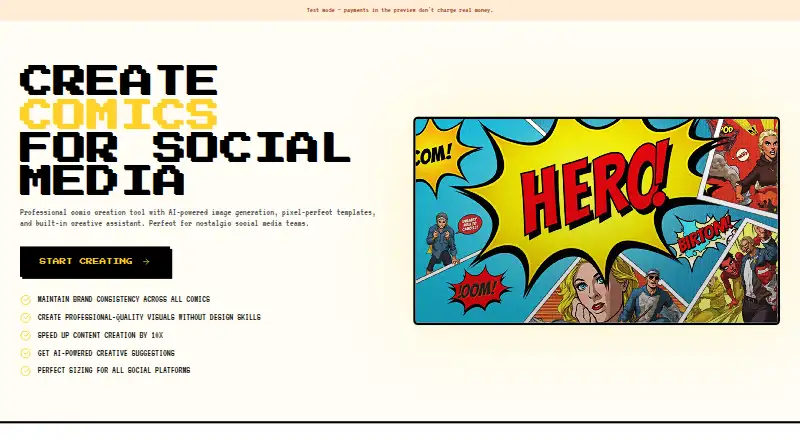
What Comic Creator is
Comic Creator is a browser-based studio for making comics from panels, characters, backgrounds, speech bubbles and page layouts. Text prompts can generate characters, backgrounds, props and panels, while its editor lets creators arrange panels and add captions, dialogue bubbles and sound effects. The AI Copilot can suggest panel descriptions and dialogue, and help develop ideas and story beats. A character library lets users reuse characters across panels and comics; style guides can keep the color palette, line weight and art style consistent across pages. Finished comics can be exported as PNG, JPG or PDF, with presets for Instagram, TikTok, Webtoon and print. Comic Creator has a free plan, and users can create their first comic without a credit card. Paid plans unlock more generations, projects and export options. Publishing, selling or marketing comics is available on a paid plan, subject to plan-specific limits. The web app is aimed at hobbyist cartoonists, educators, content marketers and small studios.
Who it suits
It suits comic makers who want prompt-based generation, reusable characters and page-level style controls. The maker also identifies teachers and students, content marketers and small studios as intended users.
What it does well
- Prompt generation includes characters, backgrounds, props and panels.
- Character library supports reuse across comics.
- Style guides keep visual settings consistent across pages.
- Exports include PNG, JPG, PDF and social presets.
What to know first
- Collaboration features are still on the roadmap.
- Commercial use is limited to paid plans.
- More generations, projects and export options require paid plans.
Limits
The free plan covers a first comic; paid plans unlock more generations, projects, and export options. Commercial use is available on a paid plan subject to plan-specific limits.
Getting started
- Open the Comic Creator website in a browser.
- Start creating a first comic on the free plan without a credit card.
- Use text prompts to generate characters, backgrounds, props, or panels.
- Arrange panels and add speech bubbles, captions, and sound effects.
- Export the comic as PNG, JPG, or PDF, or use a listed preset.
- Choose a paid plan for more generations, projects, export options, or commercial use.
Verdict
Comic Creator combines comic layout and editing tools with prompt-based generation and reusable character and style controls. Its account-based projects do not yet include collaboration features.
Questions
Is Comic Creator free?
It offers a free plan, and users can create their first comic without a credit card. Paid plans unlock more generations, projects, and export options.
Which platforms does Comic Creator support?
It runs in a browser on the web.
What export formats are available?
Exports include PNG, JPG, and PDF. Presets are listed for Instagram, TikTok, Webtoon, and print.
Can I use comics commercially?
Publishing, selling, or marketing use is available on a paid plan, subject to plan-specific limits.
Does Comic Creator support collaboration?
Projects are tied to an account. Collaboration features are on the roadmap.
Is there classroom pricing?
The maker says classroom pricing is available by contacting them about education plans.
Facts from Comic Creator's own pages
- AI generation
- It generates characters, backgrounds, props, and panels from text prompts. · comiccreator.ai, 4 Oct 2026
- Audience
- The maker identifies hobbyist cartoonists, teachers and students, content marketers, and small studios as intended users. · comiccreator.ai, 4 Oct 2026
- Character consistency
- Users can save characters to a library and reuse them across panels and comics. · comiccreator.ai, 4 Oct 2026
- Character library
- Users can save characters in a library and reuse them to keep their appearance consistent across panels and comics. · comiccreator.ai, 4 Oct 2026
- Collaboration
- The page says projects are tied to an account and collaboration features are on the roadmap. · comiccreator.ai, 4 Oct 2026
- Collaboration limit
- Projects are tied to an account; collaboration features are described as being on the roadmap. · comiccreator.ai, 4 Oct 2026
- Commercial use
- The site says comics can be published, sold, or used for marketing on a paid plan, subject to plan-specific limits. · comiccreator.ai, 4 Oct 2026
- Copilot
- The AI Copilot suggests panel descriptions and dialogue, and can help brainstorm ideas and story beats. · comiccreator.ai, 4 Oct 2026
- Editing
- The editor supports dragging and arranging panels and adding speech bubbles, captions, and sound effects. · comiccreator.ai, 4 Oct 2026
- Education
- The education page says classroom pricing is available by contacting the maker about education plans. · comiccreator.ai, 4 Oct 2026
- Exports
- The site lists PNG, JPG, and PDF exports, plus presets for Instagram, TikTok, Webtoon, and print. · comiccreator.ai, 4 Oct 2026
- Free access
- The site says users can create their first comic without a credit card and that paid plans unlock more generations, projects, and export options. · comiccreator.ai, 4 Oct 2026
- Intended users
- The site describes the product for hobbyist cartoonists, teachers and students, content marketers, and small studios. · comiccreator.ai, 4 Oct 2026
- Product
- Comic Creator is an online comic studio that runs in a browser and combines comic panels, characters, backgrounds, speech bubbles, page layouts, and export tools. · comiccreator.ai, 4 Oct 2026
- Style controls
- Style guides can set a comic’s color palette, line weight, and art style. · comiccreator.ai, 4 Oct 2026
- Style guides
- Style guides can lock a comic’s color palette, line weight, and art style across panels and pages. · comiccreator.ai, 4 Oct 2026
- Writing assistant
- Its Copilot suggests panel descriptions and dialogue, and helps brainstorm story beats. · comiccreator.ai, 4 Oct 2026
Where Comic Creator stands on Freedom251
- Comic Creation Software#15 of 30