Freedom251 › AI Comic Generators

Comics AI
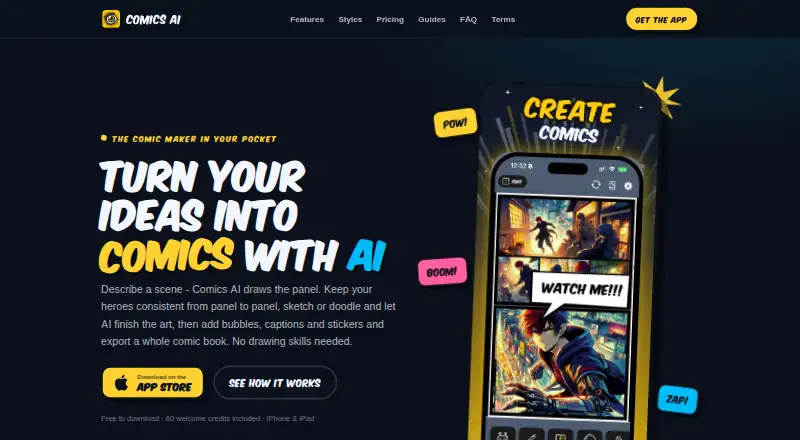
What Comics AI is
Comics AI is an iOS app for turning text descriptions or sketches into comic panels, arranging pages and exporting comic books as PDFs. To make a panel, users describe a scene and select from five aspect ratios. A scene can include up to four heroes whose faces, hair and outfits remain recognisable across generated panels. Users can also upload a sketch or doodle for transformation into comic art, or draw on the canvas with a finger or Apple Pencil. Editing tools include panel layouts, speech and thought bubbles, captions, comic fonts and stickers. The app offers 16 comic styles, with four on the free tier. The free plan costs nothing and includes 60 welcome credits; generating a text panel costs 10 credits, while each attached character reference, photo or sketch adds five credits. Credits do not expire or reset, and failed generations are refunded automatically. Free PDF exports include a small watermark. The app runs on iPhone and iPad with iOS 15 or later. Generation needs an internet connection, but canvas editing works offline. The maker says prompts, photos, sketches and finished comics are not stored on its servers.
Who it suits
Comics AI suits iPhone and iPad users who want to create comic pages from text prompts or sketches and export them as PDFs. Its canvas tools also support drawing with a finger or Apple Pencil.
What it does well
- Create panels from descriptions or sketches.
- Scenes can include up to four recognisable heroes.
- Editor includes layouts, bubbles, captions and stickers.
- Credits do not expire, and failed generations are refunded.
- Canvas editing works offline.
What to know first
- Panel generation requires internet access.
- Free exports include a small watermark.
- Free tier includes four of 16 styles.
- Runs on iOS 15 or later only.
Limits
The Free plan provides 60 welcome credits and four styles. A text-generated panel costs 10 credits, and each attached character reference, photo or sketch adds 5 credits. Free PDF exports include a small watermark.
Plans
| Plan | Billed and limits | Price |
|---|---|---|
| Free | 60 welcome credits · 4 styles · full canvas editor and bubbles · PDF export | Free |
| PRO Monthly | per month · 1,200 credits every month · All 16 styles · consistent characters and custom heroes · no watermark · credit packs · unused credits roll over | $12.99 a month |
As comicsai.com lists them, read 5 Oct 2026. The maker's own page has the final word.
Getting started
- Install Comics AI on an iPhone or iPad running iOS 15 or later.
- Start with the Free plan or choose a paid plan.
- Describe a scene and choose one of five aspect ratios, or upload or draw a sketch.
- Use the editor to arrange panels and add bubbles, captions, fonts or stickers.
- Connect to the internet to generate panels; export finished pages as a PDF.
Comics AI is an iPhone and iPad app for turning descriptions or sketches into comic panels, then assembling those panels into finished pages. It is best suited to creators who want generation, lettering, layout, and PDF export in one place. The main trade-off is between a capable editor and the credit, style, and watermark limits on the free tier.
Overview
Comics AI combines AI image creation with a page-building canvas. You can describe a scene, select one of five aspect ratios, and generate a panel, or upload a doodle and have it transformed into comic art. Finger and Apple Pencil input make the sketch workflow practical on supported iPhones and iPads. Generation needs an internet connection, while canvas editing works offline.
Key features
Character continuity is a notable strength. A scene can contain up to four heroes, with faces, hair, and clothing intended to remain recognisable from panel to panel. You can also attach a character reference, photo, or sketch, although each attachment adds to the credit bill.
The editor handles panel layouts, speech and thought balloons, captions, comic fonts, and stickers. A character library and illustration tools support further assembly, so the app is useful for making a short comic rather than merely producing isolated images. Multiple pages can be arranged into a book and exported as PDF in Original, A4, or Comic Book size. Free exports carry a small watermark.
There are 16 comic styles overall, but the Free plan exposes only four. Text generation costs 10 credits per panel; every attached character reference, photo, or sketch costs another five. Credits neither expire nor reset, and failed generations are refunded automatically, which helps occasional users preserve unused allowance.
Pricing
Free
The Free plan costs nothing and starts with 60 welcome credits. It includes four styles, the full canvas editor and bubbles, and PDF export. It is a sensible way to learn the workflow or produce drafts, but 60 credits amount to only six text-generated panels before attachment costs, and the watermark limits presentation-ready output.
PRO Monthly
PRO Monthly costs $12.99 a month, billed per month. It supplies 1,200 credits every month, all 16 styles, consistent characters and custom heroes, no watermark, credit packs, and rollover of unused credits. At 10 credits per text panel, the recurring allowance covers substantially more production, while attached references still consume five additional credits each. This plan fits creators making regular multi-page work; occasional users can remain on Free because credits do not expire.
Platforms
Comics AI runs on iPhone and iPad with iOS 15 or later. Generation requires internet access, but editing on the canvas is available offline. Apple handles distribution and payments; Google Firebase supplies anonymous identity and credit records, and an unnamed AI infrastructure provider handles image generation.
Who it's for
Choose Comics AI if you want an iOS-native workflow from prompt or sketch through lettering, page layout, and PDF delivery, especially when recurring characters matter. It also suits parents and younger creators with supervision: the app is rated 12+, generations pass automated content filters, and the maker recommends parental involvement. It is less suitable if you need Android, web access, or watermark-free work without a subscription.
Pros and cons
- Pros: Prompt and sketch-to-art generation in one canvas; up to four recognisable heroes per scene; layouts, balloons, captions, fonts, and stickers included; PDF output in three sizes; credits roll over and failed generations are refunded; the maker says prompts, images, sketches, and finished comics stay on the device rather than its servers.
- Cons: iOS 15 or later is required; image generation is online-only; Free is limited to four styles, 60 welcome credits, and watermarked exports; every attached reference, photo, or sketch adds five credits; the larger style set, custom heroes, and watermark removal require the 12.99 USD monthly plan.
Alternatives
BlankComic is the better choice for free, watermark-free creation with no subscription or account, and it works on Android, iOS, and the web.
GenToon suits users who want cross-platform access and a monthly credit structure, starting with 150 credits per month free or 800 credits for $10 a month.
LlamaGen.ai is preferable when web, API, or extension access and a larger allowance matter; its Standard plan provides 15,000 credits per month for 18.00 USD.
MakeBeliefsComix is a free, more traditional comic builder supporting up to 18 panels, with an optional account for saving and editing.
AI Comic Factory is a web alternative with a 9.99 USD monthly Starter plan that includes 600 credits, faster generation, character consistency, and ad-free use.
Anifusion is a web option offering a 2,000-credit pack for 15.00 USD once.
ComicsAI is a web alternative with a free Hobby tier and optional paid plans.
Create Comic is worth considering if a lifetime free generation or one-time gift packs suit your needs.
For broader comparisons, see Comic Creation Software, AI Cartoon Generators, and AI Comic Generators.
Verdict
Comics AI is a strong fit for iPhone and iPad creators who want one app to generate panels, keep a cast recognisable, lay out pages, and export PDFs. Its main reason to choose it is the integrated sketch-to-book workflow; its main reason to look elsewhere is the iOS-only platform and the Free tier’s four-style, 60-credit, watermarked output.
Verdict
Comics AI combines panel generation with page layout and PDF export. Its free plan includes 60 credits, while a monthly plan costs $12.99 a month and includes 1,200 credits each month.
Questions
Is Comics AI free?
Yes. The Free plan is listed as free and includes 60 welcome credits, four styles, the canvas editor and bubbles, and PDF export.
How much is the paid plan?
The pricing note says paid plans start at $4.99. The listed PRO Monthly plan costs $12.99 a month and includes 1,200 credits each month.
Which devices can run Comics AI?
It runs on iPhone and iPad with iOS 15 or later.
Can I export comics as PDFs?
Yes. PDF export is available, in Original, A4 and Comic Book size. Free exports include a small watermark.
Does generating a comic require internet access?
Yes. Image generation requires internet access, while canvas editing works offline.
How does Comics AI handle creative work and privacy?
The maker says prompts, photos, sketches and finished comics are not stored on its servers and that creative work stays on the user’s device.
Facts from Comics AI's own pages
- AI panel generation
- Users describe a scene and choose from five aspect ratios to generate a comic panel. · comicsai.com, 5 Oct 2026
- Audience and safety
- The maker says generations pass automated content filters and recommends parental involvement for younger creators; its FAQ states the app is rated 12+. · comicsai.com, 5 Oct 2026
- Character consistency
- A scene can include up to four heroes whose faces, hair, and outfits remain recognisable across generated panels. · comicsai.com, 5 Oct 2026
- Credit costs
- A text-generated panel costs 10 credits, and each attached character reference, photo, or sketch adds 5 credits. · comicsai.com, 5 Oct 2026
- Credit rollover
- Credits do not expire or reset; failed generations are refunded automatically. · comicsai.com, 5 Oct 2026
- Device and connectivity limits
- The app runs on iPhone and iPad with iOS 15 or later; generation requires internet access, while canvas editing works offline. · comicsai.com, 5 Oct 2026
- Editing tools
- The editor supports panel layouts, speech and thought bubbles, captions, comic fonts, and stickers. · comicsai.com, 5 Oct 2026
- Export
- Users can arrange multiple pages into comic books and export PDFs; free exports include a small watermark. · comicsai.com, 5 Oct 2026
- Integrations and services
- The app uses Apple for distribution and payments, Google Firebase for anonymous identity and credit records, and an unnamed AI infrastructure provider for image generation. · comicsai.com, 5 Oct 2026
- Privacy
- The maker says prompts, photos, sketches, and finished comics are not stored on its servers; creative work stays on the user's device. · comicsai.com, 5 Oct 2026
- Product
- Comics AI turns text descriptions or sketches into comic panels that users can arrange and export as comic books. · comicsai.com, 5 Oct 2026
- Security
- The maker says network traffic uses TLS, AI provider API keys stay server-side, and database records are restricted to the anonymous identity that owns them. · comicsai.com, 5 Oct 2026
- Sketch transformation
- Users can upload a sketch or doodle and have AI transform it into comic art, with finger or Apple Pencil input supported on the canvas. · comicsai.com, 5 Oct 2026
- Styles
- The app offers 16 comic styles, while the free tier includes four styles. · comicsai.com, 5 Oct 2026
- Support
- The maker lists [email protected] for support and questions. · comicsai.com, 5 Oct 2026
Where Comics AI stands on Freedom251
- AI Comic Generators#10 of 27
- Comic Creation Software#12 of 30
- AI Cartoon Generators#13 of 26