Freedom251 › Comic Creation Software

Anifusion
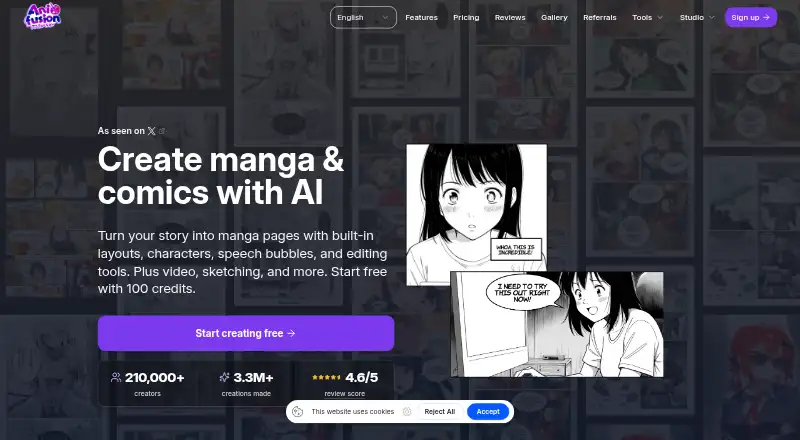
What Anifusion is
Anifusion is a web-based studio for making manga and comics from stories. It combines large language models for text and story generation with image models such as Stable Diffusion for artwork, then lets users edit generated pages on a built-in canvas. Comic tools include AI panel generation, layouts and templates, character consistency, speech bubbles, text integration, and print-ready exports. Other creative options include text-to-image generation in more than 50 styles, batch generation, image-to-video animation with HD output, sketch-to-art, character sheets, an infinite canvas, asset management, reusable presets, and custom LoRA training. Image generation costs 5–100 credits depending on the model; unused subscription credits carry over indefinitely. The free plan costs nothing and includes 100 credits and one workspace. Creator is $9 a month, while Pro is $24 a month. Commercial use comes with paid plans, subject to service and model-provider terms and users’ rights to their inputs. The service supports desktop devices only.
Who it suits
Anifusion suits people creating manga or comics who want story generation, artwork, panel layouts, and page editing in one web service. Paid plans may suit creators needing commercial use or teams with higher-volume and licensing needs.
What it does well
- Includes AI panel generation and comic layouts.
- Offers character consistency and speech bubbles.
- Text-to-image generation includes 50+ styles.
- Unused subscription credits do not expire.
- Paid plans include commercial use, subject to terms.
What to know first
- Desktop devices only; no mobile version.
- Image generation costs 5–100 credits per model.
- Unpublished work is stored and processed online.
- AI-provider data may be logged or retained.
Limits
The free plan includes 100 credits and one workspace. Creator costs $9 a month for 2,000 monthly credits, and Pro costs $24 a month for 10,000 monthly credits; image generation uses 5–100 credits per generation depending on the model.
Plans
| Plan | Billed and limits | Price |
|---|---|---|
| 2,000-credit pack | 2,000 credits | $15, paid once |
| 5,000-credit pack | 5,000 credits | $30, paid once |
| 12,000-credit pack | 12,000 credits | $60, paid once |
| 30,000-credit pack | 30,000 credits | $120, paid once |
| Free | monthly · 100 free credits · 1 workspace | Free |
| Credit pack 30,000 | one-time · 30,000 credits · credits never expire | $120, paid once |
| Credit pack — 30,000 credits | $120 · 30,000 credits · One-time pack for subscribers · Unused credits never expire | $120, paid once |
| Credit pack 2,000 | one-time · 2,000 credits · credits never expire | $15, paid once |
The first 8 of 15 plans, as anifusion.ai lists them, read 20 Sept 2026. The maker's own page has the final word. Every plan
Getting started
- Open https://anifusion.ai/ on a desktop device.
- Start with the free plan, which includes 100 credits and one workspace.
- Use credits for image generation; each generation costs 5–100 credits depending on the model.
- Choose Creator at $9 a month or Pro at $24 a month for a monthly credit allowance and paid plan features.
- Contact Anifusion support for additional questions.
Anifusion is a desktop web studio for building manga and comics, best suited to creators who want generation and page editing in the same workspace. Its broad toolset is a strong draw; variable credit costs and online processing are meaningful trade-offs.
Overview
Anifusion brings story generation, AI artwork, and a canvas editor into a single comic-making workflow. You can generate panels, arrange pages, add dialogue, and edit the results, rather than relying on a separate tool for each stage. That makes it a practical fit for creators developing illustrated stories, though image-generation costs can vary sharply by model.
The studio also covers text-to-image generation in more than 50 styles, batch generation, image-to-video animation with HD output, sketch-to-art, character sheets, reusable presets, asset management, an infinite canvas, and custom LoRA training. Exports include PNG, JPEG, WebP, PSD, PDF, and ZIP, giving creators options for further editing and sharing.
Key features
Comic creation and editing
AI panel generation, layouts and templates, speech bubbles, text integration, and character consistency support the core work of turning a story into readable pages. The canvas editor and print-ready exports make Anifusion more useful than a generator that stops at individual images. Creators who only need basic panel assembly may find the wider suite unnecessary.
Image and video tools
Text-to-image generation, batch creation, and image-to-video animation extend the studio beyond comics. More than 50 styles and tools for sketches, character sheets, and assets give creators room to develop a visual project in one place. Image generation costs 5–100 credits depending on the model, so repeated experimentation can consume a monthly allowance quickly.
Privacy and commercial use
Unpublished work does not appear on public profiles or community feeds, but it is stored and processed by the online service. Data sent to AI providers may be logged or retained and may or may not be used to train or improve their models, depending on the provider and configuration. That makes Anifusion a poor choice for sensitive unpublished work. Paid plans include commercial use, subject to Anifusion's terms, model-provider terms, and the user's rights to the inputs.
Pricing
The free plan costs nothing and includes 100 credits and one workspace. It is a sensible way to explore the workflow, but its small credit allowance is restrictive when image generation can cost up to 100 credits per image.
Creator costs $9 a month, billed $9 /month, and includes 2,000 credits per month, subscriber AI models, high-resolution exports, commercial use, community gallery publishing, and team support. It suits individual creators producing at a modest pace. Pro costs $24 a month, billed $24 /month, and raises the monthly allowance to 10,000 credits while retaining those other benefits; it is the better fit for heavier use.
Unused subscription credits never expire, which softens the pressure to spend them immediately. Subscribers can also buy one-time credit packs: 2,000 credits for $15, paid once, 5,000 for $30, paid once, 12,000 for $60, paid once, or 30,000 for $120, paid once. Packs are for subscribers, and their unused credits never expire. Studios, agencies, and commercial teams with higher volume or specific licensing needs can seek tailored enterprise plans.
Platforms
Anifusion runs on the web and supports desktop devices only; there is no mobile version. That rules it out for creators who need to work from a phone or tablet.
Who it's for
Anifusion is best for desktop-based creators who want story, artwork, page composition, and asset tools together, and who can manage a credit-based workflow. Paid plans suit creators who need more generation capacity, high-resolution exports, commercial use, or team support. It is a weaker fit for mobile-first users and for anyone who cannot send unpublished work through an online service and its AI providers.
Pros and cons
- Pros: Comic generation, page editing, dialogue tools, and print-ready exports sit in one workflow, reducing the need to move between separate creation tools.
- Pros: Unused subscription and pack credits never expire, so quieter periods do not automatically waste an allowance.
- Pros: Paid plans include commercial use and team support, with a higher-volume Pro tier and tailored enterprise options.
- Cons: Image generation ranges from 5 to 100 credits per image, making output volume less predictable across models.
- Cons: Desktop-only access excludes mobile workflows.
- Cons: Unpublished work is processed online, and AI-provider data handling can include logging or retention.
Alternatives
BlankComic is a better fit for creators seeking free comic-making without a subscription, account requirement, or watermark, and who want Android, iOS, or web access.
GenToon is worth considering for mobile access; its free plan includes 150 credits per month and 20 characters, while Lite costs $10 a month for 800 credits and 20 characters.
LlamaGen.ai offers web, iOS, API, and extension access. Its free plan includes 1,000 credits, and Standard costs $18 a month for 15,000 credits per month, 20 panels per prompt, and 10 custom comic characters.
MakeBeliefsComix is a free option for simple comic creation, with optional accounts for saving and editing and a limit of 18 panels.
AI Comic Factory is another web-based freemium comic generator; its Starter plan costs $9.99 a month and includes 600 credits per month, faster image generation, character consistency, and the ability to upload a character.
Comics AI is an iOS alternative with a free plan that includes 60 welcome credits, four styles, a canvas editor, bubbles, and PDF export.
ComicsAI is a web alternative with a free Hobby plan that includes one credit for new users, basic art styles, and standard-resolution output.
Create Comic is a web alternative whose free generation allowance is one lifetime generation shared between comics and portraits.
For a broader shortlist, browse Comic Creation Software or AI Comic Generators.
Verdict
Choose Anifusion if you want a desktop studio that combines comic-page creation with image and story tools, and you are comfortable paying for credits as your output grows. Its integrated workflow is the main reason to pick it; mobile access and greater confidence about unpublished-work data handling are reasons to look elsewhere.
Verdict
Anifusion brings story, image, and comic-page tools together in a desktop web studio. Consider its credit costs, lack of mobile support, and online data handling before using it for unpublished work.
Questions
How much does Anifusion cost?
The free plan includes 100 credits and one workspace. Creator is $9 a month and Pro is $24 a month; credit packs are also sold as one-time purchases from 15.00 USD.
Which platforms does Anifusion support?
Anifusion is a web service for desktop devices and does not offer a mobile version.
Who makes Anifusion?
The site identifies Anifusion as a CodeConda product. CodeConda LLC describes itself as an Arizona limited liability company in the United States.
Do unused credits expire?
Unused subscription credits carry over indefinitely. Credit packs for subscribers also state that unused credits never expire.
Can I use Anifusion work commercially?
Commercial use is included with paid plans, subject to Anifusion’s terms, model provider terms, and the user holding the necessary rights to inputs.
Is unpublished work private?
Unpublished work is not shown on public profiles or community feeds, but it is stored and processed by the online service. Data sent to AI providers may be logged or retained depending on provider and configuration.
Facts from Anifusion's own pages
- AI data handling
- CodeConda’s privacy policy says data sent to AI providers may be logged or retained and may or may not be used to train or improve provider models, depending on provider and configuration. · codeconda.com, 30 Sept 2026
- API access requirement
- REST API and hosted MCP access require an active Creator or Pro subscription and share the account credit balance. · anifusion.ai, 15 Oct 2026
- API limits
- The API allows 120 reads and 20 writes per rolling minute, with account and service concurrency limits that can return HTTP 429. · anifusion.ai, 15 Oct 2026
- Character sheets
- Character sheets create multiple views, poses and expressions for reusable references. · anifusion.ai, 15 Oct 2026
- Comic generation
- The comic tool generates complete pages, maintains character references, supplies layouts and templates, and exports print-ready files. · anifusion.ai, 15 Oct 2026
- Comic tools
- Its comic creator offers AI panel generation, character consistency, layouts and templates, speech bubbles, text integration, and print-ready exports. · anifusion.ai, 30 Sept 2026
- Commercial use
- Commercial use is included with paid plans subject to Anifusion’s terms, model provider terms, and the user holding the necessary rights to inputs. · anifusion.ai, 30 Sept 2026
- Company founding
- CodeConda says it was founded in 2023 and operates 11 web apps used by more than 30,000 people monthly. · codeconda.com, 15 Oct 2026
- Company legal name
- The maker is CodeConda LLC, an Arizona limited liability company that operates Anifusion. · codeconda.com, 15 Oct 2026
- Company profile
- Crunchbase lists Code Conda, LLC as an active for-profit software and web-app company with headcount of 1–10. · crunchbase.com, 15 Oct 2026
- Company size
- LinkedIn lists CodeConda as privately held with 2–10 employees. · linkedin.com, 15 Oct 2026
- Content restrictions
- The September 2026 content policy requires users to be at least 18 and prohibits pornography, sexualized minors, non-consensual intimate imagery, hate, violent wrongdoing and infringement. · anifusion.ai, 15 Oct 2026
- Credits
- Image generation costs 5–100 credits depending on the model, and unused subscription credits carry over indefinitely. · anifusion.ai, 30 Sept 2026
- Documentation depth
- The help center covers workspaces, generation, comic editing, models, billing, publishing and troubleshooting, and provides llms.txt exports. · anifusion.ai, 15 Oct 2026
- Enterprise
- Anifusion offers tailored plans for studios, agencies, and commercial teams with higher volume needs or unique licensing requirements. · anifusion.ai, 30 Sept 2026
- Founded
- 2023 · anifusion.ai, 28 Sept 2026
- Gallery licence
- Publishing to the gallery keeps user ownership but grants Anifusion a worldwide royalty-free licence to host and organically promote the public post. · anifusion.ai, 15 Oct 2026
- Generation
- The service uses large language models for text and story generation and image models such as Stable Diffusion for artwork, with a built-in canvas editor for editing generated pages. · anifusion.ai, 30 Sept 2026
- Headquarters
- Arizona, United States · anifusion.ai, 28 Sept 2026
- Hosted service
- CodeConda terms grant a limited, nonexclusive, revocable license to use hosted SaaS and prohibit copying, reverse engineering and extracting models or datasets. · codeconda.com, 15 Oct 2026
- Image and video
- Features include text-to-image generation with 50+ styles, batch generation, and image-to-video animation with HD video output. · anifusion.ai, 30 Sept 2026
- Image generation
- The image generator offers more than 50 anime and manga styles, prompt controls, high-resolution output and batch generation. · anifusion.ai, 15 Oct 2026
- Infinite canvas
- The canvas workspace supports an expanding surface, zooming, panning, visual project organization and layers. · anifusion.ai, 15 Oct 2026
- Limit: consistency and editing
- AIgregator and ToolWorthy say character or style consistency can require manual correction, and lettering and layouts still need hands-on editing. · aigregator.com, 15 Oct 2026
Where Anifusion stands on Freedom251
- Comic Creation Software#4 of 30
- AI Comic Generators#4 of 27