Freedom251 › Email Testing Software
MailHog
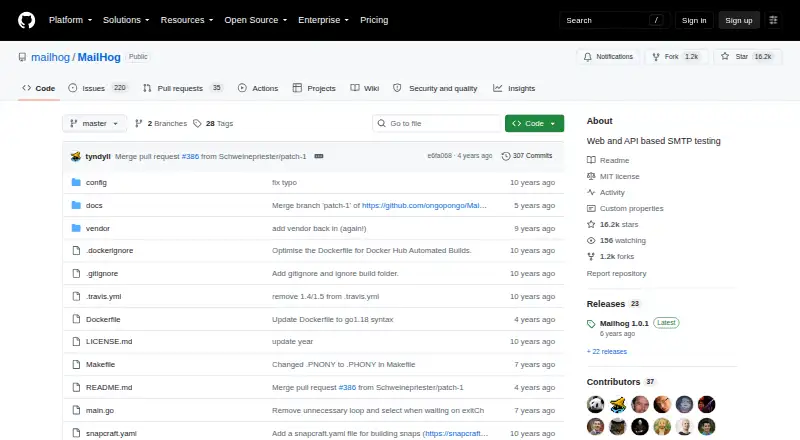
What MailHog is
MailHog is a free, MIT-licensed email testing tool for developers. Applications send messages to it over SMTP, where users can inspect them in a web interface or retrieve them through a JSON API. The interface displays plain text, HTML, or message source, supports encoded headers, and provides real-time updates. The API can list, retrieve, and delete messages, and download complete messages or individual MIME parts. Messages can optionally be released to real SMTP servers.
MailHog supports ESMTP RFC5321, SMTP AUTH, and PIPELINING, and includes a Chaos Monkey feature for failure testing. Storage defaults to memory, with MongoDB and Maildir also available. It can run from the command line, as a daemon, in Docker, or on AWS Elastic Beanstalk. By default, SMTP listens on port 1025 and HTTP on port 8025. In-memory storage limits an Elastic Beanstalk deployment to one MailHog instance; load-balanced deployments require MongoDB-backed storage. HTTP basic authentication can protect requests using a password file with bcrypt-hashed passwords. The project lists Node.js and PHP API clients and mhsendmail as a sendmail replacement.
Who it suits
MailHog suits developers who need to capture and inspect application email during testing. It also suits teams that need message access through a web interface or JSON API.
What it does well
- Free and released under the MIT license.
- Displays messages as plain text, HTML, or source.
- API can retrieve messages and individual MIME parts.
- Supports memory, MongoDB, and Maildir storage.
- Includes a feature for failure testing.
What to know first
- In-memory storage limits Elastic Beanstalk to one instance.
- Load-balanced deployments require MongoDB-backed storage.
- Default SMTP and HTTP ports are 1025 and 8025.
Limits
With in-memory storage, an Elastic Beanstalk deployment can use only one MailHog instance. Load-balanced deployments require MongoDB-backed storage.
Plans
| Plan | Billed and limits | Price |
|---|---|---|
| MailHog | Open-source email testing tool · MIT license | Free |
As github.com lists them, read 4 Oct 2026. The maker's own page has the final word.
Getting started
- Visit the MailHog GitHub project.
- Choose an installation route: command line, daemon, Docker, or AWS Elastic Beanstalk.
- Configure an application to send mail to the default SMTP port, 1025.
- Open the web interface on the default HTTP port, 8025, or retrieve messages through the JSON API.
- Choose memory, MongoDB, or Maildir for message storage.
MailHog is a self-hosted email testing tool for developers who want to capture and inspect application mail over SMTP. It suits local development and automated test workflows, but teams planning load-balanced Elastic Beanstalk deployments need to use MongoDB-backed storage.
Overview
MailHog accepts application mail, then makes messages available in a web interface or through a JSON API. Developers can inspect test messages before delivery and optionally release selected messages to real SMTP servers. That makes it useful when a development workflow needs both a safe capture point and a controlled route to actual delivery. Because it is self-hosted, teams also choose how and where to run it.
The software is free and released under the MIT license. Its default SMTP and HTTP ports are 1025 and 8025, respectively, which gives development setups clear endpoints for sending and reviewing mail.
Key features
Message inspection and API access
The web interface presents mail as plain text, HTML, or source, handles RFC2047-encoded headers, and refreshes in real time using EventSource. The choice of views helps developers check both readable content and the underlying message. Through the HTTP API, applications can list, retrieve, and delete messages, download full messages, or fetch individual MIME parts. This makes MailHog viable for scripted checks as well as manual debugging.
SMTP support and failure testing
MailHog implements ESMTP RFC5321 and supports SMTP AUTH RFC4954 and PIPELINING RFC2920. Those protocol capabilities make it a practical SMTP endpoint for application testing, while the Chaos Monkey feature adds a way to exercise failure scenarios. It is a focused testing tool rather than a general email delivery service.
Storage, security, and integrations
Messages can be stored in memory, MongoDB, or Maildir. Memory is the default and keeps the basic setup straightforward, but it constrains one important deployment pattern: Elastic Beanstalk deployments using memory storage can run only one MailHog instance. Load-balanced deployments require MongoDB-backed storage.
HTTP basic authentication can protect all HTTP requests, including static files and API endpoints, using a password file containing bcrypt-hashed passwords. The project also provides mhsendmail as a sendmail replacement and lists Node.js API v2 and PHP API v1/v2 client libraries. Those integrations can help fit MailHog into existing application workflows without changing its core role as a capture and inspection tool.
Pricing
MailHog is free: its MailHog plan costs nothing and includes open-source email testing software under the MIT license. There is no free trial because the free plan is the offering. This removes a subscription cost for individuals and teams, though they still need to run and manage their own deployment.
Platforms
MailHog supports API, Linux, macOS, self-hosted, and web use. Installation instructions cover macOS, Debian/Ubuntu, FreeBSD, and Docker, and the project says it can run without installation on multiple platforms. Deployment options include the command line, daemon mode, Docker, and AWS Elastic Beanstalk; a SaltStack formula is also documented. This range suits developers choosing their own environment, but it is not a hosted service that removes deployment responsibility.
Who it's for
MailHog is a strong fit for developers who need a free SMTP sink for development, an inspectable browser inbox, and API access for automation. Its self-hosted operation and multiple storage choices also suit teams that want control over deployment. It is less suitable for teams seeking a managed service or planning load-balanced Elastic Beanstalk without adopting MongoDB storage.
Pros and cons
Pros
- Free and MIT-licensed, with no trial window or paid tier required to use the tool.
- Provides both browser inspection and API operations, including retrieval of complete messages and MIME parts.
- Supports memory, MongoDB, and Maildir storage, with MongoDB enabling load-balanced Elastic Beanstalk deployments.
- Can release messages to real SMTP servers when a workflow needs delivery as well as capture.
Cons
- Self-hosting means deployment and storage decisions remain the team's responsibility.
- Memory storage limits Elastic Beanstalk to one instance, so load-balanced deployments require MongoDB-backed storage.
- The default ports are 1025 for SMTP and 8025 for HTTP, which may need to be accounted for in application configuration.
Alternatives
Mailpit is another free option for developers who want email testing across Linux, macOS, Windows, API, web, or self-hosted use; its default retention keeps the most recent 500 emails.
Twilio Segment is worth considering when the need is a broader web, iOS, or Android platform with a free tier covering 1,000 visitors per month, 500,000 Reverse ETL records per month, and two sources.
Emailens offers a free plan with 30 simulated previews per day and is an alternative for readers comparing email preview tools.
EmailQA may suit teams focused on real-device email renders: its free tier includes three projects per month, two team members, 25 real-device renders per month, and seven-day render history, while Pro costs $20 a month.
GlockApps is a different option for readers focused on spam and deliverability checks, with a free plan that includes two spam test credits, 10,000 DMARC messages, and five uptime monitors.
Mailinator offers a free Verified Pro plan with unlimited private inboxes, one private domain, 10MB permanent storage, and up to 10 emails per second.
MailSlurp is another free API and web option, with monthly allowances for received emails, sandbox sends, device rendering, inbox placement tests, and inbox creation.
MailTester offers a free web, API, and self-hosted plan with no account needed and more than 25 checks per test.
Browse more options in Email Testing Software.
Verdict
Choose MailHog if you want a free, self-hosted way to capture application email, inspect its contents, and automate access through an API. Its main advantage is that message capture, detailed inspection, and optional real-SMTP release sit in one focused tool. Look elsewhere if you need managed hosting, or plan a load-balanced Elastic Beanstalk deployment without MongoDB-backed storage.
Verdict
MailHog offers message capture, inspection, and API access for email testing, with optional delivery to real SMTP servers. Its default memory storage has a single-instance limit for Elastic Beanstalk deployments.
Questions
How much does MailHog cost?
MailHog is free.
Is MailHog open source?
Yes. MailHog is released under the MIT license.
Which platforms does MailHog support?
The listed platforms are API, Linux, macOS, self-hosted, and web. Installation instructions cover macOS, Debian/Ubuntu, FreeBSD, and Docker, and the project says it runs without installation on multiple platforms.
Can MailHog messages be sent onward?
Yes. Messages can optionally be released to real SMTP servers for delivery.
What storage options are available?
MailHog defaults to in-memory storage and also supports MongoDB and Maildir.
Which integrations does the project list?
It lists Node.js API v2 and PHP API v1/v2 client libraries, and provides mhsendmail as a sendmail replacement.
Facts from MailHog's own pages
- Authentication
- HTTP basic authentication can protect all HTTP requests, including static content and API endpoints, using a password file with bcrypt-hashed passwords. · github.com, 4 Oct 2026
- Default ports
- By default, the SMTP server listens on port 1025 and the HTTP server listens on port 8025. · github.com, 4 Oct 2026
- Deployment
- MailHog can be run from the command line, as a daemon, in Docker, or on AWS Elastic Beanstalk; the deployment guide also documents a SaltStack formula. · github.com, 4 Oct 2026
- Failure testing
- MailHog includes a Chaos Monkey feature for failure testing. · github.com, 4 Oct 2026
- HTTP API
- The HTTP API can list, retrieve, and delete messages, and supports downloading complete messages and individual MIME parts. · github.com, 4 Oct 2026
- Integrations
- The project lists Node.js API v2 and PHP API v1/v2 client libraries and provides mhsendmail as a sendmail replacement. · github.com, 4 Oct 2026
- License
- MailHog is released under the MIT license. · github.com, 4 Oct 2026
- Message release
- Messages can optionally be released to real SMTP servers for delivery. · github.com, 4 Oct 2026
- Notable limit
- With in-memory storage, an Elastic Beanstalk deployment can use only a single MailHog instance; load-balanced deployments require MongoDB-backed storage. · github.com, 4 Oct 2026
- Platform support
- The README provides installation instructions for macOS, Debian/Ubuntu, FreeBSD, and Docker, and says MailHog runs without installation on multiple platforms. · github.com, 4 Oct 2026
- Purpose
- MailHog is an email testing tool for developers that accepts application mail over SMTP and lets users view messages in a web UI or retrieve them through a JSON API. · github.com, 4 Oct 2026
- SMTP
- MailHog implements ESMTP RFC5321 and supports SMTP AUTH RFC4954 and PIPELINING RFC2920. · github.com, 4 Oct 2026
- Storage
- Message storage can use memory, MongoDB, or Maildir; the default is in-memory storage. · github.com, 4 Oct 2026
- Web interface
- The web interface displays messages as plain text, HTML, or source and supports RFC2047 encoded headers and real-time updates using EventSource. · github.com, 4 Oct 2026
Where MailHog stands on Freedom251
- Email Testing Software#2 of 28