Freedom251 › Email Testing Software
EmailQA
What EmailQA is
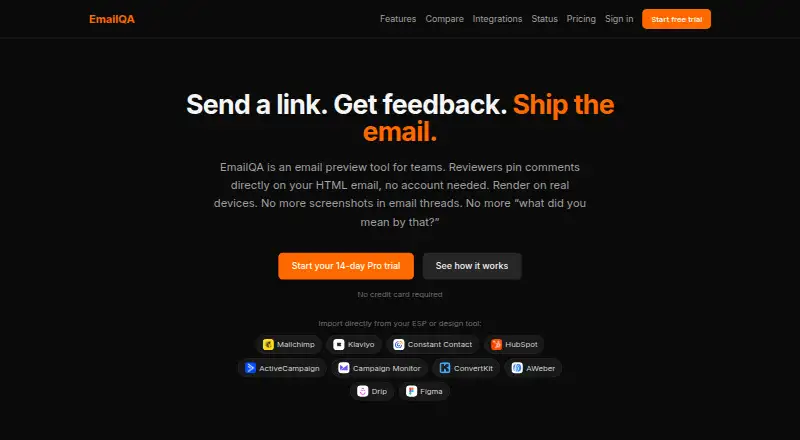
EmailQA helps teams preview HTML emails and gather comments pinned to specific locations. Users can paste HTML or upload an .html file to create a shareable preview. EmailQA renders in Gmail, Outlook, and Apple Mail on real devices and provides screenshots in light and dark modes. Reviewers can open a shared link and comment without creating an account. Teams can upload new versions while retaining previous feedback and comparing iterations. Listed integrations include Mailchimp, Klaviyo, HubSpot, Constant Contact, ActiveCampaign, Campaign Monitor, ConvertKit, AWeber, Drip, and Figma. Email service connections use OAuth with read-only access; EmailQA says it reads templates without changing campaigns or accessing subscriber data. Slack can notify teams about new comments, with replies available from Slack threads. The REST API supports HTML uploads, real-device render requests, screenshots, and render-result webhooks, and is included in Business. Plans include a free option, a 14-day trial, Pro at $20/month or $200/year, and Business at $99/month. EmailQA says it has not undergone an independent SOC 2 or ISO 27001 audit.
Who it suits
EmailQA suits individuals, teams, and agencies that need to review email layouts and collect feedback before sending. Its Business plan is positioned for agencies and automation, while Pro is for teams and professionals.
What it does well
- Real-device rendering covers Gmail, Outlook, and Apple Mail
- Guest reviewers can comment without accounts
- New versions retain feedback for comparison
- Slack notifications and thread replies are supported
What to know first
- No spam checks, accessibility checks, or link checks
- Free plan allows three projects per month
- Independent SOC 2 and ISO 27001 audits have not been completed
Limits
Free allows 3 projects per month, 2 team members, 25 real-device renders per month, 7-day render history, and 7-day screenshot retention. Pro allows 10 team members, 1,000 renders per month, and 90-day history and screenshot retention. Business allows 25 team members, 3,000 renders per month, and one-year history and screenshot retention; extra renders cost $0.05 each.
Plans
| Plan | Billed and limits | Price |
|---|---|---|
| Free | 3 projects/month · 2 team members · 25 real-device renders/month · 7-day render history · unlimited guest reviewers | Free |
| Pro | $20/month or $200/year · Unlimited projects · 10 team members · 1,000 real-device renders/month · 90-day render history · priority support | $20 a month |
| Business | $99/month · 25 team members · 3,000 renders/month · 1-year render history · full REST API · extra renders at $0.05 each | $99 a month |
As emailqa.live lists them, read 7 Oct 2026. The maker's own page has the final word.
Getting started
- Open emailqa.live.
- Choose the Free plan or start the 14-day trial.
- Paste HTML or upload an .html file.
- Create a shareable preview link for reviewers.
- Connect a listed email platform or Figma if needed.
- Use the web interface or API; API access is included in Business.
EmailQA is an email preview and review service for teams that need feedback attached to specific parts of an HTML message. It is a strong fit for marketers, agencies, and developers coordinating sign-off across a team or with clients. Its appeal is focused rendering and collaboration; buyers needing broader email-quality checks should look elsewhere.
Overview
Paste HTML or upload an .html file to create a shareable preview link. Reviewers can view and comment without an account, and comments are pinned to locations in the email. That makes client or stakeholder review less cumbersome than collecting unstructured feedback by email.
EmailQA renders Gmail, Outlook, and Apple Mail on real devices, with screenshots in light and dark modes. It supports inbox testing, but not spam, accessibility, or link checks. It is therefore a useful review workflow, not an all-in-one email QA or deliverability service.
Key features
Comments and version history
Teams can upload revised versions, keep earlier feedback, and compare changes across iterations. This is particularly useful when several rounds of review need to remain connected. Render-history retention ranges from 7 days on Free to 90 days on Pro and 365 days on Business, so longer-running projects may need a paid tier.
Integrations and API
EmailQA’s integrations page names Mailchimp, Klaviyo, HubSpot, Constant Contact, ActiveCampaign, Campaign Monitor, ConvertKit, AWeber, Drip, and Figma. ESP connections use OAuth and read-only access; EmailQA says it reads templates without changing campaigns or accessing subscriber data. Slack notifications and replies from Slack threads can keep feedback moving in an existing team workflow.
The REST API supports HTML uploads, real-device render requests, screenshots, and render-result webhooks, but API access is reserved for Business. That makes the service more useful for agencies and automation-heavy teams at the top tier than for developers seeking API access on a lower-cost plan.
Security and compliance
EmailQA says application, API, and render traffic uses HTTPS, and connected third-party credentials are encrypted with AES-256-GCM before storage. It has not undergone an independent SOC 2 or ISO 27001 audit, though it offers a GDPR/UK GDPR data processing addendum. Organizations that require one of those audits should weigh that limitation carefully.
Pricing
EmailQA has a free plan, paid plans from $20/mo, and a 14-day trial. The three tiers differ substantially in project, team, render, and history limits:
| Plan | Price | What it includes |
|---|---|---|
| Free | free | 3 projects/month, 2 team members, 25 real-device renders/month, 7-day render history, and unlimited guest reviewers |
| Pro | $20 a month | Unlimited projects, 10 team members, 1,000 real-device renders/month, 90-day render history, and priority support; billed $20/month or $200/year |
| Business | $99 a month | 25 team members, 3,000 renders/month, 1-year render history, full REST API, and extra renders at $0.05 each; billed $99/month |
Free is aimed at individuals and can cover occasional review, but its three projects and 25 monthly renders leave little room for frequent campaign work. Pro is the practical step up for teams and professionals: it removes the project cap and raises the render allowance, while adding priority support. Business targets agencies and automation, with a larger team allowance and API access; extra renders are priced at $0.05 each. The published terms do not state a trial length beyond the 14-day trial offer.
Platforms
EmailQA is available on web and through an API. Its real-device rendering and inbox testing are relevant to teams checking how messages appear across supported email clients, while the lack of spam, accessibility, and link checks limits its role in a broader pre-send checklist.
Who it's for
EmailQA suits teams that need reviewers to comment directly on email previews, preserve feedback between versions, and render on real devices. Free may suit an individual with low monthly volume; Pro is better aligned with a working team, and Business is the fit for agencies or workflows that need the REST API. It is not the right sole tool for buyers whose priority is spam, accessibility, or link validation.
Pros and cons
- Pros: Guest reviewers can comment without accounts, which reduces friction for client approvals.
- Pros: Pinned comments, version comparison, and retained feedback keep review tied to the email and its revisions.
- Pros: Real-device renders cover Gmail, Outlook, and Apple Mail in light and dark modes.
- Pros: Read-only OAuth connections and encrypted stored credentials address key concerns when connecting an ESP.
- Cons: Free is capped at 3 projects and 25 renders per month, limiting sustained team use.
- Cons: API access requires the $99 a month Business plan.
- Cons: Spam, accessibility, and link checks are not included, and EmailQA has no independent SOC 2 or ISO 27001 audit.
Alternatives
Mailpit is a free option for teams that prefer a single static binary or multi-architecture Docker images; its default retention is the most recent 500 emails. MailHog is another free, open-source email testing tool under the MIT license.
Email Accessibility is worth considering when accessibility is the priority: its Pro plan is $10 a month and includes 10 emails monthly, with additional emails at $0.70 each. GlockApps is the alternative to consider for spam testing; its free plan includes 2 spam test credits, along with DMARC and monitoring allowances.
Emailens is another freemium email-preview option. MailSlurp may suit teams whose workflow centers on receiving and sandboxing email through API, with a free plan that includes 500 emails received per month and 1 device render per month. Mailinator is another freemium option. Twilio Segment is a freemium alternative for a different software need.
Browse the Email Testing Software directory for more options.
Verdict
Choose EmailQA if your priority is real-device email rendering paired with location-specific comments, guest review, and version comparison. Pro is the clearest fit for a regular team; Business makes sense when API access or higher operating limits justify the added cost. Look elsewhere if you need built-in spam, accessibility, or link checks, or if an independent SOC 2 or ISO 27001 audit is a requirement.
Verdict
EmailQA combines email rendering with location-specific feedback and version comparison. Consider the plan limits and the stated absence of independent SOC 2 and ISO 27001 audits when evaluating it.
Questions
Is EmailQA free?
Yes. The Free plan costs nothing and allows 3 projects per month, 2 team members, and 25 real-device renders per month.
What do the paid plans cost?
Pro is $20/month, billed at $20/month or $200/year. Business is $99/month, billed monthly; extra renders cost $0.05 each.
Does EmailQA offer a trial?
Yes, its pricing note lists a 14-day trial.
What platforms does EmailQA support?
The listed platforms are web and API.
Which integrations are listed?
Mailchimp, Klaviyo, HubSpot, Constant Contact, ActiveCampaign, Campaign Monitor, ConvertKit, AWeber, Drip, and Figma are listed. Slack notifications and replies are also supported.
Does it have an independent security audit?
EmailQA says it has not undergone an independent SOC 2 or ISO 27001 audit. It offers a GDPR/UK GDPR data processing addendum.
Facts from EmailQA's own pages
- API
- The REST API supports HTML uploads, real-device render requests, screenshots, and render-result webhooks; API access is included in Business. · emailqa.live, 7 Oct 2026
- Audience
- The pricing page describes Free as for individuals, Pro as for teams and professionals, and Business as for agencies and automation. · emailqa.live, 7 Oct 2026
- Compliance
- EmailQA says it has not undergone an independent SOC 2 or ISO 27001 audit and offers a GDPR/UK GDPR data processing addendum. · emailqa.live, 7 Oct 2026
- Guest reviews
- Reviewers can view and comment through a shared link without creating an account. · emailqa.live, 7 Oct 2026
- Input
- Users can paste HTML or upload an .html file to create a shareable preview link. · emailqa.live, 7 Oct 2026
- Integration access
- ESP connections use OAuth and read-only access; EmailQA says it reads email templates without modifying campaigns or accessing subscriber data. · emailqa.live, 7 Oct 2026
- Integrations
- The integrations page lists Mailchimp, Klaviyo, HubSpot, Constant Contact, ActiveCampaign, Campaign Monitor, ConvertKit, AWeber, Drip, and Figma. · emailqa.live, 7 Oct 2026
- Purpose
- EmailQA lets teams preview HTML emails and collect feedback through comments pinned to specific locations. · emailqa.live, 7 Oct 2026
- Rendering
- It renders emails in Gmail, Outlook, and Apple Mail on real devices, with light- and dark-mode screenshots. · emailqa.live, 7 Oct 2026
- Retention
- The security page lists screenshot retention of 7 days on Free, 90 days on Pro, and 365 days on Business. · emailqa.live, 7 Oct 2026
- Security
- The security page says application, API, and render traffic uses HTTPS, and connected third-party credentials are encrypted with AES-256-GCM before storage. · emailqa.live, 7 Oct 2026
- Slack
- EmailQA can notify Slack when comments are added, and users can reply from Slack threads. · emailqa.live, 7 Oct 2026
- Support
- Pro includes priority support. · emailqa.live, 7 Oct 2026
- Version history
- Users can upload new versions while keeping previous feedback and compare changes across iterations. · emailqa.live, 7 Oct 2026
Where EmailQA stands on Freedom251
- Email Testing Software#4 of 28